Search the Community
Showing results for tags 'error'.
-
I'm following the deploy for GPO guide. I've done the "setup.exe /a" and created a basic admin image. I'm now trying to install the resulting draw.msi from the image and I'm getting: Error 2803.Dialog View did not find a record for the dialog SetupError. The photoshop also errors but the shell install worked fine. ideas? I've re-done the admin files to a local drive and tried the msi files from there and it doesn't work. if I run the files from the mounted iso it installs fine. (but I can't deploy that as it has no license info) The procedure hasn't changed from older versions of CorelDraw so I'm hoping someone has run into this before..
-
 Hi all, I've recently reimaged a number of laptops on our network. To install managed software and pull all the GPOs from our domain controller I need to run GPUpdate from a domain admin user account. When I run the GPUpdate, I get the following error: C:\Windows\system32>gpupdate /forceUpdating policy...Computer policy could not be updated successfully. The following errors were encountered:The processing of Group Policy failed. Windows attempted to read the file \\.local\SysVol\.local\Polic ies\{A1A0B568-71D9-4C4D-9DCF-CD9F431626C8}\gpt.ini from a domain controller and was not successful. Group Policy settings may not be applied until this event is resolved. This issue may be transient and could be caused by one or more of the following:a) Name Resolution/Network Connectivity to the current domain controller.b) File Replication Service Latency (a file created on another domain controller has not replicated to the current domain controller).c) The Distributed File System (DFS) client has been disabled.User Policy update has completed successfully.The following warnings were encountered during user policy processing:The Group Policy Client Side Extension Folder Redirection was unable to apply one or more settings because the changes must be processed before system startup or user logon. The system will wait for Group Policy processing to finish completely before the next startup or logon for this user, and this may result in slow startup and boot performance.To diagnose the failure, review the event log or run GPRESULT /H GPReport.html from the command line to access information about Group Policy results. I've run NSLOOKUP, and it correctly reads back the IP of our primary domain controller. When I run NSLOOKUP SCIENCE-LAPT103 (the name of the laptop), it correctly reads back its own IP address and hostname. I've also gone through and checked the RSoP. I've tried running the command as a .bat, in PowerShell, in elevated CMD. I've tried flushing the DNS config using ipconfig /flushdns, I've also done a complete networking reset on the OS, removed it from the domain and re-added it (including deleting the computer from AD and trying again), but it is consistently failing. Funnily enough, it does seem to pull through some GPOs after a while, I've checked these GPOs on the domain controller and they are all link-enabled and enforced, so I don't believe that is the issue. Has anyone else had experience with this and found a solution? I'd really appreciate a fresh set of eyes on this as I believe I've exhausted every option I can think of. Many Thanks, Liam
 -
Morning All, Real quick one for all you G suite users out there. There is a G Suite server issue at the moment causing Server errors in 1/50 Admin users and will not allow access to the Admin console from specific accounts. They are very aware and are working on a resolution - They have guaranteed that they will have this resolved today. More info - https://productforums.google.com/forum/#!topic/apps/4Fze8qiwDpA;context-place=forum/apps Happy Googling Nathan
-
Hi, I'm using the remote WSUS console from my computer on one subnet to connect to two different WSUS servers on two different subnets. I've managed to connect to one ok but the second one gives me the following error: Cannot connect to 'ServerName'. The server may be using another port or different Secure Sockets Layer setting. The WSUS server is running on port 80 and can connect to this via telnet so a little stumped as to why this isn't connecting. Connection traffic has been confirmed by the Firewall provider upstream so is getting through. Any ideas?
-
Hi all, We have an issue with Capita SIMS. Basically when we open SIMS there is a button in the top right corner named 'Documentation'. When we click it, an error appears in the bottom corner telling us that the Index file is missing. Has anyone seen this before? If so any advice would be very helpful. Thanks, Rob
-
Hey Peeps, I've got an issue with FOG's Multicasting that I can't figure out, wondering if anyone can help. I get the error below whenever I try to use the multicasting. "Can't read the following volume file: ... /stdin.001" I know the network is fine with multicasting, and FOG creates and deploys single images spot on. Its just I get this error no matter what image I try to multicast, how many machines etc. I did a bit of googling and didn't come up with much. Though a thread on Clonezilla (which i know nothing about) suggested it was something to do with the disk configuration. Im not sure how relevant that info is, considering its a completely different cloning solution. Any help would be appreciated. Sean Ps. Oh, Ive got Fog 0.28 running on Ubuntu Server 9.10 - (Its a VM, though that should make much difference I guess)
-
 Hi All, I'm having problem in backing up Windows Server 2003/2008 x64 Edition, Even after VMWare tools re-install and restart the VM I've make sure the following services was started and set as automatic running before reinstalling VMWare tools with COMPLETE options: COM+ System Application Distributed Transaction Coordinator after restart then I've turn the following services on and set as automatic running as well: VMware Snapshot Provider Volume Shadow Copy then i got the same error message: Cannot create a quiesced snapshot because the create snapshot operation exceeded the time limit for holding off I/O in the frozen virtual machine. and here it is in the Windows VM event viewer log: Event Type: Error Event Source: VSS Event Category: None Event ID: 12302 Date: 21/09/2009 Time: 1:23:31 PM User: N/A Computer: RSA01 Description: Volume Shadow Copy Service error: An internal inconsistency was detected in trying to contact shadow copy service writers. Please check to see that the Event Service and Volume Shadow Copy Service are operating properly. For more information, see Help and Support Center at http://go.microsoft.com/fwlink/events.asp. Data: 0000: 2d 20 43 6f 64 65 3a 20 - Code: 0008: 42 55 45 43 58 4d 4c 43 BUECXMLC 0010: 30 30 30 30 37 32 39 32 00007292 0018: 2d 20 43 61 6c 6c 3a 20 - Call: 0020: 42 55 45 43 58 4d 4c 43 BUECXMLC 0028: 30 30 30 30 37 32 31 39 00007219 0030: 2d 20 50 49 44 3a 20 20 - PID: 0038: 30 30 30 30 31 35 38 34 00001584 0040: 2d 20 54 49 44 3a 20 20 - TID: 0048: 30 30 30 30 32 34 31 36 00002416 0050: 2d 20 43 4d 44 3a 20 20 - CMD: 0058: 43 3a 5c 57 49 4e 44 4f C:\WINDO 0060: 57 53 5c 73 79 73 74 65 WS\syste 0068: 6d 33 32 5c 64 6c 6c 68 m32\dllh 0070: 6f 73 74 2e 65 78 65 20 ost.exe 0078: 2f 50 72 6f 63 65 73 73 /Process 0080: 69 64 3a 7b 37 30 37 34 id:{7074 0088: 31 41 41 33 2d 35 42 38 1AA3-5B8 0090: 39 2d 34 43 44 43 2d 38 9-4CDC-8 0098: 38 32 31 2d 34 35 45 45 821-45EE 00a0: 41 42 31 37 37 41 35 30 AB177A50 00a8: 7d 20 20 20 20 20 20 20 } 00b0: 2d 20 55 73 65 72 3a 20 - User: 00b8: 4e 54 20 41 55 54 48 4f NT AUTHO 00c0: 52 49 54 59 5c 53 59 53 RITY\SYS 00c8: 54 45 4d 20 20 20 20 20 TEM 00d0: 2d 20 53 69 64 3a 20 20 - Sid: 00d8: 53 2d 31 2d 35 2d 31 38 S-1-5-18 any kind of help would be greatly appreciated. Thanks, AWT
 -
Hi All, I'm pulling my hair out here with home drives on a AD-OD network. We have Open Directory setup on one mac server with it authenticating against Active Directory. The users get their home drive location from the UNC path in Active Directory and all worked fine last year. I am just rolling over the users but am having major issues. At the begining i was getting "unable to login because an unknown error occured". I can get some year groups to work correctly but some years I keep getting this error. I can get year 7, 8 and 10 to work. If I set a year 9 pupil to a year 10's home drive all works correctly but I can't get it to work as I want it. Hope this makes sense but HELP! Dan
-
Hey guys, So... I've recently explained to my boss about this piece of software that is able to view live-desktops in various computer labs (iTALC) And for the past week, I've been slowly getting through each computer, even though there is only like 25... However... The install on all of them has gone fine, without a hitch. Key files are all setup, pointing to UNC file paths on the LAN - I've tested the permissions on these, and they are working fine, so is authentication. However, when it comes to setting up the iTALC application on master computers, there is a little hitch-up which is making me want rip. my. hair. out. I can connect the computers fine to them, I can see them being interacted with, however, after about 30 minutes, the iTALC application on the master computer will crash, completely, requiring the program to be restarted. It keeps telling me that the application (ica.exe) has encountered an error and had to close... This is extremely annoying. I have tried installing this on multiple iTALC versions - 2.0 and 1.9.7 But, it is still crashing, which I find to be very weird... All the clients are running Windows XP Professional SP3 - Norton is installed on the clients, but I don't see how this could be affecting them? The master computers are all running the same except for the main server, which is running Windows Server 2008 Standard 64 bit If you guys have any Idea what could be causing this, could you please, please let me know? P.S - Would any of you know what the VPN feature of the program does, I am looking into a way that we could remote view students who are not currently in the lab but are at home doing work for their respective classes using some sort of a VPN/Terminal Server solution? Thanks, - James.
-
We have a user using one of the above printers connected locally to her machine. Sometimes, when she prints the printer sits there and does nothing! No error lights, Windows says the printer is printing but it blatently isn't! She has found by switching it off and on again it will then print the job, this is happening more and more as the days go by and she is getting quiet annoyed by it. We have several other of these printers connected in the exact same way, using the same driver and settings and all seem to work fine. I myself have one of these and it's never needed switching off. Any ideas? Cheers
-
Hi guys, Just tried to change some settings through winsuite to allow the children access to a particular network drive. However when I go to open winsuite i get the following error "There are no NT files in the XREF" any suggestions? Thanks
-
Hi there, This is my first time setting up SIMS for a proper exam season. When attempting to import basedata for Edexcel GCSE, it gives me two file options - S6Y24_10.X01 (BTEC) and S6G24_10.X01 (GCSE). Having imported the BTEC file in first, it doesn't permit me to import the GCSE contents afterward. Evidently I'm doing something wrong, but no amount of googling has provided any results pertaining to this specific issue. Is there a workaround? Thanks for your time and any help. Pollock
-
Ok so not sure if this is in the correct area or not as i'm not sure if this is a hardware or software problem. Either way we have a whiteboard in one of our class rooms that wont run Notebook. It runs every other Smartboard program just not the notebook. When trying to run Notebook an error occurs that i do not understand (See attached pic) If any one knows how to sort this problem i would be greatful as i know very little about whiteboards. Thanks Simon

-
I've been getting this error in my backup logs lately and the knowledgebase at Symantec isn't much help (the 2 solutions don't seem to help). Backup- \\app1.sch4290.somerset.gov.uk\Shadow?Copy?Components - VSS Writer File SystemV-79-57344-65247 - A failure occurred reading an object. Directory User?Data\Distributed File System Replication\DfsrReplicatedFolders\testbase32\ was not found, or could not be accessed. None of the files or subdirectories contained within will be backed up. Any ideas how to fix it?
-
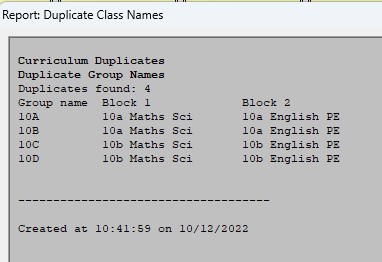
Have received the following error report in NT6 v6.41 Build 1 I'm used to seeing an error when reporting duplicate group names and can always spot what I've done wrong, but not this time. These are the blocks NT6 has an issue with: The problem only seems to come about when more than one subject is added to a block - so if I just had, say English in the English Block and Maths in Maths Block, then that returns no error. As soon as I add in more than one subject - BOING! Any suggestions gratefully received - I've seen mention of a patch from SIMS - if correct, how do I identify it.
-
 We keep getting an SSL error when initialising Dedfold. I inserted a pic of the error below. We have smoothwall firewall (transparent proxy) and filtering and we're the enterprise version of Windows Defender through MECM. There also doesn't seem to be any pattern in when or where the error occurs, for instance the software will work for half the students in a suite but not the other half. Things we've tried that haven't shown any improvement: - Runing the software locally and over the network fom an aplication server - logging in with student, staff and admin credentails. - conecting via 4G to bypass smoothwall - trurning of windows defender / any local firwal & anti-virus Any thought or ideas to resolve or futher trouble-shoot are much appreciated.
-
When you are reassuring a technophobe friend, it is their first time trying Windows 10, you tell them "Nothing's going to happen" and then they send you this:
-
- 5
-

-
- error
- something happened
- (and 1 more)
-
I'm hoping someone can help me here. I am attempting to complete an offline deployment of our Windows 10 build to a tablet device. I have created all of the offline media by copying the entire deployment share to make sure nothing has been missed. I have mounted the .iso to an external drive using rufus to make it bootable. I am getting the following error after the installation of OS: Litetouch deployment failed, Return Code = -2147467259 0×80004005 CreateProcess failed. Code(0x80070002) Command line execution failed (80070002) Failed to run the action: Set-ExecutionPolicy Bypass. The system cannot find the file specified. (Error. 80070002; Source: Windows) The execution of the group (Postinstall) has failed and the execution has been aborted. An action failed Operation aborted (Error: 80004004; Source: Windows) Failed to run the last action: Set-ExecutionPolicy Bypass. Execution of task sequence failed. The system cannot find the file specified. (Error. 00000002; Source: Windows) Task Sequence Engine failed! Code: enExecutionFail Task sequence execution failed with error code 80004005 SetNamedSecurityInfo0 failed. SetObjectOwner failed. 0x80070005 ReqQueryValueExW is unsuccessful for Software\ Microsoft\5MS\ Task Sequence, SMSTSEndProgram GetTsRegValue0 is unsuccessful. 0x80070002. Error Task Sequence Manager failed to execute task sequence. Code 0x80004005 The step that is to be completed is as follows: Type: Run Command Line Command Line: powershell.exe -command "Set-ExecutionPolicy Bypass" This says to me that the deployment cannot find powershell.exe but this doesn't really make an awful lot of sense to me. It's not like it cannot find a script or a file because as you can see from the command it is not looking for a file but is supposed to be running a command via the PowerShell program. Any assistance would be greatly recieved.
-
To save time I've run the Group policy Modeling for my user and the PC in question (a surface pro, upgraded to education from pro) The model says that the user settings should be applied. I do also have windows 10 wmi filtering on but the Group policy results, it doesn't say that the users settings were denied. it doesn't show in the results at all, it's like the PC is ignoring all user based gpo settings. I can find no mention of my missing user GPO or any error that would point to why. This means that any user who uses this tablet get no mapped drives etc. I'm at a loss as to how to resolve this issue.. For a sanity check I tried the user on another PC and everything works fine.. The only unknown is that I upgraded the pre-installed OS instead of installing a fresh one.
-
So, I've set up WDS/MDT and everything is perfect, all machines image without a problem APART from these new Lenovo's we have purchased... I'm getting this error when booting them into PXE; (Missing MTFTP Server IP Address) Anyone any ideas why this is???
-
Hi, We have just moved our Internet connection from our LEA to Virgin Media but have encountered a problem. When we connect our network to Virgin Media's co-managed firewall (which is on site), the firewall reports a lot of errors on the 3 interfaces connected to our network but 0 errors on the interface connected to their router. We have connected a laptop direct to the firewall (in its own VLAN) and there are no errors. We've changed the patch leads, disconnected everything else from the switch (just leaving the firewall and laptop connected to it) and plugged the laptop and firewall into a different switch but cannot work out what is causing the errors. Virgin Media are saying that their firewall is configured correctly and because the direct connection to the laptop works without errors it must be our network. We have also tried turning off auto negotiation and setting the ports to 100Mbps Full Duplex which didn't seem to make a difference. We want to keep the ports running at 1Gbps however as our Internet connection is 200Mbps (The Netgear switch won't let us force 1000Mbps Full Duplex). The firewall is a Palo Alto PA2020, our switch is a Netgear GSM7328S v2 (Layer 3) and we have a Meru MC1500 wireless controller. We have 4 VLANS (lets just call them 1, 2, 3 and 4 to make it easier). Firewall Port: 2 Switch Port: 1 VLAN Membership: 1/T, 3/T PVID: 1 Firewall Port: 3 Switch Port: 2 VLAN Membership: 2/T PVID: 2 Firewall Port: 4 MERU Port: 3 VLAN Membership: 4/T PVID: 4 The only configurations I have made on our switch is its IP, NTP, IGMP Snooping + Querier, 1 x LAG and VLANS + Memberships. Routing is disabled and so is STP. Any help/suggestions would be greatly appreciated. Thanks in advance, Dan
-
 Over the last two days this problem has been happening on our Windows 8 Machines Does anyone know why this is happening? The only thing I can think of is its An Update that has caused this as they have been fine up till now and no hardware or software has been installed over the network and also happening on different models of machine. Thanks Liam
-
Hi all, I've just had a Dell Optiplex 280 come into out office with a very strange Beep error code that I can't seem to diagnose even after reading though the error diagnoses sheet for that particular model. The error is as follows: 1long-1long-1short-1long-1long (brief pause) 1long-1long If any of you have had a similar error or can shed some light as to the origin of the error please do so.
-
We have a couple of HP 3525n network printers here. One of them was displaying a paper jam. When we went to see it there was no paper jam but the error message won't clear??? Has anyone else had this before? If you power off and on again it displays Ready, but when you go to print is says "Clearing Paper Path" and then 13.30.00 paper jam. Cannot even print from Tray 1! Have looked on the HP website but cannot find this error code in the manual. closest is 13.20.00. Thanks
-
Hi All, I'm having problem in my last step of installing the licensing service for my current Windows Server 2008R2, it gives me an error message with Event ID 85, see the attached error message, I've logged in as DOMAIN\Administrator but still I cannot register this terminal server ? Any kind of help would be greatly appreciated. Thanks, AWT
.thumb.jpeg.c4b2ea4e027981376480a5ab518033b7.jpeg)