Search the Community
Showing results for tags 'pxe'.
-
Hi all. We bought in a load of Toshiba R50s. They will PXe boot and load the image. Then, once in the Windows PE environment they come up with an error saying that the deployment share is unavailable due to the client not being assigned an IP by DHCP. If we F8 and ipconfig it shows that there is a NIC but 'media disconnected'. This is after updating everything with all the drivers we could find. Here's the kicker: They will image fine as long as we use a single CAT5 splitter, which takes the connection speed down to 100mbps. Could this be a switching issue? We've had the same problem with Duras laptops in the past and just had to forever use a splitter to image them.

-
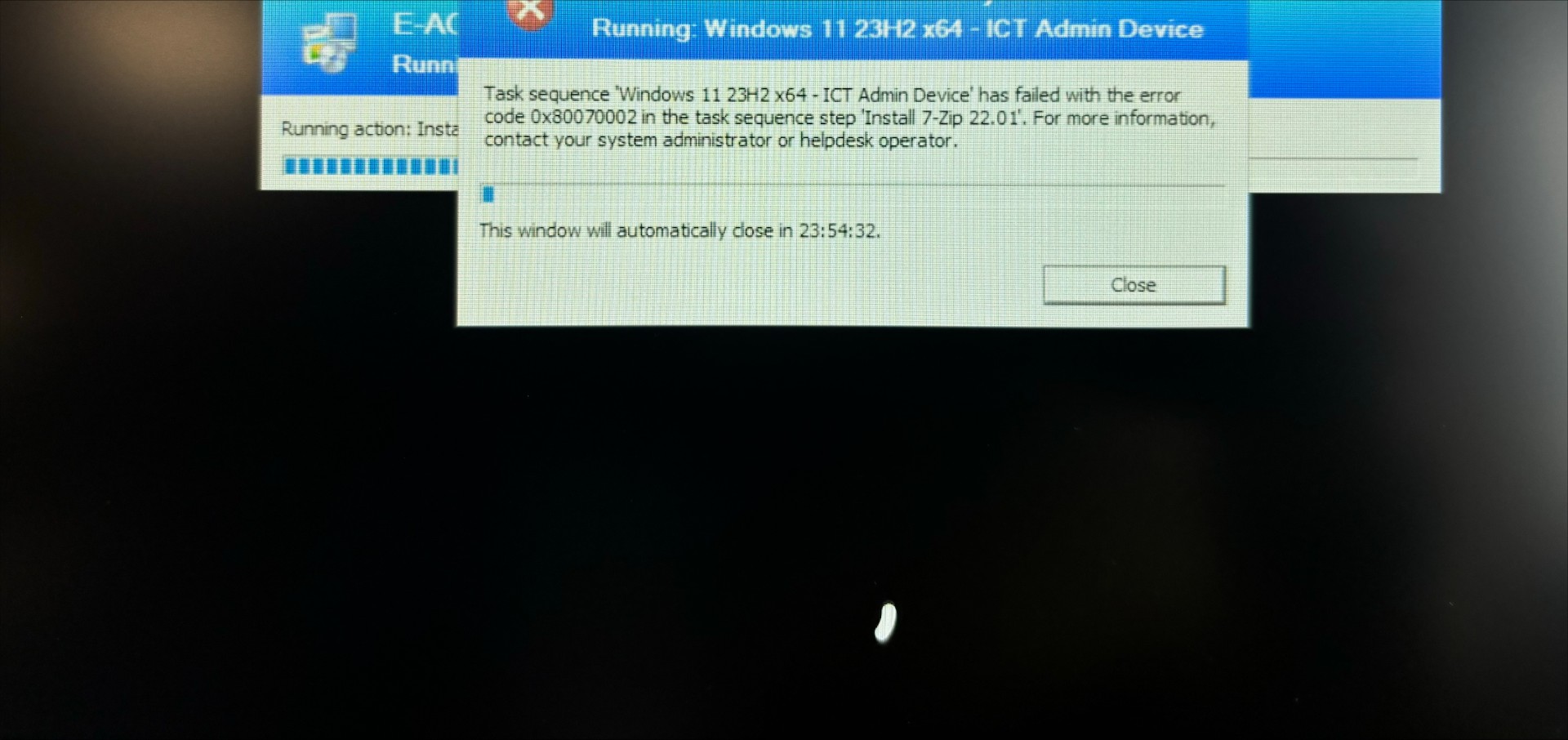
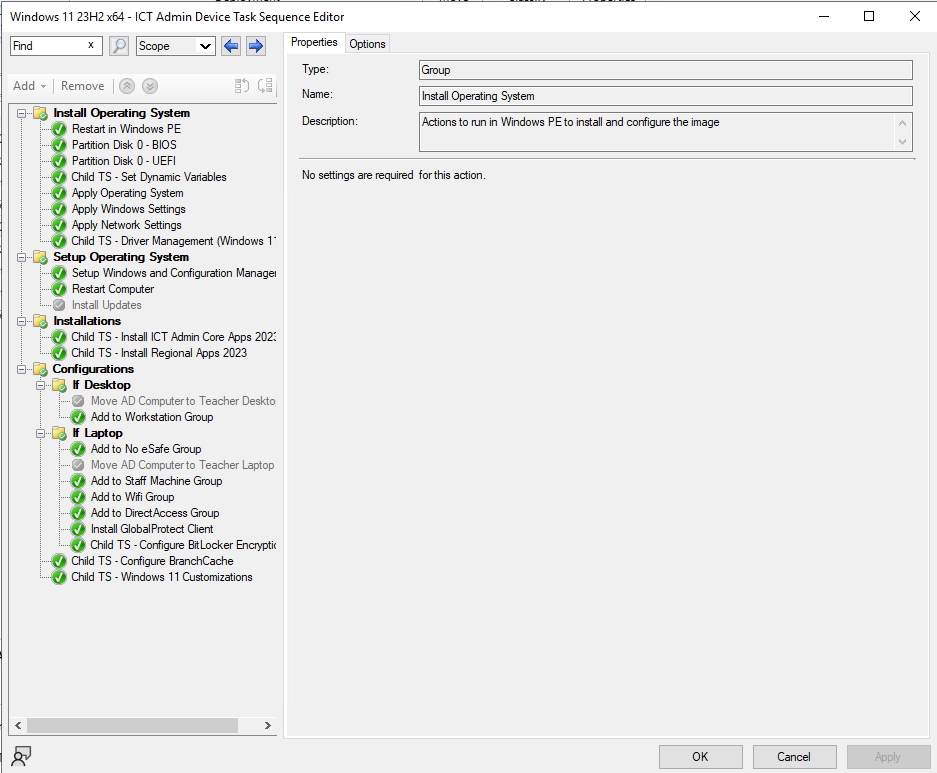
 Hi all, I'm struggling to rectify this error when pushing out an existing image via SCCM on a new Lenovo ThinkPad laptop. It gets to the Installations section and then fails with error code above, which suggests that the system cannot find the file specified however I think it's to do with the fact that I've never imaged this make and model of laptop as the laptops I've imaged before are Dell's. I've extracted and uploaded the drivers but it doesn't seem to make a difference, unless I'm missing a step? Can anyone help? TIA!
-
Hello, So, I've posted about this before however I'm still having problems with it. Basically, I have MDT set up through WDS for imaging machines. Practically every machine in the network will image with no issues aside from these 'ERGO AS1' machines This is what appears on screen; Intel UNDI, PXE-2.1 (build 082) Copyright (C) 1997-200 Intel Corporation For Realtek RTL8111B/8111C Gigabit Ethernet Controller v2.10 (071105( CLIENT MAC ADDR: 00 90 F5 8C 21 E6 GUID: FFFFFFFF-0C0C-0000-0000-000000000000 PXE-E51: No DHCP or proxyDHCP offers were received. PXE-M0F: Exiting PXE ROM. Why is this? Is there an easy fix? I have to image an entire suite like this and they all have the same issue, if I can't get it to work, I'll have to use the Windows 7 disc! Please help!
-
I've started to play around with SCCM 2007, i've got it setup and am able to distribute software to clients without a problem. I'm now trying OSD and running into problems booting from PXE/getting a response from the SCCM. This is what I have done so far, hopefully someone can point me in the right direction.... SCCM is setup, installed on our servers VLAN, the client I am testing it with is on another VLAN and has the client installed. WDS has been installed and not configured on the SCCM server I've created PXE service point and add the 2 images that come with SCCM to the DP (SMSPXEIMAGES$) In DHCP (which is on a different server) I have the following options set (on 1 scope that I am testing this with) Option 60 = PXEClient Option 66 = 10.59.100.50 (IP of SCCM server) Option 67 = REMINST\Boot\x86\wdsnbp.com On my Core Switch I have IP Helper address which forward requests to the 2 DHCP servers. When I try and boot the client using PXE I get the error that says: proxydhcp did not reply to request on port 4011 Can anybody point me in the right direction as to what I have done wrong or missed?
-
Hi all, I am having problems with a computer and found the quickest and easiest way is just to rebuild it. I try and PXE Boot the machine to start the build process but the LAN boot doesn't seem to be working properly. I have checked the BIOs settings and it is set to boot from LAN and I cannot find any other options that might be preventing it from booting via LAN. Any ideas?
-
Hi All I am trying to work my head around SCCM at the minute. So far I have a good grasp of the basics and have made a reference image and deployed it out. I would like some advice on how to deploy to unknown computers using R3 SCCM 2007. Usually we just use MDT and during the initial screen it prompts for a machine name as per our customsettings file. We then name it according to printed asset stickers we already have, so naming them as the bios machine asset number or some other sort of system is out the question. The best solution for us is to be able to name the machine with a prompt after its unboxed and fired off with a pxe build. Just like we do with MDT2012. The issue is that in SCCM 2007 there seems to be no way to do this. I have set up an image build task sequence as MANDATORY to the Unknown computers container. I was told that if i changed the collection variable on the unknown computers to OSDCOMPUTERNAME and left the other bits blank this would force a prompt for machine name before the task sequence started. This does not appear to happen. I think this does not happen because the task is mandatory (read that on some forum). If i take the mandatory bit away you can't tick the box to enable PXE for the sequence though which means i cant boot to it and start the build! ARGHH!! Does that make sense to you SCCM experts? I just want to boot to unknown computers using PXE without pre-populating any machine details and have it run a mandatory task to build the machine. I want it to prompt for the name. Obviously i will have a password set on the build so machines don't get wiped by mistake. That is all that is required for now Any help would be greatly appreciated. I know some people have scripts and whatnot that may do this but i just need one with instructions that actually works. Nothing has so far. Cheers!!
-
Hi everyone, I have a small problem with the boot of new windows 10 system image from new SCCM 1910 In our environment we have old sccm 2007 with DHPC, becouse it is used all the time, so I decided to create a new server with SCCM 1910, but without DHCP, and now my problem appears: how can I boot dhcp scope for the new server which I created, I tried to add options 66 and 67 and give the ip address and boot name there but it does not help in the SMSPXE logs: TFTP: 10.1.7.131 cannot open path to bootfile and on the computer monitor: TFTP: PXE-T00: Failed to open file. PXE-E36: Error received form TFTP server
-
So, I've got a bunch of Lenovo Miix 320s to image. Our normal process would be to pxe boot and use WDS to install an image, but there's no ethernet port, and I'm having difficulty getting it to boot to anything useful. So far have tried: USB ethernet adapter, but it seems as if these machines are finicky about what they boot from and may only like to boot from a WinPE disk and doesn't recognise the adapter as a boot source. Booting to a disk with iPXE - not recognised. WinPE disk - boots, but display corrupted (have tried merging in the display driver I backed up) so I can't see what I'm doing. Created an iso of my install wim using WAIK/oscdimg - not recognised. Using AOMEI PE Builder - not recognised as a boot source. I can boot to a W10 iso (and may have to do it this way). Anyone got any ideas?
-
 Hi, Sorry if this is long, but I'm trying to give as much information as possible. I set up WDS and MDT using LiteTouch following the instructions here: MDT 2010 Setup Step by Step Part 1 - SharePointEduTechSharePointEduTech My setup is: server1(DC, DNS, DHCP), server2(DC, DNS, DHCP), server3(DC, WDS, MDT, WAIK + SP1 Supplement) I then imported a WinXP SP3 CD and configured a basic task sequence (No drivers, no applications, just XP). I then run a test using a Dell Optiplex 780 (not using any boot media, just telling the PC to boot from NIC) and everything worked fine until it got to the Windows desktop and failed because there was no NIC driver installed So I then imported a NIC driver and run the test again. This time it worked perfectly. Next I started to change the customsettings.ini and boostrap.ini to reduce the amount screens in the wizard. I restarted the PC several times (I had to stop the multicast transmission in WDS each time or it would continue with the last session) and repeatedly booted the LiteTouch interface to test my changes and at first my changes weren't working. The main thing I wanted to remove was the prompt for deployment share credentials. After some searching I found out that I had to replace the boot image in WDS with the updated file. After doing that all my changes worked. Now that I was happy with the wizard etc, I decided to import the rest of the drivers for the Optiplex 780, change the customsettings.ini to show the applications screen in the wizard and to use our WSUS server for Windows Updates. I also added a task sequence variable to only install drivers from a specific folder "Windows XP\%model%". This is everything I remember doing. I then updated the deployment share (completely regenerated boot files) but forgot to replace the boot file in WDS. This time when I went to boot from NIC I got the following message: I then replaced the boot file in WDS and tried again, but I still get the same error. I've searched for this message and see lots of people talking about DHCP options 60, 66 and 67 causing the problem but I don't have any of these set. The fact that it worked originally makes me think I don't need them set? At the moment my scope options are 3,6,15,252 and my server options are 6,15. Thanks in Advance, Dan
 -
Hi All, I am a technical support officer for a school in Australia. My HOD has decided to go down the path of Acer tablets both Android and Windows 7. I have managed to use PXE to boot in and ghost. See here for details - Acer Support - Answers, E-Mail, Chat - How do I perform a network PXE boot on the ICONIA Tab W500? I was wondering if anyone has had any experience deploying these devices and what methods they are using. Kind regards, Ryan
-
Afternoon All With summer coming up I was looking to bench test our machines, however the software we use for doing so is an ISO and unfortunately we currently only have a WDS server set up for imaging, so I wondered if anyone else had a solution for booting ISO images over PXE that aren't wim files? Any recommendations would be greatly appreciated
-
I thought I'd just share with everyone I little workaround I accidently stumbled upon today. I'm sure there are some of those amongst us when they come across a Nvidia disabled enabled motherboard, when you try to Network Boot into WDS, it takes forever, almost 40 minutes some times, for the computer to download the Boot.SDI file. I have found that if you can identify which port on the switch the Nvidia-riddled-Based computer is plugged into, set the port on the switch to 100Mbps Full Duplex. It downloads the Boot.SDI file instantly! WDS works as expected! And after the computer has booted into Windows Setup (in the Windows PE environment) you can then set the port on the switch back to Automatic. The Nvidia NIC then goes back to 1Gbps and images as normal. Alternatively you can just throw another NIC into the PC whilst you boot it up, but in this instance I had nothing except a few USB wireless adapters. I'm not 100% sure what the problem is, but looking at Wireshark whilst the PC was trying to download the file other TFTP when the switch is set to Auto, it seems to be not receiving the packets. It might simply be that the Nvidia NIC cannot handle TFTP on a Gig Link. (Well that is my conclusion after altering TFTP settings and almost scrapped WDS's default method for a SolarWinds TFTP special.)
-
Hi, Not sure if this is the correct forum, but I am tearing my hair out with something that should be fairly straightforward. I have 32 new laptops which I need to set up with a whole load of software. Normally, I would set up one of them as a reference machine and use WDS to capture an image and then use answerfiles to deploy that image to the other laptops. However, this time I thought I'd try creating a VM to create the image from, so I used a Win8.1 64bit PC to run Hyper-V and I created a Win 8.1 64bit VM. I loaded all my software, updated Windows and sysprep'd the VM (well, to be honest, I accidentally sysprep'd the physical PC on the first attempt...doh!). Now had I realised about the differences between Hyper-V Gen1 and Gen2 at the time, I might have opted for Gen1 but I created a Gen2 VM. Of course, there is no need for a legacy Network Adapter so I created a Network Adapter, assigned it to my NIC and set it to be the first boot option. Sure enough, as I turned on the VM it started to boot from the network and the screen messages showed that it had received an IP address and was downloading the file wdsmgfw.efi file (downloading NBP file...) but it failed after a few minutes with a PXE-E18: Server Response Timeout. I have spent 2 days googling a solution but nothing seems to work. I have read about EUFI, option 66,67 and all sorts of other things but nothing makes sny difference. Before I give up and rebuild a physical laptop has anyone any idea what I have done wrong?? I should add that physical machines all boot to PXE with no problems. I also created a boot image and a capture image from a the same Win8.1 ISO that I used to create the VM. Any suggestions very welcome! Thanks Dave
-
if like me your using WDS 2012 r2 & MDT 2013, and your have Hyper-v 2012 r2 servers (Gen2 UEFI) that you would like to PXE deploy OS's too, remember to Force X64 UEFI architecture on your WDS server to use the litetouch x64.wim, otherwise you'll get a PXE E23 error, and it won't work. regards Rich
-
I have a Lenovo T60 laptop that gives a PXE-E05 error at boot time. Basically, this relates to something wrong in the PXE ROM. From what I can tell, fixing it should be easy (a simple firware flash of the PXE ROM) but the Intel PREBOOT (BOOTUTIL) package refuses to do it because it is an embeddded NIC I have tried several versions of the BOOTUTIL utility but they all refuse with the same message. Any ideas anyone?
-
Ok so after installing a new IIS site on the same server as SCCM is hosted it appears that PXE is not working! I'm almost in tears. When I pxe boot it's just a stream of: TFTP Download: smsboot\x86\abortpxe.com TFTP Download: smsboot\x86\abortpxe.com TFTP Download: smsboot\x86\abortpxe.com TFTP Download: smsboot\x86\abortpxe.com or TFTP Download: smsboot\x86\pxeboot.com TFTP Download: smsboot\x86\pxeboot.com TFTP Download: smsboot\x86\pxeboot.com TFTP Download: smsboot\x86\pxeboot.com and it just keeps going. Has anyone had this before? I'm not getting any errors in the system log under PXE service point. I'm scared!
-

[fog] PXE Boot Menu Password Causes Failure to connect to DB
mpmackenna posted a topic in O/S Deployment
So my installation of FOG 0.28 on Debian Lenny was working just great. I decided to set passwords in my PXE boot menu options in the GUI. From what I understood you had to do this before you can use the "Quick Image" option on the boot menu. I was also interested in setting a passwords on the registration options in the menu. So I went to the Other Information, PXE Boot Menu, section and entered a password (same one I use for the GUI web interface login) in to all the fields on that page. After I applied those settings my log files are all showing the same line over and over. I tried going back and setting the passwords to blank again. I also tried getting the password from the config.php file that is used for FTP/TFTP and putting that in the Master Password field. I also rebooted the box just for kicks. None of this is undoing the problem that setting a password in the PXE Boot Menu seems to have caused. Any ideas on how I can further troubleshoot this issue would be greatly appreciated! Thanks, Mike -
Hi all - I'm setting up FOG and having a few problems getting PC's to PXE boot. I've got options 66 & 67 set on a Windows DHCP server to the FOG server's IP address and pxelinux.0 respectively. If I change a client to PXE boot in BIOS, I get the PC trying to DHCP, then (too quickly to see properly) a whole string of error messages. The client then just sits there with a black screen not doing very much at all. Can anyone help me?
-
Hello! Thanks for checking out the post. Following Microsoft announcing that they do not support MDT for Win 11 and recommend using MECM for any deployments moving forward, I am struggling to get my head around how to set it up to deploy Win 11 to our PCs via PXE. Essentially we want to set up a like for like MDT replacement within MECM, but it seems easier said than done! We are a Multi Academy trust of 15 schools, and don't want to have to pull OS images and software all over the internet, but then don't want to manually copy and paste software and images everywhere if MECM will help distribute them across our schools. We also just need it to image over the network at the moment, don't want to deploy software via software centre or anything like that, just want to hit F12, boot to PXE and get list of task sequences to image PCs Does anyone have a similar set up in terms of a multi academy trust who is running MECM/SCCM who can give me an insight into how they have laid out the structure of MECM, in particular for for image deployment over PXE? Any help is much appreciated! Thanks
-
Hi all, Has anyone managed to image a DFE Geobook using a PXE USB adapter. The PXE adapter is made by Dell and is plugged in on the left USB port as the Geo website recommends however when I go to boot with IPV4 it hangs. Any suggestions? Thanks for any help.
-
Dearest technology people! We have recently purchased a number of Surface Pro 6 devices for a pilot in the school. We are loving them, however having a bit of a nightmare when it comes to re-imaging them using PXE. We deploy OS by SCCM 18.10. Standard desktops image perfectly, however Surface Devices are proving a pain. We have the official Microsoft docks and USB network adaptor. In DHCP we have added the following IP Helpers (which prove to work a couple of times): When booting the surface we are holing the volume down, it jumps into PXE over IPv4, goes through the motions, even stating NBP file downloaded successfully. Then instead of prompting for ENTER, it jumps to PXE over IPv6. Any help would be highly appreciated. We have gone top to bottom in the bios disabling and enabling all options. Many Thanks Edd
-
Hi. I'm sure this has been done already in multiple threads but I thought I'd share with you how I've managed to get my computers pxe-booting to Ghost over the network in just FOUR steps... Do all of these steps on your Ghost Server!! 1: Install 3Com PXE Boot Services This is on the GHOST Installation CD under ‘extras’. If you don’t have the CD search for ‘master.exe’ in the ‘extras’ folder. By default, only the Administrator option is selected, which will install only the management tools. Remember to change this to Server during the install. Accept all other defaults. After installation, start the 3Com PXE Server and 3Com TFTP Server services (services.msc). Set the startup type to Automatic. 2: Create a Network Boot Image Start Ghost Boot Wizard, and select option: TCP/IP Network Boot Image. Select PC-DOS, then select the universal driver, and store the boot image in the C:\TFTPBOOT directory. 3: Create a PXE boot menu Using the 3Com Boot Image Editor, select Create a PXE Menu Boot File. Click Add and select Boot From Hard Drive as the default entry, then click Add again to create a second entry containing your boot image file (the .sys file you just created in step 2). Save the file. 4. Create an entry in the BootPTab control file Start the 3Com BootPTab editor. Delete the existing entries and go to Edit > Add Host… - add a wildcard host id "????????????" as a node identifier, and point it at the PXE Menu Boot File that you created in step 3. Hope this is useful. Alan
- 13 replies
-
- 5
-

-
- ghost
- network boot; imaging
- (and 1 more)
-
We normally operate a citrix thin client environment (350 clients) where we load a windows desktop. The clients are (mostly) atom 270's or atom 330's with 1GB or 2GB RAM. Some clients are lower spec (1GHz via with 512MB or 256MB). We have recently been having trouble with citrix running on very high load, causing login/slowness problems. In order to solve this I have setup a network booting ubuntu installation. The Ubuntu boots fine from the network, mount nfs as a remote filesystem then runs applications locally, thus taking load off Citrix servers. we are in the process of testing this on a few computer and so far it looks ok - boot is fast, application run well. The setup was: windows logins through likewise, pam_mount for mapped homedrives and shared area, applciations are that don't run natively on linux run via through Citrix. The problem is that I have no idea how to plan for capacity - how many NFS servers will I need per number of clients? any takers? 10 clients per server? 30? 50? 100? 300? Also, I have no swapdrive. What should I do about that? do I need one? The linux apps are fairly basic, FF, OpenOffice, VLC etc. tia
-
Has anyone considered how to use FOG with teachers laptops? In particular how to deal with teachers taking the machines off the network when they are set to PXE boot?
-
we have set up a PXE server in our school it works really well but due to the amouth of machines we have, we now hav 29 boot wims for each machine. when it comes to updating our core images programs e.g. flash we have do the update 29 times for all the images. what we want to do is create 1 images for desktops with a bank of drivers in so that no matter what desktop we use the one image has the drivers.