LRSFC_DanJ
-
Posts
162 -
Joined
-
Last visited
Content Type
Forums
News
20th
EduGeek EDIT Conference
Blogs
Everything posted by LRSFC_DanJ
-
Now that VBScript is going end-of-life, we are once again having to look at how we make print queues available to users. Currently we have a logon script for students (and student-like accounts, such as exam accounts) that runs a VBScript that connects to the appropriate print queues, based on the AD computer object’s Location attribute. It also has logic around retrying if the connection isn’t successful the first time. We’ve tried GPO deployment in the past and found it to be too unreliable. It’s not good enough for it to work every other login, it needs to work every time consistently or we can’t use it. GPO deployment has no mechanism to enable retrying the printer connection if it doesn’t work the first time. We block PowerShell for students, so we can’t just turn the script into a PowerShell script, unless there’s a way to block PowerShell except for logon scripts PaperCut Print Deploy is out, as we’d have to pay an additional fee to have more than one Zone, and maintaining the Zones would be a nightmare as it doesn’t have any functionality around looking at the computer object’s Location attribute Given the above limitations, can anyone suggest a method we can use for print queue deployment to students in place of our existing VBScript?
-
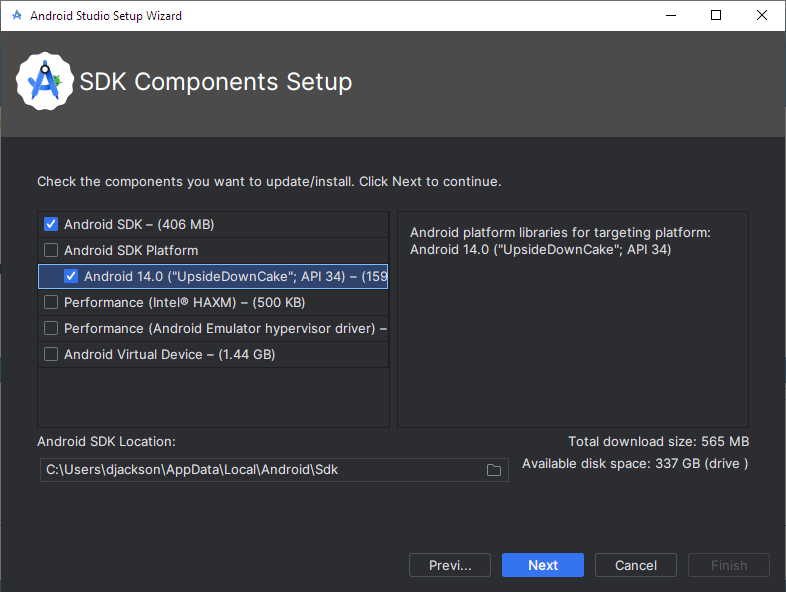
I'm running into another problem now, when I'm trying to download the SDK it is saying "unavailable": Is there some endpoint or URL that I need to allowlist in our firewall for this to work? EDIT: allowing dl.google.com and dl-ssl.google.com got me past this part but now I am unable to choose the SDK version I need, it only offers the latest one? EDIT 2: after allowing it to go through I was then able to go in the SDK Manager and remove the latest Android SDK and install the one I wanted.

-
@MartinByard This looks really useful, is there a way we can preinstall a specific SDK version so users don't have to / aren't prompted to download it? Our Pico Neo3 devices require API level 29, and the instructions also say not to have an Android Virtual Device. Additionally, the page you linked says that HAXM is being discontinued, but it looks like your script still defaults to that for Intel processors? Also, if we have a mandatory network profile for student users, what do we need to add in there for that to work?
-
I've been asked to install this on some of our devices so that staff and students can do development work for some new Pico Neo3 VR headsets we've just got, which are Android devices under the hood. Would also love to know if there's a currently working silent install method.
-
So next calendar year we're going to start using a platform called Zivver which addresses the problems like using CC instead of BCC, sending to people you don't normally send to, etc etc etc, but as mentioned I just saw a news article saying ICO are recommending disabling address autocomplete.
-
Did anyone ever find a solution for this? As new ICO guidance has come out recommending disabling of autocomplete for email addresses, so this is something I'm looking into whether we can implement. (See https://www.theregister.com/2023/12/15/to_bcc_or_not_bcc/ for the news story)
-
 Unfortunately leadership says they want an actual reply saying the person doesn't work here any more.
 -
We’re currently reviewing our staff leavers process. One of the suggestions that leadership has come up with is, when a staff member leaves, could we move their email address (note: NOT their mailbox) to another mailbox which has an autoreply set on it telling people this person no longer works for us? Our accounts are on-premise AD accounts with mailboxes in Exchange Online, synced via Azure AD Connect, so this doesn’t seem as straightforward as I might otherwise have thought. Does anyone know how long we have to wait between removing the email address and proxyAddress from the source AD account, before it can be added to the proxyAddresses in the destination AD account? Or, is there a different way we should be thinking about this?
-
Ideally we don't want to have to maintain a Linux server or prod through configuration files. Also the organisation you linked seems to change £5000 a year for support, this is a bit much, we were hoping there would be a cheaper solution.
-
Due to various issues we’re having with RADIUS accounting packets, we’re looking around for alternative RADIUS services we could use to replace Microsoft NPS. As well as being able to do the things NPS does for us currently (authenticating users using PEAP/MSCHAPv2 against AD and checking their group memberships before allowing access) we also need to be able to have some semi-intelligent rules around sending RADIUS accounting packets on to our firewall, including things such as * Delaying sending accounting packets to the firewall until the user has a non-APIPA IP address * Transforming accounting STOP packets to INTERIM packets to combat issues arising when roaming between APs Is there any commercial supplier that provides a paid supported virtual appliance (probably with FreeRADIUS or something on it) that has easy configuration options (e.g. web based) that we can just plonk in to our Hyper-V environment and set up how we want? Also just to clarify, this is just for our BYOD SSID, we don’t have/use eduroam so we wouldn’t need eduroam capability.
-
Our SCCM project ran out of time/funding before WSUS could be implemented within SCCM We understand that to use WSUS within SCCM it has to be on the same server, which won't work for us due to storage reasons We don't currently have the necessary licenses to use SCCM with servers, as these are not included in Microsoft 365 A3 (but client management is) Long term yes I agree it would be great to have everything in one place on SCCM, however in the intervening time we were hoping there would be some third party product we could get, just to tide us over until we can arrange to have SCCM sorted out.
-
Are there any good products or cloud services out there that allow easy automation, management and scheduling of on-premise Windows Server updates? For various reasons we don’t have our SCCM linked up to WSUS, so we can’t manage it through that. We want to be able to: Define groups of servers with orders in which they should be updated Define maintenance windows and assign specific servers or server groups to them Define rules such as both domain controllers can’t be down at the same time Define custom actions that need to be taken before certain servers can be updated, for example Azure AD Connect needs to be flipped to staging on the live server and live on the staging server in order for the live server to get updated Have monitoring such that we get alerts if a server does not come back up after being updated Automatic creation of checkpoints before our Hyper-V virtual machines are updated Automatically migrate virtual machines to other Hyper-V hosts so the host can be updated (we don’t have a high availability cluster, but we do have VMM) We’re aware that it’s possible to script this sort of thing, for example using PowerShell with the PSWindowsUpdate module, but we’d rather get something formally supported than trying to roll our own. Does anyone have any recommendations?
-
Mac won't correctly shut down or restart - how to troubleshoot?
LRSFC_DanJ replied to LRSFC_DanJ's topic in Mac
We've tried to check logs but even just 2 minutes worth of logs around the time of the shutdown attempt amounts to 65,000+ lines, we don't know what to look for so it is a bit like looking for a needle in a haystack. Yes, if we force power the Mac off then we will get the "You shut down your computer because of a problem" dialog after we boot it back up. We've tried wiping and reinstalling things one at a time but this was unsuccessful in revealing the culprit of the issue. -
Mac won't correctly shut down or restart - how to troubleshoot?
LRSFC_DanJ replied to LRSFC_DanJ's topic in Mac
Yes, we have EPSON printer drivers and Wacom and Huion tablet drivers installed. However, on affected Macs, the issue happens regardless of whether a graphics tablet is plugged in. -
Any suggestions on how to troubleshoot why a Mac won't shut down or restart (without forcibly holding down the power button)? We're pretty sure the cause is some software or configuration profile or setting we have installed, as it doesn't happen on a clean macOS with only Jamf and Sophos endpoint on it, but trying removing things and adding them back on one by one hasn't illuminated the culprit. Is there any log file or "log show" predicates that would help us isolate the cause of this? We're running macOS Monterey, mainly Intel Macs but I have also observed the issue on an M1 Mac Mini. One interesting artefact we noticed is that if we use the Shut Down or Restart buttons from the login window, we briefly see the Fast User Switching animation before the login window comes back again. We're aware that wiping and upgrading/reinstalling macOS will probably make the problem go away but we'd really like to locate the root cause as this category of issue keeps coming back.
-
Wonderful, this is exactly what I was looking for.
-
Originally when we deployed our Creative Cloud packages we chose the option for browser-based login, as we thought this would allow it to take advantage of the SSO capabilities we set up for our Windows users' web browsers. However we've since discovered that it caused more problems than it solves. Does anyone know if there's a way (e.g. a registry key or a config file) to switch back to Creative Cloud app based logins without having to redeploy the whole thing? As we've got it installed on 1000+ PCs, so don't really want to redeploy everything.
-
We're currently running Moodle 3.9 LTS but now that it's out we are looking to move to Moodle 4.1 LTS, we have set up a test environment with this version. It seems that somewhere along the way, the method to customise the login page has changed. Previously under Moodle 3.9 we could apply a "loginform.mustache" file in a theme template to reorder the position of items on the login page. Basically we just want the instructions section at the top, the Office 365 login button next, the guest button after that, and the manual login boxes at the bottom with a label saying they're for service and support accounts only. How do we do this in Moodle 4.1?
-
Blocking games on Google search engine
LRSFC_DanJ replied to Bagpuss66's topic in Internet Related/Filtering/Firewall
You can block https://www.google.com/logos/fnbx/solitaire to block the solitaire one -
I haven't tried a user policy with item-level targeting, I'll try that now. EDIT: no that doesn't work either, same problem as before, we only get the correct set of printers every other login.
-
Sadly this is not a viable solution for us, I was hoping someone might have seen this issue and come up with a solution that doesn't involve buying third party software to map the printers.
-
We have it set up like this but it only works every other logon. So it'll work perfectly once, then on the next logon it won't work at all and users get Microsoft PDF printer, and then the logon after that it will work again. And we do have the "Always wait for network" option set in another GPO.
-
[21h2] Connecting to network printers in logon script?
LRSFC_DanJ replied to LRSFC_DanJ's topic in Windows 10
In the end I have got it working using the prnmngr.vbs method and then afterwards checking Wscript.Network.EnumPrinterConnections to make sure the printer actually got added. -
[21h2] Connecting to network printers in logon script?
LRSFC_DanJ replied to LRSFC_DanJ's topic in Windows 10
We used to use PowerShell but we can't use it any more since we blocked PowerShell for students. -
[21h2] Connecting to network printers in logon script?
LRSFC_DanJ replied to LRSFC_DanJ's topic in Windows 10
I don't think it lets me target the printer deployments based on the Location property of the Computer account?