.jpeg.79cc2d62a7b4e0107227c20556af7427.jpeg)
chazzy2501
-
Posts
4,011 -
Joined
-
Last visited
Content Type
Forums
News
20th
EduGeek EDIT Conference
Blogs
Everything posted by chazzy2501
-
.thumb.jpeg.c4b2ea4e027981376480a5ab518033b7.jpeg)
Cost of living crisis 2022 - what have you cut back on?
chazzy2501 replied to Ditto's topic in General Chat
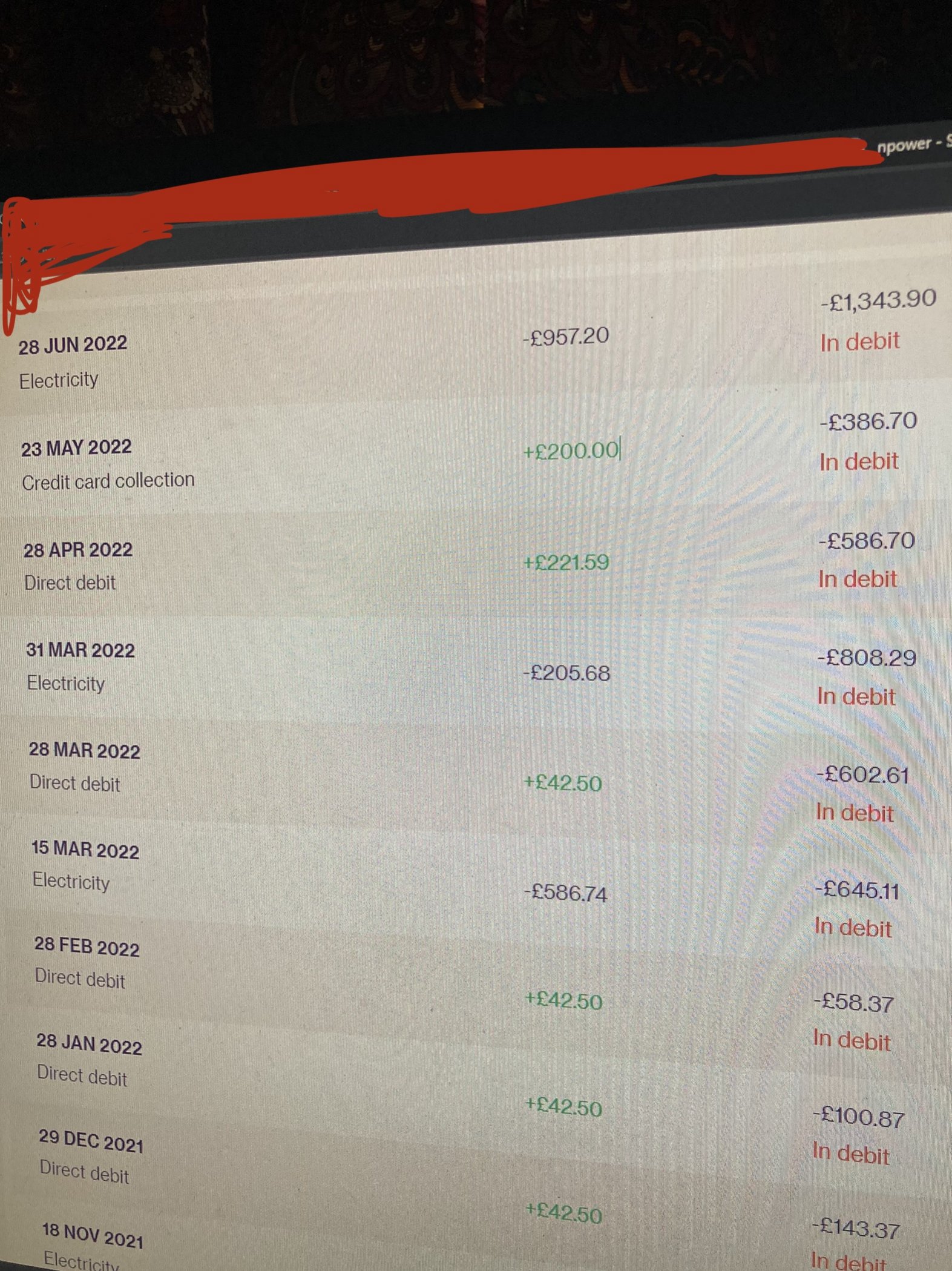
no smart meter, hadn't updated values in a while and decided that now the price is super high, I'd update it! Just me, little cottage..
-
1000Mbit of internet here Classcharts and Parentmail (and a number of other sites) will offer print previews, or reports as a downloadable PDF. The issue I'm having is that when you go to download one using MS Edge it'll open a new tab, pause for 15-20 seconds then close the tab and the download is available. Using Firefox (on my test PC only) the download will open the download dialog instantly. (these are tiny PDFs around 100kb) not sure where to start, this seems to be an edge problem but I did disable the antivirus during testing to no change. I allowed popups but this didn't help, turned off enhanced security for the website, no change. Ideas? (other than use Chrome) EDIT Edge will download immediately if I use the save link option.. ((Not always available.))
-
I've emailed 3 staff here at the school this link, I hope they go for it!
-
maybe this? https://www.amazon.com/Saipe-Screwdriver-Pentagonal-Five-sided-Screwdrivers/dp/B09CPBHZVS/ref=sr_1_6?keywords=5+sided+allen+key&qid=1656670065&sr=8-6
-
We installed a £80 25meter fiber optic HDMI cable from CPC... Not a great experience. So DEVICE, HDMI CABLE, PROJECTOR. it didn't always work, in the end as laptops would work 100% and the PC wouldn't we assumed that the PC had an iffy HDMI port or card, so we purchased a new graphics card.... Come the time to use a different laptop anddddd nope. No signal... other laptops yes not this one... F me. I bought this to fix the issues, so this is just an FYI for the archives... https://www.amazon.co.uk/KabelDirekt-active-repeater-signal-amplifier-black/dp/B076PB728Z/ref=sr_1_3?crid=1P4YUQ4W7RV26&keywords=hdmi%2Brepeater&qid=1656515891&sprefix=hdmi%2Bre%2Caps%2C81&sr=8-3&th=1 its an HDMI repeater, really for copper cables.. but it fixed the issue. it uses USB power to BOOST the signal... I suspect the optical converter in the 25M cable needs ooompf that some HDMI ports can't provide.
-
Hey, for anyone who reads this in the past or future I guess... My AMP was setup with only 5.1 speakers, this meant that it wouldn't show when it was getting an ATMOS signal.
-
ad-hoc at 5Ghz (not on intel) Need a recommendation for VR
chazzy2501 replied to chazzy2501's topic in Hardware
Replying for anyone else https://www.amazon.co.uk/gp/product/B09QCPWM4W/ref=ppx_yo_dt_b_asin_title_o00_s00?ie=UTF8&psc=1 This uses a Mediatek chipset, this is the same chipset AMD rebranded as their own, so get the AMD drivers for it;) btw this device came with the drivers on a usb stick, that I thought was neat. (and a driver link that points to dropbox...lol) Oh, I was able to make a 5Ghz hotspot on my PC, but the oculus software can't use it!>!> (it did with the intel but at 2.4ghz!) -
pecan molasses..... ommm nommmm nommmm
-
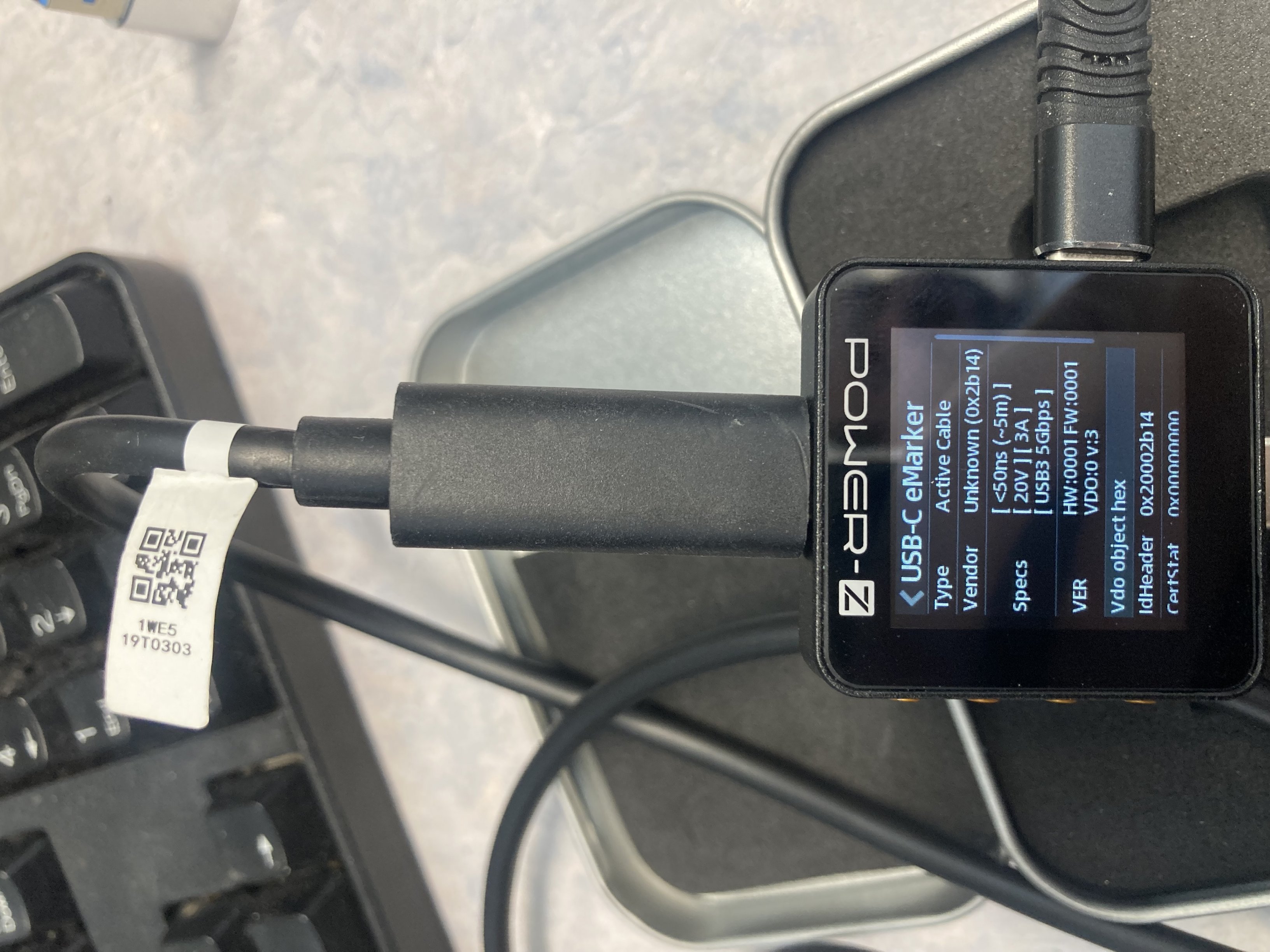
UPDATE: Testing cable replacement! I put this 4.5M 100Watt USBC (NOT HP) cable in the G5 Dock... Success! (EDIT: it didn't physically let me close the hatch, so changes would need to be made, a shorter cable would be less stout) Oh and when putting it back I swapped the cable ends, as one end gets more wear than the other it makes sense to swap them periodically. (to save to replacing it early)
-
It comes to my surprise but intel Wi-Fi cards do not allow 5Ghz Ad-Hoc connections... (This is something I wanted to test with my Quest2 VR headset) Does anyone know of a PCIE Wi-Fi Card (for desktop) that does allow 5ghz AD-HOC, ideally WiFi6 capable. (doesn't need to be over the top with speed though) Loads of cards on the internet but most seem to use an intel chipset and would run into this restriction.
-
I plugged my docking monitor in to a laptop using a USB A port to see if I could use the camera, networking and usb hub. I was going to use an HDMI cable for the picture later.... Then the desktop extended?!!? The the 2nd external monitor extended also... (that runs via dp to the docking monitor) I queried the docking monitors input and it was using "usb displaylink". Well it turns out the drivers are already in Windows... I was quite excited so grabbed other laptops but not all worked.. I think this means some hardware is required but in the laptop?! Anyhow this technology (that is built into Windows) could have been useful over the years. I was aware you could get cruddy USB A video adapters that would use some unknown unsigned driver from a mini cd but not this. Also my Epson projectors can do this but again needed Epson software to work so it couldn't be used by anyone anytime.
-
tested the oculus quest 5m usbc to usbc optical cable, DP Alt mode not supported...
-
just for curiosity I tried an oculus quest 5m optical USBC to USBC cable.... it did not work. it would seem that DP Alt mode doesn't work with optical USBC unless specifically designed to do so, in which case they don't do charging or data....
-
This may be a TLS 1.0 thingy, they've been threatening to cut it off for a while.
-
FYI on the HP website the 840 G5 only supports 2 independent displays using the dock. not sure the dock is usbc though, so may not be relevant
-
What a pain! I'd suspect the laptop then
-
Part of me is thinking that although those old monitors should work (L2251-1650x1050) they do not in this scenario. My lazy bones would just say that new 1080p monitors x2 would just work. The L2251 monitors must be over a decade old anyhow and are not display port native so you must be using an passive or active adaptor. (active is more common and cheaper?!?) EDIT: I was mistaken they are dp native but still old!
-
The dock relies on EDID and those older monitors only support version 2 (which should be fine btw) maybe they don't have original cables or have the EDID is disabled via the menu?
-
well if you are in HB3 then 3x 1080p should be possible! (btw the docks cable as you mention is rather odd!)
-
any chance that you are not using the USBC to USBC cable that is original to the dock? HB3 is a 12.5Gbps data rate.
-
Unifi and some Meraki, if I had an unlimited budget then it'd be all Meraki but I don't know how anyone could justify the cost.
-
https://support.hp.com/us-en/document/c06575423#:~:text=This%20can%20be%20performed%20by,DP%20a%20lot%20mode%20dock.
-
In the BIOS of the similar HP 440 G7 there is a high resolution mode for the USBC. this will trade USB3.0 for 2.0 but offer more picture bandwidth. (the only way to run 4k60 on the G7)
-
can I redirect you to my post http://www.edugeek.net/forums/hardware/226776-fixing-laptop-hinge-strong-but-cheap-way.html
- 3 replies
-
- 1
-

-
- dell latitude 3520
- hinge
- (and 3 more)
-
I have a few of these and was worried about what happens if the cable gets damaged... Well it is replaceable! And it's a standard 10 gigabit 100watt cable.. I wonder if it is locked down any by the dock but at the very least you could buy another... Who want to try an unofficial cable... maybe a 2 meter one!
- 5 replies
-
- 4
-
-
- hp dock g5
- power-z
- (and 1 more)