Oaktech
-
Posts
9,073 -
Joined
-
Last visited
3 Followers


About Oaktech

-
 Longevity is my concern mainly... Here's their Networking offerings... Networking Solutions
 -
Holy necro-thread Batman... Just to add closure to this, I'm still not exactly sure which was the fix, but about a week after I posted the original query HP released a BIOS update and Intel released a video update within 24 hours of each other and following the application of both of those, the issue just went away.
-
Recently replaced a failed APC unit with a Riello. Very impressed with it.
-
Renaming the school - Technical considerations
Oaktech replied to CHiLL's topic in How do you do....it?
I just applied a custom domain as my primary, created a new onmicrosoft fallback and changed the Sharepoint tenancy via powershell to the new fallback... Start-SPOTenantRename -DomainName <NewDomainName> -ScheduledDateTime <YYYY-MM-DDTHH:MM:SS> Then I updated all the usernames to be the new custom domain manually, created the old names as aliases and added DNS for the new one. After about 2 years I removed all the old custom domain addresses and MX routing although we continued to pay for the custom domain name to prevent malicious takeover. -
So, I've now taken over IT in a large primary school (850 kids, 120 staff). We currently have an elderly 40ap Ruckus system with a mix of AP models, A Splicecom phone system with around 30 extensions, and around 20 switches from an assortment of vendors including HP(procurve), Netgear, HP Aruba and TPLink. It's a completely flat network despite having almost 600 devices hung off it. I have been buying Yealink phones for the last year to replace the failing and out of support IPCS phones, and the wholesaler I've been using (UX Pro) has suggested I investigate Grandstream with a view to unifying all 3 systems. I have to say that I'm very impressed, it seems incredibly feature rich and the price point is almost unbelieveable - I can do a full hardware refresh of wired, wireless and telephones for the price of wifi and wired from Unifi or just wired from any other vendor. Anyone here used any of the Grandstream networking? They seem to be very big in asia and in the hospitality industry. The only things I'm really worried about is longevity and ability to access support.
-
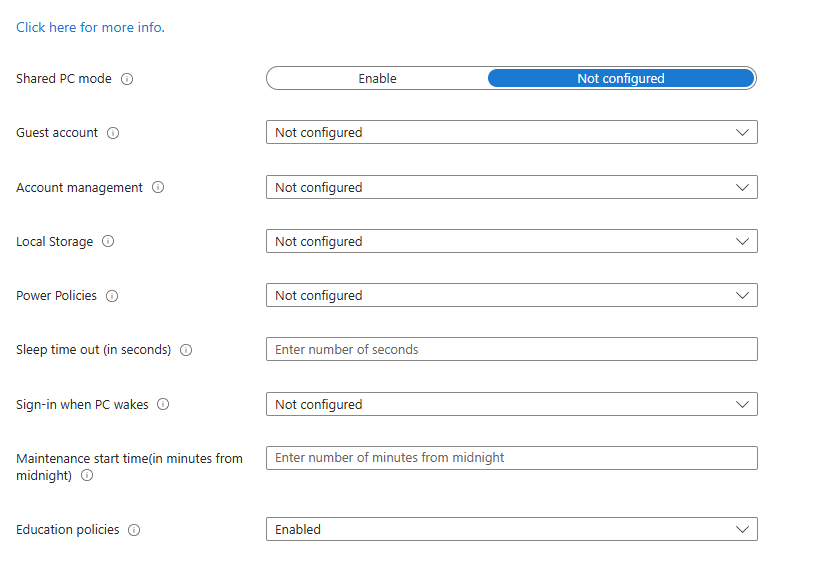
Afternoon everyone... I'm Back! I'm now doing a full-service technical management role in a very large primary school. I took over site, which was a mess and now I'm doing their IT which looks OK from the front but is a mess from the back. Once of the issues I'm currently trying to straighten out is that practically every intune windows config policy has some sort of conflict with another policy. I've weeded out all the obvious duplication of settings (AV options were set 3 times in 3 different policies for example) but I've got some now that I cannot find the source of the conflict. The one thing I have noticed is that we have the default 'education PC policy' set including the the enigmatic 'education policies' option. Nowhere can I find an actual breakdown of what that sets. I'm wondering if that is the source of my remaining conflicts. Any chance one of you good folks knows what it does?

-
We use applocker to prevent them from running anything. It looks like there may be something that can be done with the Defender version we're getting from September but that's being looked into by my MAT so I don't have any details.
-
Not really, it was taken on board and I was told at the time it was roadmapped but I haven't seen anything further on it.
-
W11 (Also W10 Now) Start Menu Search - Just Scrolling, No Apps
Oaktech replied to JRA's topic in Windows 11
You haven't got a policy somewhere that does "Remove common program groups from Start Menu (User)" Someone set that and it broke the start menu for students. -
Yes, using Delprof to remove all trace of the user profile and then signing in, the problem went away in my case. Your experience may vary.
-
I've seen something like it before - nuking the profile on the machine solved it.
-
Latitude 3420 - Running slow, Specs seem OK, what do you think?
Oaktech replied to TwistedHelixis's topic in Hardware
Make sure you have the Dell drivers off the website. I've had a similar issue with a specific HP device that has been made a lot better by installing the manufacturer drivers rather than the generic W11 ones, even the optional ones from update didn't work well. It might be worth seeing if it comes to life more with 16gb ram as well. -
And another one today - all from 07798 296630 Blocked the number now.
-
Unifi wireless issues after update overnight on Sunday
Oaktech replied to Oaktech's topic in Wireless Networks
Uggghhh, right, apologies everyone who replied to this topic & to Unifi, not your fault, not this time! Turns out the DHCP server was exhausted. What 'appened woz... in the Easter holidays and under instruction from our Trust I dialled down the DHCP scope on the Smoothwall from an admittedly excessive /16 to a /24 with an 8hr lease time and 250 adresses available via DHCP. This particular site has around 150 normally connected devices on this with an ocasional usage of about 40 additional devices. At the weekend the lease time changed back to 2 days. I'm still not clear if this was a deliberate change, an update, or an automatic settings overwrite from the parent node. A combination of factors, including a large Trust meeting where around 30 people used the Trust's network which sits on our scope and the use of a suite of Chromebooks that don't get used often, caused a higher than normal number of clients to connect Monday into Tuesday and hang onto IPs, thus by Wednesday lunch time the scope was operating one-out-one-in. 🙄 Late Wednesday night (literally at about 8pm) the Trust finally got back to me and we agreed that 2 days was excessive, dialled the lease time back to 8 hours and everything is fine this morning, around 50 free leases. We've also agreed that the Trust will put their network on it's own scope & VLAN. -
I've had a similar issue twice fairly recently. One was with a manufacturer specific Intel driver for Lenovo Thinkcentre mini PCs installed via Lenovo Service Bridge and affected monitors connected by HDMI but not by DP. That was fixed with the a new driver from Intel without the manufacturer customizations. The other issue is ongoing with 23/24" HP E and Z displays and it is basically the beginning of the end for them, it gets progressively worse and eventually they just stop working!