.jpeg.79cc2d62a7b4e0107227c20556af7427.jpeg)
chazzy2501
-
Posts
4,016 -
Joined
-
Last visited
Content Type
Forums
News
20th
EduGeek EDIT Conference
Blogs
Everything posted by chazzy2501
-
Nope, it was easier than the operating system upgrade for the appliance. Glad I don't have that again..
-
Yeap, we were pushed to advanced as well. I was told I couldn't stay on my previous plan. I also migrated to the cloud server, which is better. (when on-prem changed the underlying OS, the upgrade path was unclear... never again)
-
I used Edge and bing at home.... (ublock still works in edge) I usually do the competitions with my meagre points but had just forgotten lately... Anyhow 8700pts later, I turned it into £5 Amazon voucher! Cool I guess, that was a month of letting m$ spy on me for 5 Bezos bux.. Now if only I could collect all the pupils points and do a Richard Prior..
-
.thumb.jpeg.c4b2ea4e027981376480a5ab518033b7.jpeg)
1 Week with Windows on ARM, Lenovo T14s Snapdragon X Plus
chazzy2501 replied to DalekSec's topic in Windows
Just going to say that more games work on steam than did initially, so it is still improving. The battery life is amazing, not ipad amazing but 10% battery means 3+ hours, not any minute now. -
ok, I took it apart used magnifying glasses but the solder joints all looks good. I looked in the socket and 2 of the pins looked lower than the rest.. I ended up stripping a sandwich tie and making a tiny hook, slid it under the pins and pulled them forward. by the time the hook quit the pin was at a similar level to the others. it appears to work well with wiggling the rj45 around.. So is it failing or did something get in the socket at one point.. I guess I'll have to wait and see. Also every external screw did nothing, the years of dropping means they're all broken and a single screw holds the unit together... Now lots of tape and a single screw.
-
This is probably the exact fault but no, I'm a soldering hack and my eyes suck and the tools are subpar.
-
The trusty linkrunner I acquired from the old boss many years ago now shows intermittent cable faults that don't exist. The new ones are sooo expensive! I have an even older one that still works perfect but she's hefty and can't just sit in the tool box. So is there a non-fluke tester that is worth anything? The current one is the size of a walkie talkie, can do dhcp, ping and show cable lengths for every pin. (super duper handy), send a tone with an 3rd party sniffer and it can check cables. (1" mono lcd job, not touch screen) Also it uses AA batteries can be left for months and just work!
-
I'd just been looking at some of the new CAT6 stuff we had put in, I was surprised it used a coupler, this I thought was neat and the rabbit hole.. Did you know that the Keystone is a standard! And you can get more than just RJ45... USBC, HDMI, USBA, and they all snap into the same hole... AAAAND you can get them as wall plates. Who's been hiding these from me!

-
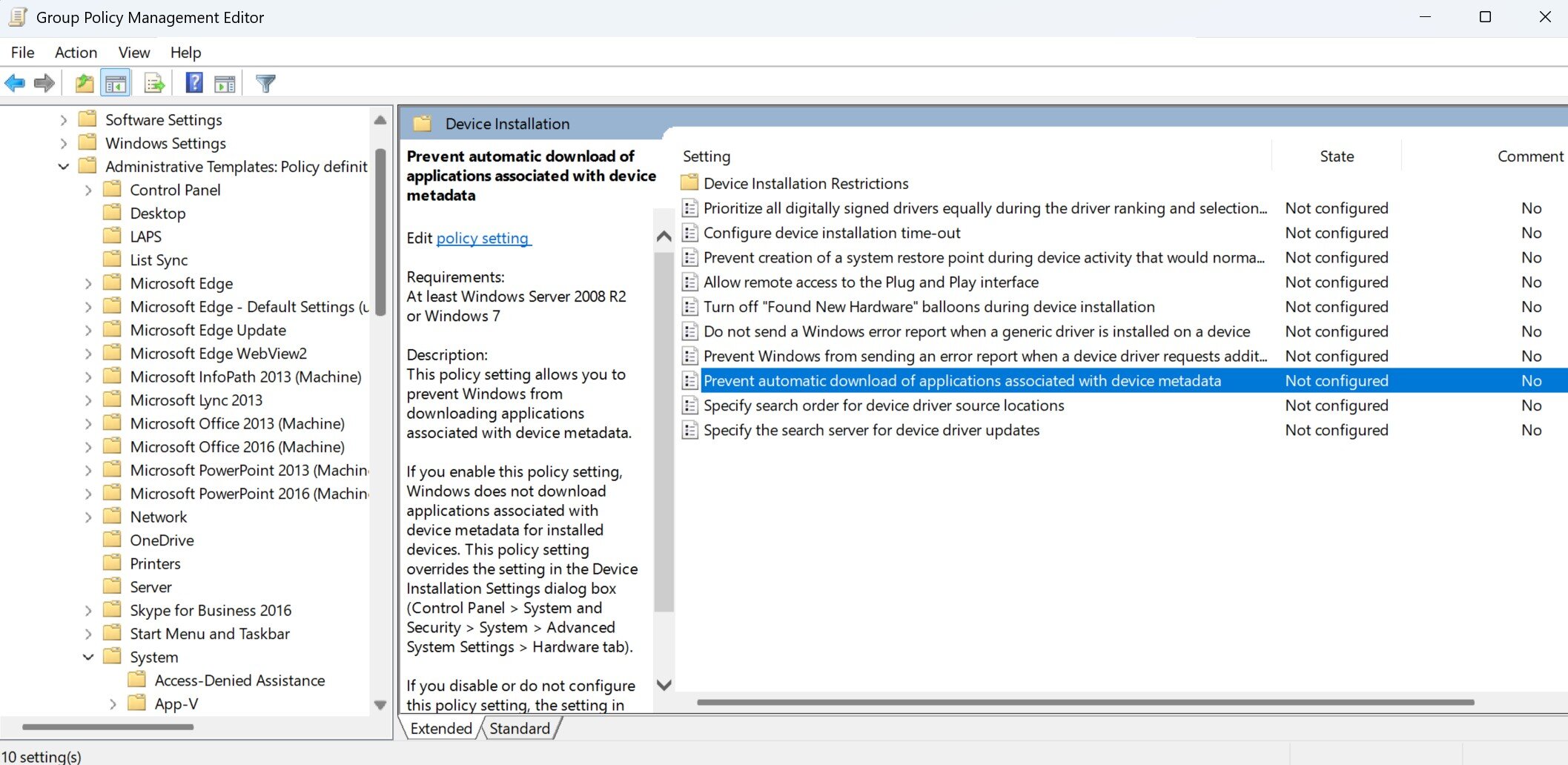
I'd heard of this and assumed it was a usb hub type of deal but it is not. This is done without user interaction using Windows Drivers / Windows update. I'm putting the setting in my WSUS GPO now!
-
My car has a parasitic draw that strikes once a month, today is that day. Anyhow, at work charging my jump pack from my monitor... try explaining that to grandpa.
-
We got this in our email: "Please refer to my email sent previously – this contains details of the move process and your next actions. As a reminder, if the move process is not scheduled as per the timeline below, then access to local FMS6 will be restricted by Monday 6th July 2026."
-
When they host: you have 10 days to move the data from their system if you cancel the agreement. They will only refund the cost of the term of the contract if they lose control of the data. You only have 5 days to object to a new data handler they choose. They can use your data for training purposes (after undocumented anonymisation). The data will be scanned by their team for unacceptable content. The only support "core service" 08:00 -17:00 excluding bank holidays. 21 concurrent user limit and they can restrict your access or charge 20% extra if you go over.. No word on EXIT fees if you want the database in a useful format. it is POSSIBLE the data is accessed outside the EU. and other issues in the TOS. What surprises me is the nonchalant attitude from management and governors.
-
ah my mistake, we don't use papercut, we print using PINS so we can track the accounting on the printer/s. (Not a great solution but free) The printers are set, No PIN, no print. Only the old V3 drivers allows for PIN entry. We could've setup AD accounting but that is per user! We want Per department. Anyhow our model is stupid and the result of penny pinching. But the new model printing doesn't work for us.
-
pin codes for accounts
-
I tried and failed, it didn't support pin codes..
-
That complicates things, as I assumed new new cloud... FFS.
-
SAFSO tell us it was in a contract we've already signed The reduced term length contract... Now Finance are reviewing that contract and are perturbed as they don't feel it was presented as that... just ongoing support.
-
(FMS is part of SIMS) Seems that our Finance team have been told that they must prepare to move to a cloud platform for FMS.. Our Finance didn't ask for this it was just told to them in an email. FMS6 will be restricted after 6th next month.. What ever that means. Then instructions on how we prepare our data to be uploaded to their cloud service. So now I'm immediately hostile to this process. I don't like strong arm tactics. It seems I was also unaware that "parentpay" purchased SIMS. I'm now writing a snooty email to the migration team about these demands.. Who will have access our cloud data? Is it encrypted? (not just the transport) Where is it stored, who will guarantee data integrity, backups and service up time? How will we be compensated when you lose control of the data in a possible data breach? Miffed in Dorset... EDIT: Seems alot of this was decided by DCC, so now to SAFSO...
-
we are encouraging use of the teams and their storage space for departments, I don't know of a limit from the tenant storage pool. Also an allocation of 50GB is the limit for users with A1 licences from the pool. I have a 10GB network share limit for staff and 5GB for pupils. (some apps can't save to cloud directly) (corel, fusion, affinity, thonny) Can't see (non-cloud storage) going away entirely.
-
Holy Moly, I had no idea! I saw CoPilot+ desktop and ASSUMED, it'd be somewhat performant. (not worse than even a 1st Gen Ryzen 3!) Lucky I only got 4, Also as you state they seem to do well in browsing and office tasks.
-
when you diagnosed the PC in the office did you also use the original keyboard and mouse? Funky peripherals can do odd things.
-
Just an FYI really for those who suffer from FOMO. I have had 2 Copilot+ PCs recently an ARM laptop and a Ryzen AI 330 Desktop.. The built in Windows features are rubbish, the image generation in paint still requires online servers, the AI just streamlines something... The offline translation for live captions only works in US English is slow and misses (at english) and is worse at conversion (compared to online google) No one wants recall. Enhanced video / audio calling, is the same (now rebranded) tech that has been in systems for over a decade. On the ARM laptop the TOPS can be used with local, text only LLMs (currently) that are under 8GB and that is it. (no faster than using the onboard graphics or CPU but it uses less power) The x86 TOPS of the Ryzen AI is not supported by anything, so FU I guess. (LLMs will use CPU or GPU) Just in case anyone here had FOMO or thought that maybe the extra £50 for the copilot+ stuff would be neat.... it is not, it is garbage, don't worry about it. EDIT2: Also the Ryzen AI 330 has the same performance as a single channel slow DDR4 RAM, 10th Gen intel i3 from 2019 despite running better DDR5 Dual channel RAM. (Probably has better graphics though)
-
Also look at how poorly the Ryzen AI 5 330 performed and it has 16GB Dual Channel DDR5 at 5600Mt/s Desktop PC BTW! CoPilot plus junk with 50 TOPs (Total'oPistake/s) The Ryzen 5 7535H is a 35watt part from a Lenovo E14 Gen6 with also 16GB DDR5 5400Mt/s but single channel...
-
Upgrading 12th Gen i5, Intel laptops using 3200Mt/s DDR4 RAM. (HP 440 G9) These laptops came with single 8GB RAM and I'm upgrading to 16GB which has obvious benefits. (Windows updates are rather slow on 8GB) I decided to run a cinebench on before and after the upgrade and to see how much performance gains running in Dual channel would yield and it is quite good! 1029 - 1274 Nice.
-
Lenovo direct purchasing - Anyone got any contacts?
chazzy2501 replied to Alawil's topic in Hardware
I've purchased direct and via suppliers. We bought some PCs direct from the website, we got about £110 in credit vouchers for the purchase and traded them for laptops bags! We used the "ProBusiness Store" to buy 4x (IdeaCentre Gen 10) for around £420 exVAT in February this year. They were co-pilot plus desktops with 16GB DDR5 and cheap at the time but not business class. (they did pxe boot and install so I'm mostly happy)