ITGURU
-
Posts
2,576 -
Joined
-
Last visited
Content Type
Forums
News
20th
EduGeek EDIT Conference
Blogs
Everything posted by ITGURU
-
I would never do a rename - always best to set up a new domain and migrate. I did it once when we merged, merged 2 AD's into a single new one...least that way you know everything is clean install and can do a bit at a time.
-
We're using Censornet email filtering as also use their proxy server software. cut down on SPAM massively from our old county provider. Just runs in the cloud, filters the mail then forwards it on to our local exchange server. Users get any blocked mail quaratine release emails. Had 0 issues with it
-
All good and well if you 100% uptime on the internet? I'll be sticking with local file storage for the foreseeable future!
-
Yes I know they remain separate but in same folder. Yes I do have that policy set, always have done. However, as I thought it was a policy issue I blocked inheritance from all policies and it still did it, so know its nothing to do with that policy setting.
-
I haven't had change to give them a call yet, it's still on my to do list. We are running Windows10 Education x64 Version 1607 Build: 14393.693
-
[windows software] Microsoft Licensing for MATS
ITGURU replied to nathan's topic in Licensing Questions
I was advised by our reseller that they keep agreements separate for MAT schools unless the FTE count it over 1000 or there are 5 or more schools in the trust, otherwise there is no benefit. -
A 10GB backbone doesn't mean you need 10GB to servers - I have 4 gb aggregated bandwidth on my servers. It's an available bandwidth so means you could be transferring data from multiple servers down the 10GB pipe, it doesnt have to be a 1 to 1 connection.
-
i had seen it mentioned but roaming profiles should still work in windows 10. Strangely enough I contacted my MS Agreement reseller for a contact at microsoft and they said they have exactly the same issue. Been advised to call MS and log a ticket as is easy to replicate
-
Haven't tried this but might be worth doing to save installing on each computer.
-
All computers have a custom logon screen with the Academy's logo on. Students get a desktop background with the logo on, staff can change their background if they wish. Staff accounts are locked down so cannot be used on student computers, so no need to differentiate between the 2 when logged on.
-
Having sussed the issue it seems there are some forums about it. When using SSDs (not as common on HDDs) it seems when users log on or log off, the server with the roaming profiles on is keeping files locked including the ntuser.dat hence the reason it says in use. When rebooting a machine if the files are in use still and showing as open on the server next time they login they get a temporary file. If you close the client session to the server and login, the usr logs in fine. Doesnt seem to be a cure right now, although a website says its recommended to use 2016 with v5 profiles but is there even a way to direct v2 (win 7 profiles) to a different server to the windows 10 v5 profiles? Here's a forum link https://social.technet.microsoft.com/Forums/en-US/ba54df5f-4356-4cee-b724-303aaad51266/file-locks-persisting-after-shutdownrestart-causes-serious-roaming-profile-redirected-folder?forum=win10itprogeneral
-
I've started to receive this on Windows 10 PCs when users login whether it's admin or a normal user...any ideas? The error message detail doesnt help much!

-
If i'm imaging several computers in the same room it means all of them can image at 1 gb and then down a 10 gb pipe which gives a greater bandwidth than 1gb to each pc and 1gb fibre.
-
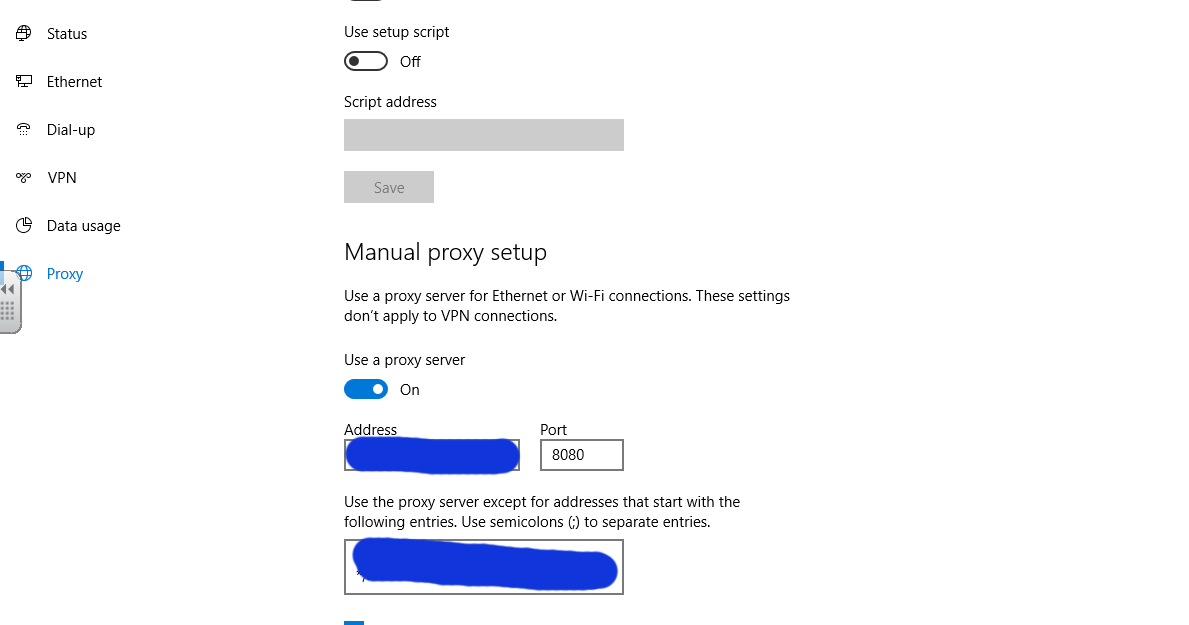
I have rolled out Windows 10 to approx 100 pcs so far and still finding open access areas. One in particular is the 'Settings' app/screen. There are so many areas in here that i'm finding are open to users. I've discovered they can now go into the internet, proxy area and see the proxy server and also disable it. How do I lock this down and other parts of 'settings'.
-
I had an issue where one member of staff could see a particular part of SIMS, but it wasn't documented in the spreadsheet or in the permissions tree as an option. Capita told me: I'm afraid we do notprovide support for individual permissions within the permissions tree. I haveattached the permissions spreadsheet though that has details of the groups andwhat permissions they provide so you can go through this and see what group theusers may have that are allowing them to see this group. How useful , NOT when they provide the software!
-
I'm not using remote desktop as such to remote on to their school computer. Instead I use RemoteApp to publish the software, programs and live file access. If they don't want to access network drives live, they use HAP
-
10GB from core to edge switches in Star topology - No switches are uplinked or daisy chained. even if a cab has 2 switches they are separately fed. Outside mobiles are still only on 1 gig though as only a few pcs. Best advantage of 10gb is when imaging pcs
-
I've got an odd-ball with the windows 10 taskbar i can right click on the taskbar where it is blank and choose properties etc, but i am unable to right click on any of the open programs/windows on the taskbar. It just does nothing.. Any ideas?
-
How are the licenses calculated - is it on the number on client computers you want to receive alerts on?
-
It is more reliable and stable than their main product that I keep reading about?! Can you PM me rough costings? thanks.
-
I used to have a flat network up until we had VOIP phones, after which I then VLAN'd VOIP, Access Control, CCTV etc. Despite being a site with 1200 clients and 22 servers, I've never noticed any difference in network performance, before or after the VLAN changes. However, we are on 10Gig backbone.
-
Does anyone know of, or have experience of, any Desktop Alert notification software. email is all well and good but if i need to send an urgent notification for uses to see, such as an internet outage or email outage I want to be able to push out urgent message. Something which will either show in the system tray as a popup until they click off it, or a box which pops up in the middle of the screen. The messenger service was removed since XP, so just wondered what people use now . Needs to work with windows 7 and windows 10 64 bit ideally. thanks.
-
Never used sysprep in all the years I've been in IT. Whether it's because we don't use software that specifically requires it, but I've never had any network issues from not using it. I create my image, re-arm office, re-arm windows, then shut down and acronis backup the image. Image can be deployed in 7 mins, rename, add to network and PC up an running again.
-
I've used UNC path shares for a number of years, and moving over to DFS namespaces with links to the shares for drive maps. Previously, it wouldn't matter if i rebooted any of the DC's during the day as mapped drives were always direct to the server names. However, having just done the usual out of hours windows updates and rebooting the DC's, when they are rebooting access to the drive maps hang and so does trying to access the DFS name ie.e \\dfs\ It hangs for a while, before access is restored, and before the server has rebooted. I'm assuming it needs to re-authenticate against one of the other online DC's before it allows access. Is this normal? Each dfs namespace has all 3 servers includes as the root namespace server, so i would have thought failover would be quicker.
-
Too many services moving to the cloud that need to be up 100% during the school day. Much prefer everything locally hosted and having our own school cloud remote access. It's bad enough when the finance off canot get on to PSF to do some work..