kennysarmy
-
Posts
6,519 -
Joined
2 Followers


About kennysarmy

-
 Is it possible to configure Cloud Filter as a "mirror" of our on-premise and NOT be able to push it's config. back to the school, previously when we tried the cloud version we lost all our custom filters and the school became compromised as students were not filtered correctly, we cannot risk that happening again.
 -
We don't have cloud filter - still on prem. The question is less about reports and more about removing basic-authenticated credentials before we're forced to by Microsoft.
-
Hi all, We're reviewing old service accounts and legacy authentication in our Microsoft 365 tenant and have found that our on-prem Smoothwall is still using an AD-synced Microsoft 365 account to send its scheduled reports and Monitor alerts. The current configuration is essentially: Smoothwall → smtp.office365.com:587 → TLS + SMTP AUTH → Microsoft 365 Smoothwall stores the username/password of a dedicated account (service_notifications) and authenticates to Exchange Online using SMTP AUTH. The same account is currently also used by Veeam, although we're treating that separately as Veeam has more modern authentication options. We asked Smoothwall Support whether Maiden-38/Newport supports OAuth 2.0 for Microsoft 365 SMTP. They've confirmed that it doesn't. Smoothwall supports SMTP AUTH/TLS with username/password, but not OAuth/Modern Authentication for this function. Their suggested alternative, if we want to remove the basic-authenticated credentials, is to use an SMTP relay. Our proposed approach therefore is: Smoothwall → Microsoft 365 SMTP relay → Exchange Online Rather than Smoothwall authenticating with a Microsoft 365 username/password, we'd create/configure the appropriate Exchange Online inbound connector and identify/authorise the school's sending connection by our fixed public IP (assuming that is suitable in our environment). Smoothwall would send to our Microsoft 365 MX endpoint over port 25 without SMTP AUTH. We'd test this alongside the existing configuration before removing anything. Once proven, Smoothwall would no longer need the service_notifications credentials. We'd then deal separately with Veeam and, once nothing needs the old SMTP AUTH account, disable/retire it. Has anyone else running on-prem Smoothwall with Microsoft 365 done this? In particular, I'd be interested to know: whether Microsoft 365 SMTP relay via an IP-restricted inbound connector is the approach others are using; whether there are any Smoothwall-specific gotchas with this; whether anyone has found a better solution that avoids maintaining an on-prem SMTP relay server; whether outbound TCP 25 or filtering/NAT caused any issues; and whether there are any security concerns or additional restrictions you'd recommend putting around the connector. I'm particularly keen not to stand up and maintain an internal SMTP server purely to solve this if Exchange Online's SMTP relay functionality can do the job securely. Any experiences or suggestions welcome.
-
Recommendations wanted – school server replacement and migration, Gloucestershire We’re a secondary school looking for recommendations for firms experienced in delivering server infrastructure projects in education. The proposed scope includes: Replacing our VMware infrastructure with two Microsoft Hyper-V hosts and shared storage. Migrating seven virtual servers, covering domain controllers, file/print and school application services. Moving to Windows Server 2025 and reviewing backup arrangements. Developing our Intune/Autopilot setup, including moving appropriate management tasks from Group Policy and retiring WDS/WSUS. Providing migration planning, testing, documentation and handover, with five-year hardware support. We have an initial proposal and hardware specification and would like additional indicative quotes, along with advice on whether the proposed approach is appropriate. Has anyone recently completed similar work and can recommend a firm? First-hand feedback on delivery, managing disruption and support after implementation would be particularly helpful. Happy to discuss the detailed requirements privately. Suppliers are also welcome to contact me directly.
-
The students are taken to the printer where the job is released - not sure I understand your question 😕
-
Our exam team accompany the students, assist them in releasing the jobs (as the invigilators know their password, but they don't) then they sign and off they go.
-
Latest Windows CU breaks Data Synergy PowerMan software!
kennysarmy replied to kennysarmy's topic in Windows 11
NB: This problem is caused by Windows Update released in September 2026. It changes the settled default Windows power policy security settings which have been present since Windows Vista (19 years ago). The problem is likely to occur with all versions of PowerMAN since 2008 including the current beta. In 18 years of PowerMAN this is the first time this has happened. We take this very seriously and have a preliminary fix currently in testing. -
Starting to see random shutdowns on our PC's so raised a ticket this morning. Hi Jeff, Thank you very much for your email. Please be assured that we will immediately start to investigate this problem. We haven’t got into this yet, but this problem would seem superficially similar to a problem reported by another customer on Friday. This was caused by a new Windows update which has subtly changed (e.g. broken!) the security model for Windows power policies. If this is the case, we have a fix already in the works.
-
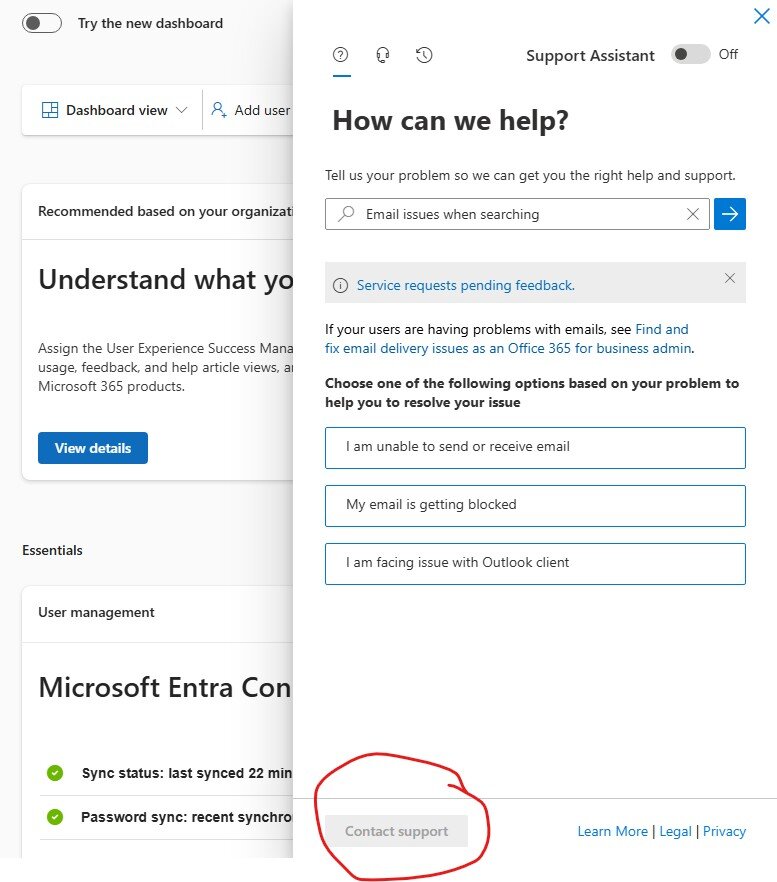
Button to Contact Support in 365 Admin Centre greyed out :(
kennysarmy replied to kennysarmy's topic in Cloud Services
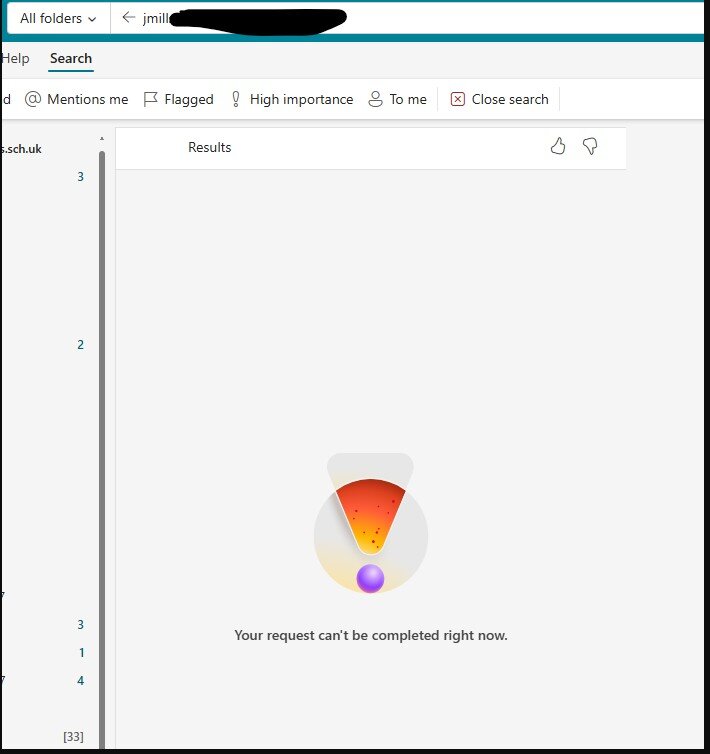
Cheers. Though I don't see this as a false positive as intermittently the same users seem to be having this issue! -
Button to Contact Support in 365 Admin Centre greyed out :(
kennysarmy replied to kennysarmy's topic in Cloud Services
A couple of users (staff) in the tenacy have reported intermittent issues when using Outlook on the web.
-
Button to Contact Support in 365 Admin Centre greyed out :(
kennysarmy replied to kennysarmy's topic in Cloud Services
Thanks! -
Am I doing something obviously wrong
-
Does anyone know if Group Provisioning is ticked in "Bromcom Office 365 integration" and a student has left the school, should they be automatically removed from the "Student Licence Group"?
-
Any views on whether the SWGfL/Phoenix aggregated Sophos buying arrangement still represents good value for money for Antivirus Central Intercept X for PC's and Servers. There blurb states: The pricing represents exceptional value for money and has been provided in order to - ensure existing users of the software renew when their licences expire, and - to enable new users to benefit from the software. Eligible purchasers include: - existing and active users of the SWGfL/Phoenix aggregated Sophos buying arrangement, - schools or other public sector establishments with an education focus that are located in the south west of England who do not currently utilise Sophos or have an active opportunity with Sophos in place. Purchasers may be required to confirm their eligibility with Phoenix Software. SWGfL and Phoenix Software reserve the right to refuse sale of licences to any individual or organisation that does not qualify as a purchaser at their sole discretion, and/or if their suppliers decline to fulfil a sale of licences to any individual or organisation.
-
Sign-in frequency / MFA Staff Users / Conditional Access Policies
kennysarmy replied to kennysarmy's topic in Cloud Services
I don't think it takes too long to resign in and it protects us from staff using personal "shared" home computers if they don't sign out before someone else uses it. Perhaps 12 hours would at least allow someone to work all day and only sign in once... I'm just loathe to effectively make the system less secure.