Davit2005
-
Posts
5,320 -
Joined
-
Last visited
Content Type
Forums
News
20th
EduGeek EDIT Conference
Blogs
Everything posted by Davit2005
-
BAD_Lease from wireless devices - Scope ran out of IP
Davit2005 replied to bicky's topic in Wireless Networks
What is the lease time on the scope, for BYOD WiFi I'd look at reducing to a day if not less if not already. That 10.19.0.0/20 does give you a huge range on that scope. For context we have 20 /22 networks for wifi and lease time of 4 hours on these scopes. Have you more than one DHCP server? -
It depends if you have PCs in the same subnet, there is some basic software that sends a wake packet on the same subnet used to be available I think it was mcwol or mc-wol used to be free but if you want to wake up machines on different subnets might need a different approach or software.
-
Recommend me an MFA token for Microsoft 365 please
Davit2005 replied to tmoon-mint's topic in How do you do....it?
You can get the Yubikey Authenticator app then you can have best of both Hardware and TOTP. Other hardware keys might have similar solution. I've setup online services to use a mixture of both in some cases if they only allow one hardware key per account. The Yubikeys have a desktop app too so can use the key to get the TOTP codes which could be handy if no access to a phone.. -
Recommend me an MFA token for Microsoft 365 please
Davit2005 replied to tmoon-mint's topic in How do you do....it?
Yubikey, there are cheaper options but check compatibility with other services you might want to use with first. They also provide the Yubikey manager which might prove handy. -
I've used quite a few flat ethernet cables, I know they can be a bit suspect and I don't use them for PoE. But apart from that I think vlans are probably the most sensible route and gives you more options in the future if you cannot run extra cables. Got a home network that would prob put some enterprise networks to shame, it is like I am permanently at work
-
[voip] Putting a voip setup on a flat network
Davit2005 replied to Oaktech's topic in Mobile Devices & Tablets
We had network noise from printers causing issues noise with VOIP phones at a previous place when we put them on the same vlan. We don't seem to have the issue now but maybe it was those specific printers (mostly HP 2055's I think) and phones. -
You can add another repository, copy the backup files across and there is then a way to re-link them which is done through the GUI and really easy, it has been a 6 years since I have used Veeam but it seriously is a good bit of software. Used it since version 6 for 4 or so years and upgraded to version 9 before I left the place. v6 used to be able to do Active Directory object restores only by running the VM in a isolated virtual lab which required the upper enterprise license but they then added the Active Directory without needing to do that but there is so much functionality available if you want to pay for it. As for the jobs what they are backing up, check the job settings, the job history should show you but you could try a restore and see what options it gives you as well as checking the job logs. Veeam works in a different way to WSB, it was sort of designed specifically then other options such as backing up physical servers came later rather than WSB which was designed a long time back for physical boxes and sort of adapted a bit for virtual environment.
-
Have you compared the actual port vlan settings with other ports where phones are working/other switches? What is the actual problem, does it not connect to the VOIP server? Could be lots of things TBH.
-
Proxy would be 1 call but if you are using decryption that might be another. With out any more info about your setup hard to say. I am of course assuming that you are trying to update via a internet connection rather than manual update. If manual (offline) update is an option that might be the easy route.
-
Same here, 2018 Seat Leon Cupra, at 35k I have the original tyres on the back I think they are continentals, the fronts have been replaced once and are Michelin Pilot Sport 4s now and have about 3mm tread left. Having a car like this in the snow can be unnerving but if you take it easy and don't ask too much of them they are fine, dry weather I cannot fault them and can really give the accelerator pedal a good heavy foot without any issue apart from a bit of fun torque steer. The car can influence tyres, I took my friends metro (nothing special jus a 1.4) for tyres about 20 years back to costco and they cost £50 more than the BFGoodrich tyres on my then current Range Rover due to the size and profile.
-
Smartplugs with energy monitoring are really cheap, yep you have to be careful of the load sometimes. I have one button which runs a script when I leave home and others such as when I go to bed via Home Assistant which turn off things I don't need when I am in bed, sleeping or not at home. Depending what energy monitoring plugs you get they can have historical data so you can see how much power you are using (or saving) by leaving on standby, leaving on or isolating power completely.
-
I'd check the BIOS too for any thing regarding power on/ last state etc. The VC should not matter TBH the servers on their own should be perfectly capable of restoring to the last state (or even set to always power back on).
-
Saw this the other day concerning data caps and the limits set once hit for business users.
-
[22h2] Send email once a file is found in c drive
Davit2005 replied to Sadiq_to222's topic in Windows 10
Have a look at powershell. I've had plenty of scripts and you should be able to do a check when a file exists. Also if you are going to use passwords you can encrypt on the server you are running the script on so you don't have passwords in the script in plain text. -
Just want a decent TV box... bit of a rant.
Davit2005 replied to AB_IT's topic in AV and Multimedia Related
Same here, AppleTV 4k (just for iTunes) , Amazon Firestick 4K for Prime both support Emby which I use, both support Netflix and iTunes but I'm only a single household. If I'm in bed I watch iTunes on an iPad if I am up I watch mostly YouTube, Prime, Netflix or Emby content on a 4k monitor. A few virtual instances of PiHole for redundancy cause everything I have goes through them if I have a choice but they don't block out all YouTube Ads. Not frustrated with the ADs on YouTube enough to forkout for YouTube premium although now I think they have put the 4k stuff behind a pay wall might not be long. But an absolute minefield. -
'Casting' PC display to multiple iPads
Davit2005 replied to SimonL's topic in Mobile Devices & Tablets
Teams would be a much easier route, you won't have to worry about if the devices are on different vlans/networks, can setup groups etc for the students. Keep it simple is my moto these days as long as it is secure. -
We are only having the physical Teams phones in specific areas. And to be honest we are pretty glad now as we too are having issues with the Yealinks.
-
How to implement LDAP on MRBS?
Davit2005 replied to oweeya's topic in Network and Classroom Management
Yep we use both in multiple systems. Only highlighting because end to end is better than jus in a VPN tunnel on its own :-) -
How to implement LDAP on MRBS?
Davit2005 replied to oweeya's topic in Network and Classroom Management
LDAP is unencrypted so if you want/need to use it I'd suggest using LDAPS as it is safer to have end to end encryption and not jus rely on a VPN. Whilst a VPN encrypts the data traveling through it at either end before it gets into the VPN it plain LDAP will be sending usernames and passwords in clear text. -
As some one who has a desktop CNC router my self I saw some videos related to this. You prob need a specific USB to Parallel adapter. The below link is for a CNC router but I'm sure there will be similarities. After all it is mostly controlling the stepper drivers and the triggering/power etc. of the laser is the only real difference. https://rckeith.co.uk/mach3-parallel-port/ In the end I replaced my MACH3 USB controller board exactly like the one in the link above with a ethernet based controller.
-
I must of had a phishing email about 20 years back from a bank I did not use so been aware of these for years
-
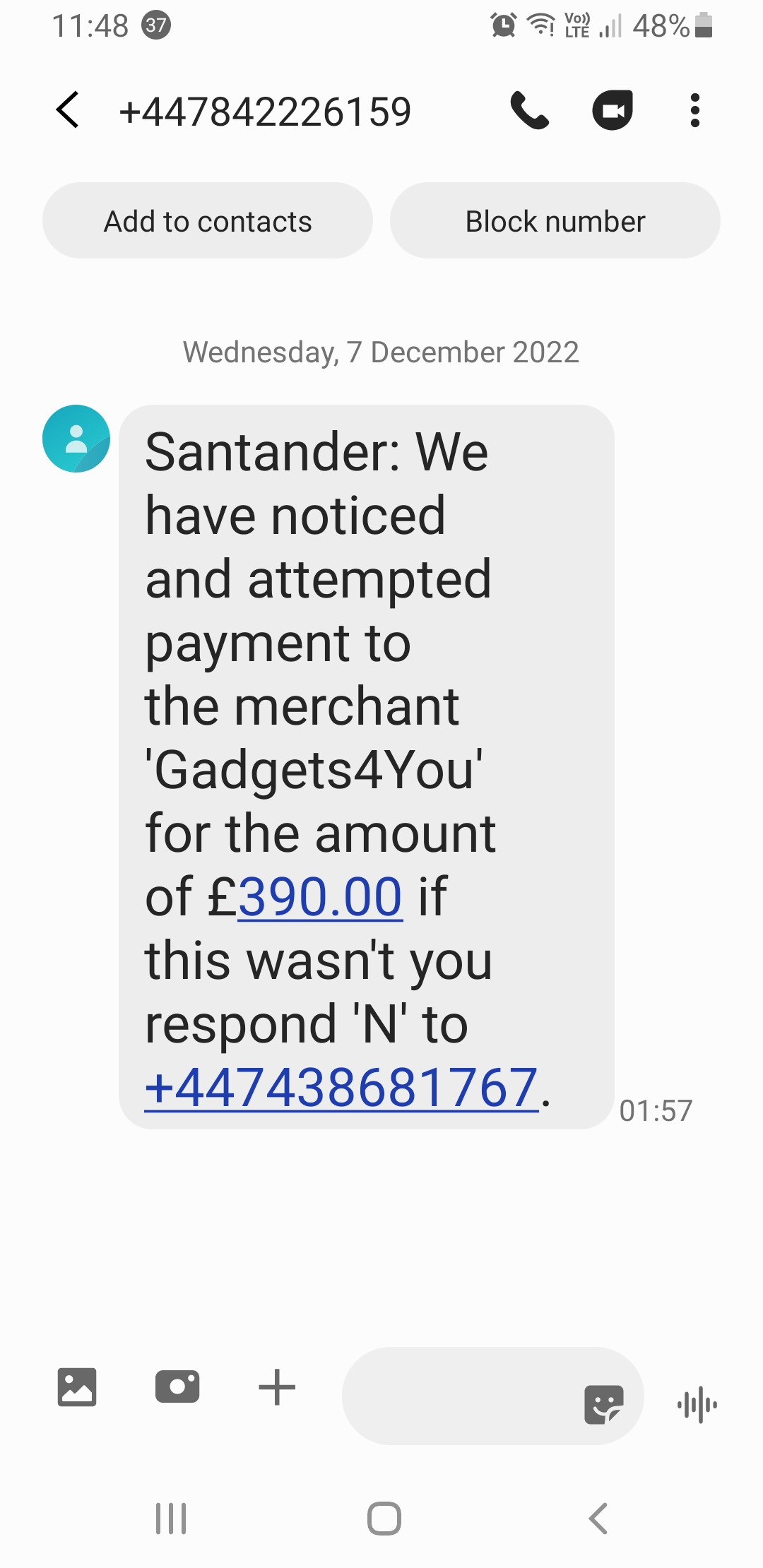
Santander text scam this morning. https://www.which.co.uk/news/article/santander-scam-text-message-copycat-website-akzka4T8V2Ib

-
Can you set the projectors to go into standby if no signal and then set the PCs to shutdown to schedule?
-
The only issue I see is students locking instead of logging off at the end of a lesson then changing/forgetting their password (and the fun begins). If you have PCs shutting down at the end of the day will poss be less of a problem but jus something to be wary of. But nope never implemented at any school for students only for staff.
-
Same here. Never passed but worked.