kennysarmy
-
Posts
6,514 -
Joined
Content Type
Forums
News
20th
EduGeek EDIT Conference
Blogs
Everything posted by kennysarmy
-
 Quick question: Do you allow your students to download ZIP files from the internet?
 -
A few more things to try! Firstly: Copy Win24H2 ISO locally and unzip, run setup.exe /product server with the local NIC disabled.
-
[*]Clean boot into Windows and then attempt the upgrade. Failed - copied the 24H2 locally after clean booting and still rolled back the update. [*]Ensure you select the option to "Download and install updates (recommended)". Failed - this is the default and is ticked [*]Check storage usage and free up space. Failed - plenty disk space 139Gb Free. [*]Repair installation files. Failed - tried DISM.exe /Online /Cleanup-image /Restorehealth and SFC [*]Fix Windows Update and device problems. Don't think there are any :/ but trying this tool https://github.com/wureset-tools/script-wureset/releases/tag/v10.5.5 [*]Disconnect peripherals and uninstall incompatible apps. No Peripherals attached, tried installing the update with Sophos disabled Failed again Might just have to bite the bullet and reimage these PC's rather than upgrade
-
I had to read that four times. Maybe you should post such items on Edugeek and get the product developers to read your posts?
-
We've been upgrading a few rooms and laptops to 24H2 and have mostly had success apart from one room we've come across where only 4 of 19 PC's upgraded without issue, the rest all failed with the error 0xC1900101-0x40017 Things I have tried: BIOS Update MEI Update Removed local profiles Update the following drivers Audio Drivers Graphic Drivers NIC Drivers HostBridge Reinstalled Chipset driver All still the same
-
[ms office - o365] Random issues with Shared Computer Activation!
kennysarmy replied to kennysarmy's topic in Office Software
Open another ticket with Microsoft and point them to this thread? -
Version: 23.0.7 (Build 68939) here Don't think we have any issues. Clicked the LOGS menu item and page refreshed in 3 seconds. Specs of VM below. PC stats Hope that helps. Good luck in resolving your issues.

-
[24h2 / lts 2024] Windows 11, version 24H2: What’s new for IT pros
kennysarmy replied to 6Foot2's topic in Windows 11
Good plan. -
[24h2 / lts 2024] Windows 11, version 24H2: What’s new for IT pros
kennysarmy replied to 6Foot2's topic in Windows 11
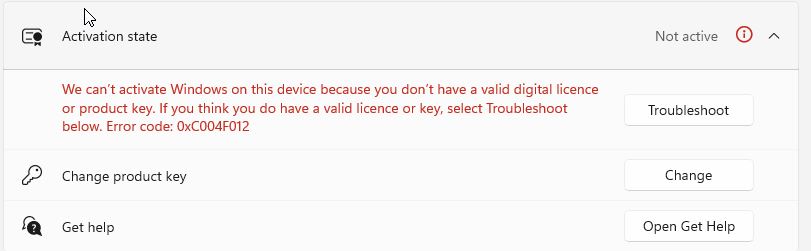
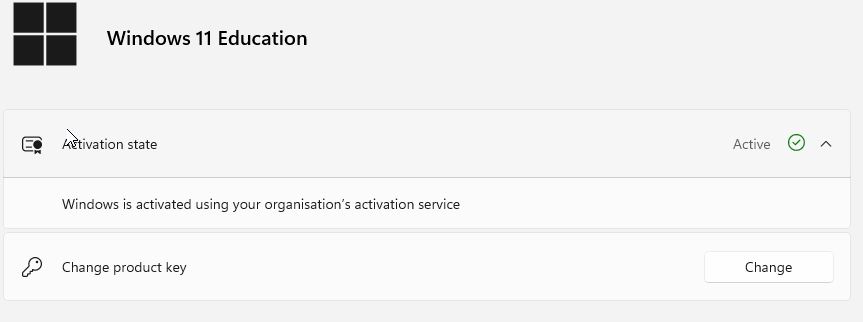
On a test PC after updating to 24H2 we get this in the activation area of settings. On a working PC still on 23H2 it says. Anyone know what I might need to do on our AD to fix this?
-
Allowing ChatGPT to students?
kennysarmy replied to FragglePete's topic in AI in Education & Enterprise
We have the category ai tools blocked for students but have discovered they are still able to get on to : https://safe.duckduckgo.com/?q=DuckDuckGo+AI+Chat&ia=chat&duckai=1 @tom_newton -
I'm unable to get on to our Dashboard. Page not found The page you are looking for may have been moved or does not exist. To log in to the Cisco Meraki Dashboard, go to https://dashboard.meraki.com. Hope it gets resolved soon!
-
I've been asked to look in to this to help our Drone Club attendees get better at flying :/
-
[ms office - o365] Random issues with Shared Computer Activation!
kennysarmy replied to kennysarmy's topic in Office Software
Still an issue here - we found this works fairly reliably. Open PPT, log off via account menu option, close PPT, login in via account (twice as first one throws up an error), close PPT, open PPT, slight delay and it works. -
As title, I'm trying to work out how for a specific user I can create an Excel spreadsheet listing all the files in a particular user's OneDrive account that also shows file size data. Googled and cannot seem to find anything :/
-
Blooklet - Blank dashboard behind Smoothwall
kennysarmy replied to tg12's topic in Internet Related/Filtering/Firewall
Can you advise the URL's you blocked to lock Blooket down as you have? -
[bromcom] Bromcom SSO Issue / Slowness
kennysarmy replied to michaeljbrewis97's topic in MIS Systems
Wednesday, November 06, 2024 1:05 PM (20 minutes) Thanks. Jeff -
[bromcom] Bromcom SSO Issue / Slowness
kennysarmy replied to michaeljbrewis97's topic in MIS Systems
Call opened with Bromcom 28 days ago: O365 sync missing Owner when transferring classes MEDIUM priority was selected when opening the ticket. 26 days ago I had the ONLY update to the ticket. Thank you for logging your call, regarding O365 sync missing Owner when transferring classes. We will look into the example provided and get back to you as soon as possible with an update. Kind regards Jackie I've posted EIGHT replies to the ticket since, asking for updates, all ignored. Great service Bromcom! -
Any Smoothwall report experts?
kennysarmy replied to kennysarmy's topic in Internet Related/Filtering/Firewall
Thanks. If I choose "hits" in option 1 report, I presume that's just a count of "blocked" requests, so I could use this to determine which IP is potentially belonging to someone going a little off-task and then run report 2? -
I am struggling to see how I can create a report which will output the blocked sites for the Group Guests, ideally this output would be: Set start and end date/time: IP Address 1 Sites blocked ordered by time/date IP Address 2 Sites blocked ordered by time/date IP Address 3 Sites blocked ordered by time/date etc
-
If I use my personal mobile to sign in using 4G it accepts my username and password, I give it the code from the authenticator app and then.... Why does it then think I want to change my password???
-
Oh education!
-
Powershell script help to delete a reg key
kennysarmy replied to kennysarmy's topic in How do you do....it?
Managed to deploy the above out as a startup script (needed to amend AppLocker policies to allow) and now all our devices are starting to appear in Intune -
i3 unless DT, Music or Computing then i5 16Gb RAM 256 SSD 22" student monitors 24" staff (more and more double setups - if not triple in finance!)
-
Powershell script help to delete a reg key
kennysarmy replied to kennysarmy's topic in How do you do....it?
ChatGPT came up with this: # Define the registry path $registryPath = "HKLM:\SOFTWARE\Microsoft\Enrollments" # Get all subkeys under the specified path $subKeys = Get-ChildItem -Path $registryPath # Define the target value data $targetData = "https://enrollment.manage.microsoft.com/" # Loop through each subkey foreach ($subKey in $subKeys) { # Get all values under the subkey $values = Get-ItemProperty -Path $subKey.PSPath # Loop through each value in the subkey foreach ($value in $values.PSObject.Properties) { # Check if the value data matches the target if ($value.Value -eq $targetData) { # If a match is found, delete the subkey Remove-Item -Path $subKey.PSPath -Recurse -Force Write-Host "Deleted subkey: $($subKey.PSChildName)" break } } } Explanation: The script starts by specifying the registry path where the subkeys are located. It retrieves all subkeys under HKEY_LOCAL_MACHINE\SOFTWARE\Microsoft\Enrollments. For each subkey, it checks all its values. If any value data matches https://enrollment.manage.microsoft.com/, it deletes that subkey using Remove-Item. Ensure that you run the script with administrative privileges, as modifying the registry requires elevated permissions.