robyholmes
-
Posts
2,547 -
Joined
Content Type
Forums
News
20th
EduGeek EDIT Conference
Blogs
Everything posted by robyholmes
-
S2D Failover Cluster - Storage Pool IO Error
robyholmes replied to robyholmes's topic in Windows Server 2022
Yes with many thanks to @Tefters The server reporting the issue we found in the end wasn't the server with the issue. We had to shut the cluster down by restarting the one remaining server. But once we did this, when both came back online they synced up again. It seems to be linked to servers having different updates on them. One updates first, shows the I/O error but in truth, it's waiting on the other server updating as well. At least that's what we found with my system. Not ideal shutting down the working server and thus cluster. But worked for me. Just make sure you have completed backups first. -
Are people finding Wonde are behind, with some gateway errors? Just checking it's not just us.
-
Ahhh damn. Not received this email yet but that's a real shame. I wonder if they'll reconsider for education.
-
Do you use UE-V by any chance? We had this issue for months, tried all sorts even new DCs, GPOs, reimaging machines etc. Turned out to be UE-V being enabled on our machines. We no longer used it, so disabled it and issue went away once machines applied the new policy.
-
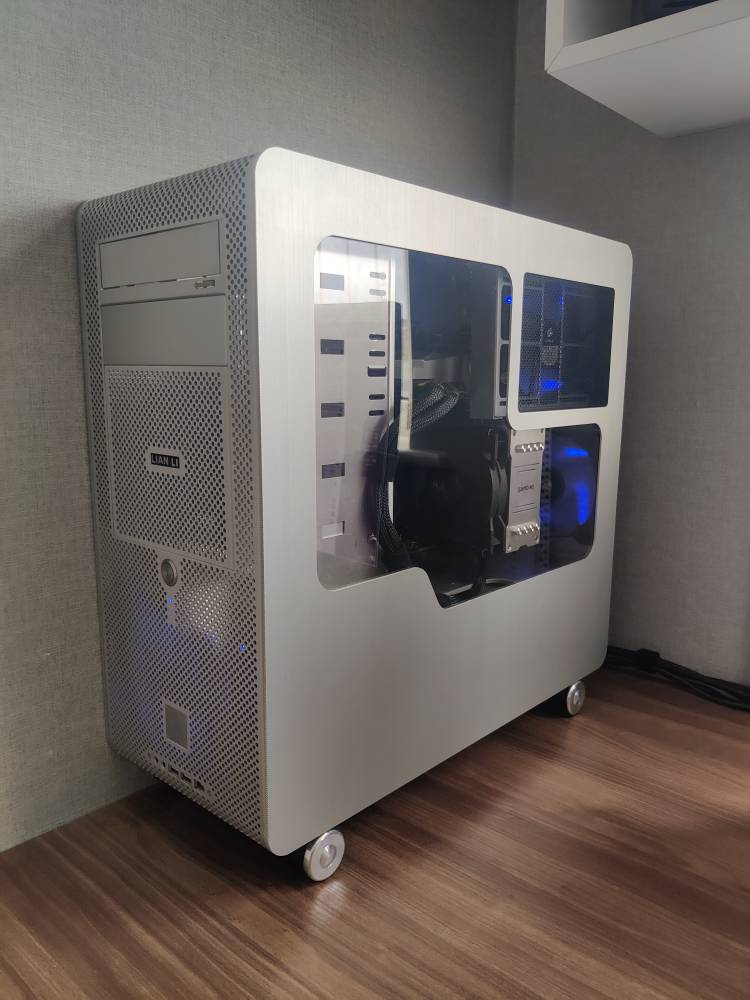
As someone who very much took part in the mid 2000s scene of PC case modding, water cooling and cold cathode lighting (Shoutout anyone from Gruntville) very much miss those days! But one bit has stayed with me. My Liain Li PC V1000 case. Upgraded to a Ryzen 5 7600X in the last few weeks in fact! I still have a massive Cooler Master Cosmos case as well in storage, custom window installed and powered coated black inside... Why I keep it I don't know. It's far to big to use these days. Ha.

-
I still have a case open to Pearson. They 'lost' the support case for a number of months, as first line didn't escalate it correctly. So even though I chased them, and they said it was being looked at by 2nd line. One it got to the correct 2nd line they admitted to me it hadn't been touched for months. Been over a month mind and still no response from them.
-
[ms office - o365] PowerPoint Bug Test - I need your help!
robyholmes replied to robyholmes's topic in Office Software
Thanks for confirming. I've about given up with Microsoft on this one. They are just refusing to admit this issue exists. I've sent them all sorts of information but they just keep asking for more. They seem fixed on this issue being user or PC related. I can't see to get across to them the issue is widespread. All I can ask is that if you have to time, please submit a ticket of your own for this issue. Reference my support case ref: #2405140050001756 and hope it gets caught by someone who can escalate it to the right team. -
Zoostorm PC's - Monitors blacking out primary display
robyholmes replied to jweeks1's topic in AV and Multimedia Related
Is the secondary display connections directly into the motherboard? IE not via a pig tail connector? You mention you've tried another display connection so it doesn't sound to be a cabling issue but I thought I'd throw it out there. -
Wireless Headphones with paired USB receiver (Any computer)
robyholmes replied to robyholmes's topic in Hardware
I think, I've found one: https://www.jabra.com/business/office-headsets/jabra-evolve/jabra-evolve-65##6593-839-409 Jabra say they supply a USB dongle that's pre-paired with the headset, so it's plug and play between devices. I've contacted there sales to confirm this but fingers crossed it'll do what we need. Not cheap mind but it'll be cheaper than having to have a headset per room for this user. -
Hi All, Has anyone come across a wireless headset that pairs with a USB receiver directly, not via Bluetooth on the PC. I ask as I need a headset which can be plugged into any computer and work right away. Bluetooth I understand pairs using a OS key, so doesn't roam on the receiver itself. So you'd have to re-pair it each time. I'm sure this must exist somewhere, and I can find mentions of it online, but I've not found anything that says for sure it can do this. So I'm reaching out to you lot. Cheers, Rob
-
[ms office - o365] PowerPoint Bug Test - I need your help!
robyholmes replied to robyholmes's topic in Office Software
Hi All, Could I ask you all to test this again and let me know the licence your using to activate Office 365 Desktop Apps with please? As Microsoft are wasting a huge amount of my time now getting me to test different licences, doing full removals of office, installations and all sorts. Even when I tell them the issue is present on multiple licences, multiple users, multiple machines and versions. The daft thing is, we can live without this bug being fixed if we have too. I'm was just hoping to get this sorted for the 'Great Good' so everyone can benefit from not having to suffer from it in future. However this issue seems to affect everyone but Microsoft employees! -
I think it's linked to a driver, but not sure which one. But that would then sort of follow make and model as they'd use the same driver (Although it's a third party one, likely the NIC driver I suspect). Once we disabled UE-V we stopped having issues (Once that policy applied mind, as disabling it can fail to apply of course). We also found you have to have the Domain Default policy in place and ideally not changed in anyway. Group Policy always seems to check this policy first (Even if others are higher than it in GP) and if it couldn't get to it for any reason, it would throw this error. Sometimes it would then apply others, sometimes it wouldn't.
-
Same as many comments above. Smoothwall is a good product, but support has been a problem for a number of years now. The cloud products are progressing, but still for us at least a long way off replacing the onsite web filter. However the onsite web filter hasn't progressed for a number of years now.So for us it's not only support that seems a bit stale at Smoothwall, but development as well. I will give Smoothwall credit that our support issues do tend to get looked at by someone who knows the products in 2nd line, so do get resolved in the end. Plus their commitment to keeping track of UK Government / Department policy changes and communicating these to customers is also very welcome. It provides you with some confidence they are matching the product to the requirements schools must follow. The risk however is this only works if the product works, which replies on development & support.
-
[ms office - o365] PowerPoint Bug Test - I need your help!
robyholmes replied to robyholmes's topic in Office Software
Well I'm still battling with Microsoft on this one, they are still claiming the issue isn't present when they test it. They are now checking that our A1 Plus Faculty licence covers 'PowerPoint Narration'. As they claim this feature might not be covered by this licence.... I mean it's present on my Office 365 Family licence as well but he claimed they had only confirmed it worked on a Microsoft 365 Enterprise licence so we might need to use that. So while I keep having phone calls with them every few days showing them the issue time and time again. If anyone would like to log a ticket for this issue themselves, please do feel free too. My ticket reference is: TrackingID#2405140050001756 if you could refer them to that so things are linked up. Thanks, Rob -
[ms office - o365] PowerPoint Bug Test - I need your help!
robyholmes replied to robyholmes's topic in Office Software
Did you have the bug too? - - - Updated - - - Thanks everyone so far for checking. I'm not going mad and this gives me more information to go back to Microsoft with. -
[ms office - o365] PowerPoint Bug Test - I need your help!
robyholmes posted a topic in Office Software
Hi All, I've recently been made aware of a bug, which I've been able to replicate easily on multiple machines, even my personal machines at home. I've contacted Microsoft about it, but after talking to multiple people and sending them a PowerPoint file containing the bug, with instructions. They can't replicate it...or at least so I'm told. So before I go mad, I need your help to see if you suffer with this bug as well. Please can I ask you to download the attached PowerPoint slideshow, open it in PowerPoint Desktop and run the presentation. You'll need speakers or headphones as the bug is audio based. I'm afraid this does mean you have to listen to me. Sorry. The file doesn't contain any VBA or Macros etc, just two slides and some narration from myself (Which is work safe). If you can then report back your findings with your Office build number. Especially if you are behind current or use LTSB versions of Office. I won't give the game away as to what the bug is yet, I'll let you hopefully find it yourselves with this test. PowerPoint Recordings Pause Bug Test.pptx I'll go first with: I'm Rob Holmes and I'm suffering with this bug on Version 2404 Build 16.0.17531.20152) 32-bit -
Just using direct send here. Easy to setup and just works. In tenancy only mind.
-
Microsoft 365 retiring Basic SMTP auth in September 2025
robyholmes replied to jslate1980's topic in Cloud Services
You can use direct send as long as you only need to send internally. No authentication required for that so shouldn't be affected by this if I understand it right. -
Do you have an OVS or EES agreement with Microsoft for onsite Windows and Office licenses? If so you should be able to get Office 365 apps added via that for free.
-
We base permissions off our Department Teams. So for Example English Team (English Staff Department Team) will have Ownership of the English Subject Site (As well as admin), Members of the Team will be Members to the subject site, and then we just add 'Everyone' as a visitor, as I see no problem guests, supply staff etc all being able to access the subject sites the same as students. By using the Team Groups, then you only have one 'English' group to manage membership wise.
-
Block specific HTML file (Eaglercraft)
robyholmes replied to Undertoad's topic in How do you do....it?
We've had to block all local files being opened in Chrome and Edge due to students playing games via downloaded html files. Doing do breaks PDF viewing as well, so we've made Adobe Reader the default viewer. -
I was thinking that 'Cloud Services' is more Office 365, Adobe CC. User facing cloud services, compared with cloud management tools like Azure, Intune, Any MDM etc. It might be worth trying to split them up as more of us move server tasks in to cloud management, deployment, policies etc.
-
Doh, no idea how I managed that one. Anyway, now the correct thing attached. I can understand it conflicting with Group Policy, but it's conflicting on a machine that's only managed by InTune, joined directly to Entra ID. The machines were never on the domain so I'm not sure what other policy is applying the setting which causes it to conflict.
-
As the number of threads relating to MDMs, especially Intune increase. Is it worth creating a new section for them. Especially as I'm never sure where it's best to post about them.
-
Hi All, So to start off with, my knowledge on Intune is limited, so bare with me. I have some Windows 10 Entra Joined devices and Hybrid / Co-Managed devices which Intune shows as having 'Conflicts' on certain profile settings. However I understand it's meant to show you the two profiles / policies that are conflicting, but it only shows one? I can understand it might be conflicting with local group policy on the hybrid joined machines, but it's the same policies conflicting on the Entra ID only joined devices as well. So I'm not sure where to start with sorting out the conflict, or does it not matter? I'm guessing it's not a show stopper, but not ideal either as you don't know what setting it's applying. Thank you, Rob