-
Posts
1,359 -
Joined
Content Type
Forums
News
20th
EduGeek EDIT Conference
Blogs
Everything posted by mb2k01
-
Absolutely!
-
I'm left wondering if they are operating over capacity after their BETT stand this year. Very showy and attracting a lot of people. Perhaps more orders and new sites in such a short time that their support can't handle the initial queries / issues which new sites often face? Add to that the fact that the latest two revisions seem to have broken some functionality, I'm guessing they are extra busy with that too... not that this should be our (the customer) problems really.
-
Does this work upgrading from 8.1 enterprise? I'm trying, but being prompted to enter a product key?
-

IT Technician - Penrice, Cornwall £17514 - £22212
mb2k01 replied to pirran's topic in Educational IT Jobs
I used to work at a school very close to Penrice, and am still fairly local. Penrice themselves are a 1:1 iPad site with Apple RTC status, and their IT team has been completely transformed over the last few years. Should be a very nice base to work which has a great atmosphere. (Can't comment on the other schools in the Trust as I'm not aware who they are - I'm in a completely different school/trust!) -
Hi Jaminben, When you say to sync the group, are you referring to the normal AD > 365 sync process, or a specific sync function within SharePoint? What do you mean when you say to create your page using the group you just created? (Sorry - probbaly really n00b questions!)
-
Hi All, I'm hoping someone can help me out on this one. SharePoint remains my largest unknown generally, but what I'd like to do is create a 'new' (well, ideally replacement!) Shared Area - but only accessible by staff. Is this possible, and how would I go about it? We have a single O365 tenant. Staff have @school.net domain names and students have @students.school.net domain names. Each have appropriate licensing. We use ADFS and manage users locally in AD, though groups do exist up in the cloud via the Azure AD area so are searchable in the other 365 areas etc. Any help will be greatly appreciated! Cheers Mark
-
This is the definitive advice all CCTV operators need to follow: https://ico.org.uk/for-organisations/guide-to-data-protection/cctv/ Other useful info: https://ico.org.uk/media/for-organisations/documents/1132/report_dp_guidance_for_schools.pdf
-
Live Streaming and Recording for local Mosque
mb2k01 replied to Zoom7000's topic in How do you do....it?
In terms of what I wrote, kind of... You'd need to enable / disable to stream in terms of Wirecast, but in terms of your website having the integrated YouTube feed you wouldn't need to do anything new - it would display a stream to a visitor if there was a stream for it to view etc. -
Live Streaming and Recording for local Mosque
mb2k01 replied to Zoom7000's topic in How do you do....it?
If this was video-based streaming i'd say YouTube was perfect. You can broadcast live events these days, and they give you a customised (well, slimmed down) version of Wirecast to do the upload / streaming part. If video wasn't wanted, I guess you could still use the same method but just stream the live audio with a graphic in place of the live video? You'd be able to embed it nicely in to your website (providing you enabled the option when setting up the YouTube config for the stream) -
In that time frame they may have decommissioned your tenant - they did it to me on a second tenant I'd registered and left for about a year. You might find you have to re-register and do the initial config again.
-
Office 365 - Do you have staff and students on the same tenant?
mb2k01 replied to tj2419's topic in Cloud Services
Same tenant, but a separate domain to staff (well, a sub-domain) Staff have @school.net and students have @students.school.net -
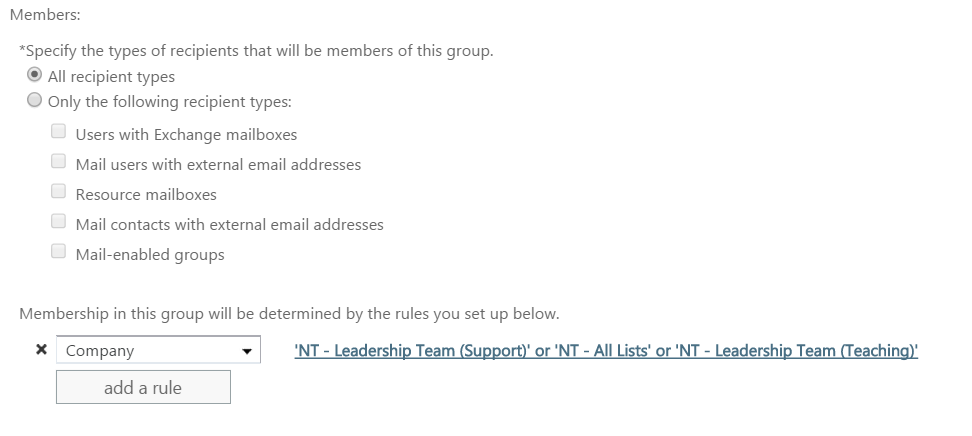
I'm torn between saying that will work, or whether that will actually break it. It might interpret that to mean that it will only send mail to people who have both conditions met? (I guess it would be easy to do a quick test!) What I did was just add multiple rules in: In this example is for my "All Leadership" list - but we have two different kinds of Leadership Team, and then a very selective list of people who pick up "all lists"

-
I've had something similar requested here and also had issues going down the 'rules' route. In the end I edited the dynamic distribution rules to add a second group in - so in your example you'd add an AD property for the safeguarding user, then edit the dynamic distribution list for each of the lists the safeguarding officer wants access to (So Year 7 dynamic list would pick up "Intake 2014" AND "Safeguarding") It's a bit fiddly but works
- 4 replies
-
- 1
-

-
- distribution group
- (and 2 more)
-
..............
-
I'm guessing this is to complete the form sign up - which I've now just completed.
-
I know that the webpage you linked to has the proper explanation, and even a definition, but Haptic still sounds like a new bleach to me!! Thankfully Chris still works wonders with pricing so I'll be sticking with you!
-
Geography isn't my strong point, but having never heard of it before, I'd love to be able to put on my best Bond villain accent and tell people I worked at "Ascension Island"!
-
Basically yes. Just create a standard user and place then in AD. For LDAP users I tend to do "ldap-serviceuser" (replacing the word service user with something reasonably identifiable!) In the SMH area for bind user just type the username and in bind secret type in the password.
-
I've got this working here following the instructions below - though please note I already had uploaded users via CSV, so it was a matching exercise... not sure if this is what they would get a new user to do if they didn't have cloud users provisioned already? (First you would need to arrange a public facing LDAP server with port 636 for SSL LDAP or 386 for normal LDAP open and pointing to their server - see below - so if you are on SWGfL it will mean a change request being submitted for firewall ports to be opened on your selected server...) To integrate we need to match accounts by either email address or MIS ID. One of these needs to be in both your AD and SMHW. It's easier to do this with email addresses so we suggest this first. 1. The following attributes need to be set by the school admin (Settings > LDAP/Active Directory Settings). • The IP address or hostname of the server to connect to • The port to connect to (usually 636 for the secure connection) • The LDAP / Active Directory base : • If you have all users in 1 OU : ou=people,dc=example,dc=com • If you have more than 1 OU : ou=teachers,dc=example,dc=com|ou=students,dc=example,dc=com (notice the | separating the 2 OU) • The (bind) user name to use to connect to the server (this user should only have read only rights) • The (bind) secret to use to connect to the server • The name of the AD attribute storing the username on the ActiveDirectory server (usually 'sAMAccountName' or 'userPrincipalName' or just 'mail') • The name of the AD attribute storing the email on the ActiveDirectory server (usually 'mail') • The name of the AD attribute storing the MIS id on the ActiveDirectory server (optional) The last 2 are used to find the users in our database. It's quite likely that you have the email address stored in AD for all your users, so this should be sufficient (when we have all email addresses for users in our database). 2. You will need to authorise our Production IP address to connect to the Active Directory server for security reasons. How will the login happen: - your users would need to access the login page using your school's subdomain (https://school.showmyhomework.co.uk/sign_in instead of https://showmyhomework.co.uk/sign_in) - They will then type in their ActiveDirectory username and password and click login - Login happens Users that are not using Active Directory can use the same login page without a problem.
-
Starting a fresh IT Inventory, recommendations?
mb2k01 replied to elliot-w's topic in Learning Network Manager
For inventory we use a program called Inventoria. The free basic one is OK, but the cost of the full version is cheap and gives additional users etc. While we don't actively use the section ourselves, there is also a nice order request / authorisation section in there too which might be useful for your internal teams -
I saw this on another post too which helped out a lot. Do you know of any other news or entertainment live feeds going via YouTube? Good ol' Google doesn't seem to be very helpful!
-
This gets flagged as malware by Chrome and then by Windows Defender / AV?
-
Check the NTFS permissions on the source folder. My guess is that the user doesn't have modify permissions. They probably have read and write which allows them to save the initial file, but after Word creates the initial file it doesn't have the access to modify it! (We actually run our shared areas this way to educate users to save an original copy of their work to their personal documents before copying to shared areas)
-
AM Bell - 08.35 Reg / Assembly - 08.40 Period One - 09.00 Period Two - 10.00 Break Time - 11.00 Period Three - 11.20 Period Four - 12.40 Lunch Time - 13.20 PM Bell - 13.50 Period Five - 14.00 End of school - 15.00 Period Six - Currently optional / viewed as "Activities" - 15.20 Late buses - 16.45
-
I've been using the EBuyer special value ones for years and they've never let me down. They must be cheap as chips (fried kind!) now too! Edit: Can't seem to find those, but wow - blown away at how cheap these ones are (twin pack for £15!) D-Link DHP-309AV 500Mbps Mini Powerline Adapter - Twin Pack - Ebuyer