2ilent8cho
-
Posts
610 -
Joined
-
Last visited
Content Type
Forums
News
20th
EduGeek EDIT Conference
Blogs
Everything posted by 2ilent8cho
-
Really look at others before SIMS. We were a SIMS school for years then changed to iSAMS, with the exception of cover which SIMS did better we are much happier with iSAMS, things are generally easier and its web based so works on any device in a browser and not some clunky, bloated .net app. I don't have nice things to say about SIMS or Capita.
-
Could it be SIP blocking it? I have to whitelist a lot of my scripts starting with 10.14 , 11.0 was blocking everything I did and had to start using https://github.com/jamf/PPPC-Utility to create profiles to allow my scripts to run. When running it manually do you get a popup in the GUI saying its trying to access a folder?
-
Yes, 3 staff just, but they found quiting teams and re-loading it allowed them in.
-
We don't have the Insight app either...
-
Considering the shipping dates for these are slipping to March now I think Apple know their target audience for these. If they had over priced them nobody would be buying them which would not seem to be the case.
-
Apple Announces The Apple Silicon M1: The end of x86?
2ilent8cho replied to flyinghaggis's topic in Mac
It is the first in a family of Apple Silicon processors, it's the slowest processor Apple will ever make and the M1 is for the base/entry level devices. A higher performance version will come for the 16" MacBook Pro and higher end 13' Pro (Likely the M1X) but the amusing thing is, the entry level chip can already beat the 16" Intel MacBook Pro with an i9 and that's not the product this processor is aimed at. There will be one even faster than those too eventually for use in the Mac Pro, and then once the whole family is running Apple Silicon, out will come the M2 and be 30% faster again. -
We dumped our Teacher Classroom stations back in 2013 and went MacBook Air + iPad + Apple TV Airplay, then slowly introduced iPads 1:1 to students so every student now has an iPad. We use Office 365 mainly with these devices. The MacBooks are just coming up to 8 years old now, have been used almost daily in that time , been workhorses and staff are only just starting to say that the battery is not as good as it was and they only get 4 to 5 hours out it now instead of the 7 they use to get which you cannot grumble at due to the age. Once those new Apple Silicon Mac's start becoming available we will start refreshing the Teacher MacBooks as the Apple laptops have been the best laptops we have ever had way better than the HP's, Acer's and Dell's we have had before. We still have 3 IT Suites with iMacs in them. This is mainly for computer programming, music and the odd thing that a desktop class OS works better than mobile. The Teachers like the freedom Airplay brings, it means they can have their desks where they want without having to have the room layout dictated to by network cables, docks or power sockets which also improved classroom management with some by the teacher sitting behind the kids so the kids cannot see where Teacher is looking. Apple Pencil + iPad and Airplay is very liked for annotating documents and this is what is used instead of expensive interactive TVs, as an iPad + Pencil + 75" TV can be had for half the price of a touch screen TV of that size. Before you go mobile I would seriously look at your infrastructure first and get 100%, especially WiFi and switches. Luckly the 2013 MacBook Airs supported Wireless AC, and our previous Wireless did too so we had decent Wireless bandwidth, and this summer we put Wireless AX in to see us through the next 10 years. But it does not matter which platform you pick either Apple, Microsoft or Google it will fail if this part is not correct first. Is your Internet bandwidth enough for that many devices to all start wanting updates at the same time? Plus what caching options are there? Apple for example have Apple Caching Server so all Mac and iOS updates and apps from the App Store get cached locally so it does not saturate your internet connection. What do Microsoft and Google offer in that area? The responsibility for updates also now gets pushed more to the end user. When you have desktops you can push the updates after school or in the holidays no problem, but when you go mobile you rarely ever see these devices again, so how is patch management going to happen? With iPads being like giant phones the kids and teachers know how to update them easy and it rarely goes wrong, plus if they are supervised you can force the update via your MDM and iPad Apps can me updated automatically to latest version without the user knowing. If you pick Windows devices how often to updates break something? how often do Windows updates go wrong? How painful will keeping the apps updated be on that platform? Are you also using Cloud Storage at the moment? As that becomes a must when you go mobile. Going mobile can be very successful but you have to have all bases covered or it will likely fail badly.
-
Feedback on our 1:1 scheme - iPads over Laptops?
2ilent8cho replied to maxrebo's topic in How do you do....it?
The school own and bought our iPads not the parents, buying 1 year at a time since 2013. We do allow games we have pre-approved for use at home, lunch and break, but if the kids mis-uses the iPad (like playing games in lessons) we have a smart group that removes them from the device as punishment. You can do location based rules with JAMF based on local IP if you wanted so apps become blocked or unblocked automatically depending on the Network it is connected to. You can also use something called iBeacons which broadcast a code via bluetooth and if the iPads see this they know to do something such as block the camera, and these cost just a few ££ on eBay. We have not looked into it much yet, but there is now a Jamf Parent app which the parents install on their iPhone and they can restrict the iPad more or less at home (You define the hours the parents can have control in the JAMF settings). iOS also has basic content filtering built in which will catch most adult websites should they try to access that kind of content on unfiltered home connection. If you wanted to allow more freedom at home you could put apps like Facebook , Instagram , Netflix in the in house App Store , block these when the device detects it is at school, and only allow them at home if the parent has given consent for those type of apps by putting the device into say a group that allows them. The managed Apple IDs for students (which supports Office 365 login) does not allow purchasing of even free apps, so they are forced to use the in house App Store, so long as you restrict modifying account settings or the kids will logout of their school Apple ID and then login with a personal if you don't. -
Feedback on our 1:1 scheme - iPads over Laptops?
2ilent8cho replied to maxrebo's topic in How do you do....it?
We have 1:1 iPads with Year 7,8,9,10,11 and use Office 365, Teams and stuff really well. We did before iPads early last decade have 1:1 Windows devices for years 9,10 and 11. I would choose iPads every time when going 1:1 with kids, Windows laptops will just cause you pain on that scale with that kind of deployment. Software updates and App deployment will be easier on iOS with the right MDM (we use JAMF), and will be easier for the users to self update, and its also extremely unlikely you will have malware and viruses to deal with or the pain of Windows doing something weird which it often likes to. From a hardware point of view you will likely end up with lots of keys missing, broken trackpads and batteries life starting to degrade after a few years, iPads? Battery life will likely still be good at 5 years and only thing that generally breaks is the screen if dropped badly. We had some Microsoft Surfaces that 6 teachers had, just the basic ones, 2 years later we swapped them for MacBook Airs, why? The batteries on the surfaces became garbage after 2 years barely lasting 1 hour. I cannot stress enough how much of an advantage the battery life will be on the iPad compared to a Windows device you would get in that price range. In the classroom the iPads are always on, light, and very portable. I would not worry about them not having a physical keyboard, you will find kids are very use to typing on virtual keyboards , its us older ones who cling onto the physical one because its what we grew up using. I don't actually have a problem typing in word on a physical keyboard I've done that lots. So long as you get your setup done right from the beginning , like using the an in house App Store (JAMF Self Service for example) so they only gets apps you approve and other parts restricted as need everything is a breeze. Just have procedures in place for if an iPad gets broken, for example we keep 10 hot swaps. So student breaks a screen we swap it with a spare, since all data is in Office 365 they just login to new one while we repair there existing one. We buy the screens and repair our selves, typically around 2 screens a week out of 1000 iPads. Then you have other cool things that can happen, we have an Apple TV connected to every screen in each class room, kids can AirPlay to them for example when doing a presentation in English. -
We're an iSAMS school.
-
Have you tried Firewall Zero on the PSVR with the gun? I really enjoyed it.
-
How to put 00 in front of all files in folder (Batch rename)
2ilent8cho replied to Sonic007's topic in Windows
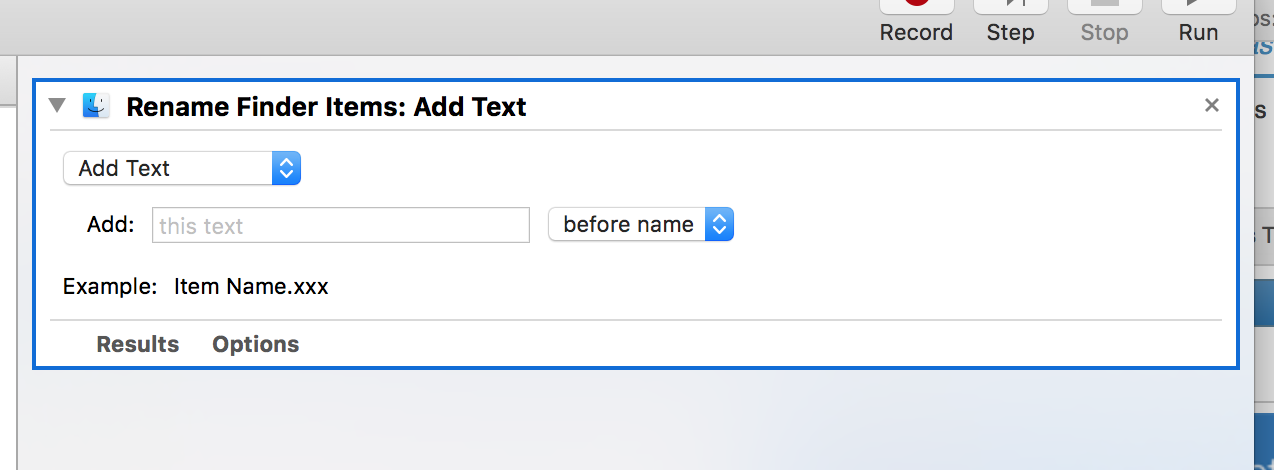
If you are using MacOS Automator that is built in has a workflow for this.
-
Our Head Teacher would have a fit if email stopped working, our whole school runs on it, all messages are delivered this way. Are the schools you have worked for still printing 1 memo, photocopying it 60 times then putting it in everyones pigeon hole?
-
Only thing you can do is vote with your feet. Many MIS's out their, yes the initial move is painful, but its worth it to save years of more pain staying with SIMS.net.
-
This is why i almost always drive London from the midlands, I can get there and back on £40 fuel and park my car for under £5 for the whole weekend. If i take friends its £10 each return to London if 4 of us. Train? would be several hundreds!
-
We have a 200D and it does the job fine. We filter for our own devices, guest devices, and use captive AD portal login for the shared iPads.
-
Got my PSVR the month it came out, and i still use it, i was on it last night as Titanic VR was released. The amount of content on PSVR is vast now so you should not get bored of it if you have that. I will admit there was a period of about 4 months where i did not touch it once but that was due to not much content being there in the earlier days and had enough of the games i did have for it.
-
We run iSAMS. I do not think it will be easy, our attached documents for SEN are stored in C:\iSAMS\iSAMS.Files\pupilprofiles\senreports\ on our IIS server, but they are all on random folders.
- 2 replies
-
- 1
-

-
- data migration
- export
- (and 2 more)
-
How does your establishment handle printing and charging?
2ilent8cho replied to Olliesaurus's topic in How do you do....it?
No , we did have PCounter years ago but just scrapped it all. -
How does your establishment handle printing and charging?
2ilent8cho replied to Olliesaurus's topic in How do you do....it?
We do not charge departments or have printer credits, if people need to print or photocopy then they do so. -
You can telnet to them and change the country code with a command, its what we did when we bought some US ones off eBay a couple of years back.
-
Fortigate 100E UTM CPU issue
2ilent8cho replied to nikaso's topic in Internet Related/Filtering/Firewall
A 100E ?! I would only consider that on a small site. We run a 200D on a 200 Megabit with all UTM features turned on and it can get quite high on memory and CPU sometimes. You may not have to reboot our older 200B use to do what you are describing and the B was just too under powered. SSH to the box and run the following commands diag sys top-summery then look what is eating up the CPU and get its process ID Then run diag sys kill 15 processid and it should go back to normal operation without having to reboot the whole device. -
£340? They are £319 on Apple's website for the 32GB, education pricing will be even lower, and when you knock off VAT you should be paying more like £250 an iPad not £340.
-
I dont think the Mac Sales are much to be worried about. If you compare Q1 to Q3 2017 to Q1 to Q3 2018 https://www.statista.com/statistics/263444/sales-of-apple-mac-computers-since-first-quarter-2006/ We have 13.8 Million Mac's sold in 2017 Q1-3 and in 2018 Q1-3 12.9 Million. Considering the Macbook Pro was only just refreshed, and the Mac Mini has not been refreshed for years i dont think its bad. Especially when Apple said 60% of those 3.6 Million Mac's sold were to customers who had not had a Mac before (guessing they use the Apple ID to tell) the Mac base is growing. Its really hard to justify for me to buy a new Macbook when i have 3 in total and my 2012 Macbook air still runs very quick and fast with decent battery life still.
-
If you get a licence to copy/redistribute it, you have the right to copy. You know what was implied.