Rob_D
-
Posts
3,124 -
Joined
-
Last visited
Content Type
Forums
News
20th
EduGeek EDIT Conference
Blogs
Everything posted by Rob_D
-
I would say, yes. Network accounts are still "desirable" in education. (And I'd think they're still use a lot in business, but I can't say for sure). The main arguments for network accounts (whether that's on site AD, AAD or something else), are auditing and tracking of student users as part of the wbefiltering/safeguarding solution, and convenience. If you have a "shared local login" on the PC then that's 2 logins they need to put in, and remember in a world where everything is pushing toward SSO, and an environment when I've been asked "can you reduce the number of clicks to get to X", having to login and then login in again is going to be a harder sell. And leaving the workstations "open" sounds like asking for problems. And I'd say even in business, the main reason to move away from network accounts is 1:1 devices but even then, the device account is still authenticating against an AD like central directory.
-
True (although has that date moved recently? I thought I'd read Jan 2025 before). But might as well start now and take our time rather than rushing everything summer 2025.
-

EU agrees directive that will force Apple to change iPhone charging port
Rob_D replied to elsiegee40's topic in IT News
But the US, Russia, China, etc is a big enough market to potentially split manufacturing. There's no reason UK couldn't side RtoW rather than the EU. Or I suppose roll with the EU until USB5.0 uses a triangular connector, leaving the EU stuck with the older type until the newer standard can get through legislation (which one assumes won't be a quick process). This is very much a situation where the UK's positioning could allow them to eat their cake and have it. Does anyone know if the legislation is just for the physical connector or the connector and the connection standard? Because there are already about three different connection standards that use USB-C connectors, and I'm sure given half the chance apple will still have a bespoke pin-out or connection standard for their "TYPE-C connectors". And while getting everyone on the same port would be nice, it would be even better if we could unify the connection standards/features as well. -
I think we've got a tech room on Windows 11 for some "live testing", seems to be okay and things like start menu and desktop redirect have ported over from win10 fine. Biggest thing for us is hardware compatibility.
-
Hi all, We're in the process of moving to Bromcom and I can't work out how your supposed to edit the "Roll(s)" field in the staff profile (see in the image below). As far as I can tell, it's not related to the "Rolls and permissions" Rolls. But is linked to the "Staff Type" column in the staff list. I can't find any mention of this in their documentation/training. So if someone knows where/how this is set please let me know. Thanks!

-
Trams were happy to take them back. Not sure if it's an Apple thing or not.
-
I remember one time years ago we were asked to pipe "elevator music" into the halls during parent's evening. That idea was shelved pretty quick.
-
Carful with this one, playing music in "public areas" can be a bit of a licencing nightmare. Why? I've never understood the appeal/point of backlighting TVs and how noticeable would it be in well lit room. I get wanting professional looking cable management, but socket covers seems a bit much, if it were here, the staff would wind up taking them off and losing them. Drone footage is a great idea, we had a promo video done which included drone footage (along with classroom clips and student interviews), which is on our website and playing on the reception display screen). I'm a big fan of cable management, so I'd always go with trunking where possible. During a recent classroom refurb, we had all the room trunking replaced with desk-height dado all along the front wall with all the power/data/AV put through it. Some of the things we've done here that have made a difference are below, but for me the biggest thing when it comes to making the school look "professional" is the decorating and furniture. - unified AV solution across all the classrooms (our classrooms look way better now we have the same smartboard/soundbar than when we a grab bag of different projector/smartboard/amps across the school). Okay, not so small, but worth doing. - digital signage around the school using consistent formatting/branding (staff really like having the digital signage, and having a template or at least a frame you can drop content into makes it look more professional IMO) - dual stands for offices that have dual monitors (helps with a clean desk and with cable management, our staff like having them) - wireless keybaord/mouse for "front of house" staff to help with a clean desk.
-
The details our IT teacher got about this course suggested the following "free" applications. Adobe Aero XR+ Unity Unity Vuforia Engine Lens Studio Spark AR ZapWorks Zappar Brioxr
-
Computer Naming in admin areas and offices
Rob_D replied to kennysarmy's topic in How do you do....it?
We stopped using Staff Names on PCs because yes, it was getting a bit ridiculous. (or the machines weren't getting renamed which caused confusion). But location/room# isn't a problem as if a PC is changing location it's probably going to get reimaged anyway, so changing the name isn't any extra work. -
Inherited Network, How do I change the setup to meet our needs
Rob_D replied to JAB1a's topic in Wired Networks
As it stands, you have physically 2 separate networks and if you want to move a port from one network to the other you have to repatch it in the cabinet. If you physically merge the networks, the basic way to set it up would be 2 VLANS (assuming all the switches support VLANS) to to keep the different subnets apart, and the easiest way to move a port between the VLANS would be to repatch it in the cabinet. To get what you want, you'd need to configure your normal switch ports as Hybrid for both VLANS (this allows both VoIP and curriculum traffic on the same port, but would require the phones to be set to tag their traffic). Then you need to have Trunk ports for all your uplinks (so they carry both VLANS between the switches). And (probably) an access port for each VLAN going into the relevant router port. Exactly how you do this is going to be dependent on your hardware, but hopefully this gives you start for googling. -
Inherited Network, How do I change the setup to meet our needs
Rob_D replied to JAB1a's topic in Wired Networks
Do you know why it was set up like that to begin with? I'd be worried there might be a good reason for keeping them physically separate, that you only find out about when it breaks the network. It's potentially more work, but have you considered just running extra cables in along the existing phone-network runs? (You can never have too many network points IMO) If you do want to merge the networks, one thing to consider is if you can change the phone settings? (Our provider never gives us the admin passwords for our VoIP phones). If you can change the phone settings, then I'd try putting it on DHCP and connecting it to your curriculum network and seeing what happens (Obviously make sure you can change it back if it doesn't work). If it works fine, then it's super easy. Just flatten the whole thing to a single network. At the least, it makes for a reasonable starting point - We have a larger network (100 IP phones, and 250 computers), which seem happy enough to share a VLAN. -
Just stick the shortcut in C:\ProgramData\Microsoft\Windows\Start Menu\Programs\StartUp
-
We've been looking at the same issue and have come to using different logins for each paper to be sure they can't re-open papaer1 while they're doing paper2.
-
Computer Naming in admin areas and offices
Rob_D replied to kennysarmy's topic in How do you do....it?
Our offices have room ID numbers the same as the classrooms, so we just use %RoomNumber%-%MachineNumber% for offices the same as classrooms. We've tried other things at various points, but nothing ever stuck. We do however make liberal use of the description field in AD. -
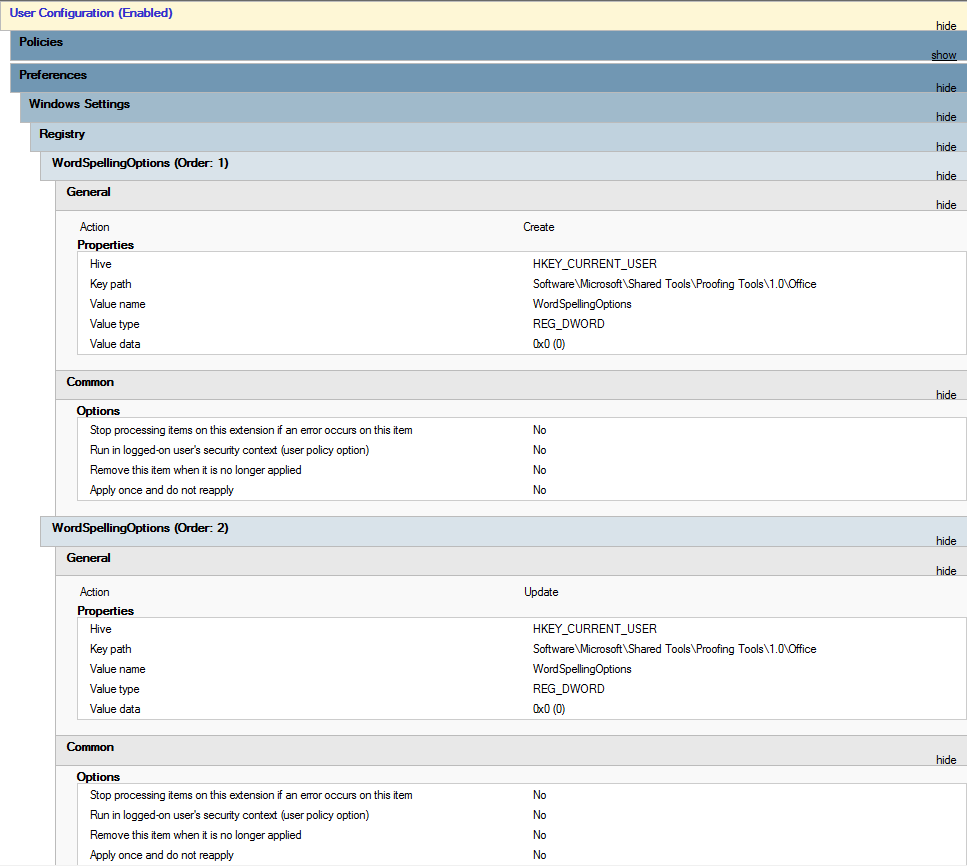
We use this to disable spellcheck (we're using Office 365 now, but it worked on 2019 as well), but for users rather than machines. It would be good to see if celliottadmin has something better.
-
I wasn't a fan of the holographic Rios, but would totally watch more of him as captain of the Stargazer. If you like the Rios actor, check out Salvation, where he plays a tech billionaire trying to save the world from a meteor impact.
-
We've always used Magicard printers (which seem to last about 5-6 years before they start to play up)
-
Both us and our maintenance/site team use ManageEngine.
-
My dream is to one-day work in an office where I don't have my back to the door. If you've got the space (which I've never really had), then a good sized section of work bench (I'd want 2-3 "work stations" worth of width) with wall mounted monitors for testing/imaging/etc (underneath the benching can be storage). We use these for imaging and direct access server work, and they've been great: https://www.amazon.co.uk//dp/B0013DFJA4/ Also, some kind of reception desk or even better a service hatch for people who've popped by to get their passwords changed or similar quick issues (As we already have it, I'd have the biostore self service password reset here).
-
Our minimum is 128GB storage, which gives us a reasonable overhead, but it depends on your image. 256GB should be plenty unless you have some really big programs, I'd just look to have about 40% (or more) free space after you've got everything installed.
-
Our trolleys work pretty well. The trick is to buy good laptops to start with and have a team/member of staff who has ownership and a vested interest in making sure they're working. In my experience Library or Curriculum area based trolleys work best.
-
We're not multi-site. But our firewall/webfilter is up for renewal soon and we're looking at Fortinet, Sophos and Smoothwall. We use Horizon/Gamma for our phones. Never had any real problems with it, and because it's cloud it will work multi-site fine. During lockdown some of the staff just took their (polycom) handsets home.
-
Cost of living crisis 2022 - what have you cut back on?
Rob_D replied to Ditto's topic in General Chat
Parents have gone a step further and invested in an on-shore wind farm. (https://rippleenergy.com/) -
Sounds like an almost textbook use case for Azure and 365 Endpoint Manager/Autopilot. Enroll all your uni-owned devices, and you can monitor and manage them through Office 365.