fiza
-
Posts
6,750 -
Joined
Content Type
Forums
News
20th
EduGeek EDIT Conference
Blogs
Everything posted by fiza
-
Hancock
-

Using School accounts and personal accounts on Chromebooks
fiza replied to fiza's topic in Cloud Services
Try under Devices>Chrome>User and Browser settings I think that's the one.
-
Using School accounts and personal accounts on Chromebooks
fiza replied to fiza's topic in Cloud Services
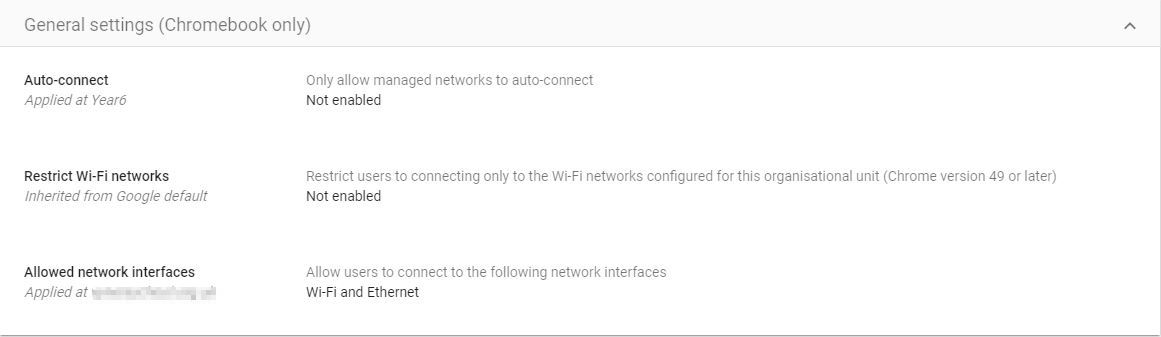
@rogerdnixon - would the settings below work? In school we want it to auto-connect without interaction and at home once set up to auto-connect so they don't have to keep typing it in to connect?
-
We are about to introduce a 1:1 Chromebook scheme for Y7. Currently I have the Admin Console set up so that all chromebooks pick up the school WiFi network and auto-connect. We also restrict users to only being able to login with School Google accounts. Going forward I want the students to be able to auto-connect to their own home WiFi and when in School Auto-connect to the School WiFi. I also want to utilise the "off-hours" setting in Admin Console to allow users to sign in with personal accounts when at home. Has anyone done this? if so how is it working out for you? I take it that it is best to keep local data rather than erase so the Chromebook remembers the logins but how does that work out when the 32GB hard drive gets full?
-
I think I may have found it but I havent clicked into it!!
-
iR ADV 4551, C5560i and C7570i
-
We have had Canon MFDs on a management print contract which are about to go back. Canon have said personal data could be held in data storage on the Canon machine and it is our responsibility to delete the data. Canon can do it for us but want £125 to do it!!. Does anyone know how to delete data on these so we can do it in-house?
-
[2004, 20h2] File explorer search box not working in a certain OU
fiza replied to nikaso's topic in Windows 10
We have the same issue. Not found a solution yet. -
Gnome..
-
Just tried, I have the same issue.
-
Decide how to apply link-sharing security update to Drive
fiza replied to caffrey's topic in Cloud Services
Will your users know which option to take when the time comes? Google have not indicated what kind of message users will see so it's hard to judge how users will react to this. Could mean a barrage of tickets on your helpdesk when users don't know what it means or which option to choose. -
Decide how to apply link-sharing security update to Drive
fiza replied to caffrey's topic in Cloud Services
I just had that email too. When you go to the alert in the Admin Console it tells you how many files it will impact but not which files. Might cause some confusion with users! -
Any way to mark external emails with a warning in Gmail?
fiza replied to fiza's topic in Cloud Services
All settings in Safety already ON. -
Any way to mark external emails with a warning in Gmail?
fiza replied to fiza's topic in Cloud Services
@localzuk - Yeh the content compliance only allows you to modify the subject line. No way to add a line to body of the email! Shame. -
For those that run these schemes for parents to buy devices for students, what do you do when the take up is not great? In a class of 30, If only 10 students have a device from the scheme what do you do about the other 20? Purchasing a device cannot be mandated so do you have enough devices to loan out to those students?
-
Any way to mark external emails with a warning in Gmail?
fiza replied to fiza's topic in Cloud Services
I know gmail marks the email as "external" now but its the appended content "CAUTION: External email. Do not click or open unknown links or attachments." that I would like to add. -
I have seen emails from external people that I have communicated with showing [External] in the subject when they reply to me and also wording attached saying "CAUTION: External email. Do not click or open unknown links or attachments". Is there any way to do this in G Suite so external emails are marked in this way?
-
We use Wonde and provide the pupils with the option of QR Code, Emoji Login or Wonde username and password.
-
Has anyone started using My Cloud Backup?
-
[sims] PAGEONE SMS text provider costs? Intouch PAGE ONE
fiza replied to coolhands's topic in MIS Systems
Not sure if it works with SIMS Intouch but we use Gov.Notify which gives free 10000 SMS messages for schools and then 1.6p per text after that. https://www.notifications.service.gov.uk/ -
Win a Western Digital 1TB MyPassport portable drive
fiza replied to VeryPC's topic in Our Advertisers
Me Please! -
It's a shame they haven't a got redirect from their old site to the new. We have used them since I started this thread and service has been great!
-
Does anyone link the student photos from SIMS to Google accounts or is that a bad idea?
-
Thing is there is AC in the room but no one switches it on during school times as the IT Suite is only used occasionally. Mostly they now use Chromebooks. The AC stays off during holidays and it is at these times around June, July that it gets really hot.
-
In our primary school the Server, core switch, router and firewall are in the IT Suite along with 25 computers. Although the room does have AC this is hardly ever switched on and definitely not during holidays. Yesterday the temperature was 27C here and when we went to visit the school the fans in the equipment were going crazy. We can switch on the AC (when it's working and doesn't need a service!!) whilst we are there but when the school is closed as it will be for the rest of this week the AC is off but all the equipment stays on. I assume a lot of other primary schools have equipment in the IT Suites, due to lack of space, so how do you ensure everything continues to work in this heat?