coolhands
-
Posts
326 -
Joined
-
Last visited
About coolhands

-
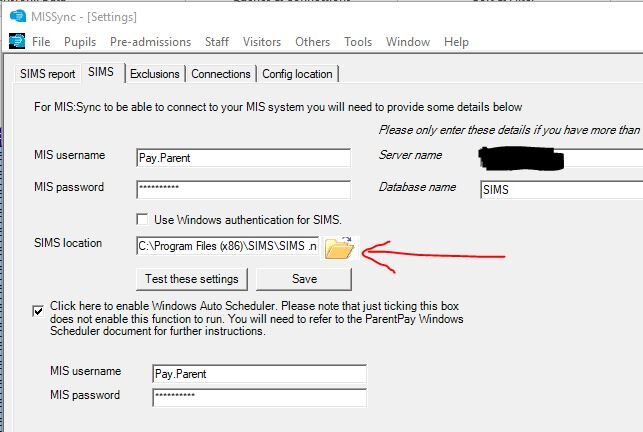
yeah that not staying ticked is a problem I guess. Could it be the admin permissions highlighted below that prevent it? Also just to reiterate this is set up on my normal pc login - not the sims server using a made up sims account. We used to run it from the sims server but I seem to recall we had to move it to my actual normal pc using my own SIMS logins as we had problems with it not working on the sims server but this was 2 years ago so I don't remember the exact reason. Checklist Confirm all of the following before relying on the scheduled task, or it may fail. The task is set up on the SIMS server directly. Task Scheduler runs on a server or PC that remains powered on during its scheduled window. The logged-in user profile has administrator permissions. The author of the scheduled task is the same as the login profile. The PARENTPAY2026 report, or later, is installed on SIMS. This is normally part of the standard MIS Sync installation on the latest release, or can be achieved by resetting it via MIS Sync, Tools, Settings, SIMS Report, Reset, then restarting MIS Sync, or by manually importing the report into SIMS, available from ParentPay Support if required. A successful pupil upload has been carried out via Pupils > Auto Update in MIS Sync before attempting to run the scheduled task. Enable scheduled task is ticked in Tools, Settings, SIMS tab, as above. also I don't know anything about networks / mapped drives but in case it helps you could the below be an issue: (I doubt it is to do with this though?) NOTE Where the scheduled task runs with the SIMS.ini file saved to a mapped drive, or via a virtual location, a NetUse script will be required to run alongside the task. This type of configuration has known issues and is not guaranteed to operate correctly.
-
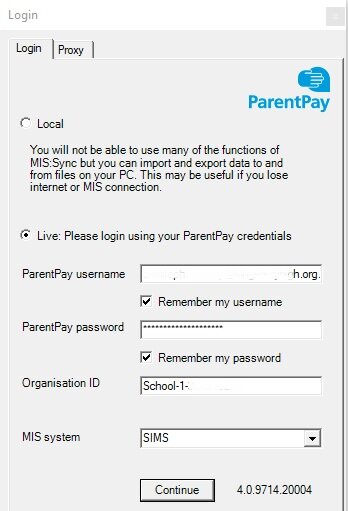
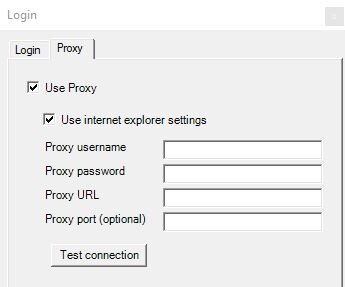
I've just opened mine now and yes that is still ticked, ie it remembers and is always ticked. My config location seems to be the same as yours (I've put user.name in place of my actual username) C:\Users\user.name\AppData\Local\ParentPay\MISSync (by the way this is my actual username ie not a generic administrator account, not sure if that matters, just pointing it out). note parentpay group is a horrendous experience so trying to find anything on the misnamed 'help' or support pages is a nightmare, so I am putting this article number here KB0016369 the link is KB0016369 for you or others. Probably won't help but anyway it says this for reinstall (maybe worth you reinstalling from fresh download? the download is on that page) Reinstallation (over an existing version) From time to time, a reinstall may be required to protect the school from new security threats or to introduce new fields or functionality. Use the reinstall option to minimise the configuration and setup required when installing in place of an existing setup. Prerequisites to reinstall MIS Sync: Download the latest version of MIS Sync. Extract the files to an accessible location. Launch the setup.exe file to begin the installation. Follow the instructions on the setup wizard. You must ensure the installation location is the same as the currently installed copy. Upon completion, the application will launch automatically. Once reinstallation is complete, the application will launch with the previously configured credentials. If no credentials are present, proceed as if it were a new installation (above). For completeness I will put my first 2 tabs on loading here so you can check yours against them:

-
Also just check there isn't a duplicate account that's been made in sims. Sometimes HR make another version of the staff member. And the one that is linked to the SIMS permissions (Focus>System manager) is not the one that is the HR record of the person. Screws everything.
-
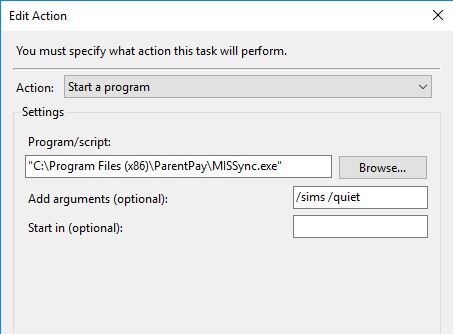
Not sure if it will help but make sure you've updated to latest MISSync 4.0.9714.20004 as they changed it fairly recently. I have my settings in task scheduler Actions tab like this: also make sure the SIMS location has a space for some crazy reason before the dot in the actual MISSync programme settings: C:\Program Files (x86)\SIMS\SIMS .net
-
the timetable search is not working, they know about it. You have to go to print timetables and search there (or something, I've not bothered trying). Our redirects are not working so even though when opening timetable in SIMS it should open in Next Gen, it doesn't it just opens in SIMS!
-
Just to answer my question to help probably me in a few weeks time again, on the sims server I had to stop the 2 wonde services and restart them after a pause. "Wonde comms service" and "Wonde recovery service". So this would actually have been affecting other wonde services too like classcharts etc I believe.
-
total guess but probably a policy violation and classcharts don't even know it!
-
we keep having problems, anyone else? It doesn't write back the absences then the cover person here has to add them manually to SIMS, (as they need to cover the lessons!) then when it does eventually sync they will of course be doubled up in SIMS so the person has to manually delete out of SIMS. Obviously going round in circles as they blame SIMS etc continually and suggest we reboot SIMS and or contact WONDE. But our other services are ok like classcharts that write back to sims.
-
This may not help in anyway but this is the website http://id.sims.co.uk to see if you can log into it and get anywhere? I always find it very bizarre, I have a username which will be eg... [email protected] and password but I think I have to log in using 'google' so you may need to experiment. It's always tricky and whichever one you use it will demand the other
-

Class Charts off-roll students suddenly reappeared this week
coolhands replied to rebannkem's topic in MIS Systems
I just did a download and checked against a download from our MIS (SIMS). I found one 'Year 9' in classcharts who went off roll in 2020! And one other 'Year 13' student with a forename and surname, but no UPN, in classcharts but I cannot find the student anywhere in our MIS going right back to 2007, so I don't know who that person is at all. -
well just to conclude the thread. It seems it should be in the following: from this thread: discover-dynamic-groups-not-feeding-in-to-sims although mine only has "C:\Windows\ServiceProfiles\NetworkService\AppData\Local\Discover\Discover.Warehouse.Service.log" and "C:\Windows\ServiceProfiles\NetworkService\AppData\Local\Discover\Discover.DataEngine.DataViewMonitor.Service.log" there which are no use (and not today's date). But anyway after 3+ hours amazingly the transfer has 'succeeded'. No idea why it takes so long
-
I started a manual transfer using the Discover administration utility, and it's taking forever to complete so guessing it's failed. I can't find the log files anywhere, any idea?
-
Do you know if you now have both Optimise and Engage packages?
-
Last year we paid in the region of £Xk+vat for all our sims modules. This year Parentpay have invented new packages, and moved modules into more than one so you are forced to purchase different packages to retain the same functionality. So Assessment is within 'Optimise' but Lesson Monitor is within 'Engage'. That's an extra approx £Yk please (total is now over approx £XYk). Obviously almost every school will be using at least those 2 core items. They are an unbelievable company. Can't believe there's not an outcry about this; God knows how they can do this - what are contracts for?
-
Ours are generally kept in a particular folder on our network (eg our drives). The best method is usually to search a drive or folder for the admission number of one of the students to see where they are - eg type name:119801 (assuming the admission number is 119801) in the search box. If you admissions numbers begin with zero then try one search with and one without eg name:011523 and then name:11523 But sims doesn't store the old ones itself.