BKGarry
-
Posts
4,199 -
Joined
-
Last visited
Content Type
Forums
News
20th
EduGeek EDIT Conference
Blogs
Everything posted by BKGarry
-
OK, this is going right around in circles, not quite what I intended, and actually I prefer to be OS and Vendor agnostic but this is really bad. This is very much reminding me of this comic from The Oatmeal https://theoatmeal.com/blog/fix_computer :-) I do not think we are going to agree, I also think in schools we cannot restrict ourselves to any one system, but I think we are a bit of a way away from the attempt of a 100% pure linux environment in schools
-
This, This times three thousand. I can see us only have a server to run a DC, DHCP, DNS and possibly onsite Printers going forward, everything else being leveraged into the cloud.
-
What seems to be interesting with the Linux for Schools Project is being able to use Windows as the client OS, but servers as all Linux. TBH, this is pie in the sky stuff, no right or wrong answers. With students learning to use Chrome OS here as well as windows and MacOS, having a trolley of linux clients isn't too much of a jump
-
Now that is a use I hadn't thought off, although there are very few fixed machines here, I am waiting for our new internet connection in order for people to be able to use the HTML5 client in Server 2019 for RDP.
-
One of those crazy moments of things popping into my head. After having enough of messing around with RaspberryPI emulators etc. I setup an Linux based XRDP Server that allows students to logon with Windows remote Desktop and use a linux environment for some tasks. How many people feel that they would every be brave enough to try and go full Linux with something like https://www.linuxschools.com (formally the Karoshi project) It is an interesting notion, and may actually give something to think about, although there is something nice about having a paid for product that is something goes horribly wrong you can get premium phone support. Just wondering what people's views are.
-
Is your main firewall a SophosXG by chance, if it is RED is an option for you. It is a site to site VPN kinda tech, but you set it up, send it to the other site, and anything plugged into it works like it is on your main LAN
-
Wonde may be an alternative from what I have seen, not used it myself but you can actually have QR codes that get scanned to sign them into services.
-

Access to employees files.
BKGarry replied to JaffaC121's topic in Data Protection & Information Handling
OK back to the original question. couple of things, is there a caveat in your AUP for monitoring? Ours does have this, but is pulled into place only when needed, we do not actively monitor staff all the time, that would be a nightmare. For my school, no staff member has out right access to anyone's areas, except Domain Admins, People can submit requests that have to be signed off by my line manager or the Headteacher in order to get a copy, and email is just the same, in fact, email they have to ask for a from and to address and I run a powershell command to copy those emails to their inbox, so I cannot see anything. Now as for this particular scenario, I would o to the head to sign it off no mater what the main policy is, this is because this person is signed off, and theory should not be working but as from previous experience, being off and not doing anything can actually heighten the stress levels, as you feel like you are falling behind and not being useful -
No I am wrong, I was thinking of this https://cindori.org/trimenabler/
-
Now IIRC, you have to change some setting in the OS to get Macs to play nice with SSDs that were not built with them, and reapply those settings every update.
-
How much is two datacenter edition licenses? As they will give you unlimited server VMs
-
[1809, ou] Strange Pojector and Computer Issue
BKGarry replied to Shadow_Walker's topic in Windows 10
have you disabled the hardware acceleration? it is sounding like something it taking over the screen settings and changing them, which is acting like a disconnect. Very strange indeed -
[1809, ou] Strange Pojector and Computer Issue
BKGarry replied to Shadow_Walker's topic in Windows 10
is PowerPoint switching to the presenter view? The one where you get all the notes on the main screen and the slideshow only on the projector? I suspect the answer is yes, as that swaps the computer into extend, and then when you exit powerpoint, it goes back to duplicate, which makes the projector think you have disconnected and reconnected and therefore turns off the freeze. In 2019 it is no longer called presenter view but the options are in the same place. This screen is from File > Options
-
Ruckus Dog please :-)
- 35 replies
-
- 1
-

-
- access control
- bett
- (and 3 more)
-
Could be BDPUgaurd on the port on the cisco side. Also is it not a HP SFP+ module then there is a setting you have to change on the HP Switch to allow it to work (I had to do this as I was using a SFP+ cable without converting to fibre)
-
Recently been through the process of this (not swapped yet but orders placed) was on our LAs broadband but was a lot cheaper to move elsewhere. We have gone with Wave9 as they gave a very comprehensive package and were transparent with what they were offering and how all the way along
-
That's only because I have no shame on the whole thing :-)
-
Application wise, they can download Office through 365 and Adobe CC apps (Adobe is dependent on subject areas taken). Certificate, I have to admit I don't bother with at the moment but I am looking into a way for that later on. Most apps are told to go to the Remote Desktop server. Printing is through PaperCut Mobility print which, after you setup the DNS settings, seems to just work
-
Good Morning, Our BYOD Network is restricted to just staff and sixth form, Sixth form get a new AUP to reflect this when they start. We have a SSID that is BYOD that is then restricted through RADIUS to only authenticate for those groups in AD, the other groups are basically told no. We then pass the RADIUS accounting details (through our access point configuration) to our web filtering system. This then automatically signs them in for their Internet access at the correct filtering level. The SSID for BYOD connects to it's own VLAN which can access our printer VLANs but not server VLANs, they can access school resources through Remote App/Remote Desktop if they need them, but we have done a big push to Google Classroom, which has solved most of those issues. We have also recently got in PaperCut, which we have installed the Mobility Print part, and they can download the client to print to the Pull Print queues in order to print.
-
It should do, but sometimes get's stuck and needs a kick
-
Have you tried it in an Incognito window on the Mac? This would identify if it is a cookie/temp file/similar issue. If it does work incognito, reset the settings/clear browser data/cache Also check it is the latest version of chrome, sometimes it can get stuck in a version if not automatically updated in a while.
-
Check your Academic Year setup, it is probably there, but I would advise editing that out of hours, as it can take some time. It is under Routines > school > edit academic year
-
[sims] FMS timeout? SQL - Communication Link Failure
BKGarry replied to Koldov's topic in MIS Systems
The other cause could just be the good old sleep setting on the PC, so when they do step away for 5 mins to use the facilities or make a cuppa, it disconnects the SQL client, but FMS is not intelligent enough for it to know until the next transaction takes place -
[sims] FMS timeout? SQL - Communication Link Failure
BKGarry replied to Koldov's topic in MIS Systems
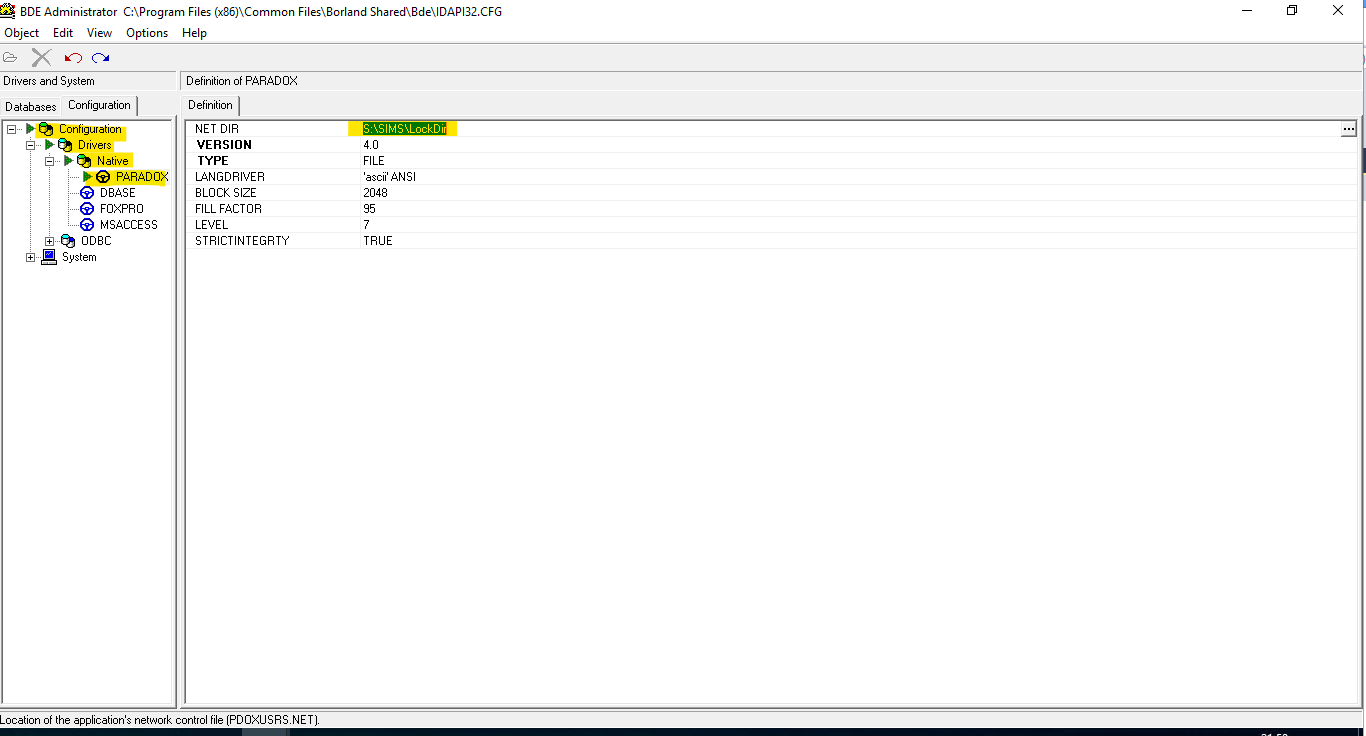
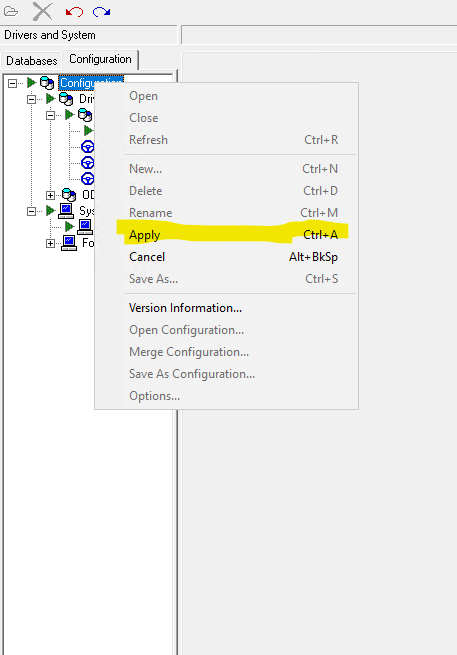
Sorry for the delay all, This has to be done on all FMS workstations, I realised that I forgot to do it to my remote desktop server, so I did it there. Open Control Panel and open the BDE Administrator Expand the following: Configuration > Drivers > Native and then select PARADOX In here change netdir to the shared path that FMS users have write access to Then expand System and select INIT In here change Local Share to TRUE Then right click on Configuration and select apply and apply your changes I do believe this is what solved the issue for us, but you must make sure that FMS users have write access to that folder, if not they start getting issues later on.
-
[sims] FMS timeout? SQL - Communication Link Failure
BKGarry replied to Koldov's topic in MIS Systems
Right, wide shot idea here, I seem to remember having something like that and it isn't SQL it is the Borland Configuration. It is the do with the Lockdir setting I do believe, the lock directory settings for all FMS should be a network location, something like S:\sims\lockdir and a setting set to use local share for lock. The FMS users will need write access to that Lockdir I am out at the moment, but I will try and get screenshots when I get home.