flyinghaggis
-
Posts
2,151 -
Joined
-
Last visited
Content Type
Forums
News
20th
EduGeek EDIT Conference
Blogs
Everything posted by flyinghaggis
-
I like using it for running virtual test environments and a lot of the Microsoft Server OS's need quite a lot of RAM these days. If you're running virtual LAN with a DC, Exchange, SQL then you start eating up the stuff pretty quickly so I'd prefer to have the flexibility to install more than 16Gb to be honest [i currently have 18Gb]. Like you say RAM's dirt cheap so £140 would buy 32Gb providing you have the DIMM slots.
-
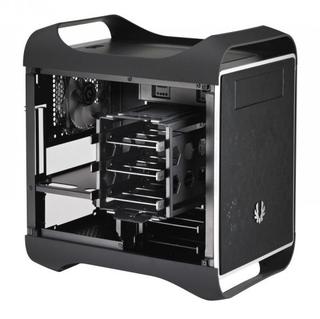
If I was going to build another system in future I'd be tempted to go for one of these :- BitFenix Prodigy Mini-ITX Cube Case - Midnight Black [bFC-PRO-300-KKXSK-RP] Looks really neat and, most importantly, it can take a full sized GPU card. The only serious drawback I can see is that the ITX board limits how much ram it can accommodate. I'm actually tempted to build another PC when Haswell is released in June as my current one is now 3 years old but there isn't really anything out there it struggles with at the moment so it's pretty hard to justify except for fun!

-
+1 TBH. When SCCM works it's quite nifty but it always seems to find a new and exciting way to break. As others have said when it does break the error messages are so cryptic and the event logs so hard to track down that it's often takes days to remedy. If anything that fact alone means I'd be tempted to stick with the more basic deployment methods simply because they appear to be more reliable. Admittedly we're using SCCM 2007 so it may be that 2012 is improved. The thought of trying to upgrade it sends a shiver down my spine though....
-

Microsoft UAG 2010 & Windows 8 Support
flyinghaggis replied to flyinghaggis's topic in Enterprise Software
If some of our staff had installed something unusual, were running Windows 8 beta or had bought it the day it was released I could understand but when it's been out for over a quarter and anyone buying a new laptop will get it by default! Maybe Windows 8 sales have been so poor that MS don't see it as a priority! -
We use Microsoft UAG 2010 for our staff to run RDP and remote apps on their home computers . From what I'm reading on the Technet website it seems to imply that they don't currently support this using Windows 8 / IE 10? UAG 2010 Service Pack 3 is in the works - Forefront UAG Product Team Blog - Site Home - TechNet Blogs Is it really the case the Microsoft aren't supporting the latest version of their own software or am I missing something ?
-
I had the same problem with inkjets at home in that I used them so rarely the cartridges would always dry/clog up so I switched to mono lasers instead. Currently using a HP 1102w which is pretty good and works with PC,iPad and iPhone all wirelessly. Haven't found a neat solution to print with my android tablet to it yet though as the HP 'cloud' print seems a but rubbish. Would recommend it apart from that though.
-
The introductionary upgrade price offer expires on the 31st of January so if you're going to buy it I'd get it sooner rather than later! http://winsupersite.com/windows-8/windows-8-pricing-update
-
I can't believe MS didn't include a way to prevent or at least postpone Windows rebooting to apply updates. I mean, seriously, I'm in the middle of working and my PC just simply decides it's going to restart to apply updates without even asking me and loses the files/documents I had open!!! WTF Microsoft! At least give me the option to postpone it
-
We've been looking at Zendesk. It seems OK so far and it's ultra straightforward to setup as they host it for you.
-
You couldn't make this stuff up if it weren't true.... Kerry Katona: Formerly bankrupt star criticised for signing up as new face of payday loans service | Mail Online http://i.dailymail.co.uk/i/pix/2013/01/08/article-2258974-16CEF893000005DC-16_634x372.jpg
-
[windows tablet] Microsoft Surface
flyinghaggis replied to HMCTech's topic in Mobile Devices & Tablets
Interesting rumour on Neowin today saying that the Surface Pro may feature Intel's refreshed range of 7 watt Ivy bridge chips that were announced toady at CES. It would certainly explain the delay for the Surface Pro if that's the case so there might be some mileage in the rumour? Could a recent Intel announcement mean Surface Pro will have better battery life? The upcoming "Bay Trail" SOC sounds like a pretty useful update from Clover Trail offering double the performance. Hopefully it'll also remove the 32-bit only and 2Gb RAM limitations of Clover Trail . http://www.neowin.net/news/intel-reveals-new-windows-8-based-processors-at-ces-2013 -
This is the biggest problem MS is facing from a Windows hardware point of view IMO. 90% of buyers can carry out virtually all of the tasks (Web Surfing, Email, etc.) they need to on an iPad or equivalent tablet which is starting to make full Windows laptops seem like overkill. Price is also a key issue as consumers can now buy low to mid range Android tablets for £100-200 and high end 'premium' (at least as far as they're concerned) tablets for £300-400. You can barely buy a new Windows8 laptop for that and if you do it's likely to be one of the slow, cheap and nasty "throwaway plastic crap" models mentioned in the article that nobody really wants! It's not hard to see how in that environment MS and the other OEMs are struggling to sell Windows8 tablets and laptops for £500+ when the simple reality is that most people aren't willing to spend that kind of money any more. One of my friends asked me which laptop they should buy to replace their old WindowsXP one and it's reached the point where I'd actually recommend most people buy an iPad rather than a Windows device unless they have a specific need for it!
-
"Netbooks" was the term originally used to describe small sub 10" laptops with atom CPU's and 1024x600 displays. Windows8 has upped the minimum resolution to 1024x768 so strictly speaking none of the 'netbooks' are capable of running it. The final nail in the netbook coffin was Apple's iPad which pretty much killed the whole netbook market dead by selling a usable tablet for £280-400 I actually see the whole netbook/ultrabook terms as nothing more than marketing drivel to be honest. "Netbooks" tended to refer to underpowered/miserably specced laptops and "ultrabooks" were supposed to indicate high end slim laptops but the reality was most of the ultrabooks were just overpriced laptops with fairly mediocre specs for the money made by manufacturers hoping for a slice of Apple's profits. As always the sensible money has tended towards something between these two extremes. Good riddance to both of them IMO Most OEM's are probably busy re-tooling their production lines for Windows8 touchscreen tablets/convertibles (Microsoft Surface, Samsung ATIV, ASUS Vivotab) which are a better and more cost effective option for most consumers than ultrabooks/netbooks ever were.
-
Cheers for the heads up. I've spent a few hours playing stalker and it's really good fun. Even for a 6 year old game the graphics surprisingly don't look too bad but looks pretty slick with the mod. If anyone hasn't tried it yet I'd recommend picking up FTL: Faster than Light whilst it's on sale for £3. It's a must have for anyone who has aspirations of being captain Picard. Best experienced with a cup of Tea...Earl Grey.....Hot
-
Busy buying more games/series that I missed the first time round as wasn't sure if I'd like them. Just added Borderlands, Psychonauts, Stalker: SOC and Stalker:COP to the list of steam games that I'll probably play for 5 minutes then never again Those flash sale deals are just too good to pass up though!
-
Just noticed this has been released on steam though I think it's still in alpha/beta. Is anyone still playing it? Worth a punt for £10 if you enjoyed Day z? http://store.steampowered.com/app/226700/
-
[windows tablet] Microsoft Surface
flyinghaggis replied to HMCTech's topic in Mobile Devices & Tablets
It's good to see loads of retailers taking on Microsoft's range of hardware. I'm not particularly interested in either the SurfaceRT (or the current Ivy Bridge Surface Pro) at the moment but it's nice to know that if any other MS devices are released in future (ie a Haswell Surface Pro) there's a good chance we'll be able to demo them in store. -
We currently have a mixture of (mainly) SMART board and Prometheans. We actually tried the wireless tablets before but staff found them very tricky to use as they didn't have a display on the tablet so staff tended to just used the boards instead. I think the staff who suggested an ipad/wi-fi projector setup saw it more as an alternative to an interactive whiteboard rather than something that would work alongside it. I think what they're after is an ipad style device they can carry about the classroom that has all of the functionality of an interactive whiteboard though I'm not sure how realistic those expectations are!
-
Thanks for the input folks. I think the main gist of what our teaching staff were hoping for was a way to have a tablet they could walk around the classroom with whilst controlling the projector. I'm wondering if trying to setup a wired desktop at the front of class and then remotely controlling that might be a better option. A few folks have suggested AppleTV as being one way of doing this but I don't have any expereince when it comes to Apple kit? I'm aware this might be blue-sky thinking but staff have asked what's possible so wanted to look into the options!
-
We've had several requests from staff suggesting that they'd like to be able to connect to projectors wirelessly from laptop devices that are currently on our existing Ruckus Wireless network. Does anyone else on here use a setup similar to the one above? All of our existing projectors are currently wired via VGA to desktop computers at the front of class. I noticed a few of them have Ethernet (RJ-45) connectors on them but from speaking to our AV technician he's convinced that you can't actually send video over the network port to them using this and that the connection is purely there for monitoring bulb life and auditing them? I've checked a few of the websites for devices we have and they mention vague terms like being able to "remotely control" the projectors but I'm uncertain whether this means you can actually send an image/audio to them remotely? Can anyone recommend a best practice guide for connecting them? Should we be looking at getting wi-fi projectors and connecting the laptops directly to them over this or would it make more sense to try and wire the projectors onto the existing Ethernet network and have the laptops communicate with them via that? Is there any kind of standard for sending AV to a projectors over an Ethernet connection? Sorry if this sounds like a noob questions but I've never used a wireless projector before and my google-fu skills seem to be unable to find a clear cut answer to this so any advice would be appreciated!
-
I need to get myself a new computer desk for my room. Looking for something around 140-180cm long by 50-70cm deep and about 70-75cm high.Budget wise I'd be looking at spending £100-200 though might stretch a bit further for something If I thought it was exactly what I was looking for. I've had a hunt at Staples and John Lewis so far and seen a couple that look quite nice. Does anyone have any other suggestions?
-
That's a shame. The size of the handset/screen slightly too large IMO but for the money it's an awesome phone. I can see why so many people would want to get their hands on one. If my iPhone needed replacing it would be top of my list.
-
Windows File Share Cluster - Slow Performance?
flyinghaggis posted a topic in Windows Server 2008 R2
We been finding that when accessing our SAN via a Windows 2008 SMB file cluster the performance is incredibly poor. So bad in fact that we've found even one user transferring files off a USB hard drive to the network causes a noticeable slow down for other users. Accessing the same disks on the SAN through a standard SMB share works file so it's definitely something to do with the cluster setup that's impacting it. Has anyone else on here noticed a drop in performance when accessing a SAN over a file cluster or is there anything obvious we may have configured incorrectly when setting up the cluster? -
I've heard fairly mixed reports about them as well to be honest. The general feedback seemed to be that it's no match for an SSD. You can get a 128Gb model for around £50 these days so unless you really need a teragbyte of storage on your laptop there probably isn't much point IMO. Having said that I only use my laptop as a portable device. If you're laptop was your main computer I could understand you might not be so keen to make that compromise.
-
I've just ordered a Crucial M4 128Gb SSD for my home laptop so will post an update letting people know how I get on with it once it arrives. How'd you get on with the 100 in your PC's. Any failures/faults? I really need to update my home desktop actually as it's still running an 80Gb Intel X-25m which is only really good for basic apps and the OS. I'll probably upgrade it to a 512Mb model next year at some point.