-
Posts
2,107 -
Joined
-
Last visited
Content Type
Forums
News
20th
EduGeek EDIT Conference
Blogs
Everything posted by Jaan
-
This is getting silly now...... i haven't approved this months yet. I tend to wait a week or two for this very reason........... and there's still the printnightmare thing!

-
 Sorry if this isn't in the right place, Everything other app is fines except Premier Pro. It hangs on "Loading ExporterQuicktimeHost.prm" I've tried deleteing the file as Google suggests, it is recreated but with the same issue. Anybodyelse have this? I suspect its a file permission issue. Just thought i'd reach out before going down the rabbit hole. Cheers
-
I managed to sort this...... seems i had "Hide menu" enable in the fog settings. with bios boot i had a ctrl+f interrupt. That doesn't seem to be the case with uefi
-
I believe so. I have it set to "Other OS" this is from the mobo manual:- "OS Type" - Select this option to get the optimized functions when booting on Windows non-uefi mode and microsoft secure boot only non-compliant systems. "Windows UEFI Mode*" - Executes the microsoft secure boot check. Only select this option when booting on windows UEFI mode or other microsoft secure boot compliant Operating Systems. *The Microsoft secure boot can only function on windows UEFI mode. I have this set to "Other OS". Setting it to WIndows UEFI gives me a secure boot violation. cheers
-
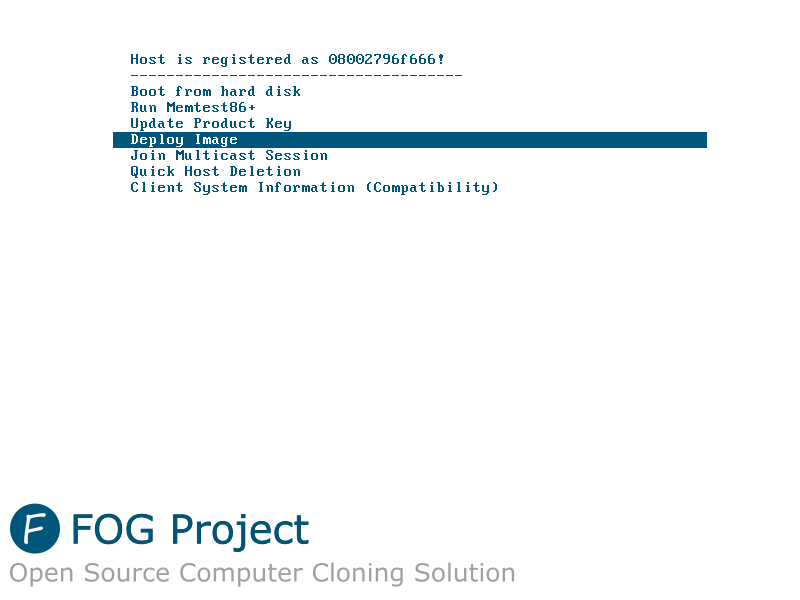
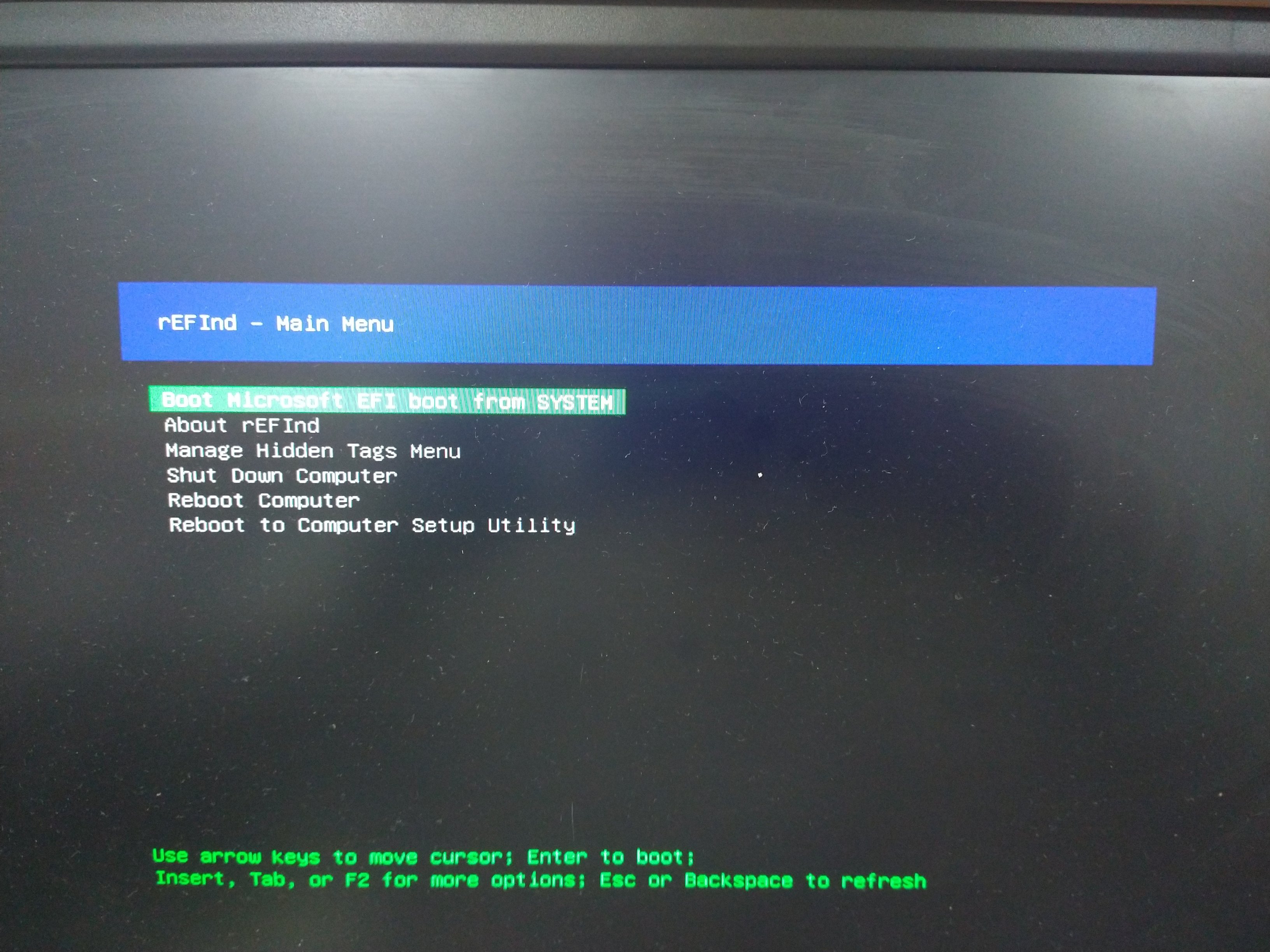
Hi all, I have used FOG for a number of years now which works flawlessly. (NON UEFI). I get the white fog screen where i can select to "deploy my image", no drama. (See below) However I have a set of machines that will only work with UEFI (intel 500 series integrated GPU). but i can't seem to get to the "FOG Menu"to deploy a image. I have configured DHCP to allow uefi, but when i boot from nic (uefi) i boot from uefi..... but get the below "rEFIND" screen when i was expecting the one above. What have i done wrong? thanks all
-
New Servers (hooray) Hyper-V Configuration
Jaan replied to Warwick_Tech's topic in Windows Server 2019
We have A physical DC-01 A VM DC-02 3 S2dNodes Veeam backs it all up, all Dell hardware -
Premiere Pro and OneDrive Home Folder - Loading importerquicktime.prm
Jaan replied to mitchell1981's topic in Windows
Is this applied at your computer or User level GPO. cheers -
Premiere Pro and OneDrive Home Folder - Loading importerquicktime.prm
Jaan replied to mitchell1981's topic in Windows
I'll give this a go and report back. Cheers -
No purpose other than curiosity Is you personal mobile device Apple, Android or other? that is all
-
Premiere Pro and OneDrive Home Folder - Loading importerquicktime.prm
Jaan replied to mitchell1981's topic in Windows
I've just started to get this issue after deploying this. We don't have Onedrive but do have folder redirection, although appdata isn't redirected. everything else works except Premier Pro. Did you manage to resolve this? I'm stumped at the moment. -
Fixed that for you
-
We've got it working here...... but we are very strict when it comes to local install and local admin access etc etc. It was/Is a real pain for us.....we actually given the staff member a off domain laptop that connects to our BYOD just to complete their tasks with it. See my above post if it's of any use to you. But i agree...... the software is very poor in that today's security standards and principles will stop it in it tracks......... It needs to be integrated into the MIS..... [sarcasm]Wait until you have a look at the "Alerts" program....... that's awesome! it also installs on Ipad..... apparently[/sarcasm] - - - Updated - - - i also forgot pathways Bromcom is cloud based..... except alerts, Etimetabler and pathways
-
IP Address changes, should have had a email about that one to change IP in web filters/Firewalls https://docs.bromcom.com/knowledge-base/ip-address-changes/ Seems fine now
-
Same here - - - Updated - - - Service status page is green......... that's a very pointless page......
-
Thanks all i've give this a try.
-
Hi all, Long story short, we're ready to update to cc2020 (deploy works fine on our test machines). However that after we manually uninstall the older cs5 suite. CS5 was part of our "Golden image" and has since been removed from that. I'm trying to remove CS5 from our 400+ machines without the need to manually remove or reimaging them. If tried PDQ deploy (9 day left of my trial), it launched the uninstaller but just sits at running, never actually does anything. I've also tried adobe "removal tool" where it references an xml. and still no joy. source:https://leereid.wordpress.com/2011/08/04/how-to-uninstall-adobe-creative-suite-5-cs5-silently/ Also tried the cleaner tool with no joy "AdobeCreativeCloudCleanerTool.exe --removeAll=ALL" Just wondering if anybody has any info that might help. cheers all
-
Yeah i have all of this in place. It just started to work again friday..... go figure
-
well we currently use 2016 here, but the gpos set in there say "Word 2013" for example and aren't applying to 2021. Default save location is set to n\: but doesn't work in 2021.
-
I've just downloaded the "latest" admx templates from Microsoft's site. The description said the it includes 2019/21 templates. I've added them to sysvol and i can't see any difference. even the bundled .xls sheet doesn't reference anything 2021...... have i missed a bulletin? cheers peeps https://www.microsoft.com/en-us/download/details.aspx?id=49030
-
This started to become an issue yesterday. I've checked all sage exceptions are in place, https scanning is disabled and nothing is hitting the firewalls..... happens when you query an invoice after entering the "reference" number and clicking "check". Anybody else seeing this? Sage service status is all green. we're web hosted.
-
An update to this..... I was given the wrong details from our supplier...... Once i got the right point of entry it was simple...... thanks guys!
-
Long story short, we've had our first dell failure, never had to deal with them before. It as simple HDD failure, just looking to swap it out and put it back in the 3 node cluster (S2D). Everything is online we have ProSupport 5yrs and was expecting to be able to email/webchat to get it sorted........ the only option i have is to call them....... i've been listening to dell music on their phone system for far too long, and i've had to hang up twice because i've been "needed" to go and show somebody how to use a power button...... ideally i'd like to email and deal with it that way.... anybody know of any dell "Tricks" Cheers edugeek peeps
-
I've just bought a raspberry on the back end of your post. Any are you able to share your layouts? thanks for the inspiration!
-
How do I automatically assign products to users in Adobe Control panel?
Jaan replied to Jaan's topic in Educational Software
My thoughts exactly! -
How do I automatically assign products to users in Adobe Control panel?
Jaan replied to Jaan's topic in Educational Software
Managed to have time to look at this again. So we have our Google Admin panel syncing users to Adobe via SAML. Thats working fine and users are still being added/disabled even today. I have 3 groups I created in Adobe. IT Admin, Students and Staff. Each of these user groups have products already assigned to them. The issue i have is adding the users already in Adobe (From Google) into these User groups (Where they will get licences assigned to them). CSV isn't an option for us. It seems we need BOTH Google SAML syncing users into Adobe for SSO. AND the AD SYNC TOOL to assign users into groups and then licences. Here's the online documentation for that.......... https://adobe-apiplatform.github.io/user-sync.py/en/ My head is just mush lol I don't know why this has to be this complex. I've had to request support from adobe to see if they have had a look for me as i can't get it working...... i there was a tick box in the adobe panel to add SAML synced users to groups....... it would be sorted