-
Posts
2,107 -
Joined
-
Last visited
Content Type
Forums
News
20th
EduGeek EDIT Conference
Blogs
Everything posted by Jaan
-
 Oh right, so if i move a member that has a license assigned out of the OU that automatically assigns them, It doesn't get removed automatically if i move them out of that OU? EDIT: looks like Google directory cloud sync does support assigning of and removal of licenses; (Optional) Check the Remove this license from Google domain users that don’t match this rule box to remove licenses from Google users that don’t match the rule. Note: Checking the box might result in removing licenses for a large set of users in your account if your LDAP configuration isn’t correctly defined. Check your configuration before using this feature.
 -
Morning all, So we've just made the jump to Google Premium after about 8 years on the free tier! I've received the licences and how to pack along with the documentation on how to assign licences. I was hoping that i'd be able to just use Google active Directory Sync to assign licensing, with the option to "Remove licenses from suspended users" option..... Apparently i dream that button up! So before i make a decision, i was just wondering how you guys do it. How you manage suspended user license removal, and any pitfall i might need to know about? Cheers all
-
Not sure tbf. we check every month
-
We copied the whole "Console" folder over to our server area. Think its found in "V4" iirc Base url is whatever the primary "server" inventry machine is on your site. Your simply running the console from the server area, but it connects to inventrys machine on your site. edit: remember this isn't support by inventry tho....
-
We copied ours to a server share and ran it from there. it's been rock solid ever since. Just make sure you check if there's been a update on the inventry machines, you copy the new console over.
-
Sorry i've been using the wrong terminology here..... thanks for highlighting that. Home folders NOT User profiles. I've updated the thread thanks for pointing that out FN-GM, not sure if your response still applies.

-
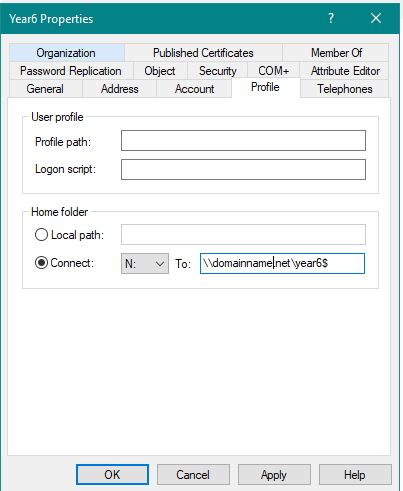
Following on from this thread: http://www.edugeek.net/forums/enterprise-software/225709-adobe-premier-pro-hangs-loading-exporterquicktimehost-prm.html i've started a new thread as this is more a AD home folder question. I have a issue with Premiere Pro where i seem to have pinned to how to user home folder is set up in AD. If home folders are configured like this: staff \\domainname.net\staff$\%username% Premier pro fails to load. Hangs on "Loading ExporterQuicktimeHost.prm" We use this method as when we create new users, the folder structure is created automatically along with the user specific ntfs file permissions. This ties into Folder redirection also. Students are configured the same way, and also have Adobe Premier Pro Hanging on "Loading ExporterQuicktimeHost.prm" student \\domainname.net\2019$\%username% Folders for staff and students are shared at "staff$" and year "2019$" level (depending of year of course). With NTFS file permissions allowing or disallowing access. We also have a "year6" account we use for any primary schools that might visit. this is configured like this. \\domainname.net\%username%$ as its a single account that multiple users might use. Premiere pro loads fine. Changing any of the staff or student accounts to match that of the "year6" account resolves the issue with Premiere Pro. Changing the year6 account to match that of the students or staff member results in Premiere pro not loading. Hanging on "Loading ExporterQuicktimeHost.prm" Just wanted to ask people how you have your folders setup and connected to your user home folder in AD. And if you have Premiere loading. i'd be interested in knowing if anybody has: \\domainname.net\2019$\%username% \\domainname.net\staff$\%username% with premiere pro loading or if you have: \\domainname.net\%username%$ with premiere pro loading Any help would be great thanks.
-
I think is great that Bromcom has listened to customer feedback and implemented change. Thumbs up from me.
-
So the service status page has had a update? https://status.bromcomcloud.com/
-
This might help with the auto start. Control Drive for desktop via reg edits Not had chance to try it here yet.
-
As above really, Any body had any issues before i apply this months updates?
-
We walked and went onshape.
-
Yeah i know where it all goes. I just need another one running and would like to match the spec. It is armored. as it "sits" ontop of the building I'm just trying to de code whet each section means.
-
its this i need to identifly
-
Hi all, i need to identify a optical cable we have. I used to have a link to a website which explaned what each section of the cable but i can't find to save my life. even Google isn't helping? Anybody have a link or resources that might help? cheers
-
I've played through 5 times now with over 400+ hours on google stadia epic game. Stadia didn't have too many issues. Just a ladder glitch. where you could only climb one 90% of the time (you'd just fall off it when at the top)
-
Login loop on Chromebooks - anyone else having this issue today?
Jaan replied to TMBS's topic in Cloud Services
We've started to get this today. -
Premiere Pro and OneDrive Home Folder - Loading importerquicktime.prm
Jaan replied to mitchell1981's topic in Windows
Nope im wrong, i have an account without folder redirect and it still doesn't work........ i'm at a total loss here and adobe dont seem to be able to help. Starting to stress me out now and i can't find anything in any logs to even hint where the issue is -
This is awesome news! Its something we've been looking forward to since moving to bromcom in sept! Thanks for the updates........... timetabler next ? EDIT:Do Bromcom have a "roadmap" page anywhere? You used to have one but it disappeared.
-
The bromcom alert software is pointless....... its installation, management and configuration is extremely dated and painful. Personally i believe it needs to be abandoned and maybe bromcom could call browser notifications. That would probably be better.
-
Well i missed that one! Just doing some maintenance/spring cleaning of some of our policies. It's Chrome's turn today. I noticed that below policy has been deprecated, luckily it's still operational. From what i understand, i should be using the "proxy settings" gpo now. How are you guys applying the proxy settings to chrome now? any examples of the new gpo you've used? I would have thought that those of you using the advance endpoint management (paid google) are doing it that way or a mixture of that and gpo? I'm looking at enabling DPI on the XG to get rid of webproxy all together, but have "safe search" concerns which will require webproxy to be around for a while yet. Cheers all
-
Premier Pro not loading due to folder redirection
Jaan replied to Jaan's topic in Enterprise Software
no we don't redirect appdata have you applied any special folder permissions. -
Hi all, I'm having a nightmare with this one. Is anybody successfully managed to get Premier pro working with their redirected folder policy in place? If i create a standard student account without folder redirection it works fine. Of course isn't isn't something we can do. Anybody shine any light on this before i go into a corner and cry a little?
-
Premiere Pro and OneDrive Home Folder - Loading importerquicktime.prm
Jaan replied to mitchell1981's topic in Windows
This didn't fix our issue, but after more testing, it seems to be related to folder redirection. If i disable folder redirection on a standard user account it loads fine. As soon as the users documents are redirected it fails. APP data isn't redirected.............. -
Exactly the same issue i'm having. Not able to generate a licence as no product are appearing. We're using onshape now instead.