Steve21
-
Posts
9,168 -
Joined
Content Type
Forums
News
20th
EduGeek EDIT Conference
Blogs
Everything posted by Steve21
-
Official "soon" response from Apple helpful as is! Steve
-
Slightly off topic thought, but are you sure you don’t have the OU delete/suspend settings too low? Just wondering if it is still working but it’s blocked with the year roll over if you deleted/suspended a lot at once and haven’t over ridden the limit Steve
-
If it’s not changed recently there’s a config file it creates when you run it that points to where it should use We preceated it and gpo deployed it so when it’s run it points to their home drive instead Think it was called something like settings.json ? Steve
-
Honestly it feels like the base structure needs a lot more polishing work before branching out further Even trying to do a few basic bits I would do on another store I’m having problems with - If you sort by price etc the whole left bar of filters stops working so can’t pick brands etc - The menu structure isn’t great, for example trying to find laptops, 3 menus down, then you expand it and only find chrome books - then realise the level above is a button - why not put chromebooks under devices and have a seperate laptop? - the same buttons in two places do different things - Education via top menu is different to education in side menu. Yet devices is the same page it goes to - the whole education focused section is mixed logic - why is some paper under education and other paper under office etc - mixed logic with a lot of other categories too, under WiFi has no wireless routers yet under “service equipment” it does - go to software can’t see senso as that’s “education focused” yet can’t see Photoshop licenses etc under education - search doesn’t seem to work for what you actually ask for - as an example I enter a specific laptop model number and get 1190 results returned - “all prices ex vat” as per top of the website, but all prices include vat by default Few kind of examples of what I found in a few minutes flicking through, but shout if you want more thoughts Steve
-

Exam accounts O365 activation with no ineternet access allowed
Steve21 replied to Harlington_IT's topic in Office Software
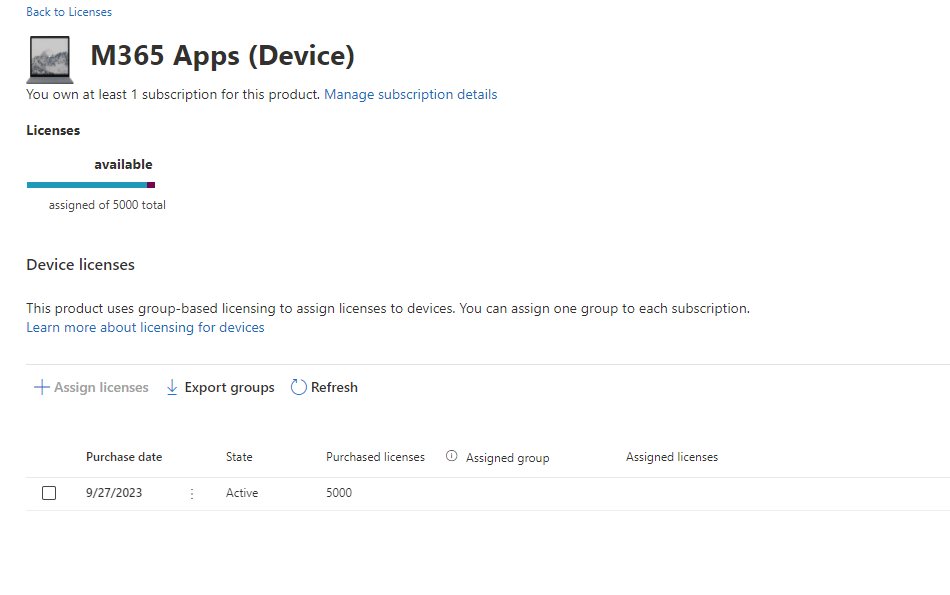
Well you have to do one of the two if you are using M365 versions.... or you stick with 2021 etc (Edit - or the lonnnnng winded way would be setting a custom proxy filter policy that force blocks anything non-MS activation servers etc if you wanted to go that route) Regarding the reseller, they're wrong. They do sell it It might be you're not on a plan that has it, but it's definitely an item. What plan are you using? M365AppsForEntForDevicesEDU ShrdSvr ALNG SubsVL MVL AddOn is the partcode we have on our renewal We renewed ours last month (5000 devices covered): Steve
-
Exam accounts O365 activation with no ineternet access allowed
Steve21 replied to Harlington_IT's topic in Office Software
If you have the option that’s why it’s better using device licenses, then no requirement per individual user. But if you are using user licenses with “shared”’licensing it stores the token in appdata by default , so you can redirect it if you are happy with roaming and share the same token on different machines, alternatively and probably the better option for roaming is you can specify a network share for the tokens in the later versions of 365 apps “Licensing token roaming Starting with Version 1704 of Microsoft 365 Apps, you can configure the licensing token to roam with the user's profile or be located on a shared folder on the network. Previously, the licensing token was always saved to a specific folder on the local computer and was associated with that specific computer.” Steve -
Exam accounts O365 activation with no ineternet access allowed
Steve21 replied to Harlington_IT's topic in Office Software
The tokens for activation last 30 days, whether user or device based. So either you would need to have them logged in advance as the exam users so it activates prior to exam. Or use device licenses and then you can have them on prior to internet (without being logged in) But obviously both routes still require internet access prior to exams Steve -
Need help translating what T and P means now.
Steve21 replied to jmair's topic in Internet Related/Filtering/Firewall
Depending on which firewall you have currently There are some current bugs regarding DNS acc calculations PAN-227639 - Fixed an issue where the ACC displayed an incorrect DNS-base application traffic byte count. https://docs.paloaltonetworks.com/pan-os/10-1/pan-os-release-notes/pan-os-10-1-11-known-and-addressed-issues/pan-os-10-1-11-addressed-issues https://docs.paloaltonetworks.com/pan-os/10-2/pan-os-release-notes/pan-os-10-2-6-known-and-addressed-issues/pan-os-10-2-6-addressed-issues Etc New versions should have fix in it (depending if you’re on 10. Or 11. Etc) Steve -
Intune / Apple School Manager - Can't reassign an app to another iPad
Steve21 replied to mikeglover's topic in Mac
Did you just unassign it? If so it won't release the license, you need to set it to "uninstall" assignment before it'll remove/re-assign the license Steve- 7 replies
-
- 1
-

-
- apple school manager
- intune
- (and 1 more)
-
[22h2] Symlink/Junction/Otherwise move C:\Users to another disk?
Steve21 replied to Garacesh's topic in Windows 10
Yep would either be loopback Or we just give those students in the media courses a local drive still as some programs don’t even like syncing it like that as you still need to consider the upload before log off etc if using it direct via OneDrive Steve -
I'd say that's expensive (as if they're taking RRP pricing not educational) These are the kind of weekly emails we get from suppliers about those models (NS Optimum in this case): Steve
-
We recently had the same situation regarding the mid ranged being removed (apparently it’s coming back later this year with a version of OS etc so depending on when you’re looking might not need to check) Steve
-
[22h2] Symlink/Junction/Otherwise move C:\Users to another disk?
Steve21 replied to Garacesh's topic in Windows 10
As in this GPO? Set the default location for the OneDrive folder This setting lets you set a specific path as the default location of the OneDrive folder on users' computers. By default, the path is under %userprofile%. If you enable this setting, the default location of the OneDrive - {organization name} folder is the path that you specify. To specify your tenant ID and the path, in the Options box, select Show. This policy sets the following registry key to a string that specifies the file path: [HKCU\SOFTWARE\Policies\Microsoft\OneDrive\DefaultRootDir] "1111-2222-3333-4444"="{User path}" where "1111-2222-3333-4444" is the tenant ID. If you disable this setting, the local OneDrive - {organization name} folder location defaults to %userprofile%. Does that help? Steve -
Logon times and folder redirection best practices
Steve21 replied to miloshmedia's topic in Windows 10
Depending on what deployment methods you have available (whether SCCM or just GPO etc), you could just use one of the powershell scripts that does this Example below (this is one of the ones we ran for Windows 10 via SCCM during OSD but it can work after too) $AppsList = "Microsoft.BingWeather", "Microsoft.GetHelp", "Microsoft.Getstarted", "Microsoft.Messaging", "Microsoft.Microsoft3DViewer", "Microsoft.MicrosoftOfficeHub", "Microsoft.MicrosoftSolitaireCollection", "Microsoft.MixedReality.Portal", "Microsoft.OneConnect", "Microsoft.People", "Microsoft.Print3D", "Microsoft.SkypeApp", "Microsoft.StorePurchaseApp", "Microsoft.Wallet", "Microsoft.WindowsAlarms", "Microsoft.WindowsCommunicationsApps", "Microsoft.WindowsFeedbackHub", "Microsoft.WindowsMaps", "Microsoft.WindowsPhone", "Microsoft.WindowsSoundRecorder", "Microsoft.Xbox.TCUI", "Microsoft.XboxApp", "Microsoft.XboxGameOverlay", "Microsoft.XboxGamingOverlay", "Microsoft.XboxSpeechToTextOverlay", "Microsoft.YourPhone", "Microsoft.ZuneMusic", "Microsoft.ZuneVideo" ForEach ($App in $AppsList) { $PackageFullName = (Get-AppxPackage $App).PackageFullName $ProPackageFullName = (Get-AppxProvisionedPackage -online | where {$_.Displayname -eq $App}).PackageName write-host $PackageFullName Write-Host $ProPackageFullName if ($PackageFullName) { Write-Host "Removing Package: $App" remove-AppxPackage -package $PackageFullName } else { Write-Host "Unable to find package: $App" } if ($ProPackageFullName) { Write-Host "Removing Provisioned Package: $ProPackageFullName" Remove-AppxProvisionedPackage -online -packagename $ProPackageFullName } else { Write-Host "Unable to find provisioned package: $App" } } You just add/remove things from the top list that you want removing, so if you want Print3D just comment it out or remove it etc There are plenty of other versions though, things like "Decrapifier" yes that's the name that update scripts more often with new apps as they're released etc, but I prefer to start with less and add things to remove as you go Steve -
Logon times and folder redirection best practices
Steve21 replied to miloshmedia's topic in Windows 10
Stick with local profiles including appdata (roaming etc aren't supported officially anymore). Redirected docs is fine, but as you said that's without offline etc. If it's not been redirected previously the first login will take time as it uploads all their docs to the server from the local machine Remove "silly" apps from the image, things like xbox etc, as this provisions for every user when they login so slows things a lot Remove delprof, that's not supported since 2018. Use the GPO settings for removal of old profiles Get that RAM upgraded to 8gb+, 4gb is below minimum "real-world" spec nowadays Steve -
There's a bug in 2.16 if you updated to that recently? Upgrading to macOS Sonoma beta 14.1 fixes it apparently (or restoring via timemachine etc back to 2.15 if you have that option?) Steve
-
I'm assuming that was in reference to the fact you have it set as "Lan In" rather than WAN/Internet etc, depending on what it's called on Unifi If the second network isn't defined as a local/LAN one the pings would be coming in via the WAN/Internet interface normally. e.g. A client, goes ping, goes to A firewall, out via WAN/Internet interface, goes to B firewall in on WAN/internet interface and should be dropped there Steve
-
Surely you just turn this back onto the parent - If your kid is signing the ICT AUP you have agreed to these terms, whether or not you disagree with the principle. If you aren't willing to then you have no computer access. - This also removes the "What if's" as it's then down to the parent to decide if they agree or not. In terms of the requirement for a "lawful basis" in that scenario assuming that reference was to GDPR it's then simply consent. (Ignoring any moral arguments regarding legal obligations and where they start/stop) The "reasonable" or in GDPR terms "necessary" implementation are only under certain bases which doesn't include consent so wouldn't be a factor in there either. Steve
-
Not sure if they have the same firmware updates on the G5, but some of the older 800s needed a firmware update to fix SMART errors on their SSD/NVMEs Have they been fully patched using HP tools etc? Steve
-
We've used both routes, SDS cleanup works well if it had a profile, but also if you want to script it can delete the groups behind the teams to remove them (Just change the displayname part to what matches yours, and if you want to test it prior to running it live just add a # before the Remove part to comment it out so it just outputs the names it'll run against) If you don't have the module downloaded you'll need to install that via powershell first Connect-ExchangeOnline -UserPrincipalName [email protected] $Groups = Get-UnifiedGroup -ResultSize Unlimited | ? {$_.DisplayName -like "ABC-22-23*"} Foreach ($Group in $Groups) { Write-Host $Group.DisplayName Remove-UnifiedGroup -Identity $Group.Name -confirm:$False } Disconnect-ExchangeOnline -Confirm:$False Steve
-
Teams not visible in Teams iPad app, but visible on desktop computer
Steve21 replied to Mr_Co's topic in Office Software
Just FYI if you haven't seen it on admin portal: Take it that might have fixed your issue if it's related Steve- 5 replies
-
- 1
-
-
- microsoft
- microsoft teams
- (and 1 more)
-
Student Appdata folder - redirect or not?
Steve21 replied to mdrabble's topic in How do you do....it?
Yep! Forgot to hit quote Steve -
Student Appdata folder - redirect or not?
Steve21 replied to mdrabble's topic in How do you do....it?
It was broken but was fixed a while back (would say 1909). It no longer uses that file and uses one of the others that does update Steve -
We use CDM and while it works for a lot of scenarios, it also brings on other problems. For example, long paths won't work on Windows by default (while they do in sharepoint online) so that causes a lot of issues unless you enable long paths by default. Password changes on local AD can require a long time to sync to Azure->CDM meaning users are left with no access to shared drives on occasions Steve
- 1 reply
-
- 1
-
-
Been having a dig into this further, and seems quite a few different forums have random reports of KB5028166 and KB5029244 causing issues with HDMI and monitors power savings etc (Jul/Aug rollup for Win10 22H2) As we have our updates on a 14-day delay cycle I thought I'd test on a machine to see if there's a new September release and there is KB5030211 which was released 14~ days ago, so will be interesting to see if this does anything to it! Steve