kennysarmy
-
Posts
6,514 -
Joined
Content Type
Forums
News
20th
EduGeek EDIT Conference
Blogs
Everything posted by kennysarmy
-
And who knew there was a decision regarding Surface PRO v GO !
-
With around 40+ teachers using older iPads (plus fixed Apple TV's in 50 locations) as an additional resource to their fixed desktop PC's I've now been asked to investigate whether Windows Surface Pro devices could be phased in as the iPads go end of life! The reason the iPads are all older is of course a combination of them just not being used and budget constraints! To me it sounds like the "proposer" is after a shiny new toy at the school's expense. Thoughts?
-

YouTube - Do you block or allow access to students?
kennysarmy replied to Nausing's topic in How do you do....it?
Blocked for most, 6th form have access as do a few students doing specific research - they then have access but only during lesson times. -
I think "Keyboard use and web activity". Surely everyone will know what that means! I will run it past our DPO (again)
-
All keystrokes and web activity on school computers is being constantly monitored. All key presses and web activity on school computers is being constantly monitored! I know which I prefer. But apparently there are too many teacher's who don't know what a keystroke is!
-
Don't ask
-
Send Recurring Emails?
kennysarmy replied to Gongalong's topic in Internet Related/Filtering/Firewall
Dear IT, Please can you make a pop-up appear on PC's to remind staff to logon and check their emails so they see the reminder about doing their duty! -
Send Recurring Emails?
kennysarmy replied to Gongalong's topic in Internet Related/Filtering/Firewall
Surely they'd forget to check their emails. -
Microsoft Teams - Anyone using in a school environment?
kennysarmy replied to SimonInOz's topic in Enterprise Software
Any reason for phasing out Firefly? Our staff, students and parents seem to be fully engaged with it. -
[sims] Autumn 2019 upgrade (7.190)
kennysarmy replied to Esteban_Child_of_the_Sun's topic in MIS Systems
A workstation fix that will require exclusive use of SIMS to deploy? -
Microsoft Teams - Anyone using in a school environment?
kennysarmy replied to SimonInOz's topic in Enterprise Software
I'm yet to be convinced of it's real usefulness in our environment. We really heavily on our Firefly VLE. My worry it would just be another thing staff don't have time to learn. -
Chrome. IE remains accessible for some legacy apps.
-
AUP signed as all other staff who get network access have to do. Their accounts are no different to permanent staff, but like others they are n't given access to our MIS.
-
[sims] Autumn 2019 upgrade (7.190)
kennysarmy replied to Esteban_Child_of_the_Sun's topic in MIS Systems
Think I'll be holding off on the u/g for a while. Can't wait to be on Bromcom or some similar cloud based MIS ! -
Just about to start a 20 day demo of Smoothwall Monitor on up to 50 devices. Any pointers for how to best setup the system greatly appreciated.
-
Yes, your steps are correct. Step 5 though, the copier reports "jobs have been released successfully" PaperCut MF Version: 19.1.5 (Build 52403) Built on: Oct 10, 2019 Copiers are all Xerox (Secure Access EIP 1.5+) Driver is the Xerox Colour C70 PS Yes it appears to happen to all users that we've so far tested with, whether they are set to use the account pop-up selection or have an account set for charging. Our latest test is to remove the check box against "Advanced Printing features", I'll have the results of the test documents sent on Friday shortly.
-
We've turned off "Enable Advanced Printing Features" and our test prints from yesterday have come out this morning. Does anyone else have this on and are still able to release prints sent the day before? https://www.papercut.com/kb/Main/EnableAdvancedPrintingFeatures/
-
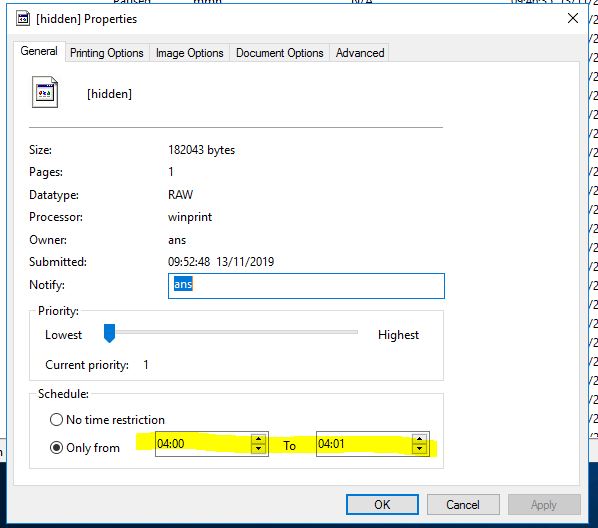
It was set to 04:00 to 04:01 - but no one knows why or who did it....hmmm It's been changed now to "Always available" and we'll test again tomorrow. Hopefully that's been the issue. Our test student and teacher accounts don't have rights to make those changes, the security rights look OK on the queue so I'm flummoxed.
-
Does anyone know what the highlighted part refers to? That's from the properties of a test job in the FollowMe queue...

-
Our tests last night concluded that even if the account is set to print to a set account (rather than choose via the pop client box) the next day prints from the followme queue are not released successfully.
-
I can't find any evidence in event viewer that it is....
-
First thing we did when we were alerted to this was to upgrade to the latest v19 on the server and roll out a new client to the desktops. I'll check the event logs for that...thanks.
-
If this was the issue I would expect once the user to visit the copier it would say there are no jobs for release. The jobs are showing...they just don't print off It's as if something runs overnight which strips the jobs of the account information, hence the client pop up box appears on the users PC to ask again, who do you want to charge this job to!
-
Yes, this is set to 5760 mins or 4 days.
-
We can recreate a condition (and it's annoying staff) whereby jobs sent to any FollowMe queue which are not collected the same day do not print! The copier reports successful release, but nothing exits the copier. Back at their PC, the client pop-up reappears asking them to choose the account again, if they do and return to the copier the jobs print fine. Any ideas? @jasonatpapercut