kennysarmy
-
Posts
6,514 -
Joined
Content Type
Forums
News
20th
EduGeek EDIT Conference
Blogs
Everything posted by kennysarmy
-

[mdt] Adding MS updates in to your deployment of Windows 10
kennysarmy posted a topic in O/S Deployment
Can I ask how everyone updates their Windows 10 deployments with the latest updates? I've been reading through a few online posts, one mentions doing it via WSUS Offline Updater - is that the preferred method or is there a better way? I have a WSUS server. -
MS Office O365 / 2019 - giving me a headache
kennysarmy replied to kennysarmy's topic in Office Software
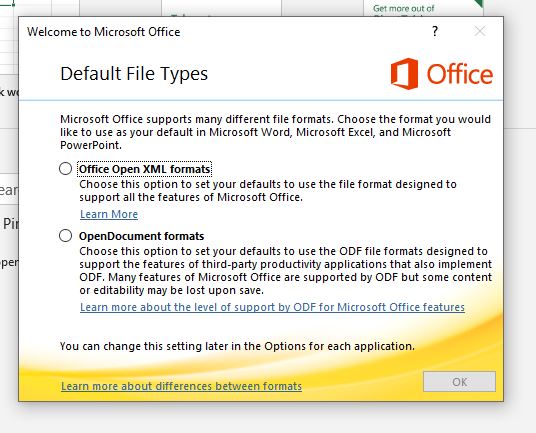
All seems to be working apart from this annoying prompt that appears for the test users: Can this be removed by a setting in the Office Customization Tool ?
-
Seemed to do the trick. https://docs.microsoft.com/en-us/windows-hardware/customize/desktop/wsim/open-a-windows-image-or-catalog-file Opens fine in MDT now !
-
I'm just on that now Cheers Arthur
-
In case it helps anyone there is bit of chatter about this here: https://social.technet.microsoft.com/Forums/en-US/df7f8b10-da83-48cd-8eb6-607e37568bf0/windows-10-1903-sim-tool-in-adk-101183621-fails-to-generate-catalogs-correctly-for-x64
-
That did n't help Performing the operation "generate" on target "Catalog". Starting: "C:\Program Files\Microsoft Deployment Toolkit\Bin\Microsoft.BDD.Catalog40.exe" "D:\DeploymentShare\Operating Systems\Win10Edu1903\install.wim" 1 > "C:\Users\admin\AppData\Local\Temp\Microsoft.BDD.Catalog.log" 2>&1 No existing catalog file found. PROGRESS: 0: Starting. PROGRESS: 0: Creating mount folder: C:\Users\admin\AppData\Local\Temp\IMGMGR_install_Windows 10 Education_krotw5mr.os2. PROGRESS: 5: Creating temp folder: C:\Users\admin\AppData\Local\Temp\IMGMGR_install_temp_rkygbswc.p0o. PROGRESS: 10: Mounting Windows image: D:\DeploymentShare\Operating Systems\Win10Edu1903\install.wim. This might take a few minutes. PROGRESS: 30: Mounted Windows image. PROGRESS: 33: Serializing Data. PROGRESS: 63: Cleaning up... PROGRESS: 63: Unmounting Windows image: D:\DeploymentShare\Operating Systems\Win10Edu1903\install.wim. PROGRESS: 66: Deleting mount folder. PROGRESS: 69: Cleaning up... ERROR: Unable to generate catalog on D:\DeploymentShare\Operating Systems\Win10Edu1903\install.wim: System.IO.FileNotFoundException: Could not load file or assembly 'Microsoft.ComponentStudio.ComponentPlatformImplementation, Version=10.0.0.0, Culture=neutral, PublicKeyToken=31bf3856ad364e35' or one of its dependencies. The system cannot find the file specified. File name: 'Microsoft.ComponentStudio.ComponentPlatformImplementation, Version=10.0.0.0, Culture=neutral, PublicKeyToken=31bf3856ad364e35' at Microsoft.ComponentStudio.ComponentPlatformInterface.Cpi.CreateOfflineImageInstance(OfflineImageInfo imageInfo) at Microsoft.ComponentStudio.ComponentPlatformInterface.OfflineImageCatalog.Serialize(OfflineImageInfo imageInfo) at Microsoft.ComponentStudio.ComponentPlatformInterface.OfflineImageInfo.CreateCatalog() at Microsoft.BDD.Catalog.Program.DoCatalog() WRN: Assembly binding logging is turned OFF. To enable assembly bind failure logging, set the registry value [HKLM\Software\Microsoft\Fusion!EnableLog] (DWORD) to 1. Note: There is some performance penalty associated with assembly bind failure logging. To turn this feature off, remove the registry value [HKLM\Software\Microsoft\Fusion!EnableLog]. Non-zero return code from catalog utility, rc = 2002
-
Maybe this:
-
Well it completed but with an error! Performing the operation "generate" on target "Catalog". Starting: "C:\Program Files\Microsoft Deployment Toolkit\Bin\Microsoft.BDD.Catalog40.exe" "D:\DeploymentShare\Operating Systems\Win10Edu1903\install.wim" 1 > "C:\Users\admin\AppData\Local\Temp\Microsoft.BDD.Catalog.log" 2>&1 No existing catalog file found. PROGRESS: 0: Starting. PROGRESS: 0: Creating mount folder: C:\Users\admin\AppData\Local\Temp\IMGMGR_install_Windows 10 Education_d0zhtwsb.myc. PROGRESS: 5: Creating temp folder: C:\Users\admin\AppData\Local\Temp\IMGMGR_install_temp_1coc05jm.f1x. PROGRESS: 10: Mounting Windows image: D:\DeploymentShare\Operating Systems\Win10Edu1903\install.wim. This might take a few minutes. PROGRESS: 30: Mounted Windows image. PROGRESS: 33: Serializing Data. PROGRESS: 63: Cleaning up... PROGRESS: 63: Unmounting Windows image: D:\DeploymentShare\Operating Systems\Win10Edu1903\install.wim. PROGRESS: 66: Deleting mount folder. PROGRESS: 69: Cleaning up... ERROR: Unable to generate catalog on D:\DeploymentShare\Operating Systems\Win10Edu1903\install.wim: System.IO.FileNotFoundException: Could not load file or assembly 'Microsoft.ComponentStudio.ComponentPlatformImplementation, Version=10.0.0.0, Culture=neutral, PublicKeyToken=31bf3856ad364e35' or one of its dependencies. The system cannot find the file specified. File name: 'Microsoft.ComponentStudio.ComponentPlatformImplementation, Version=10.0.0.0, Culture=neutral, PublicKeyToken=31bf3856ad364e35' at Microsoft.ComponentStudio.ComponentPlatformInterface.Cpi.CreateOfflineImageInstance(OfflineImageInfo imageInfo) at Microsoft.ComponentStudio.ComponentPlatformInterface.OfflineImageCatalog.Serialize(OfflineImageInfo imageInfo) at Microsoft.ComponentStudio.ComponentPlatformInterface.OfflineImageInfo.CreateCatalog() at Microsoft.BDD.Catalog.Program.DoCatalog() WRN: Assembly binding logging is turned OFF. To enable assembly bind failure logging, set the registry value [HKLM\Software\Microsoft\Fusion!EnableLog] (DWORD) to 1. Note: There is some performance penalty associated with assembly bind failure logging. To turn this feature off, remove the registry value [HKLM\Software\Microsoft\Fusion!EnableLog]. Non-zero return code from catalog utility, rc = 2002
-
Been sat like this for an hour now with the bar not moving
-
Thanks. Would this work?
-
We've been running some commands post install of Windows 10 which I may be looking to add in to our Task Sequence. Before I do I thought I'd question whether some of these are even necessary! The commands are : winsat formal Assess the system performance and make changes at reboot to prefetch, superfetch, and ReadyBoot fsutil behavior set DisableDeleteNotify 0 Enable TRIM schtasks /change /tn "microsoft\windows\defrag\ScheduledDefrag" /disable Disable Defrag - suspect this may not be required sc stop SysMain sc config SysMain start= disabled Disable SuperFetch regedit.exe /s "\\fp5\netman2$\Software\Scripting\Windows 10 IM\SSD\EnablePrefetcher.reg" Import a key to Disable Prefetcher
-
Well weirdly I tried to recreate it again and this time it's worked - so all good - must have done something wrong the first time. Thanks.
-
Can anyone share how they have automated the installation of .net framework 3.5 using MDT ? I'm following the guide here: OS|DC: MDT 2013 U1: How to Install .Net Framework 3.5 on Windows 10 Which basically says: Open MDT expand your deployment share and right click on Package and select Import OS Package. Pick the microsoft-windows-netfx3-ondemand-package.Cab file from .\Source\SXS folder of your Windows 10 ISO Make sure that the step “Apply Patches” is enabled in the Preinstall section of your task sequence. The above does n't seem to be doing anything, when I launch the optional features GUI there is nothing against .net framework 3.5 I've seen other instructions which say to do the following: Create a Run Command Line task and type in the this DISM command : dism /online /add-package /packagepath:”\\your_shared_win10_media\sources\sxs\microsoft-windows-netfx3-ondemand-package.cab” I've not tried that yet...
-
MS Office O365 / 2019 - giving me a headache
kennysarmy replied to kennysarmy's topic in Office Software
Not sure if this was it but I changed "Pin icons to Taskbar" from Off to On and can now access the installed versions. -
MS Office O365 / 2019 - giving me a headache
kennysarmy replied to kennysarmy's topic in Office Software
So I've gone through the OCT tool and created an XML file : Architecture 64-bit Office 365 ProPlus Update channel Monthly Channel Version to deploy Latest Excluded Applications: OneDrive (Groove) Languages Match Operating System --Primary Any Installation options Show installation to user None Pin icons to Taskbar Off Logging Off Shut down running applications Off Update and upgrade options Enable COM management On Remove MSI products Off Match MSI products languages Off Automatically upgrade to the selected architecture Off Licensing and activation Product key User Activation Accept EULA On Shared computer activation On Roam licensing token Off Downloaded the files and deployed using a task sequence. Am I being daft , does this ONLY deploy the shortcuts to the Online versions of the Apps? I can't see any shortcuts to WORD, EXCEL etc -
As an example a student's drive would be: \\server\d$\users\PupilDrives\2014\6503 I will look in to a method to batch change all the accounts. Thanks.
-
It used to be so simple. Download Office, create a custom install and put it on your base image. Then it got a bit more complicated (and automated to be fair) and now I push out Office 2016 as part of my task sequence. Office 2019 or Office 365 seems to be pushing complications to a whole new level! Currently we use O365 for our email and single sign on works across the site. In using the Office Customization Tool to create my XML file and eventually a new task sequence to install Office to my freshly imaged PC's, should I be choosing: Office 365 ProPlus? or Office Professional Plus? What are the pros and cons of each? I have active directory based activation working across the site for W10 and current Office 2016 version, if I choose Office 365 ProPlus I can then choose User Based or Shared Computer - what are the pros and cons of these? I can only have User Based if I choose Office Professional Plus! Under our Microsoft 365 admin center we have the following products: Office 365 A1 (faculty and students) & Office 365 ProPlus (faculty and students) All active users are licenced for both Office 365 A1 & Office 365 ProPlus Under Office 365 ProPlus we have all services enabled Under Office 365 A1 we only have Education Analytics, Exchange Online & Whiteboard Plan enabled.
-
As part of my investigations in to deploying a newer Windows 10 image I've been looking closely at our setups. In AD I've noticed three different ways users have their Home Drives set: 148 accounts have Connect H:\ To: \\\usershare$ 546 accounts have Connect Z:\ To: \\\usershare$ 952 accounts have Local Path: \\\usershare$ The logon script for all accounts includes : net use h: /home I have a folder redirection policy for all accounts which includes: Documents Setting: Basic (Redirect everyone's folder to the same location)hide Path: %HOMESHARE%%HOMEPATH%\Documents Options Grant user exclusive rights to Documents : Disabled Move the contents of Documents to the new location : Disabled Also apply redirection policy to Windows 2000, Windows 2000 server, Windows XP, and Windows Server 2003 operating systems : Disabled Policy Removal Behavior : Leave contents Everything seems to be working fine. I'd like things consistent in AD though, should I change all the accounts to Local Path: \\\usershare$ ?
-
[1903, au] New Windows 10 Image - it's been a while!
kennysarmy replied to kennysarmy's topic in Windows 10
Thanks - I'll give that a try. Think I'm a bit old school having needed to run SYSPREP when we rolled out Windows NT ! -
Current OS deployed around the school using WDS/MDT is 2016 LTSB. It's about time I started investigating 1903 EDU, but it's been some time since I created my current image so just checking I've got things right in my head after not touching MDT for a few years! Does this sound right? Add base 1903 OS to MDT Deploy to test VM Customize OS Run SYSPREP Script "LiteTouch.vbs" / Task Sequence "Capture Image" Capture "Gold Image" back to MDT Create task sequence for stripping out "MS_CRAP" Deploy custom WIM and Test As far as my previous notes for Customize the OS go: Install .net 3.5 Install updates Remove Network and Homegroup options from the navigation pane Strip down the Right click start menu (http://www.edugeek.net/forums/windows-10/163286-windows-10-start-menu-working-solution-9.html#post1421421)
-
Papercut - Department printing - summary
kennysarmy replied to kennysarmy's topic in Enterprise Software
Ah yes I can do that - I thought you meant there was a way to filter the users in PaperCut so I could see exactly which users were in PaperCut who has a blank department field. -
Papercut - Department printing - summary
kennysarmy replied to kennysarmy's topic in Enterprise Software
Hi, thanks for replying but I'm not sure I understand what you mean. How do I filter users without a department in AD? -
I've just been looking at our PaperCut reports and when running the Department printing - summary it shows something against the "Department: [No department]" - how do I trace who did this printing? Thanks.
-
How do I prevent / remove Office Exchange Online Plan?
kennysarmy replied to michaeljbrewis's topic in Cloud Services
Are you not able to multi select users (max 100 I believe) and make the change? You might need to be on the Preview view? -
3rd Gen Apple TV's failing to install latest update
kennysarmy replied to kennysarmy's topic in Hardware
Will fire up iTunes and give it a go - nothing to lose