kennysarmy
-
Posts
6,514 -
Joined
Content Type
Forums
News
20th
EduGeek EDIT Conference
Blogs
Everything posted by kennysarmy
-

LGFL - is it really worth it ?
kennysarmy replied to xicor's topic in London Grid for Learning (LGfL)
WOW I'm under the SWGfL and we have to pay for ALL those licences!!! -
Office 365 Emails for staff who get married and change name?
kennysarmy replied to kennysarmy's topic in Cloud Services
I think it's only work for people like me who are getting to grips with a new system and way of doing things. It was my bad for doing things perhaps out of sequence and changing items not required to be edited. -
Office 365 Emails for staff who get married and change name?
kennysarmy replied to kennysarmy's topic in Cloud Services
Thanks. -
Office 365 Emails for staff who get married and change name?
kennysarmy replied to kennysarmy's topic in Cloud Services
OK - I think I'm getting somewhere. In the Attribute Editor in User properties I was changing anything with the old surname to the new surname - including the entry "mailnickname" If I leave this as is then the command : Set-MSOlUserPrincipalName -UserPrincipalName "OLD-EMAIL" -NewUserPrincipalName "NEW-EMAIL" WORKS! Emails work correctly. However - in AD the mailnickname is still showing as the old name! Should I be worried? -
Office 365 Emails for staff who get married and change name?
kennysarmy replied to kennysarmy's topic in Cloud Services
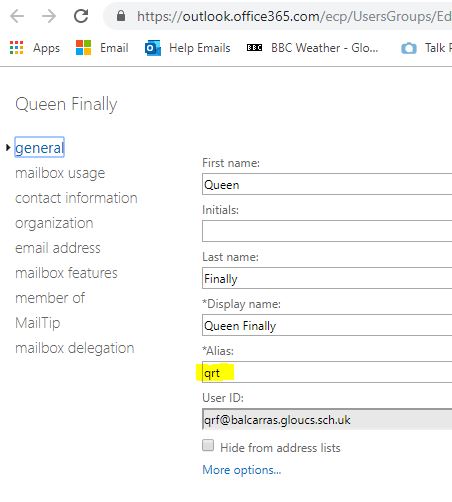
Actually, can anyone who has done the exact operation check an account for me and see if on "Exchange admin center" when editing a mailbox the *Alias entry on the General section still list the original username? Maybe it does n't update... -
Office 365 Emails for staff who get married and change name?
kennysarmy replied to kennysarmy's topic in Cloud Services
I was doing that, and also did my last post not show that the UserPrincipalName has already been updated? I'm way past head-scratching now -
Office 365 Emails for staff who get married and change name?
kennysarmy replied to kennysarmy's topic in Cloud Services
I think it's because it can't find the user: If I run : Get-MSOLUser -SearchString "qrf" | fl It returns : (amongst other things) UserPrincipalName : qrf@schoolname So I think the UserPrincipalName has been updated OK ( from qrt ) -
Office 365 Emails for staff who get married and change name?
kennysarmy replied to kennysarmy's topic in Cloud Services
In case this is the bit I'm missing I tried to do this but received an error back: Set-MsolUserPrincipalName : Access Denied. You do not have permissions to call this cmdlet. At line:1 char:1 + Set-MsolUserPrincipalName -UserPrincipalName qrt@schoolname ... + ~~~~~~~~~~~~~~~~~~~~~~~~~~~~~~~~~~~~~~~~~~~~~~~~~~~~~~~~~~~~~~~~~~~~~ + CategoryInfo : OperationStopped: ( [set-MsolUserPrincipalName], MicrosoftOnlineException + FullyQualifiedErrorId : Microsoft.Online.Administration.Automation.UserNotFoundException,Microsoft.Online.Admini stration.Automation.SetUserPrincipalName -
Office 365 Emails for staff who get married and change name?
kennysarmy replied to kennysarmy's topic in Cloud Services
I've definitely changed that in my latest test. Originally account was qrt - changed everything I can find under the test account to qrf Yet still the exchange and online centres show the *Alias as qrt See attached.
-
Office 365 Emails for staff who get married and change name?
kennysarmy replied to kennysarmy's topic in Cloud Services
I'm going to create a new test user and try again - pulling my hair out on this one... Hopefully it was just a glitch with the test user I first tried it with! -
Office 365 Emails for staff who get married and change name?
kennysarmy replied to kennysarmy's topic in Cloud Services
My test user can now receive emails to both new and old account. If they try to reply to an email that has come to them via the old or new account the message in O365 is "The message can't be sent at the moment. Please try again later. The SMTP address has no mailbox associated with it." So think I've missed one final piece of the jigsaw! When I check Online Exchange Admin Center - under the accounts General Tab there is an *Alias section which is still showing the old username. When I check Exchange on premise there is no corresponding *Alias entry on the General Tab. Any ideas? -
Office 365 Emails for staff who get married and change name?
kennysarmy replied to kennysarmy's topic in Cloud Services
Sorted it - god damn missing s in the email address argghhhh -
Office 365 Emails for staff who get married and change name?
kennysarmy replied to kennysarmy's topic in Cloud Services
The proxy address is there correctly in AD @school.name.sch.uk The proxy address is there correctly when I check in Exchange @school.name.sch.uk The proxy address is there but changed from our @school.name.sch.uk to the @schoolnameschuk.onmicrosoft.com when I check the admin centre online. Consequently when I send a test email to the new address it works but to the old one it bounces back saying "Recipient not found by SMTP address lookup'" -
Office 365 Emails for staff who get married and change name?
kennysarmy replied to kennysarmy's topic in Cloud Services
Do I need to add a proxy address for both our domain and the onmicrosoft.com one? -
Office 365 Emails for staff who get married and change name?
kennysarmy replied to kennysarmy's topic in Cloud Services
I just don't want the list of folders on the server to be out of sync. with the list of usernames - maybe it's just me. -
Office 365 Emails for staff who get married and change name?
kennysarmy replied to kennysarmy's topic in Cloud Services
I think we have to - username linked to SIMS & Firefly and other things that sync to AD. -
Office 365 Emails for staff who get married and change name?
kennysarmy replied to kennysarmy's topic in Cloud Services
Thanks for all the replies. Will having a hybrid O365 setup make any difference? So far to test using a dummy account I've got: Change last name, display name and description in General Tab of Active Directory also; Account Tab : edit User logon names Profile Tab : edit home folder \\fp2\$ Edit proxy details (new email address) Add new proxy details (old email address) H:\ drive Un-share H:\ drive Rename folder Rename share name Re-share Re-share Double check permissions Firefly - check next sync updates name and email address(?) PaperCut - do a sync - check username and name updates. Check Papercut for any emailed monthly reports and update email address. SIMS - (after Data Manager updates surname) - check and amend if necessary the SIMS logon details. Print new ID card. Update staff phone list -
Relatively new to Office 365 here. One of our female staff is getting married in the summer and in September will have a new surname. Our staff accounts here are initials so she's changing from something like RA to RXB. I'll create her a new AD account - move over her files to her new H:\ drive, create a new papercut account etc But what's the best way to give her access to her old emails and contacts? If she sets up forwarding on her old email to her new one with a auto responding message, will that still work if I disable her old account in AD? Cheers
-
Group Policies that everyone should have
kennysarmy replied to Simon_Sion's topic in Learning Network Manager
A good naming policy for your GPO's! We prefix. C-* policies applied at that the Computer Level U-* policies applied at the User level SD-* polices that install software -
Booking Pro has been replaced by the Lettings Module from Tucasi. (Part of School Cash Office I believe)
-
SMART Board® MX series review by a teacher! Surprising results
kennysarmy replied to kennysarmy's topic in Hardware
Than the existing Promethean ABV578PRO boards! -
Picking someone up from Heathrow Terminal 5
kennysarmy replied to kennysarmy's topic in General Chat
Gloucestershire! - 2 hour drive. Plane should land at 10.30 pm. Did n't think there was a pick up point zone - only a drop off or short stay parking option... -
SMART Board® MX series review by a teacher! Surprising results
kennysarmy posted a topic in Hardware
We installed a SMART Board® MX series panel in one of our Math's rooms and have had the following feedback from a teacher: - The screen becomes dirty quickly so constantly needs cleaning - The screen reflects so it is difficult to see from an angle - It sticks out from the wall see the angle is exacerbated - Being a hard surface the pen makes a banging noise when writing on the board - The pen is slow to react to movement meaning that you can only write slowly - The board is maybe 12 inches shorter which makes a huge difference to the amount of work that can be presented. We had envisaged rolling the panels out to all the Maths rooms this summer - guess that's on hold now! Has anyone rolled panels out to replace IWB's and had positive feedback? -
Picking someone up from Heathrow Terminal 5
kennysarmy replied to kennysarmy's topic in General Chat
Just been looking on their website and it says you can park for 2 hours for free in the long term car park at t5. Is it viable to park their or is it a trek to the terminal? Parking prices Drive-up prices First day: £29.50 0-2 hours: Free Each additional 24-hour period or part thereof: £23.50 -
Picking someone up from Heathrow Terminal 5
kennysarmy replied to kennysarmy's topic in General Chat
Thanks - think I'll do that. Is it well signposted once I get within the airport boundary to the drop off / pick up point?