Homer
-
Posts
579 -
Joined
-
Last visited
Content Type
Forums
News
20th
EduGeek EDIT Conference
Blogs
Everything posted by Homer
-
*swearing* If only I had known that at the time. We asked them several times for this and the answer was NO every time! I spent ages trying to bodge it without much success. I'm glad I don't have to deal with it any more - I wasn't keen on NRS at all
-
I'm running Biostore's cashless system - Fastrak. I must say, I do recommend it! Clean, simple UI from this decade (not a mish mash of 1993 and 2002) and I have only had to call them up once in the year that we've had it installed, and I think I introduced the issue in the first place. Very clean, fast, easy to understand for the people who actually have to use it. Canteen staff can do everything from the till, and it only has two interfaces (till, and admin). We're using it with sQuid and the refresh time is instant between top up and it showing on the users account. Ties in with GroupCall Exporter so any MIS should be able to feed it (including Arbor, which we're using) and it's cheaper than the rest too! Seriously, give it a look if your changing... it is a different beast to the others! It has previously been targetted at primary schools but we're a UTC (14-19) and it's absolutely fine for our needs! The only issue I would say I have with it, is it does need a keyboard attached to the POS terminal if you intend your canteen staff to use it for back office operations as well (end of day, reval control etc). As far as ICT goes, I have to do *nothing* for it other than make sure the server stays up. I had NRS in my last school, and it was absolute turd in comparison to this with a mish mash of about 90 different windows in the back office and the requirement for the canteen staff to have access to the server* (!) to stop/start the revaluation units for cashing up. It was also quite clunky in it's operation with back office, and I was never too keen on the till front end either... not to mention it's shagging expensive for what it is. FasTrak - Cashless Catering & School Attendance System * this is how it was configured for us, could be different in other situations
-
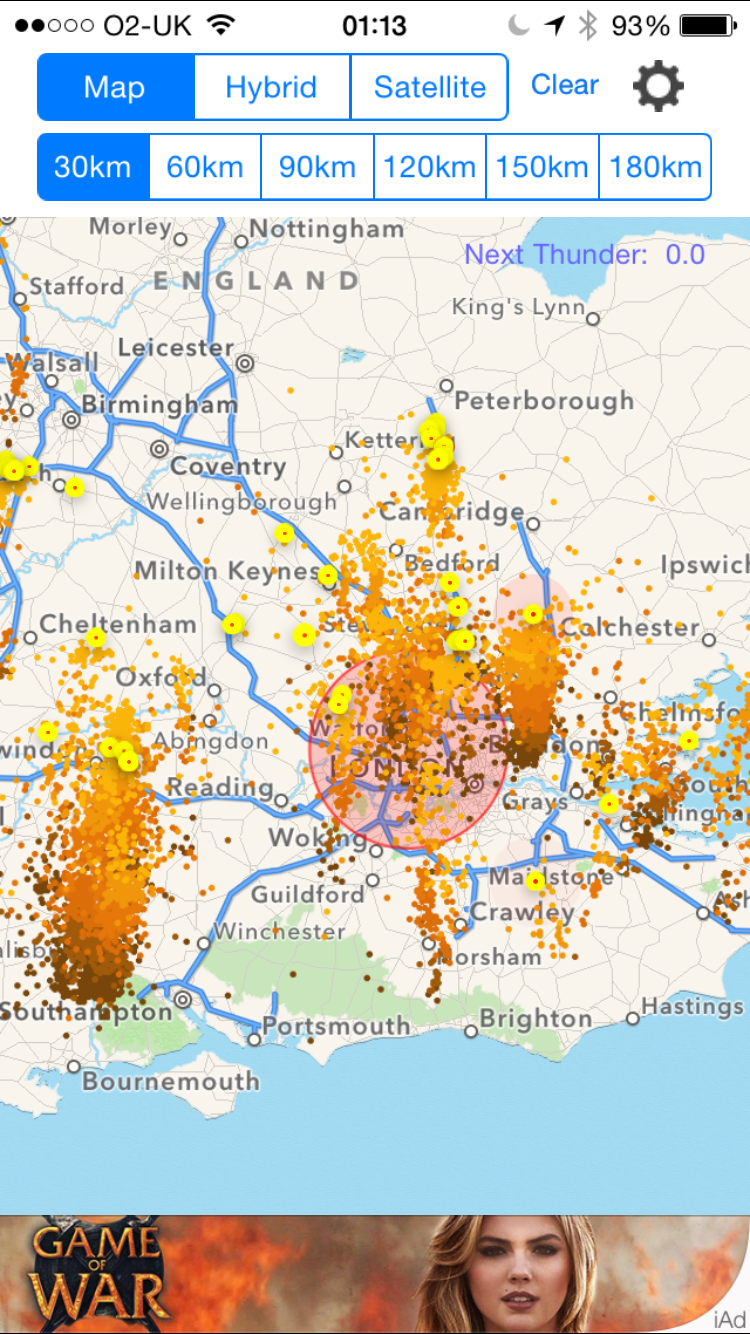
Storms last night & lightning strikes: 102,544 in the 24 Hrs to 6:04 today
Homer replied to 6Foot2's topic in General Chat
Hehe only shows the current day Took this on my phone while it was all going off Zoomed in on more my region - was a mad old night
-
My point in case! What suits one person isn't everybodies cup of tea. Although I had misunderstood where Arthur was coming from. Agreed. I think the basis of their arguments though is that it was a good launch pad for new and random TV
-
20c solid in the server room! Office... not so good at around 28c
-
I don't understand what the makes sense bit is about? Personally I rarely watch it - but surely there should be choice for all generations? As the BBC is a PSB they should be making content for all generations. Maybe BBC4 should go as well?
-
Weather For Next Week: BBC Weather Centre [London Region]
Homer replied to 6Foot2's topic in General Chat
Shaping up for storm potential at the end of the week too!! -
British Transport Police found a tired bee during a vehicle check...
Homer replied to 6Foot2's topic in General Chat
I get that but (and I haven't read the full story so I may be wrong) how do we know they aren't on lunch/taking a break/not tasked with anything? At least they're doing something nice rather than destructive/stupid/unproductive Which lets be honest, we are very guilty of in our profession -
British Transport Police found a tired bee during a vehicle check...
Homer replied to 6Foot2's topic in General Chat
So none of us are guilty of doing something a little un-work related if we're quiet or between jobs? -
20c in mine, 21c and the core switch fans start making too much noise which is an issue at the moment as it's also doubling up as an office at the moment due to our situation. I have 4 air con units so plenty of cooling power - a steady 20c all day long
-
Evening people Who are you getting your SSL certs from at the moment? I would like one that has the chain on pretty much any platform - Windows, Mac, iOS, Android. One of our GoDaddy certs isn't valid on iOS which is annoying Cheers Steve
-
I'd be careful, make sure your DC isn't using encryption anywhere before killing the CA off. You may find that the DC has a setting applied in a GPO which is telling it to request certificates. Should be under Computer > Security > PKI > Certificate Services Client - Auto-Enrollment If this is applied to a DC, and in your certification authority a template is enabled to allocate certificates to a DC, this would explain what's going on!
-
Has anybody got OSTicket to do LDAP Auth? Last time I tried I couldn't (although I didn't try hard) to get it do AD authentication for anybody logging in? Liking the look of OP Smart Desk though, not badly priced and very user friendly
-
Evening all Hope you can help, we've got a few Lightroom licenses that we're keen to get installed and into use but I am acutely aware that Lightroom does not play well with network shares/drive maps for it's library. Have any of you managed to find a work around to get it working for the users in your schools? If so, how have you done it? I am thinking putting a 'scratch' location in place on the machines for local storage, allowing certain students to write to the location (and denying others read) and then a program/signed powershell script which has two options - first to copy the library from network to scratch, and then to copy it from scratch to network when they are finished. What do you all think? Please help, I'm a little stuffed with this one! Steve
-
Anyone else need a separate internet line in school just for techs? LEA proxy
Homer replied to DCUK6's topic in General Chat
I have a glorious VMB connection that I and only I manage - so no issues with stupid LEA filtering! -
XFM in the car on the way in/home. Love the breakfast show Spotify during the day
-
Morning all Sorry for a kind of thread revival but it's not too old so thought it would be ok - and I have exactly the same issue. Has anybody else found a good solution to this one? I'm thinking along the lines of a restricted writable space on the local disk, with a program that can 'sync' the catalog files? Maybe offline files could help? *shudder* Any advice welcome... iSCSI is an interesting idea too
-
Pretty much what howartp said - I had our solutions provider ask their reseller for their DEP ID and the answer was that they know it will be ready in a few months but not available yet - even though you can begin the enrollment process on the Apple VPP website. ARGH
-
Morning all Found this script from TechNet: https://gallery.technet.microsoft.com/office/6f7eee4b-1f42-499e-ae59-1aceb26100de#content It's very well featured and does what I want it to do. However, when it generates the signature for a user who has not launched Outlook before, Outlook launches. I can't for the life of me figure out why Outlook wants to launch because I can't see anything in the script that should be calling it? Hoping one of you guys may be able to help me out with this one. I have made some changes to the original script to try and get it to work without launching Outlook, so I have pasted the version that I am running at the moment, below. Thanks Steve <# .SYNOPSIS Script to set Outlook signature for Outlook 2010 or Outlook 2013 .DESCRIPTION Script to set Outlook signature as either available or forced. Tested on Office 2010 and Office 2013. Provided AS IS with no warranty. This script is a modified version of Jan Egil's script: http://gallery.technet.microsoft.com/office/6f7eee4b-1f42-499e-ae59-1aceb26100de Some of the modifications made: - Removed signature version stamp in registry - Ability to set the signature version - When setting the signature as available, the COM object is used and when forced, a registry change is applied - Removed a lot of things removed that did not fulfill my needs - A lot of other things that I don't remember Author: Daniel Classon Version: 1.0 History: 1.0 2014-09-24 - First version released Step-by-Step 1. Create a *.docx file 2. Edit the file so it looks the way you want the signature to look and edit text to correspond with the AD properties further down in the script. For example the test "Title" corresponds to the AD property "title". 3. Edit the section #Custom variables 4. Run the script 5. Done! #> #Custom variables $SignatureName = 'Signature' #Insert desired name of signature. This will name will appear in Outlook. $SigSource = "\\path omitted" #Provide full path to the *.docx signature file $SignatureVersion = "1.1" #Change this if you have updated the signature. If you do not change it, the script will quit after checking if signature is up to date. $ForceSignature = '1' #If set to '0', the signature will be editable in Outlook and if set to '1' will be non-editable and forced. $DefaultAddress = 'omitted' $DefaultCity = 'omitted' $DefaultTelephone = 'omitted' #Environment variables $AppData=(Get-Item env:appdata).value $SigPath = '\Microsoft\Signatures' $LocalSignaturePath = $AppData+$SigPath $RemoteSignaturePathFull = $SigSource #Copy version file If (!(Test-Path -Path $LocalSignaturePath\$SignatureVersion)) { New-Item -Path $LocalSignaturePath\$SignatureVersion -Type Directory } Elseif (Test-Path -Path $LocalSignaturePath\$SignatureVersion) { Write-Output "Latest signature already exists" break } #Check signature path (needs to be created if a signature has never been created for the profile if (!(Test-Path -path $LocalSignaturePath)) { New-Item $LocalSignaturePath -Type Directory } #Get Active Directory information for current user $UserName = $env:username $Filter = "(&(objectCategory=User)(samAccountName=$UserName))" $Searcher = New-Object System.DirectoryServices.DirectorySearcher $Searcher.Filter = $Filter $ADUserPath = $Searcher.FindOne() $ADUser = $ADUserPath.GetDirectoryEntry() $ADDisplayName = $ADUser.DisplayName $ADEmailAddress = $ADUser.mail $ADTitle = $ADUser.title $ADDescription = $ADUser.description $ADTelePhoneNumber = $ADUser.TelephoneNumber $ADFax = $ADUser.facsimileTelephoneNumber $ADMobile = $ADUser.mobile $ADStreetAddress = $ADUser.streetaddress $ADCity = $ADUser.l $ADPOBox = $ADUser.postofficebox #$ADCustomAttribute1 = $ADUser.extensionAttribute1 $ADModify = $ADUser.whenChanged #Copy signature templates from domain to local Signature-folder Write-Output "Copying Signatures" Copy-Item "$Sigsource" $LocalSignaturePath -Recurse -Force $ReplaceAll = 2 $FindContinue = 1 $MatchCase = $False $MatchWholeWord = $True $MatchWildcards = $False $MatchSoundsLike = $False $MatchAllWordForms = $False $Forward = $True $Wrap = $FindContinue $Format = $False #Insert variables from Active Directory to rtf signature-file $MSWord = New-Object -ComObject word.application $fullPath = $LocalSignaturePath+'\'+$SignatureName+'.docx' $MSWord.Documents.Open($fullPath) #User Name $ Designation $FindText = "DisplayName" #$Designation = $ADCustomAttribute1.ToString() #designations in Exchange custom attribute 1 If ($Designation -ne '') { $Name = $ADDisplayName.ToString() $ReplaceText = $Name #+', '+$Designation } Else { $ReplaceText = $ADDisplayName.ToString() } $MSWord.Selection.Find.Execute($FindText, $MatchCase, $MatchWholeWord, $MatchWildcards, $MatchSoundsLike, $MatchAllWordForms, $Forward, $Wrap, $Format, $ReplaceText, $ReplaceAll ) $LogInfo += $NL+'Username: '+$ReplaceText #Title $FindText = "Title" $ReplaceText = $ADTitle.ToString() $MSWord.Selection.Find.Execute($FindText, $MatchCase, $MatchWholeWord, $MatchWildcards, $MatchSoundsLike, $MatchAllWordForms, $Forward, $Wrap, $Format, $ReplaceText, $ReplaceAll ) $LogInfo += $NL+'Title: '+$ReplaceText #Mail $FindText = "mail" $ReplaceText = $ADEmailAddress.ToString() $MSWord.Selection.Find.Execute($FindText, $MatchCase, $MatchWholeWord, $MatchWildcards, $MatchSoundsLike, $MatchAllWordForms, $Forward, $Wrap, $Format, $ReplaceText, $ReplaceAll ) $LogInfo += $NL+$ReplaceText #Description If ($ADDescription -ne '') { $FindText = "Description" $ReplaceText = $ADDescription.ToString() } Else { $FindText = " | Description " $ReplaceText = "".ToString() } $MSWord.Selection.Find.Execute($FindText, $MatchCase, $MatchWholeWord, $MatchWildcards, $MatchSoundsLike, $MatchAllWordForms, $Forward, $Wrap, $Format, $ReplaceText, $ReplaceAll ) $LogInfo += $NL+'Description: '+$ReplaceText #Street Address If ($ADStreetAddress -ne '') { $FindText = "StreetAddress" $ReplaceText = $ADStreetAddress.ToString() } Else { $FindText = "StreetAddress" $ReplaceText = $DefaultAddress } $MSWord.Selection.Find.Execute($FindText, $MatchCase, $MatchWholeWord, $MatchWildcards, $MatchSoundsLike, $MatchAllWordForms, $Forward, $Wrap, $Format, $ReplaceText, $ReplaceAll ) $LogInfo += $NL+'Street Address: '+$ReplaceText #City If ($ADCity -ne '') { $FindText = "City" $ReplaceText = $ADCity.ToString() } Else { $FindText = "City" $ReplaceText = $DefaultCity } $MSWord.Selection.Find.Execute($FindText, $MatchCase, $MatchWholeWord, $MatchWildcards, $MatchSoundsLike, $MatchAllWordForms, $Forward, $Wrap, $Format, $ReplaceText, $ReplaceAll ) $LogInfo += $NL+'City: '+$ReplaceText #Telephone If ($ADTelephoneNumber -ne "") { $FindText = "TelephoneNumber" $ReplaceText = $ADTelephoneNumber.ToString() } Else { $FindText = "TelephoneNumber" $ReplaceText = $DefaultTelephone } $MSWord.Selection.Find.Execute($FindText, $MatchCase, $MatchWholeWord, $MatchWildcards, $MatchSoundsLike, $MatchAllWordForms, $Forward, $Wrap, $Format, $ReplaceText, $ReplaceAll ) $LogInfo += $NL+'Telephone: '+$ReplaceText #Mobile If ($ADMobile -ne "") { $FindText = "MobileNumber" $ReplaceText = $ADMobile.ToString() } Else { $FindText = "| Mob MobileNumber " $ReplaceText = "".ToString() } $MSWord.Selection.Find.Execute($FindText, $MatchCase, $MatchWholeWord, $MatchWildcards, $MatchSoundsLike, $MatchAllWordForms, $Forward, $Wrap, $Format, $ReplaceText, $ReplaceAll ) $LogInfo += $NL+'MobileNumber: '+$ReplaceText #Save new message signature Write-Output "Saving Signatures" #Save HTML $saveFormat = [Enum]::Parse([Microsoft.Office.Interop.Word.WdSaveFormat], "wdFormatHTML"); $path = $LocalSignaturePath+'\'+$SignatureName+".htm" $MSWord.ActiveDocument.saveas([ref]$path, [ref]$saveFormat) #Save RTF $saveFormat = [Enum]::Parse([Microsoft.Office.Interop.Word.WdSaveFormat], "wdFormatRTF"); $path = $LocalSignaturePath+'\'+$SignatureName+".rtf" $MSWord.ActiveDocument.SaveAs([ref] $path, [ref]$saveFormat) #Save TXT $saveFormat = [Enum]::Parse([Microsoft.Office.Interop.Word.WdSaveFormat], "wdFormatText"); $path = $LocalSignaturePath+'\'+$SignatureName+".txt" $MSWord.ActiveDocument.SaveAs([ref] $path, [ref]$SaveFormat) $MSWord.ActiveDocument.Close() $MSWord.Quit() #Office 2010 If (Test-Path HKCU:'\Software\Microsoft\Office\14.0') { Write-Output "Setting signature for Office 2010" If (Get-ItemProperty -Name 'ReplySignature' -Path HKCU:'\Software\Microsoft\Office\14.0\Common\MailSettings' -ErrorAction SilentlyContinue) { Write-Output "Signature already exists" } Else { New-ItemProperty HKCU:'\Software\Microsoft\Office\14.0\Common\MailSettings' -Name 'ReplySignature' -Value $SignatureName -PropertyType 'String' -Force New-ItemProperty HKCU:'\Software\Microsoft\Office\14.0\Common\MailSettings' -Name 'NewSignature' -Value $SignatureName -PropertyType 'String' -Force } } If ((Test-Path HKCU:'\Software\Microsoft\Office\14.0') -eq $False) { Write-Output "Office 2010 is not installed" } #Office 2013 If (Test-Path HKCU:'\Software\Microsoft\Office\15.0') { Write-Output "Setting signature for Office 2013" If ($ForceSignature -eq '0') { Write-Output "Setting signature for Office 2013 as available" #$Outlook = "Outlook" #if ($Outlook -ne $null) #{ #Stop-Process -Name $Outlook -Force #} $MSWord = New-Object -comobject word.application $EmailOptions = $MSWord.EmailOptions $EmailSignature = $EmailOptions.EmailSignature $EmailSignatureEntries = $EmailSignature.EmailSignatureEntries $EmailSignature.NewMessageSignature="$SignatureName" $EmailSignature.ReplyMessageSignature="$SignatureName" #Stop-Process -Name $Outlook } If ($ForceSignature -eq '1') { Write-Output "Setting signature for Office 2013 as forced" If (Get-ItemProperty -Name 'NewSignature' -Path HKCU:'\Software\Microsoft\Office\15.0\Common\MailSettings' -ErrorAction SilentlyContinue) { } Else { New-ItemProperty HKCU:'\Software\Microsoft\Office\15.0\Common\MailSettings' -Name 'NewSignature' -Value $SignatureName -PropertyType 'String' -Force } If (Get-ItemProperty -Name 'ReplySignature' -Path HKCU:'\Software\Microsoft\Office\15.0\Common\MailSettings' -ErrorAction SilentlyContinue) { } Else { New-ItemProperty HKCU:'\Software\Microsoft\Office\15.0\Common\MailSettings' -Name 'ReplySignature' -Value $SignatureName -PropertyType 'String' -Force } } } If ((Test-Path HKCU:'\Software\Microsoft\Office\15.0') -eq $False) { Write-Output "Office 2013 is not installed" }
-
Could be a lot worse than that mate! I'm glad it's running now though
-
Good shout, check all fuel / ignition fuses, see if you can hear the tank pump running when you put the ignition to position 2 (before cranking). Have you tried giving it just a tiny bit of throttle when cranking? If the idle control is completely blocked it could starve it of air? Just a random idea
-
Is it actually cranking or is the starter just spinning? Coil pack could be a possibility they can be a weak point on the old Focus', has it been running badly?
-
Wonder if PizzaHut/Dominos use crap like this or if it is the little independant chains that are guiltier? @Sdrawkcab - that would explain why when I've bought the bags of grated cheese it's tasted like proverbial!
-
Another +1 for WebHelpDesk, used it since around 2010 now and it has been excellent. Has a lot of very useful functionality, and does exactly what it says on the tin. It may cost, but it works well. Hit Unipress up, they resell it at cost (I think) and have their own in house support if you buy through them. Give it a trial, I think you will like it
-
Standardising Underground Maps To Make Them Easily Understood
Homer replied to 6Foot2's topic in General Chat
Watford isn't east of Uxbridge, it's north! Not the best, however it makes some kind of sense?