Olliedawg
-
Posts
1,359 -
Joined
-
Last visited
Content Type
Forums
News
20th
EduGeek EDIT Conference
Blogs
Everything posted by Olliedawg
-

Trouble with Silently configure OneDrive user accounts
Olliedawg replied to AlteredAdmin's topic in Cloud Services
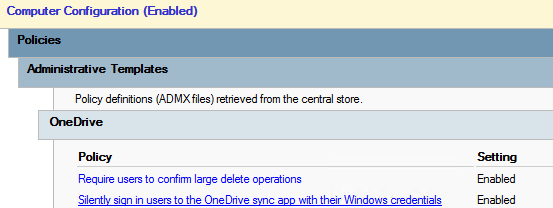
Resurrecting this thread - having the same problem. I have the GPO set, however it seems to be sporadic on when it decides to sign in. I have Edge/Teams auto signing in fine for staff and students.. Just onedrive which is an issue. As above, if a user clicks on the grey cloud in the taskbar, they are prompted to setup & this does work
-
https://shotcut.org/ Used this myself
-
Just a thought - does this not void cyber insurance, since you are technically running on "unsupported" hardware?.. I have stuck with w10 across the board at my school for the time being. As for meeting the hardware requirements of w11, we have 3 IT suites to replace (x34 desktops in each), around 30 Staff desktops, about 50 laptops. Our newest IT suite is running 6th gen intel, oldest is 4th gen.
-
VmWare Host - Not Responding
Olliedawg replied to Bankesy's topic in Thin Client and Virtual Machines
This is happened to me before running ESXi on a SD card. Was fine for a few years though! We didn't have a backup of the ESXi configuration either that was a fun afternoon I think best practice is running on an internal SSD/SSD's (BOSS RAID 1 if using dell servers) -
WufB is easier to manage. Set policies and then it does its own thing.. Worth looking into even if you don't use Intune
-
following
-
You could use the machine wide installer to deploy the "classic" teams now. Come next early next year, if you are running the classic version, you will automatically receive an update to the new version of teams. Deploying the new version of Teams seems to be a bit more of a job than the classic one, as they dont offer a .msi package
-
Seen that - EOL 31st March 2025. I'll get in touch with our service provider who provided us the firewall & see what our options are.
-
Thanks you. Yeh i've come to the conclusion that it just cant handle all the traffic, even for our small-ish school. Im sure our XG210 is in contact until early 2025
-
Not a LGfL school.. But we do use Salamander, its great, and the support team are also great. I use the remote access/support via their Salamander Integration Suite software (I believe it uses an API to send data about your configurations/workflows to the assigned support technician.) Requires a certain version of PowerShell to run I believe? (don't quote me on that). Always worked well for us, just enable it for the day you submit a ticket. Can be extended if required.
-
Just checked, only two FW rules have HTTPS decryption applied, and they only apply to students. I'll try disable the decryption & see what the usage is like this afternoon *edit* Disabled HTTPS decryption on both of the student policies about an hour ago now. CPU usage is now averaging around 25%. Seems like the FW can't keep up with the amount of decryption/scanning! This is a shame as we don't get the keyword reporting with this disabled.
-
Not massive. ~540 students, ~120 staff. Decryption is not enabled for staff. (just double checking all the FW rules now..) This is what it is reporting in Solaris mode ( Sophos Firewall: Check the CPU usage using top )
-
Afternoon all, Experiencing some performance issues with our XG210. CPU usage sometimes bumps up to 100%, causes websites to load slowly for end users. Only thing I have changed recently is enabling HTTPS decryption for all student traffic, which includes Student PC's, Shared iPads, Student VLAN.. this was enabled for FastVue Reporting. Users authenticate through Sophos STAS. I don't really want to disable the decryption, as the keyword monitoring is invaluable to our Safeguarding lead. In anyone's experience, is there anything I can tone down to lower this usage? (and yes i have tried switching it off and on again!)
-
I do similar for our students who are entitled to Word processors (laptops) during exam periods. We use ExamWritePad with the student working locally using individual Exam user accounts, which are locked down heavily (even more so than their regular student user). These accounts are only able to save to specific folder/s. I deploy a scheduled task to these exam laptops which runs robocopy /e every 5 minutes to the network location where we store their exams. All a power outage would do for us during exams is remove the ability to print, until power is restored.
-
HIK Vision - Web Portal - Login - Chrome Browser
Olliedawg replied to Koldov's topic in Physical Security
+1 for iVMS. Set up your local super user account & then create the user a account with operator level permissions, tweak as necessary. I did try to use the web interface, would be great if it actually worked.. just so inconsistent -
You could add a shortcut to the App Launcher in 365 (the 9 dots in the top left) Will need to provision users to it, otherwise it will appear for all users in tenant Add custom tiles to the app launcher - Microsoft 365 admin | Microsoft Learn Pin apps to your users' app launcher - Microsoft 365 admin | Microsoft Learn
-
This is what is stopping me from using InTune at the moment. We're on A1 Edu, very barebones indeed. Lack of configuration is keeping me on local domain joined setups / group policy, even for laptops. ( Don't get me wrong this method works fine, but for mobile devices especially inTune is far superior if you have the licences for it.
-
Who was this with please? Way cheaper than what I was quoted!! - - - Updated - - - I thought it was best to have 3CX running bare-metal on a standalone machine - Correct me if im wrong though!
-
Looking to upgrade our aging on-prem server which hosts 3CX. Currently running on a HP ProLiant DL20 Gen 9 with following spec.. CPU : Intel E3-1220 v6 Memory : 16GB (is 8 enough? usage seems to peak at 6GB) x2 500GB HDD's in raid 1 (storing recordings etc..) x2 240GB SDD's in raid 1 (OS) Was looking at something similar to this : Dell PowerEdge R250 1U Rack Server – ServerSource : Seems to fit the bill pretty well What do you use for your onprem 3CX? Arguments for going cloud-hosted vs onprem?
-
If I remember rightly they staggered the release to PC by quite a bit with GTA V.. most likely be the same. Shame as I don't own any consoles, only a PC!
-
Looks promising. One thing I did notice was how crowded the streets were. Hopefully this is the same in-game!
-
As title, is this possible with a task sequence in MDT? How did you all perform in place upgrades from 10>11? We don't use WSUS or SCCM. Just preparing for when we have enough compatible machines to warrant moving to 11 (majority currently are not compatible)
-
I think Delprof would be the easiest.. Delprof cleans up registry as well so you can be sure the profiles are completely removed
-
Have been silently following - glad you are getting somewhere. You could try remove the stuck user via powershell & then attempt a log in once this is done (possibly with another account?). Although like you say, its strange that a reboot didn't clear this
-
Do you block Youtube for Students?
Olliedawg replied to Driftingashore's topic in Internet Related/Filtering/Firewall
Allowed for all students in restricted mode, staff have moderate. I have often wondered if its worth having unblocked for students, as im sure most just pi** about on there, although i've never had any concerns raised by any teaching staff. Both have usage monitored using FastVue / Sophos XG