Search the Community
Showing results for tags 'hap+'.
Found 19 results
-
Hello, We are just about to use the booking system, but have noticed what looks like a bug. We have added some department laptops to the system and have enabled split resources. However, during testing, we have noticed that if we book say 10 out 20 laptops, the booking system time slot will still say there are 20 free laptops. Surely, this should say 10? (in this particular case) Whilst on the subject of the booking system, is it possible to have FREE/Not Booked time slots a different colour so that they can be easily identified? Either make them bold, or green - something like that. Thanks in advance.
-
Hello everyone, We have just got the booking system up and running and working quite well. I was just wondering if the following authentication scenario is supported: If so, is it possible for it to be set up like this: https://hap.school.lea.sch.uk/hap/bookingsystem - this uses Windows Authentication and logs the user in automatically https://hap.school.lea.sch.uk/hap/helpdesk - this uses Windows Authentication and logs the user in automatically but if they were to go to: https://hap.school.lea.sch.uk/hap - it would show the login form and ask for username and password. Thanks.
-
Firstly thanks Nick for an excellent piece of software. After our upgrade from v10 pre-release to V10 final, we can no longer see any bookings or booking slots on the main page. They are still visible on the overview pages. The date picker does not work and it looks like the date isn't being loaded. Our server is 2012 R2. We would appreciate your advice. Sean
-
Hello, I am trying to setup HAP+ at another school so they can make use of the room booking system. However, for some reason every time a member of staff logs in, it throws the "Unauthorised" error. I have tweaked the Booking System web.config as follows: Staff can login and get to the landing page, but when they go to click "Booking System" it then just shows the unauthorised page. If I log in as a user that's a member of Domain Admins, it works without any problems. I've also noticed that although I've restricted access to setup.aspx to Domain Admins, all users can still access this. Is there an IIS role that's missing? Many thanks in advance.
-
I've just installed HAP v10 and would like to thank Nick again on creating a great product. Playing around with the new features in v10 I've spotted the DirectEdit option and enabled it by default for all users (from: http://www.edugeek.net/forums/home-access-plus/139919-globally-enable-direct-edit.html). In the past, there have been staff that haven't read the warning when double clicking a file, about using 'save as' and to upload it again, then complained that the system isn't working when the changes they made aren't there when they log back in the next day. I was just wondering if it was possible that when a file is double clicked for the file types that DirectEdit supports (and DirectEdit is enabled), if a message could be displayed first asking the user if they want to "edit the file in (name of default program)" or to "download file". Depending on what is selected, the relevant task then happens. If a message box isn't feasible, an 'Edit' option could be displayed on the blue bar at the top. I am aware that the option to either download or edit is available via right-click, but most users will forget if I tell them about it, will never right-click it, or just double click the file as they are used to. I've tried to attach an example of what it may look like, although my photo editing skills aren't up to much. P.S. What file types does DirectEdit support? I'm assuming all of the default MS Office ones.

-
Hi all, Was hoping to find out if anyone new if it's possible to remove the custom file extension filter (or add to it) that is applied to the upload box. I've added Smart Notebook to the list of file extensions allowed, but when a user comes to upload it they have to click on the extension drop and choose all files - so quite a problem to staff ("all my files have vanished!") So can I remove the custom file extension filter? So it'l let them choose any file? (It still would tell them if its not allowed) Or can I edit this custom file filter?
-
Hi All, I wonder if anyone could help me. I have setup HAP version 8 and I think it is fantastic, its much better than the old system we used to use here. I am however having some trouble understanding how to setup the exchange Live Tile. I assume this is done by the "Exchange Advanced Features" as discussed in the documentation on page 5... Exchange 2010/Office 365 Establishments If you run an Exchange 2010 Server or have an Office 365 account, you can enable advanced features by setting the exchange server attribute in the ~/App_Data/HAPConfig.xml file Look for the element and add: exchange="%your external FQDN of your Exchange Server%" The problem is, I cant seem to find the element that the documentation talks about. Can anyone point me in the right direction, no doubt I'm just missing something. Thanks very much in advance!!
-
Hi all, I'm currently a first time user of HAP and I'm desperately trying to get this set up on our webserver. After reading through the forums, I appear to be coming up against the same problems identified in this: home-access-plus/91133-documents-dont-appear-when-i-log.html thread (sorry I can't post links yet). That thread seems to have died now and so I thought I would start from scratch to see where the problem lies. I have ticks all the way through the first General tab and so it all looks fine there, but the problem is when I drill down into the AD tab. Using Firefox / Firebug seems to have given me a better insight into the problem. A popup that I am seeing shows the following: There is something wrong connecting to your AD Infrastructure, please review the AD settings and try again. The most common cause of this is using a user not in the Domain Admins or Administrators Group Now I know that the user(s) that I've tried are all domain administrators and everything I've entered appears to be correct but I continue to get the red X under base settings. Trying to browse the students group opens a blank popup box with a text box inside but nothing works. Testing the API for connectivity recieves 'OK', and using setup API I get 'Endpoint not found. Please see the service help page for constructing valid requests to the service.' but everything seems fine elsewhere. I'm absolutely convinced that what I'm entering here is correct. Really struggling with this one as I've spent a while trying to get this up and running now. Any help is much appreciated!
-
Hi im new to HAP this install is my first attempt, i wonder if anyone can help me with a problem im having. The install has worked very well, I can log on, browse and download files in the shares i setup using My Files (ie Home directory). The problem i'm having is when i try and upload a file. I get the upload dialog box, i can browse to the file but when click upload i get the upload progress bar in the bottom right but nothing happens. I have tried it internally to rule out any problems on the firewall. Using ISS 8, server 2012. Thanks in advance Mike.
-
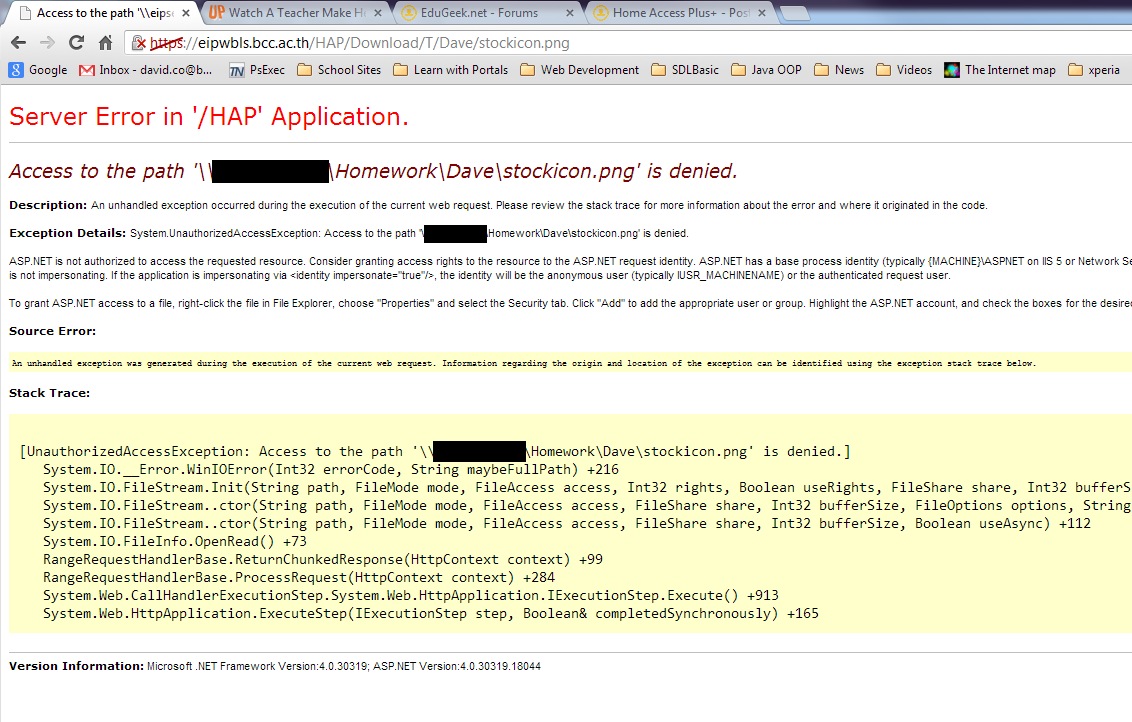
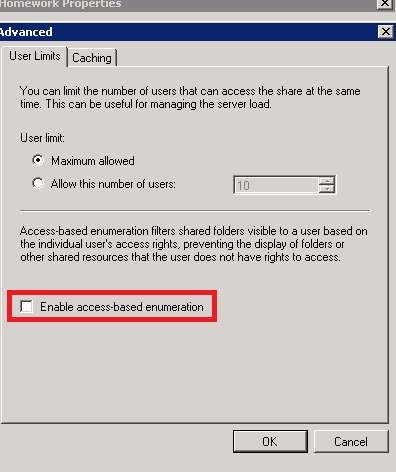
The following maybe of some help to administrators / teachers trying to configure HAP+ for Homework. I’ll try to keep this updated as I refine it, sorry if it’s a bit long winded. Just some background,I work at a school in Bangkok, and I am both the IT admin for my departments private network and a computer science teacher, which is both a blessing and a curse. I have been working on testing the below over the past few weeks, and collecting feedback from students and teachers via questionnaires. Our situation Teachers want to distribute files / handouts to students outside of class time, have the students complete the work digitally (or scan / photograph work), then upload it through HAP+ so it can be marked. Teachers want specific folders that they can create in a homework drive and for students to be able to list all the files in the folder and upload their files. However, they do not want students to be able to change it / delete it once uploaded, and they also don’t want student getting access to the other files. The HAP+ setup · Create a drive in HAP+ called homework mapped to a network share (mine is \\server\Homework). · Give both students and teachers Read/Write access in the HAP+ admin panel. The Share Setup · Create a folder on your file server called Homework. · Share this folder to both the Teacher Group and the Student Group. At this point give them both read/change access. · Right click on the folder and set up the NTFS permissions. This is the important bit. I have 2 groups, one called Teacher and another called Secondary. The permission for those are as follows (I did this in the standard permission box on the security tab, but if you have issues with inheritance you may need to use the advanced section, removing inheritance and adding System, Administrator, Teacher and Secondary): o Teacher – Modify, Read and Execute, List Folder Contents, Read, Write o Secondary – List Folder Contents, Write Testing With the above setup, teachers see the Homework drive like any other drive they have read/write access to. Students can see the drive, enter it, see folder but not list any of the files. They can upload, but get no confirmation that it uploaded, nor can they check without trying to upload it a second time, which they receive an error that the file already exists. Fixing the file listing so students can see the files This took me a long time to figure out, but the reason why students don’t see any file listed is due to Access-Based Enumeration. Windows handles sharing / NTFS permissions with this switched on by default. As I understand it, with this enabled Windows will hide files that don’t have Read Access. It’s a nice security feature, but after testing multiple homework submissions and getting feedback from my students, they all complained about not being able to see files, and check if the upload worked. So, to disable access-base enumeration and list all the files in HAP+, simply: 1. On the server, go to Server Manager -> Roles -> File Services -> Share and Storage Management. 2. Find the share you want to adjust, in my case Homework. 3. Right Click and select Properties. On the first tab (Sharing), select Advanced. 4. Uncheck the box labeled “Enable access-base enumeration”. 5. Click OK, and the effect should be instant. Now when students log into HAP+ (or if they have a mapped homework drive) they can list all the files, upload their homework, but still can’t download / copy / delete / edit them. HAP+ Issues The file manager in HAP+ responds oddly to this. Because it can see the files, you still get the context menu listing download / Zip / Delete. Zip and Delete just don’t work and give the standard red error bar. However, if a student selects Download, you are presented with a nasty error page (see attached). I am hoping this is just a small issue with HAP+ that can be fixed, but my students are just happy we can list files and submit. Security Issue I am no security expert, but I can only imagine that Access-based Enumeration is enabled by default for extra share security. I am using a very specific share only for homework, so I can’t really see how I maybe exposing a security hole. But there is always the possibility. Plagiarism We found a nice way to check for plagiarism as well. When the file is uploaded through HAP+, it gets stamped with a creator because of HAP+ virtualization. So as I get my students to upload files with a filename of their student ID, if I think they got their friend to complete and upload their work for them, I can always right click on the file in explorer and check who created it. Admittedly this only shows if someone uploaded it for them, but the illusion of control in teaching is sometimes very effective. Future Developments A couple of teachers have asked by returning homework once it is marked. Right now we use another drive with Read Only permissions to store this stuff. The majority of the time it wouldn’t matter if students see each other’s work after it has been submitted and marked. But there is always an exception (like multiple classes at different stages in learning) where access only to the specific student might be needed. I am working with testing a solution / power script with a teacher where they can adjust the individual file permissions in batch with zero technical knowledge. Hope this helps people in the homework situation. I know HAP+ has a homework script in development, but it’s not ready and also adding individual students to a homework category can be laborious (especially as I have 300+ students spread over 11 classes) .
-
Howdy, I'm having some real issues installing Home Access Plus onto a newly created web server. I have followed the video instructions to the "t" but when i go to launch the setup.aspx i get a server error 500 "there is an error with the resource you are looking for and it can not be displayed". However, if i put a index.html file in the folder it will display properly. So somewhere I'm having issues getting the aspx files to display. Can someone point me in the right direction on this? Thanks!
-
Hi @nickbro I had the MyFiles preview working in HAP+ 7.7, but since I've upgraded to 7.8 I'm getting an error. This is my first HAP+ error, so go easy on me debugging it, I'm a newby! I've deleted all the HAP folder and recreated it out of the latest HAP+ Web v7.8.1211.1640.zip file, replacing my copy of the web.config and App_Data\hapconfig.xml files. Still no dice. Can you point me in the right direction to try and sort this? Thanks, Tim. The error is below: Index and count must refer to a location within the string. Parameter name: count Description: An unhandled exception occurred during the execution of the current web request. Please review the stack trace for more information about the error and where it originated in the code. Exception Details: System.ArgumentOutOfRangeException: Index and count must refer to a location within the string. Parameter name: count Source Error: Line 84: if (window.location.href.split('#')[1] != "" && window.location.href.split('#')[1]) { Line 85: curpath = window.location.href.split("#")[1] Line 86: if (typeof (window.FileReader) != 'undefined') $("#MyFiles").attr("dropzone", "copy<%=DropZoneAccepted %>"); Line 87: if (viewMode == 1) { $("#MyFiles").addClass("details"); $("#MyFilesHeaddings").show(); } Line 88: else if (viewMode == 2) $("#MyFiles").addClass("small"); Source File: c:\inetpub\wwwroot\hap\MyFiles\Default.aspx Line: 86 Stack Trace: [ArgumentOutOfRangeException: Index and count must refer to a location within the string. Parameter name: count] System.String.RemoveInternal(Int32 startIndex, Int32 count) +0 HAP.Web.MyFiles.Default.get_DropZoneAccepted() +448 ASP.myfiles_default_aspx.__Render__control3(HtmlTextWriter __w, Control parameterContainer) in c:\inetpub\wwwroot\hap\MyFiles\Default.aspx:86 System.Web.UI.Control.RenderChildrenInternal(HtmlTextWriter writer, ICollection children) +131 System.Web.UI.Control.RenderChildrenInternal(HtmlTextWriter writer, ICollection children) +246 System.Web.UI.HtmlControls.HtmlForm.RenderChildren(HtmlTextWriter writer) +315 System.Web.UI.HtmlControls.HtmlContainerControl.Render(HtmlTextWriter writer) +48 System.Web.UI.Control.RenderChildrenInternal(HtmlTextWriter writer, ICollection children) +246 System.Web.UI.Control.RenderChildrenInternal(HtmlTextWriter writer, ICollection children) +246 System.Web.UI.Page.Render(HtmlTextWriter writer) +40 System.Web.UI.Page.ProcessRequestMain(Boolean includeStagesBeforeAsyncPoint, Boolean includeStagesAfterAsyncPoint) +5290
-
Hi How can i disable the negotiate authentication pop up once someone logins using sso? Cheers Mark
-
Hi, I see when One Drive was called Sky Drive you could link it with HAP+. Is this still possible? It would be great to have a 'send to one drive/office 365' option like the send to Google Doc's option already in HAP+ Thank you
-
Hello, Been trying to get SQL Login Tracker working but for some reason the following page is displayed when logging on to the site. The SQL database is hosted on a different server to the HAP server. I have put the following into the Web.config to specify the SQL Connection to no avail: "SQLConnectionString" connectionString="Server=SQL2\HAP;Database=hap_DB;User Id=hapDB_user;Password=;" If anyone has any bright ideas, I would be most grateful. J.Worth
-
Hello everyone, We have HAP+ working well. We also have RemoteApps listed on Home Access Plus+ available to staff. My question is there anyway of having SSO so that when a user signs into the HAP+ site, they don't need to enter any credentials to login to a RemoteApp? Thanks in advance. J.Worth
-
Hey folks! I'm trying to setup Home Access Plus on a Win2k8R2 server, but I'm getting some odd behavior. I set up the site according to the documentation on the Codeplex site, but whenever I open the URL in the my browser, it seems to only be loading the specific page I'm on - no CSS, Javascript, etc. If I view source and click on one of the files it's trying to load, I get an error stating that "The page cannot be displayed because an internal server error has occurred." I've not seen this one before, and Google's being of only limited help. Has anyone encountered this error before? Joey
-
Good Afternoon, Is it possible to get HAP to accept [email protected] as a login? Thanks Paul
-
Hi, I'm following the Server 2012 / IIS8 Video and am up to the point of requiring an SSL Cert (I can access the setup page using http - http://localhost/hap/setup.aspx with services check failing). I've not done much / anything with SSL certs previously, could somebody give me a quick walk through of how/where you acquired the cert / how you installed/setup the cert on IIS8 please? Our Web domain is purchased through GoDaddy, will I need to purchase the cert through GoDaddy too? Thanks for any help provided.