DaveJohnCole
-
Posts
4 -
Joined
-
Last visited
About DaveJohnCole

-
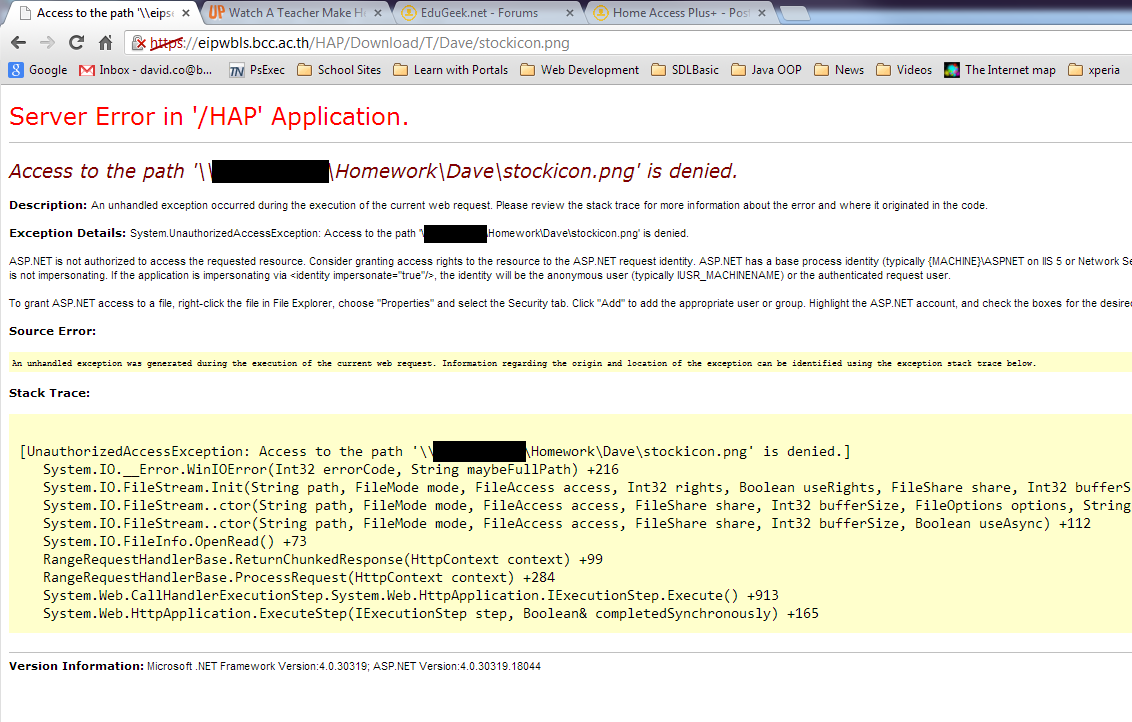
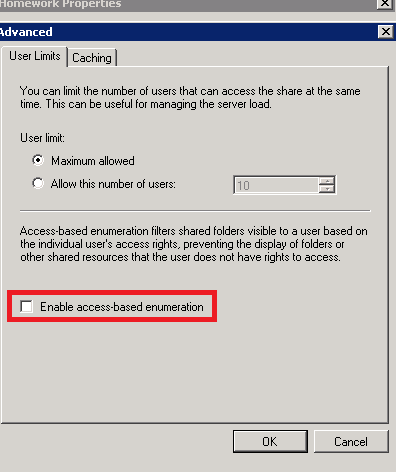
The following maybe of some help to administrators / teachers trying to configure HAP+ for Homework. I’ll try to keep this updated as I refine it, sorry if it’s a bit long winded. Just some background,I work at a school in Bangkok, and I am both the IT admin for my departments private network and a computer science teacher, which is both a blessing and a curse. I have been working on testing the below over the past few weeks, and collecting feedback from students and teachers via questionnaires. Our situation Teachers want to distribute files / handouts to students outside of class time, have the students complete the work digitally (or scan / photograph work), then upload it through HAP+ so it can be marked. Teachers want specific folders that they can create in a homework drive and for students to be able to list all the files in the folder and upload their files. However, they do not want students to be able to change it / delete it once uploaded, and they also don’t want student getting access to the other files. The HAP+ setup · Create a drive in HAP+ called homework mapped to a network share (mine is \\server\Homework). · Give both students and teachers Read/Write access in the HAP+ admin panel. The Share Setup · Create a folder on your file server called Homework. · Share this folder to both the Teacher Group and the Student Group. At this point give them both read/change access. · Right click on the folder and set up the NTFS permissions. This is the important bit. I have 2 groups, one called Teacher and another called Secondary. The permission for those are as follows (I did this in the standard permission box on the security tab, but if you have issues with inheritance you may need to use the advanced section, removing inheritance and adding System, Administrator, Teacher and Secondary): o Teacher – Modify, Read and Execute, List Folder Contents, Read, Write o Secondary – List Folder Contents, Write Testing With the above setup, teachers see the Homework drive like any other drive they have read/write access to. Students can see the drive, enter it, see folder but not list any of the files. They can upload, but get no confirmation that it uploaded, nor can they check without trying to upload it a second time, which they receive an error that the file already exists. Fixing the file listing so students can see the files This took me a long time to figure out, but the reason why students don’t see any file listed is due to Access-Based Enumeration. Windows handles sharing / NTFS permissions with this switched on by default. As I understand it, with this enabled Windows will hide files that don’t have Read Access. It’s a nice security feature, but after testing multiple homework submissions and getting feedback from my students, they all complained about not being able to see files, and check if the upload worked. So, to disable access-base enumeration and list all the files in HAP+, simply: 1. On the server, go to Server Manager -> Roles -> File Services -> Share and Storage Management. 2. Find the share you want to adjust, in my case Homework. 3. Right Click and select Properties. On the first tab (Sharing), select Advanced. 4. Uncheck the box labeled “Enable access-base enumeration”. 5. Click OK, and the effect should be instant. Now when students log into HAP+ (or if they have a mapped homework drive) they can list all the files, upload their homework, but still can’t download / copy / delete / edit them. HAP+ Issues The file manager in HAP+ responds oddly to this. Because it can see the files, you still get the context menu listing download / Zip / Delete. Zip and Delete just don’t work and give the standard red error bar. However, if a student selects Download, you are presented with a nasty error page (see attached). I am hoping this is just a small issue with HAP+ that can be fixed, but my students are just happy we can list files and submit. Security Issue I am no security expert, but I can only imagine that Access-based Enumeration is enabled by default for extra share security. I am using a very specific share only for homework, so I can’t really see how I maybe exposing a security hole. But there is always the possibility. Plagiarism We found a nice way to check for plagiarism as well. When the file is uploaded through HAP+, it gets stamped with a creator because of HAP+ virtualization. So as I get my students to upload files with a filename of their student ID, if I think they got their friend to complete and upload their work for them, I can always right click on the file in explorer and check who created it. Admittedly this only shows if someone uploaded it for them, but the illusion of control in teaching is sometimes very effective. Future Developments A couple of teachers have asked by returning homework once it is marked. Right now we use another drive with Read Only permissions to store this stuff. The majority of the time it wouldn’t matter if students see each other’s work after it has been submitted and marked. But there is always an exception (like multiple classes at different stages in learning) where access only to the specific student might be needed. I am working with testing a solution / power script with a teacher where they can adjust the individual file permissions in batch with zero technical knowledge. Hope this helps people in the homework situation. I know HAP+ has a homework script in development, but it’s not ready and also adding individual students to a homework category can be laborious (especially as I have 300+ students spread over 11 classes) .

-

Possible explanation for Android downloads stalling
DaveJohnCole posted a topic in Home Access Plus+
If anyone is having issues with android users being unable to download files, take a look at this page. http://www.digiblog.de/2011/04/android-and-the-download-file-headers/ It's old, but the issue with GET seems to be causing the problem. All solution are for php / apache and none seem appropriate for a secure system right now. Just throwing it out there. I know my users will need downloads across multiple devices. -
Passing user details from HAP to other web apps?
DaveJohnCole replied to DaveJohnCole's topic in Home Access Plus+
Thanks for the quick reply. I'll be sure to give this a go sometime this week. Just want to say thanks for all the work you have put into HAP. I spent so much time trying to develop the same thing in php, it was a nightmare! HAP is a life saver for me and my users. -
I am cuurently testing an install of HAP 9.1 and have a limited user base of 5 teachers and 2 students. I am hoping to roll this out to our entire department of 400 students and 30+ teachers in the coming months. I love HAP, but my experience is with developing in php. I would like to use HAP not only as a file manager but as a landing page for our entire eLearning solution. I am developing a simple php site for students to gain access to teacher and subject relevant pages, and use LDAP authentification. I would like to simplify user login with a one time event, then giving access to the other sites. Is there a way for me to pass user details from HAP to a php app? I know very little about ASP. I need it to be secure, but also know my user base and the complaints I will get about having to kog in multiple times.