AngryTechnician
-
Posts
3,772 -
Joined
-
Last visited
Content Type
Forums
News
20th
EduGeek EDIT Conference
Blogs
Everything posted by AngryTechnician
-
What make/model of machine are they? I've had a few older ones where PXE simply doesn't work, and others that don't work until I update the BIOS.
-

[video] Yes I know it's an advert.....
AngryTechnician replied to mattx's topic in Jokes/Interweb Things
To be honest I'd much rather they spent their money on legal protest in line with their stated values - i.e. things that raise awareness as this does - than some of the more questionable direct action some of their members get up to when let off the leash. -
Batch script to add port exceptions in Windows 7
AngryTechnician replied to MNHughes's topic in Windows 7
If you start using the newer ADMX templates for Windows 7 you can configure this in Group Policy. -
Group Policy Central Store - Yes or No?
AngryTechnician replied to Cache's topic in Windows Server 2008 R2
I can't think of a reason not to do it, honestly. Unless you're in a mid-to-large organisation doing lots of ADMX editing I can't think of any real problems you might encounter. -
How easy is it to manage Microsoft Exchange
AngryTechnician replied to steves22's topic in Windows Server 2008 R2
I have Exchange 2010. It took some careful going over of the docs to get installed, but it installed perfectly with no hassles. Since then (18 months ago) I have had very few issues with it and have barely had to touch it apart from some tinkering with the spam filter settings and adding new users. The only issues I did have were with installing one of the hotfix rollups, which didn't install correctly because Microsoft give out incomplete instructions. Personally, I would still look seriously at a cloud solution. The only reason I haven't switched is because the vast majority of our staff email is sending attachments to one another, and I don't want our Internet connection (which is not a leased line) to be continually tied up with traffic that doesn't actually need to leave the site at all. If you're determined to have Exchange, definitely look at Live@edu. It doesn't entirely remove the need for on-premises servers because you need a server to handle the account and password sync, but it does remove the need for a lot of storage for the mailboxes (and backup for them). If you're not hell-bent on Exchange, there is still much to be said for Google Apps, despite the Live@edu fanbase here. -
Pretty sure that would be this: IDENT I've also used this one: SourceForge.net: Retina Scan Identd - Project Web Hosting - Open Source Software
-
[windows software] DPM 2010 + HyperV licencing
AngryTechnician replied to a topic in Licensing Questions
Note that with the above model (2 licences for the Hyper-V servers), I believe you can only install the agent onto the Hyper-V hosts, not onto each guest individually. This could potentially mean less functionality if the guests are running SQL/Exchnage/SharePoint. -
Love it. The other bus drivers are blatantly sitting there thinking "bugger, we look like total pansies now".
-
Crikey, that crept up on me. Thought it was another couple of months away!
-
[ms office - 2010] Outllook 2010 - Reading Pane
AngryTechnician replied to rush_tech's topic in Office Software
No, there is no way to do that. If you need to find out who you sent it to, you'll need to click on that message and use the 'Find related messages' function. -
Laptops which support slot-in Docking Stations
AngryTechnician replied to CommodoreS's topic in Hardware
Also, most of the Lenovo ThinkPad line have docking station options. -
9.4.2 works with redirected AppData and is ostensibly a supported scenario, so long as your share has the permissions it requires. Users must have the Traverse directory permission on every folder from the root of the share through to their redirected AppData folder, even if they only have actual read access to their folder. My own testing of 10.1 indicates that Protected Mode is still broken for drives maps to DFS shares, though it seems to work with raw UNC paths. Also, if you turn it off, you may get the following error when double-clicking some (but not all) PDFs on a UNC path (DFS or not): http://angrytechnician.files.wordpress.com/2011/06/reader.png Oh, and it does it with Outlook 2010 attachments too. The best part is that if Adobe Reader is already open, it doesn't do it - only if Reader isn't open already, and only with a seemingly random selection of documents. I've finally given up with Adobe and am in the middle of testing a Foxit Enterprise Reader deployment right now.
-
Use Chrome in primaries as default browser
AngryTechnician replied to SimpleSi's topic in General Chat
The user settings folder can be relocated, but only in its entirety - meaning it relocate the cache folder as well, which will likely take up masses of disk space. -
Use Chrome in primaries as default browser
AngryTechnician replied to SimpleSi's topic in General Chat
User settings don't get stored in roaming/redirected AppData, so you will get the new user run every time the pupil uses a different machine unless you suppress it. Even if you do, any settings (including bookmarks) will not migrate between machines unless you set up and use a Google Account with every user. Updates are a pain. Either you give the users permissions to the install folder so the auto-updater can run, or you have to push out a new MSI roughly every 2 weeks. The MSI is also just a wrapper for a legacy installer and the default detection rules for WSUS sometimes can't tell the difference between versions, so will think the newer version is already installed unless you actually uninstall the older one first. -
WSUS console & duplicate (workgroup) computer names
AngryTechnician replied to PiqueABoo's topic in Enterprise Software
Give these options a whirl: Change Primary DNS Suffix -
WSUS console & duplicate (workgroup) computer names
AngryTechnician replied to PiqueABoo's topic in Enterprise Software
I haven't ever tested it myself, but yes, this scenario should be possible if you specify the primary DNS suffix on the machines so that every client knows its own distinct FQDN. To my knowledge the NETBIOS name is not important to WSUS, but WSUS doesn't do its own DNS lookups, and relies on the client to tell it what its FQDN actually is. -
Office 2010 Unit of Measurements Deployment
AngryTechnician replied to riverphoenix12's topic in Windows Server 2000/2003
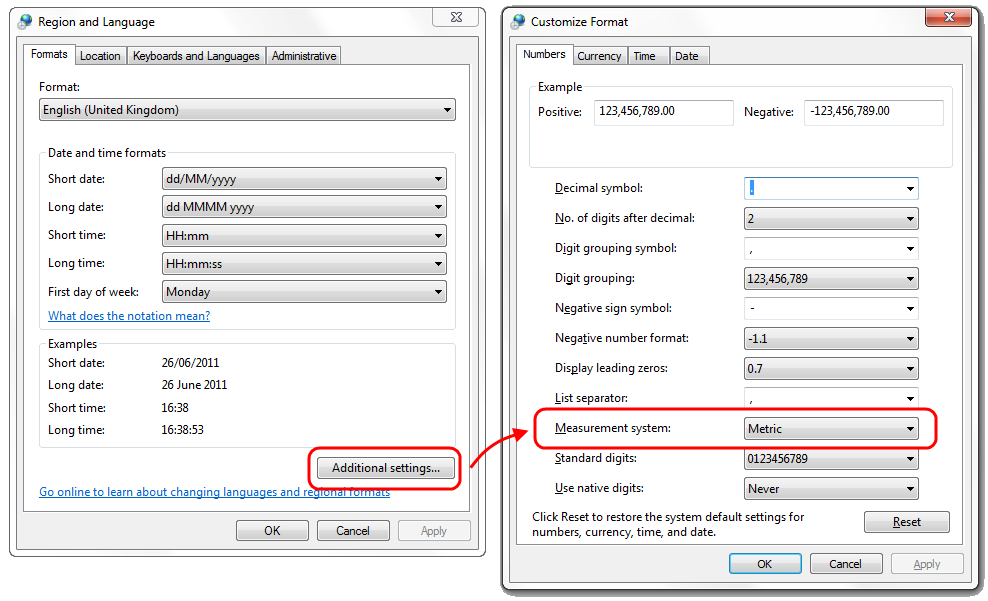
No idea where the setting for Word etc. is stored, but I do know that normally it defaults to whatever the locale of the computer is set to. Find Region and Language on the control panel and check the unit setting: If it's wrong, unfortunately there's no regular Group Policy setting to correct it. However, if you are using (or able to being using) Group Policy Preferences, you can set it in User Configuration > Preferences > Control Panel Options > Regional Options.
-
Problem with RM mobile one and Windows
AngryTechnician replied to cloverleafitservices's topic in Windows
RM CC3 networks have a network rebuild option that should do it for you. You have to use a floppy disk(!) to initiate it, if you don't have said disk you can build it from the RM Management Console. -
This is pretty much par for the course for HP printer support. At my last school we went for nearly 2 weeks with a failed LaserJet 5550 once despite having paid extra for NBD onsite warranty.
-
The rule of thumb is that you should avoid having any avenue of communication with a student that cannot be monitored by the school/LA. If you add them on Facebook, PSN, or any other gaming network or forum that allows private messaging, then that avenue exists and the oversight is gone. You are then in a very tricky situation if an accusation is made. Most importantly though, you follow whatever policy the school/LA puts down, even if it goes beyond this. If an accusation is made and you have ignored school policy, you've lost a key defence.
-
Problems creating a Domain Administrator Account in AD
AngryTechnician replied to swpmre's topic in Windows Server 2008
Sounds like there are Group Policies applying to the computer account that have settings defined in the User Configuration section. Have you run an RSoP against the computer and account in question? -
[css] Webpage not following basic CSS in IE
AngryTechnician replied to SimpleSi's topic in Web Development
Also you have some invalid CSS in the style tag of the HTML page: "heavy" isn't a valid CSS font-weight, and you've got a background-color of #eoeoff which I think should be #e0e0ff -
[css] Webpage not following basic CSS in IE
AngryTechnician replied to SimpleSi's topic in Web Development
Try adding an HTML doctype (e.g. ) On IE9 here it's rendering in Quirks mode by default, but forcing the browser into standards mode (via the F12 developer tool) makes it render the same as it does in Firefox 4. I think adding the doctype will make it render in standards mode by default. -
IIRC Mac programs can save PDFs natively so I wonder whether your deputy opened it in something other than Reader and used the built-in save to PDF, which would have stripped out the form data?
-
If you're considering a Windows device, you could do worse than the Dell Inspiron Duo. It's basically a convertible dual-core netbook.