AngryTechnician
-
Posts
3,772 -
Joined
-
Last visited
Content Type
Forums
News
20th
EduGeek EDIT Conference
Blogs
Everything posted by AngryTechnician
-
CN = folders.schoolname.borough.sch.uk Simple as that really.
-

VLC Media Player v1.1.1 is out - Lots of bugs fixed!
AngryTechnician replied to Arthur's topic in Downloads
I built my own MSI using Advanced Installer. Takes me about 5 minutes to update it when there's a new version, and most of that is just checking which files have been added/removed. Mine doesn't have any context menu items though (and only one file association) so probably wouldn't be much use to you I'm afraid, plus I'm not really sure how distributing an alternative installer gels with the licence agreement. -
This is the bit I'm dubious about - what's special about their agreement that ties it to their largely unrelated CC3 product? Tim Bush (MS Education Marketing Manager) has got back to me on Twitter that he will try to get to the bottom of this from his end tomorrow. I suspect he will update here directly; if not, I'll pass on his response.
-
@Little-Miss, how are you doing on the computer front? I'm replacing nearly 50 machines this summer, so if you need some, the old ones are all yours (they are 4-5 years old though!)
-
If the floppy with your .lic is not working, contact TechSoft and they should be able to supply a new disk. They've always been quite helpful when I've dealt with them.
-
For some resold software, such as RM Virus Protect (actually Symantec Antivirus), this is true and is in the licence terms. For Office, it almost certainly isn't true. I think Microsoft might have something to say about this, so I will point someone this way and see if they would like to comment. As for other RM software such as RM Maths, Colour Magic, etc, I'm not convinced. If it was, I think RM would have told me when I rang them to cancel my CC3 support contracts due to going vanilla. I even explicitly asked them about things like this since we still use the RM SmartCache.
-
[ms office - 2010] Ribbon Hero 2 - Clippys Second Chance
AngryTechnician replied to jc1875's topic in Office Software
Yep, got it working nicely here and the ICT teacher reports the pupils are really enjoying it. -
My first thought is that the entire of my Intranet home page could be replaced with tiles on the Start screen. Web apps and standard apps in the same intuitive menu system? Yes please! As for using it without a touchscreen, my guess is that it will work a bit like Media Center: cursor keys replace swiping left and right. I think I spotted a horizontal scroll bar in there too. It will take a bit of getting used to, just like the Office 2003 -> 2007 switch did, but that went fine in every school I did it with.
-
Are the "shared resources" shared from the server? Making the server the one thing that becomes unavailable?
-
I have about 30 old ones sitting in storage! That is an amazing discount, combined with the special on the price at the moment that's only just over £100 for a full HD monitor, even without the touch. Max 15 per customer according to the T&Cs, but I am so taking advantage of that, especially as I planned on buying a few more anyway. Tempted to buy one for home too!
-
Disaster planning: how much to repair a cut fibre?
AngryTechnician replied to AngryTechnician's topic in Wireless Networks
Here's what it looks like: http://angrytechnician.files.wordpress.com/2011/05/fibreduct.jpg I've explained to them they need to clear the debris as well as repairing the duct, and have emailed the projector manager to make sure they get tasked formally. The best bit, however, was when they showed me the plans for the whole project and it clearly indicated that a large portion of the duct is not where I had been told it was, and so about 50m of the fibre run will need rerouting as the new building is going pretty much on top of it. -
No worries, thanks for the update!
-
I just took delivery of one of these today to try out in one of our Learning Support rooms (where there is no room for an IWB). Will check in again in a few weeks with the end user perspective, but having played with it a bit myself, I'm pretty happy with it. Touchscreen Responsiveness is pretty good; not as good as a capacitative touchscreen but miles better than resistive. Accuracy is at least as good as on a well calibrated IWB, if not better. You can use pretty much any pointy thing you want as a stylus: nothing sharp obviously, and Dell say it should be a minimum of 7mm across to pick up, but I used a SMART board pen which is a bit less than that and it worked perfectly. Stand Although Dell only show you a few different stand angles in their product gallery, the stand is spring loaded and fully adjustable between 10° and 65°, as well as being able to go completely flat. FYI, and angle of about 55° makes you feel like you're at the helm of the Enterprise Software I tested on Windows 7, and flicks and pinch zoom worked fine. The pinch zoom wasn't as easy to get right as on my Android phone, for example, but I think that's a Windows 7 thing rather than the display. It tended to work better with two hands rather than a thumb and finger. The usual array of curriculum software we use on our IWBs also worked fine. Anything very near the screen edges (such as the the Start button, unfortunately) can be a bit tricky to hit accurately due to the way the screen is recessed into the surround. With the Start button in particular, I found it easier using my right forefinger instead of my left. Extras The screen has passable speakers built in; they are only 2 watts and don't have a lot of bass to them, but are better than most laptop speakers. Volume is decent but you wouldn't want them in lieu of a proper set in a classroom. A notable omission from the box contents is a DVI or HDMI cable: you only get a VGA cable included. I wasn't expecting HDMI but DVI would have been nice, but I had loads lying around anyway. There are cable clips built in on both sides of the screen to help bundle up the cables a bit and push them left or right rather than having them splayed out of the bottom. With 4 cables to connect you will probably want to wrap some cable tidies around them unless they are hidden away. Gripe My only gripe is the complete lack of mounting options. No VESA holes, nothing. Although heavier than most LCD screens (6.3kg), there are plenty of wall mounts with the balls to hold it, and it would have been awesome to have the option. Price Buying from Dell direct seems to get the best price I could find online, £186.75 incl. VAT and delivery as of the time of posting (link).
-
Disaster planning: how much to repair a cut fibre?
AngryTechnician replied to AngryTechnician's topic in Wireless Networks
Well, they started work on Friday and when the Bursar and I went down for a look this morning, they have indeed managed to smash through the ducting, but luckily for them, the fibre isn't damaged. Yet. I'll post a photo on my blog later when I've calmed down. -
Ah, yes, that's probably it. 'Basic' MBR disks can only have partitions of up to 2TB. Not everything supports GPT so the Buffalo is probably formatted for MBR by default.
-
I don't think iSCSI has a limit, but my Netgear NAS had a 2TB limit on a single iSCSI target until a recent update. Have you dug into the Buffula docs to see if it's a limitation of the box itself?
-
Our e-safety policy, which is what this refers to, is currently under review (the previous document is somewhat inadequate). Once it is done I will post a sample.
-
Repair Software - Access Database 2007
AngryTechnician replied to mo_vigilante's topic in Office Software
I've never found a good one. I once even paid for one out of desperation but it did no more than I could have done myself opening the database in Notepad++. -
Chrome will bring about the ICT revolution in schools
AngryTechnician replied to somabc's topic in Blue Skies
I'm sure their advertisers won't mind if you don't send any more traffic their way. -
Chrome will bring about the ICT revolution in schools
AngryTechnician replied to somabc's topic in Blue Skies
Given the amount of money our current government has slashed from school IT, and school budgets in general, I'm not going to hold my breath on that one. -
Google Apps Calendar- AHH!
AngryTechnician replied to rocknrollstar's topic in Virtual Learning Platforms
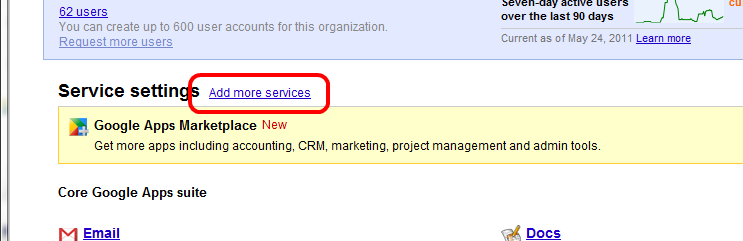
Does it not appear as an option when you click Add more services on the front page of the dashboard?
-
Windows Movie Maker Live on Windows 7 MSI
AngryTechnician replied to djgreek's topic in Educational Software
I know older versions had this problem (this is the workaround) but I'm using the latest version and can save to the network just fine without any alterations. -
Chrome will bring about the ICT revolution in schools
AngryTechnician replied to somabc's topic in Blue Skies
You're right, if they did it for that sort of money it would be a great deal. I for one am extremely interested to see how this pans out. Unfortunately, Google have announced the pricing for Europe, and it's the same for Business and Education: €21/month for the cheapest model. At current exchange rates that's nearly £18.50/month. Saying we can forget the current pricing is no different to saying we can forget Microsoft's current pricing. Yes, we like to dream, but that doesn't change reality. Personally, I hope it does get cheaper, but I don't think Google will drop it significantly. Indeed, recent moves indicate they are actually tightening up on the freebies. -
Comparisons to tobacco are fatuous at best in my opinion. There is no way to use tobacco "safely"; it's not a question of risk over whether or not it will harm your health, it's just a question of how much it will harm your health. On the other hand, something like Facebook presents risk, not an absolute guarantee of harm, and can be used safely if you know what you are doing. I'm not in favour of lowering the age at all; despite being trivial to ignore, it does still have value as a deterrent (more so to parents than children). However, until there is a workable way to actually enforce an age limit, discussions on raising or lowering it are largely a moot point. Education is the only option that makes sense right now.
-
I had the opposite, when my O2-locked Dell Streak was replaced I got an unlocked one in return Insured through my joint Barclays account with Mrs AT - it turns out that if you get the insurance on a joint account you can insure both of your phones for no extra cost!