MNHughes
-
Posts
87 -
Joined
-
Last visited
About MNHughes

-
Hi, Has anyone been able to install Impero on Windows 7 successfully? Many Thanks, Martin
-
We only have server 2003 at the moment so no ADMX compatibility, I was being an idiot I forgot that unlike windows XP you can add port ranges in Windows 7 so there is no need to use a batch script I can just make it part of our laptop image. Big fan of your blog, I especially like the gerbal incident.
-
Hi Everyone, We use Impero here as a classroom management tool that needs over 100 port exceptions so in Win XP I've made a script that does this automatically however the same script doesn't work in Windows Vista and above, does anybody have an idea? FOR /L %%I IN (start of port range here,1,end of port range here) DO netsh firewall add portopening TCP %%I "Impero services: port %%I" enable subnet Many Thanks, Martin
-
We only have the one subnet and I've tried using just the ip address to no avail unfortunatly.
-
This works for my HTC Desire, the phone is rooted and running a custom ROM called Redux. In order to get it working I turn on the wireless connection, join the school Wi-Fi then I run the Transproxy app and set the proxy. I was hoping to connect to our exchange e-mail server and download e-mails, but there appears to be an issue with SSL certificates (Config option on exchange server). I forgot to mention that this solution allows me to access the schools really speedy internet on my wireless connection, I can also connect to local intranets
-
Hi Dezt, heres some more info, by the way we are using RM Smartcache as our proxy
-
I meant to say I'm having two seperate issues, one where I set the proxy setting in spiceworks, but it doesn't seem to like it; and the other where I can't perform a network scan because the next button seems to be greyed out, however the network scan issue is the more pressing of the both. I think I've just resolved the network scan, still having proxy issues.
-
We use RM CC4 for network management and use RMSmartcache as our proxy for filtering/logs. Cheers, Martin
-
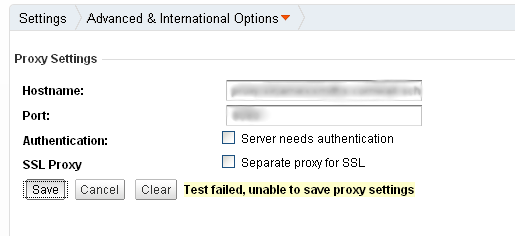
This is the error I get: I have tried 3 other proxys all with the same result, I 've tried entering user authentication and even the SSL option, although we do use SSL on the same proxy

-
Settings > Advanced and international options > Proxy settings
-
I think I've just resolved the network scan, still having proxy issues.
-
Sorry, I posted a bit too quickly. I meant to say I'm having two seperate issues, one where I set the proxy setting in spiceworks, but it doesn't seem to like it; and the other where I can't perform a network scan because the next button seems to be greyed out, however the network scan issue is the more pressing of the both.
-
Hello Everyone, Does anybody here use spiceworks? If so have you been able to set your proxy details in the settings section and been able to run a network scan? I'm trying to set the proxy details so that spiceworks can check for updates etc online. When I try to do a network scan I put in an IP address range and the next button remains greyed out, I've tried clicking on the next button and nothing happens. I've tried Firefox and IE both on the spiceworks server and on a client workstation with the same result. Our server has it's Windows Firewall turned off We have Sophos Enterprise Anti-Virus installed and running, not sure if thats causing the issue or maybe a switch? Many Thanks, Martin
-
Does it cope with alternative DNS though, for example if your on a work wireless network can you specify the DNS.
-
I have used the RM Blueprint with unfortunatley no luck - the package installs but keeps reinstalling iself.