ADMaster
-
Posts
1,402 -
Joined
-
Last visited
Content Type
Forums
News
20th
EduGeek EDIT Conference
Blogs
Everything posted by ADMaster
-
What platforms are you looking to support? I've been using Lanschool for a few years and it is solid on the PC side. However it has a few quirks on chromebook, but nothing that is a deal breaker. My license is up this summer so I've been watching all of these classroom monitoring threads. I may try a few this spring. I don't want to hijack the thread to much, but could someone tell me about the netsupport chromebook experience.
-

Create a new Deployment Package in SCCM
ADMaster replied to NetworkNinja's topic in Enterprise Software
I would always upgrade my own machine before the users. However I'd do a lot of testing in a VM first. -
Create a new Deployment Package in SCCM
ADMaster replied to NetworkNinja's topic in Enterprise Software
A lot of folks to a build and capture of a Gold / Master image. I just deploy the base OS and customize on the fly during OSD. In short import the image from the install source into the operating systems section. Create a task sequence pointing the OS section to the newly imported OS Deploy that task to a collection. I suggest reading several of the step by step guides. https://prajwaldesai.com/sccm-2012-r2-step-by-step-guide/ You may need to update your ADK and boot images to support Windows 10, upgrade yourself to the latest CB then deploy 10. Current branch added several features specific to deploying 10. https://www.systemcenterdudes.com/step-by-step-sccm-1610-upgrade-guide/ -
The ADR will deploy it for you.
-
If you have WSUS automatically downloading and approving updates you will want to stop that. That article talks about ADRs which does everything for you once you set the rules. You may want to do it manually a few times to understand what is happening and it gives greater control. I have an ADR for the daily definitions, but do the monthly stuff by hand. You have 3 groups to consider Update packages are where you will download the updates to, I just create a new one every year so they don't get too large. Software update groups, I have 3+ These are where you add updates to be deployed to the clients. I have one for definitions, one for the current month and one for each year. Everything in the years deployment is set to install and reboot if needed, updates in the current month get a 2 week deadline and do not force a reboot. However the next month I move those updates to the year group. This gives the users a month to six weeks before updates force a reboot on them. Collections are what you deploy the updates to, collections can be either devices or users, but for updates we want devices. You can deploy to workstations with different settings then servers. You can create searches and save them, so software updates required equal to or greater then one and not expired and not superseded and not deployed are all the updates needed by your clients. So the monthly process is this; Run your saved needed updates search Select all, right click and download Go through the wizard and select or create this years updates package, and I download them from the internet. Select the updates you want to deploy, right click and either choose create software update group or edit membership, depending on if you have already created the current months update group. Once you have added the updates you want to the group, go to the software update groups right click and deploy to a collection, setting deadlines as desired. I prefer to do it by hand so I can pick and choose if there is a bad update that month, but with the monthly roll ups I may got back to ADRs. I feel I've wrote you a mini novel so I hope its not too confusing.
-
WSUS is required for SCCM, SCCM talks to WSUS for you. SCCM gives you the ability to schedule updates and set deadlines WSUS would just download and install after approval. Sometimes computers would just reboot, SCCM has maintenance windows. If WSUS and SCCM are on the same server you should be able to stop approving updates in WSUS and just downloading them in SCCM. depending on what you contractor did you may need to remove readd or reconfigure the software update point in SCCM. Do you have recent updates listed in SCCM?
-
I have roughly 1900 students 200 staff, 1700 chromebooks, 400 PCs (Desktops and laptops) and about 100 ipads. It is just me and I get contracted support once a week to help with hardware repairs. Your workload looks very manageable by comparison. What are your day to day problems, can they be prevented or streamlined some how? Chromebooks are a breeze to manage mostly hardware issues with them. The Ipads used to consume a lot of my time they are a pita to manage, thankfully they are going away. I have all the PCs locked down so no junk software to deal with. I take a teaching approach to issues where I can, a screen is zoomed in, or headphones don't work because they have ticked something in settings. I show the classroom teacher how to fix these issues. I have remote support setup on all the PCs saves a ton of time if an issue is across site in another building. The PDQ software has saved a ton of time as well with software requests. Write scripts to do repetitive tasks. Standardize where you can having all the same make model of something makes working on them much easier. Get a helpdesk to track issues, if you a busy stopping you in the hall is not acceptable. Get SLT to help you set the proper expectations there is only one of you. Depending on work load try to make a schedule, work on projects / servers in the AM and go see users in the PM as one example. Building A on Mondays and B on Tuesdays etc. I hope some of these ideas will make you a better one man IT department.
-
I use Iboss, I think they are in the UK market.
-
Chromebooks are great for student use 90% of our student devices are chrome. Teachers still have windows machines for the IWBs, gradebook etc. We also have some suites with the full Office, Adobe and Autodesk for the classes that teach that software. Students not enrolled in a Office applications or Digital art, or robotics courses can do all there work on a chromebook. We are a google school and I have no plans of adding O365.
-
I use webhelpdesk they were acquired by solarwinds a few years ago. It used to be free for 1 tech, not sure if that is still the case. It is very customizable and does asset and parts inventory. When I made the decision it was between them and sysaid, but our LEA used webhelpdesk so that's what I went with.
-
If tagged is the same as trunked then yes. I have cisco switches, the ports for the VMs trunked so multiple vlans can pass, the port for management is a standard access port with the vlan assigned on the switch. In the VM settings I just tick the VMID box and enter the vlan number.
-
Win 2012 Virtual DC recover from backup
ADMaster replied to Benjiboy87's topic in Windows Server 2012
Does shift restart work on 2012 or is that just new to W10? I've not got a 2012 server to test on. -
Classic Shell has admx templates that you can configure. I've not tried configuring it with xml.
-
OSD is Operating system deployment I use SCCM. The bottom line is getting that first run file into the users profile / default user profile for new users. I read back and you mention mandatory profiles. I don't use them so cannot test, but you should be able to just copy this fine into the mandatory profile and be done.
-
I had ruckus installed about 3 years ago, and they told me not to mess with the default vlan or it would mess the system up. I have APs on 3 different vlans no problem, they get the ZD info from DNS, and the ZD is on a management vlan with the rest of the network equipment. The vlan set on the ZD is still 1. I'd restore from backup.
-
I just added this one liner to my OSD, maybe I should post this in that other thread too. New-Item -ItemType file -Path "$OSDISK\Users\Default\AppData\Local\Google\Chrome\User Data\First Run" -Force If you want to hit existing PCs it should be easy enough to do something similar with a start up script, or GPP. You can find the file in your own profile too, if you have previously opened chrome. This is just a blank text file named First Run with no extension or anything, basically tells chrome first run has already ran.
-
How important is it to have good equipment in the tech field...
ADMaster replied to madmin's topic in General Chat
I have a standard all in one i3 4GB, its what our business lab has for teaching office. I put an SSD in it when my HDD failed, and I've added a second monitor from a PC that failed previously. So nothing to special. I try to work with similar spec to the end users so I know their experience. All the staff got laptops with i5 8GB and SSDs last year, but my AIO has a larger screen full keyboard etc. I can be more productive on it. All my VM testing is done on the hyper-v server so I don't need ram for that. The most resource hungry app is PDQ Inventory / Deploy, this is where the SSD helps. Most everything else is RDP / Web, RSAT, and other admin consoles. Our digital art lab got new i5 8GB machines this year. They would be nice, but mine works fine can't really justify it at this time. -
Regional IP and TLD blocking
ADMaster replied to Duke5A's topic in Internet Related/Filtering/Firewall
My ITC / LEA geo blocks, on occasion I've had to request them allow and IP through. I also add TLDs in my DNS server for places like .CN and .RU so that traffic doesn't even make it to the web filter or ITC firewall. -
EduGeek Minecraft - HermitPack Server details
ADMaster replied to localzuk's topic in EduGeek Minecraft
I built a quantum quarry and only ran it for a day. We have 75K granite and 50K marble, and just a ton of other resources. If anyone was holding out until we were established, come build its practically creative. I'm generating about 80K rf/t and most of it is going unused. I created a RF entangler that does wireless RF so you can build to style and use less cables. -
Installing Adobe and Java across network
ADMaster replied to marsdenprimary's topic in Windows Server 2008 R2
+1 for the PDQ suite well worth the money. -
No, this will make them change their password now, the the clock is set to another six months. With teachers coming in August to prepare for the new school year my six months is usually August - February. If your staff are not in over Christmas they will just get asked to change it when they return in January. If you want to stop the clock select all users, right click properties account tab and tick password never expires. Then don't forget to un tick this box in January. Personally I'd leave it alone most of my staff don't need their hands held to change a password. However I've had this setup for several years now, if this is your first year a reminder email before Christmas break would be good.
-
EduGeek Minecraft - HermitPack Server details
ADMaster replied to localzuk's topic in EduGeek Minecraft
1.4 has been promoted to release, it brings immersive engineering. https://www.feed-the-beast.com/projects/ftb-presents-hermitpack/files/2344893#additional-files -
EduGeek Minecraft - HermitPack Server details
ADMaster replied to localzuk's topic in EduGeek Minecraft
I'm at the same point as Gara. I have more energy and resources then I know what to do with. Mike mentioned the 1.4 version will bring IE so thats good for wiring of the times. -
The default is to keep indefinitely including deleted items if you are using vault. outside of vault a users Spam / Trash folder is deleted after 30 days, but you can get messages back with vault. If you set a retention period you can choose if it expunges deleted items or from the inbox too. Also my understanding is if you delete an account, that also deletes their mail archive. I disable the account and move them to a leavers OU with the year they left. So in X years I can delete those accounts.

-
Bit of fun - who has the oldest (working) Windows domain?
ADMaster replied to 3s-gtech's topic in General Chat
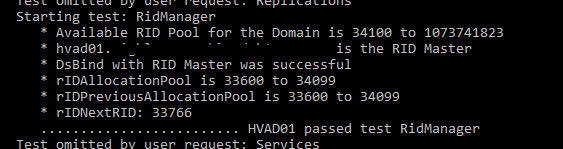
@HPlum78 I'll try that repair switch next time thanks, I think I'm good on RIDs, if I'm reading this right I've used 33,765 still leaving me over a million.