DGardiner
-
Posts
1,544 -
Joined
-
Last visited
Content Type
Forums
News
20th
EduGeek EDIT Conference
Blogs
Everything posted by DGardiner
-
Getting started basics of setting up a Chromebook in G Suite
DGardiner replied to TwistedHelixis's topic in Cloud Services
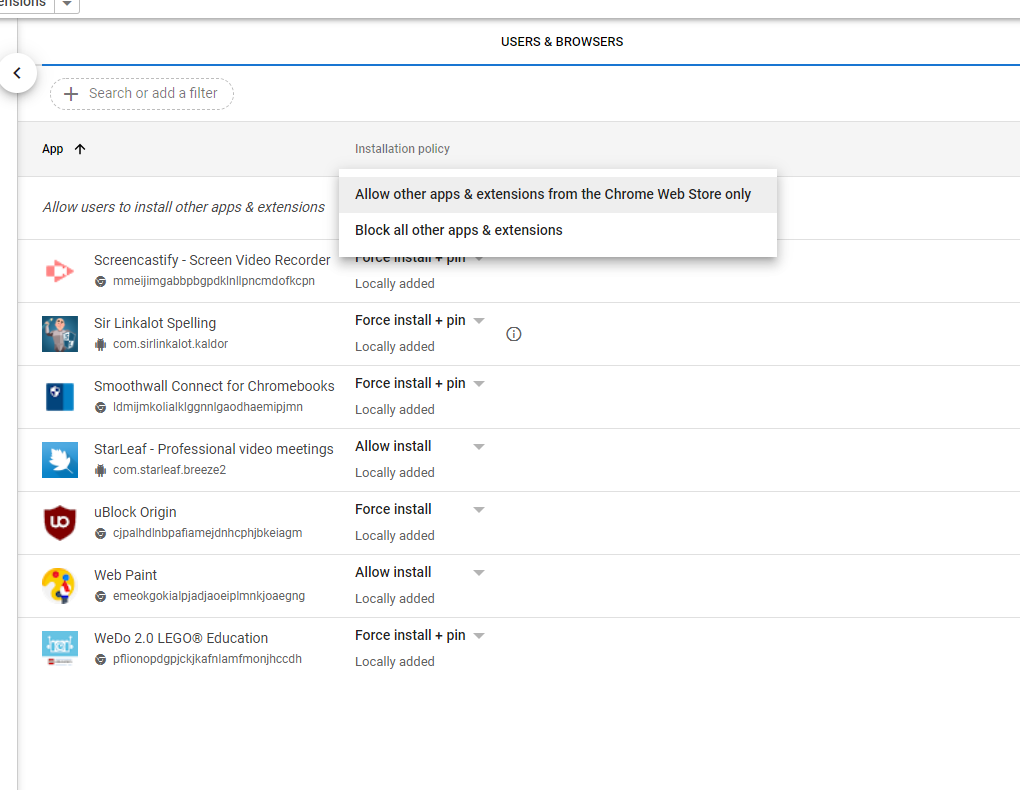
Possibly this setting?
-
Getting started basics of setting up a Chromebook in G Suite
DGardiner replied to TwistedHelixis's topic in Cloud Services
i dont have one to test but i was sure ours could browse but "this is not approved for your domain" was displayed, i could be wrong though -
Getting started basics of setting up a Chromebook in G Suite
DGardiner replied to TwistedHelixis's topic in Cloud Services
how would they have done this for your windows network? its locked down just as they would have been. You wouldnt want people loading crap from the play store anyway half of it is malware -
Getting started basics of setting up a Chromebook in G Suite
DGardiner replied to TwistedHelixis's topic in Cloud Services
depending on your filtering theres a fair bit of whitelisting to do if you ssl inspect things too! -
Get configurator out and start enrolling manually, if you didnt do this at the start of the order you missed the boat IMO, this is a known part of the DEP proccess and you will spend more time chasing them up now than it will take to enrol manually. that said, just call computacentre and ask for their dep code
-
Getting started basics of setting up a Chromebook in G Suite
DGardiner replied to TwistedHelixis's topic in Cloud Services
dont think you can bulk delete, but you can tell a device to wipe its profiles -
Apple have a mode where the kids get profiles to log into the ipads, this means all the icloud data is downloaded and that when they move between, this can be cached on an apple cache server. It requires they be setup ina specific way https://support.apple.com/en-gb/guide/mdm/mdm71124b400/web ive never touched it though. Their classroom stuff is kinda cool though, but again requires a bit of prep/setup
-
Yep, you need your org ID for them from ASM and their reseller key authorisaed in your ASM. If the orders are recent most places will push them into DEP for you on request, anyone being difficult here is just being difficult..
-
If your ipads are all DEP enrolled you can get by. If not, you need A mac to enroll them into dep(one off) and then theyre just controlled by whatever mdm you kick them into, that said if its any significant quantity having a macmini run as a cache server will make your life a bit easier when it comes to them updating/downloading apps
-
Just get your query emails in early if you dont get the invite within a day as there will be back and forth that tends to be a reply a day - also the school need to do the form to report before 12
-
a local restriction is PHE/Local Authority has instructed you to send a bubble/school home.
-
I do wish we had, i was worried about getting denied and had just hoped asking for what we need would make the turn around quicker. Just had to wait a week to get 50 we NEEDED approved.
-
The criteria for the allocation appears to be FSM/PP - We have just been ordering based on those numbers in the affected groups. until we hit our allocation total.
-
i thought it had been established.. nhsx isnt serco... its open source you can check what theyre collecting its all anonymous and relies upon the end users outing themselves once the app says to do so
-
Not just pickup a copy of netspot run it yourself? https://www.netspotapp.com/ gives you a bit more flexibility to seing things improve if you can play/update it as you go
-
This depends on the demographic of the school i think. Our allocations have been quite healthy from this round.
-
Getting started basics of setting up a Chromebook in G Suite
DGardiner replied to TwistedHelixis's topic in Cloud Services
Id avoid android stuff unless you need it - Has to be downloaded per profile -
Getting started basics of setting up a Chromebook in G Suite
DGardiner replied to TwistedHelixis's topic in Cloud Services
Theres an enrolment setting somewhere in there which sets this, by default all chromebooks will popup in the root - You can change the setting to move to the OU the user that enrolls it is in. https://support.google.com/chrome/a/answer/2657289#device_enroll_permission I wouldnt worry about the Device locations as much unless you want the base machine config to be different The device will apply its device settings based on that OU, then apply the user settings over the top as they log in. Its not as overlapping as youre probably used to with GPO -
Getting started basics of setting up a Chromebook in G Suite
DGardiner replied to TwistedHelixis's topic in Cloud Services
Oh and if youre playing setup, chrome://policy is your friend for reloading/viewing applied settings. Might save you a headache i had yesterday. In the root, Set user & browser settings, Change Download Location to force google drive! I cleared profiles off 100 chromebooks the other day and ate peoples "download folders" since they had been local and not saved to drive by default.. Id check it has the intended outcome before guaranteeing that though, ive only turned it on after i caused the fire! -
Getting started basics of setting up a Chromebook in G Suite
DGardiner replied to TwistedHelixis's topic in Cloud Services
Yes thats the right licence. and if you want the devices to connect prior to login you need to send it to device. -
Anyone with a social worker seemed to get managed from the LEA with us onthat initial batch of vulnerable people. The september allocations seem to have all went direct to the trust for sorting thankfully!
-
All the options on techsource now have an Unsecured option now to avoid all the presetup stuff.
-
Getting started basics of setting up a Chromebook in G Suite
DGardiner replied to TwistedHelixis's topic in Cloud Services
The google man? They always seem to be the thing were left chasing! -
Im having a right nightmare getting what we need - Data submitted monday and still geting declined orders...
-
Getting started basics of setting up a Chromebook in G Suite
DGardiner replied to TwistedHelixis's topic in Cloud Services
You can check the licences in billing, they can be a pain to get assigned form some resellers.... Your instructions cover you, it really is that simple! We just have our chromebooks in an OU under the users for compartmentalising them into each school/area the majority of the options youwill change in admin will come down from the users Settings anyway - Device Settings are more likely to be global in nature ive found