tj2419
-
Posts
1,150 -
Joined
-
Last visited
Content Type
Forums
News
20th
EduGeek EDIT Conference
Blogs
Everything posted by tj2419
-
That's what i've got. Mustn't have been set up correctly for our url provider. Cheers
-
Hi Guys, Have HAP 9 up and running in school. But struggling to get it working externally. I have a URL hap.schoolname.sch.uk pointing to an internal IP 10.**.**.76 port 443. But when i try alter my bindings i cannot get it to work. I have only set sites up using port 80 before so all i've had to do is in the binding change it to the IP and add the URL as the host and it works. But for https port 443 you cannot enter a host (URL) in. Anyone be able to print screen theirs and show me? Cheers
-
If staff use office 365 are they eligible for the free office 365 as well?
-
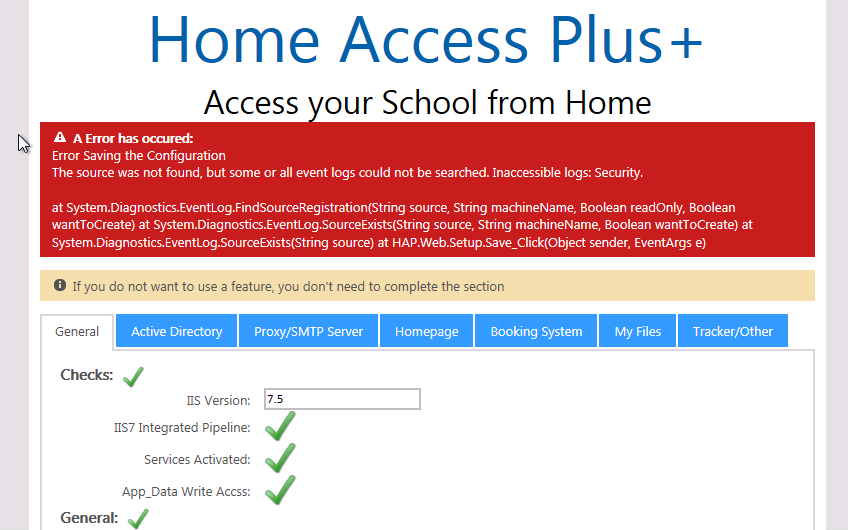
Hi Nick, Thanks for the reply. Just saw the issue when running the debugging. I had a bracket in the room name, which it didn't like. Removed them and they are fine now. Just to save having to start a new thread. Importing bookings from SIMS. I have run your extract moved it to C:\inetpub\wwwroot\HAP\App_data\sims-bookings.xml and checked that my teachers display names equal the names in the sims-bookings.xml (e.g. Mrs S Smith) but i get the following error when i try and run the import. I tried changing the names in the xml to their AD usernames but no luck. Thanks again for your response, very much looking forward to launching this

-
Hi Two questions really. I am having an issue with the booking system. Set it up as part of a new installation and all the classrooms show up fine. But the laptops don't show any bookable slots. My hapconfig.xml has no differences between the rooms or laptops. See the attached image. Remote Apps. Where do you start with them? How do you configure them? Any guides out there? Would love to have something like libra office, SIMS and RMMC available on it but just haven't a clue where to being. Thanks
-
Hi Nick, Thanks worked a treat. I am seeing this error periodically when trying to remove things i've saved like a quote server i've mistyped. Thanks
-
Hi As the title says anyone recommend a good black and white laser printer that wont cost too much but that we wont need to replace toners on it every other week. Ideally something with a toner larger than 10000 pages. Cheers
-
Spoke too soon. Now getting a different save error.
-
Hi I clicked save, it errored. Refresh the page then start again seems to be working now.
-
From what i can see it appears to be an issue with .Net. Which version are you running?
-
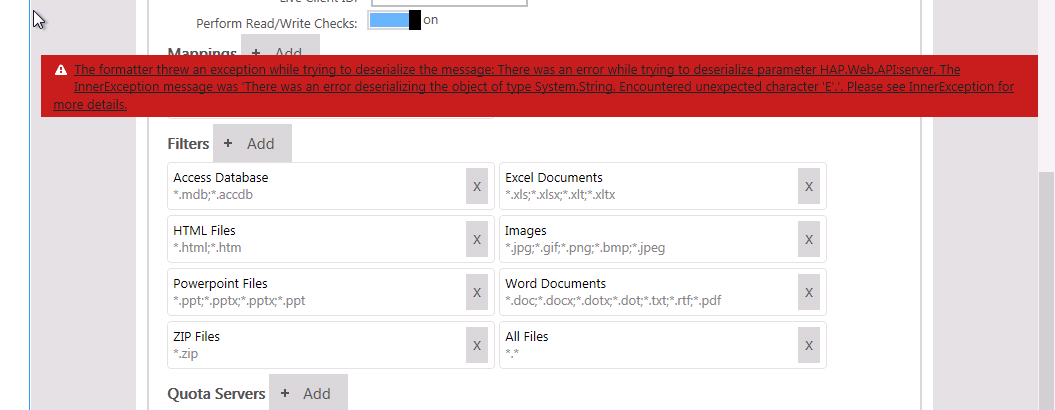
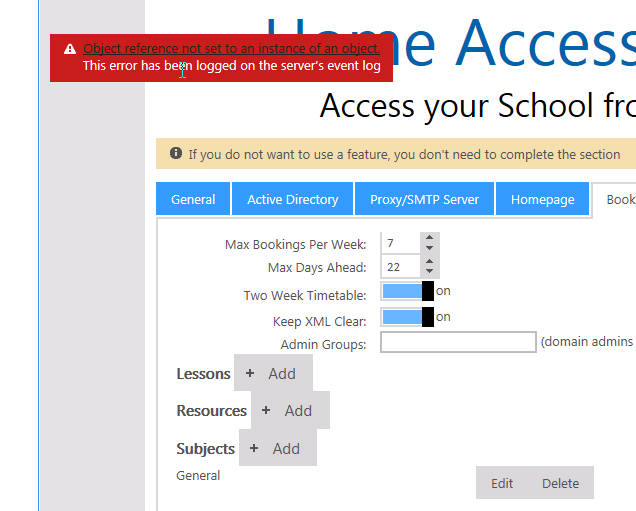
Hi I am trying to set up Home access plus but am running into a problem completing the setup pages. It's all setup in IIS and file permissions. I have got the three green ticks on the front page. When i move to the Active Directory User List OU's for teaching staff etc i get the following error message "object reference not set to an instance of an object" when i try save them. The pop up appears with my AD tree fine and i was able to select the student group fine. I also get the same error when i try to add a lesson on the room bookings tab. Any ideas what could be causing this? Many Thanks
-
Where to start creating a virtual server setup? RM CC4 to Vanilla
tj2419 replied to tj2419's topic in How do you do....it?
Just had a look and svr1, 2,3 are all acting as DC's all running DNS with just svr 1 running DHCP. Possible Setup I think i would (money permitting) go for 3 hosts, 1 fast SAN, 1 slow SAN. Setup with 3 VM's running as DC's. The additional VM's (Spiceworks, print server etc). Have it set up to replicate across the three hosts incase of a failure of one of them. For the replication incase a host fails i take it the file directories and shared drives need to be stored on the SAN so all the hosts can access it? We already have a pretty good backup system hardware wise with two HP Proliant DL180 G6 servers Xeon E5520 @ 2.27Ghz (8CPUs) and a HP autoloader running backup exec at the min but hopefully change that to veeam. Each with 16TB storage on them (8 * 2TB drives). So am i right in thinking that As users login and connect to the VM's they are automatically balanced across the three hosts to help with performance? We can remote onto a particular VM's IP and make changes and that is replicated across the hosts immediatly? If configured correctly a host could die and users would automatically be redirected to the other two hosts to continue work? Would you connect the three hosts up to the core switch directly? Have a separate switch linking the Hosts to the SAN for extra speed? Thanks -
Where to start creating a virtual server setup? RM CC4 to Vanilla
tj2419 replied to tj2419's topic in How do you do....it?
Very true. We started of virtualising our moodle install on Xen server and now already have 3 VM's with the spiceworks and XIBO We currently have three servers for our curriculum network svr1 (DC, DHCP, DNS), svr2 (DNS, member server) svr3 (DNS, member server). Would you keep the same setup with 3 vm's or consolidate as the user directories would be stored on the SAN? for the extra resilience. How many of you have two SAN's mirroring? incase your SAN goes wrong? Thanks for all the help and advice a lot to take in but finding it very interesting -
Where to start creating a virtual server setup? RM CC4 to Vanilla
tj2419 replied to tj2419's topic in How do you do....it?
How many user accounts, how many concurrent log ons. What is the state of the surrounding network infrastructure. We have around 1200-1300 user accounts, concurrent logons could be reaching 300-400 if all IT rooms were in use at the same time. How many VMs do you expect to be running? and what heavy duty VMs will you be running (SQL for sims, fms etc for one) what about exchange, SCCM etc? Plan is to have VM's for SCCM, Spiceworks, XIBO, Moodle (Fairly well used), Website, then the domain controllers (Depending on number), Print server, think thats about it. In the future it would possibly be also having a SIMS SQL and FMS etc from the admin network but that's only if i win Heavy duty ones would be the Moodle VM and the network servers / DC's. We currently have three servers for our curriculum network svr1 (DC, DHCP, DNS), svr2 (DNS, member server) svr3 (DNS, member server). Would you keep the same setup with 3 vm's or consolidate as the user directories would be stored on the SAN? for the extra resilience. How many of you have two SAN's mirroring? incase your SAN goes wrong? We have 4 DC's 1 physical and 1 virtual on either side of the wan. What is the benefit of keeping a physical DC as well instead of having them all virtualised? -
Where to start creating a virtual server setup? RM CC4 to Vanilla
tj2419 replied to tj2419's topic in How do you do....it?
How do you have yours set up? Thanks -
Where to start creating a virtual server setup? RM CC4 to Vanilla
tj2419 replied to tj2419's topic in How do you do....it?
Haha yer not too too bad. Been doing a lot of updating recently. Tried proposing a switch from two domains a while back but LEA scared the school leaders into thinking its a bad idea. So the plan is to create a quick, robust and reliable network and then propose the merging again. Having a play around with VLANS at the moment. Setting up BYOD on a ruckus wireless with a smoothwall (opensource) box. Proving interesting but my first go at vlanning. NAS is about 6 years old RM NAS ONE i think the model. 1TB storage set up in RAID 0. Backup exec we are on 2010. I've seen the newer versions seem to handle vm backups but it just seems overly bulky for what we need. What i cannot get my head around is how you make the decision over number of hosts? Number of DC's and the best strategy for storing the user directories. (On the DC's or SAN?) Cheers -
Where to start creating a virtual server setup? RM CC4 to Vanilla
tj2419 replied to tj2419's topic in How do you do....it?
Hi MrBios thanks for the detailed response. As you can tell this would be my first time designing / creating a network. Managed a few but never created. I don't really like having the split domain but like i said i really want to leave the admin network till i have a stable vanilla network of my own and then merge them. In answer to the questions Are all your switches managed and vlan capable? We had New HP 1910v switches fitted a year ago. Fibre backbone How many PCs, printers etc does your network have? 400 desktops, 80 laptops, 80 ipads on curriculum and 25 desktops on admin. How many users? 1300 users in total What's your wireless like? Are you going to want a managed wireless setup in the future? New Ruckus wireless installed summer 2013 Moving to virtualisation most likely means a new backup and recovery strategy Currently have backup exec but have been looking at buying into veeam as a backup solution. We have disk to disk to tape autoloader currently. Have you explored the potential of Hyper-V, Xen and VMware to conclude as to which is the best product for your uses? (Honestly these days if your licensing works out effective then Hyper-V is a fantastic competitor and big money saver compared to VMware now, and i say that as someone who has praised VMware since the day i started using it) We are playing around with xenserver the open source one but i just worry about building a whole network on an open source solution. Would look at hyper-v again as i was looking for vmware after discussions with suppliers and local schools but need to sit down and compare them properly. What sort of licensing structure are you under? (volume licensing, OVS, EES etc?) Microsoft EES agreement for Desktop OS, Office. Thanks -
Hi I am starting to do research into migrating our CC4 network to a windows vanilla network. We are also thinking of moving to a virtual server setup. Been playing around with XenServer recently and love it. CURRENT SETUP 2 Domains - Admin & Curriculum (The way its been set up by the LEA) ADMIN DOMAIN Admin SVR1 - DHCP, DNS, SIMS Server, FMS, User workareas and shared drives stored locally. about 25 admin/office staff CURRICULUM DOMAIN Curriculum SVR 1 - DHCP, DNS, All Staff accounts work areas, two shared drives, Software running off a RMPublic drive. Curriculum SVR 2 - DNS, Half of the student accounts Curriculum SVR 3 - DNS, Half of the student accounts NAS BOX 1 - Two file shares for staff and students. Questions How would you set it up if you were virtualising? How many hosts? SAN? Switch links to SAN? DC's? How do you decide which services to split across the servers? Where do you keep your user directories? SAN or DC? SUGGESTION One suggestion is to leave the admin network as it is as we currently only really want to mess with one network at a time. Get it fully working and then merge the two networks. (Current admin network is vanilla but set up by LEA) - Two Hosts running VM ware 5 both having a DC on there. - Have one host mirrored to the other for HA. - SAN storing all the shared areas and user areas. or - Three hosts running VM ware 5 to offer more resilience. - SAN storing all the shared areas and user areas. As you can probably see its a very new area for me. Quite happy managing networks but setting up from scratch especially on a virtual setup is a new one Any advice would be great thanks.
-
Microsoft to name Real Madrid's ground.. What can we come up with?
tj2419 replied to GREED's topic in General Chat
That's already available at old Trafford -
Microsoft to name Real Madrid's ground.. What can we come up with?
tj2419 replied to GREED's topic in General Chat
YES! Love it! -
Hi Witch, Don't know if it helps but what here is what we did as ours was a council run email system with no clear migration route. Set up our new account with office 365 trial. Told staff to not use emails after a certain date. Asked our LEA to redirect our email to the office 365 account. On this date we reset everyones password to something only we knew Set up a laptop with MS outlook client installed on it. Added a new email account (One of the staffs, did it alphabetically) This was their current email on the old system. Also added their new office 365 account. Once all the emails had downloaded on the old account we selected them all and copied them over to the O365 account and synced it back up. Then once it was complete removed the two accounts and repeated for each account. Didn't take too long to do. Here is a link to the easy mail process for linking to outlook. How to setup POP3/IMAP using Microsoft Outlook to receive RM EasyMail Plus emails
-
One thing to note is that if you use OSX server you must upgrade that at the same time. Otherwise you have mavericks installed but the osx server will not open as it needs to be updated. We lost our settings and groups in profile manager. Luckily we hadn't started using it properly yet.
-
Hi I am starting to plan for a possible migration from a RM CC4 network to a windows vanilla network. Basically I want to plan and do some research into what will be needed and how feasible it is so I can put forward a proposal to our SLT. First question is for anyone who has done this. Do you have any documentation you created along the way, plans or checklists of points you needed to consider or tools you needed to replace. Are you happier after the switch? How many guys did you have on the switch? Did you do it yourself or third party company? What did you replace the rm tools with? Like RMMC, how do you image machines? Would you tie this in with an upgrade to virtualising the network? Or do vanilla one year and virtualise after? We are basically replacing our three ageing curriculum servers and a nas box where we are running out of space. Any advice or docs would be greatly appreciated. Thanks
-
Ah right i just use OSX Profile manager to manage them.
-
I think i have it. Seems to be working on my test iPad. 1. Supervise the iPad (If it was already supervised, update Apple Configurator to the latest version on OSX mavericks and plug it in and click refresh) 2. Remove the current management profiles off the iPad. 3. go to macserver.local/mydevices (What ever your mac server is called and /mydevices) 4. Log in as the admin and install the enrolment profile. 5. Install the trust profile. (on the second tab) 6. Log out of the safari browser. 7. Check on your OSX Server Profile Manager that it has picked up the iPad. 8. Choose an app that you have uploaded to profile manager and add it to the device. 9. Hit save and it should deploy without needing to login. Ensure you are also logged in on the iTunes account on the iPad in the settings. I also removed any profiles i had added using configurator and am just using profiles delivered via Profile Manager. Let me know if this works for anyone else. Going to try it on some more and i'll feedback.