robyholmes
-
Posts
2,548 -
Joined
Content Type
Forums
News
20th
EduGeek EDIT Conference
Blogs
Everything posted by robyholmes
-
No need to wait for the snow to melt. Here you go: https://www.facebook.com/SouthgateLightRailway/ https://www.youtube.com/southgatelightrailway Glad I didn't go in to work today, not only as I wouldn't have been able to get home, but also because I would have missed out on this fun, ha
-
It's come down pretty thick here in North Yorkshire, something just had to be done about it. Yes, I do have trains in the garden...... and I'm a big kid.

-
Coronavirus: General discussion (see opening post for rules)
robyholmes replied to Dos_Box's topic in General Chat
Yep this lockdown doesn't seem to have been taken in the same way as the first by people. More students and staff onsite. Protection steps are much better mind. Even the drive to and from work seem busier. -
Raspberry Pi 4 running Nems Linux which is a pre-configured nagios install. Just be careful with the pre-configured i ternet speed test, it uses a lot of bandwidth by testing too frequently.
-
Yep saw that. Going to do the same but I know they won't read it. Hell, they never plugged the old laptops in so it'll be interesting.
-
Just received 14 of these 114s. Created an MDT bootable USB and used a USB network adapter. Exported the drivers and put them in to MDT and it's now installing the OS. Fingers crossed it just works. Might run like a dog but they're free so can't complain to much. Luckily for us these are for use in school and students already have devices at home we provided a number of months back. Charging via the headphone jack will be fun! I'm guessing the Type-C USB can't be used for charging?
-
Had to many problems redirecting App Data so gave up. Microsoft don't recommend it now, look in to UEV. Works well here.
-
[2004, 20h2] Qualcomm AR5BWB222 Wireless Issues
robyholmes replied to robyholmes's topic in Windows 10
Well I think I might have made a break through this evening. I found a setting in my Unifi setup which moved 'High Performance Devices' to 5Ghz. as @Michael suggest I don't think these laptops like 5Ghz or certainly don't like only being on 5Ghz. So I removed this setting (Which is show as in Beta anyway) and that might have solved it. So open your wireless network profile and under 'Advanced Options' you'll find 'High Performance Devices'. I unticked this and it appears to have worked. -
Hi All, For a few days now I've been having problems with Qualcomm devices connecting to our Unifi network. At first I thought it was Unifi issue so I updated the controller and firmware of the APs. However that didn't help. So I then started to find the only devices with problems had old Qualcomm wireless cards. I've updated the drives on a few and that seems to have solved the issue but one set of laptops still have the same issue. The cards in these are Qualcomm Atheros AR5BWB222. I've updated to the latest driver found here: https://www.ath-drivers.eu/download-driver-for-Atheros-chipset-with-id-74-and-Windows10-64bit.html I've also played about with Advanced settings on the wireless card itself, enabling power saving, setting it to g/n only etc. However it doesn't make any difference. I've also disabled power saving via device manager (Windows power saving) but again no change. Sometimes it connects, sometimes it doesn't. If it does connect it often shows very little signal if any. It works but randomly disconnects and reconnects. Unifi also reports 0% signal (Even though it is kinda of working). Everyone and again mind it connects with 99% signal and I can get a good download speed. Pings are 1 to 2ms to our local server. This keeps working even if I disable the wireless, but as soon as I restart it's back to not working. Microsoft did report problems with older Qualcomm wireless cards on V2004 (20H1) but they seem to have sorted that as they they released the hold on the update block, however I'm struggling to find out what update or change was made. Any help? Similar issues? I'm thinking I might need to look at purchasing new new wireless cards. Thanks, Rob
-
Azure MFA with On-Premise RDP
robyholmes replied to HereIGoAgain2601's topic in How do you do....it?
We have it working and one thing it doesn't make clear is you can't use text code or app code for RDP. As it doesn't give you a chance to enter it. You need to use phone call or approval via app. -
running out of space for VMs
robyholmes replied to dibekem's topic in Thin Client and Virtual Machines
You were right with edit and compact. Sorry I got that wrong. Are your disks fixed size or expanding? Shrink the partition in your VM first, you might need to run a defrag first if it doesn't let you shrink it far. Shut the VM down and then do that process again. -
running out of space for VMs
robyholmes replied to dibekem's topic in Thin Client and Virtual Machines
You need to shut down the VM, then in Hyper-V manager, open the VM settings, go to the disk and you should see an option to modify. Run this and you'll have the option to shrink. However if it doesn't shrink as much as you hope, you might need to defrag the drive in the VM before trying to shrink it. -
We have them 1 per two classrooms (Or there abouts) but we don't have a bank of laptops, just odd ones and phones etc. If we did have that I'd go one per classroom.
-
Oops, i was meant to post it! Doh https://osticketawesome.com/
- 34 replies
-
- 1
-

-
- fault reporting
- helpdesk
- (and 2 more)
-
Hoping to move to OsTicket soon from Spiceworks on Prem. I've heard good comments about this theme for it which brings the user interface in to the 21st century and improves mobile use.
-
Sketch & Snip not loading using Win+Shirt+S or PrintScreen
robyholmes replied to robyholmes's topic in Windows 10
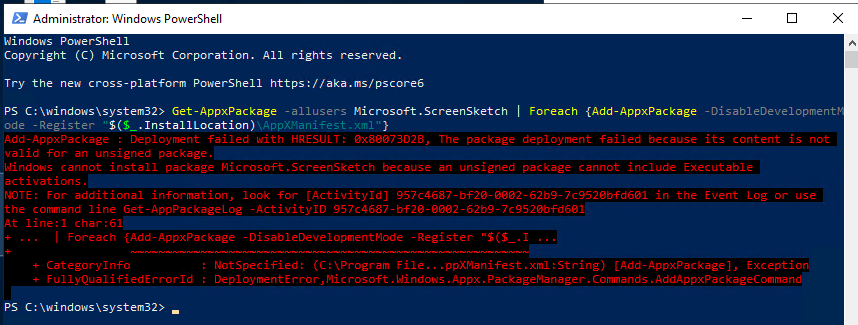
Well didn't get very far:
-
Sketch & Snip not loading using Win+Shirt+S or PrintScreen
robyholmes replied to robyholmes's topic in Windows 10
I wonder if the shortcuts don't work when it's installed per user, but if I ran that install for all users it might start working. That's todays job. EDIT: Forgot to add, Build 2004 Education -
Sketch & Snip not loading using Win+Shirt+S or PrintScreen
robyholmes replied to robyholmes's topic in Windows 10
Searching start menu for Snip & Sketch doesn't return anything but Snipping Tool. So that looks to be the issue! Have you found the same? -
Sketch & Snip not loading using Win+Shirt+S or PrintScreen
robyholmes replied to robyholmes's topic in Windows 10
I'm just going to check that, however the program does open from Snipping Tool which staff are currently loading, and then clicking on the 'Try Snip & Sketch' (I got the name wrong way round in the title of this thread, doh) -
Our teaching staff are finding that some machines allow you to press Windows Key+Shift+S to take a snip using Sketch & Snip but other machines aren't. Sketch and Snip will open on machines which don't work and it shows the keyboard shortcut when you open it. But it doesn't work? Staff have also tried going to in Settings and setting PrintScreen to load Sketch & Snip but that doesn't work either. Anyone found this? I'm drawing a blank online. Thanks, Rob
-
Yes they seem to. Bit of pain mind, be nice to be quicker but we don't delete local profiles quick enough for it to be a problem unless it's a long holiday. Christmas or Summer. You can always get to data via Teams or Office. Or manually sync too.
-
I find new logins take around 15 to 20 minutes to start syncing the libraries. So long as OneDrive is able to update and auto login. Once syncing however, if you use Local Profiles and don't delete them then it'll be syncing again as soon as you login.
-
Teams - how to view another users meeting settings
robyholmes replied to PyROm's topic in How do you do....it?
You do get a notification from guests joining a meeting you've not started yet which says 'Jo Bloggs (Guest) has started the meeting' however they are just in the lobby. So has the user seen this message and quite rightly, thought they'd started the meeting without them? -
No issue here but we're not using Exa filtering, not sure if you are and if that's the difference.
-
[tv show] Doctor Who Returns to Production as Series Length is Cut
robyholmes replied to 6Foot2's topic in TV & Movies
Is the 11th one the Christmas special?