dsmith8
-
Posts
77 -
Joined
-
Last visited
Content Type
Forums
News
20th
EduGeek EDIT Conference
Blogs
Everything posted by dsmith8
-
I believe you can do the dock using shell scrips GitHub - microsoft/shell-intune-samples: Sample shell scripts for Intune admins.
-

Shared bookmark for Onedrive for business personal files
dsmith8 replied to supportman's topic in Cloud Services
Could you do https://-my.sharepoint.com/personal/ -
I like using a little smartbot than can push buttons SwitchBot Smart Switch Button Pusher - No Wiring, Wireless App or Timer Control, Add SwitchBot Hub Compatible with Alexa, Google Home, HomePod and IFTTT : Amazon.co.uk: DIY & Tools I think you need a hub mini to link to alexa or maybe a smart plug they are always handy.
-
Securly - Is it all that?
dsmith8 replied to TheRobins's topic in Internet Related/Filtering/Firewall
We've just transitioned a few of our schools over to Securly as it's been really smooth user based login does it's job and the fact it works anywhere with the Smart PAC is great. -
Hey everyone, We are currently having an issue where the MS Teams Pinned Icon on our start menu is not working (see attached picture) Here is our XML Layout, I've tried linking it to %LOCALAPPDATA% but that did not seem to work either. Any ideas much appreciated

-
[sims] Same report keeps opening from sims. I don't like the way it was fixed.
dsmith8 replied to browolf's topic in MIS Systems
We've found this is where OneDrive syncs and caused SIMS to freak a little. We've made a login script that deletes the My Sims Documents and TempSimsRpt on login tends to resolve it most of the time. I've had to use short paths as Powershell does not like spaces so just check your locations by using dir /x in command line. I've also had to move the folder from OnedDive to another location then delete in our case I used AppData this is because the OneDrive Folder does not like Remove-Item query's. Here's our script: Move-Item $home\ONEDRI~1\Documents\TEMPSI~1 $home\appdata\ Remove-Item $home\appdata\TEMPSI~1 -Recurse -Force ; Move-Item $home\ONEDRI~1\Documents\MYSIMS~1 $home\appdata\ Remove-Item $home\appdata\MYSIMS~1 -Recurse -Force Hope that is of some use. -
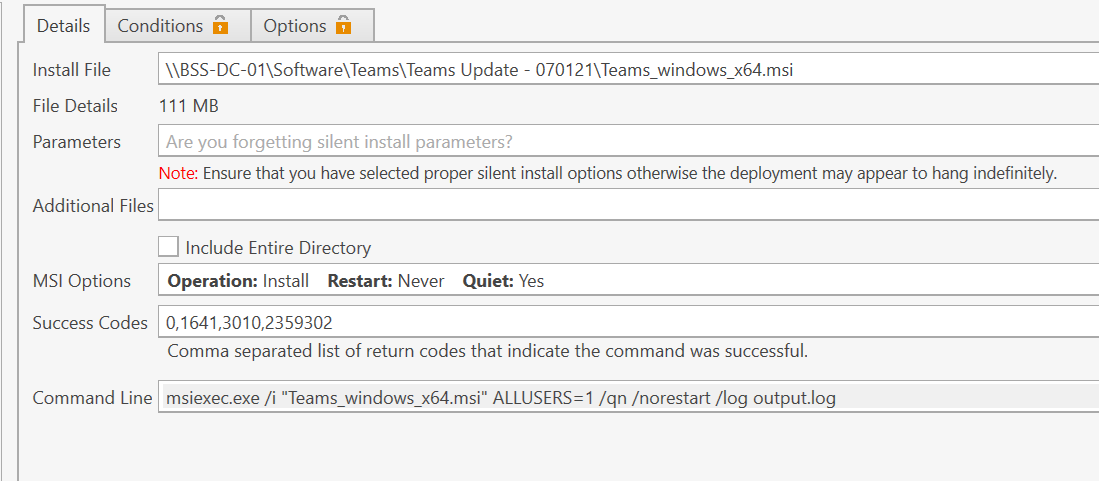
How are you deploying it? Are you deploying the msi with PDQDeploy if so make sure you haven't got any additional switches in the command line area ours looks like this
-
I don't think roaming profiles should change anything. You may notice that log files fill up your app data folders a bit so make sure you got storage sense enabled too.
-
We've created a shortcut in start menu's to %localappdata%\Microsoft\Teams\Update.exe --processStart "Teams.exe" and that seems to work fine for us. We found we were installing initially with the master packager mst which installs with the alluser = 1 switch. This then apparently disables auto updates. Blog (masterpackager.com) we stopped this and did the above.
-
Thanks for this so if we launch it using that it will update at some point?
-
Well, that's not confusing haha...
-
Mine is saying I've got the most up to date on my off the network machine, I have a feeling the msi does not auto update looking into it. "You have Microsoft Teams Version 1.3.00.28779 (64-bit). It was last updated on 07/01/2021"
-
So does this have to be the shortcut in appdata and not the one in C:\Program Files (x86)?
-
Hi all, We have the Teams Machine MSI installed through group policy. However I am struggling to see how we update it. I've read stuff around how the exe updates itself but there is not a lot of the machine msi and updates. We don't seem to get anything installed into appdata folder however in our c:\Program Files (x86)\Microsoft\Teams on each machine there is an Update.exe The only thing we are doing is deleting the Teams regkey from HKLM\SOFTWARE\WOW6432Node\Microsoft\Windows\CurrentVersion\Run as that was the only way we found of stopping it auto launching. Any ideas would be appreciated, Just want to know the best way of having up to date teams.
-
Does anyone know a way of using a wildcard with RMDir command in cmd we are trying to do "C:\Users\*\OneDrive - eLearning & Information Management\tempsimsrpt" /S /Q but it's not playing ball. I'm aware we could remove item in powershell but it's not a fan of the - naming of the path. We have tested RMDIR and it works just need it for every user
-
We have done this by setting up a custom field so when they hit sign out it asks where they are going and we have options such as our other sites, home, break/lunch etc. It's been working quite well for us.
-
+1 for Senso Cloud we recently starting using these guys and their support is great and they are constantly developing new features.
-
I've got one of those horstmann thermostats with with boost button that I want to convert to being smart so that when my Octopus Energy Price goes cheap it heats my water heater. Was looking at getting some switchbots and a hub to link to alexa as it seemed real cheap to do. https://www.switch-bot.com/products/switchbot-bot (they sell on amazon too)
-
Hi MeadowGirl Think we have a similar issue where the RDS is not making profiles for a couple users. How did you get round it?
-
What we did was download the OneDrive.exe from https://www.microsoft.com/en-gb/microsoft-365/onedrive/download Then in powershell cd to where the exe downloaded to or right click + shift in explorer and "open powershell window here" then run .\OneDriveSetup.exe /allusers
-
We are using the per machine installer where we download the OneDrive.exe and use the /allusers switch https://docs.microsoft.com/en-us/onedrive/per-machine-installation#:~:text=Download%20OneDriveSetup.exe.,setup%20completes%2C%20OneDrive%20will%20start. There are scrips to deploy through Group Policy and intune etc.
-
We've recently placed an order for some 70" Sharp Big Pads from the demo's they seemed to have the smoothest tools etc.
-
Not sure if this will help you directly but we were having SSO issues back along. Turns out it was because our machines were domain joined but not Hybrid Azure AD Joined via Azure AD Join. We found this by running dsregcmd /status in cmd, then we saw that AzureAdPrt under SSO was No. So we went back through and ensured the devices were hybrid Azure AD joined and it now works. Could be worth a check?
-
Thanks James, I think we are in a similar boat as we want to start pushing Onedrive using the native sync client with some redirection. Then use Sharepoint Online where possible. One of our headaches is with staff wanting to save to shared areas as our 3rd party tool is letting us down. I know office apps can see it natively but when they are downloading files etc it's a pain.
-
For those who have moved their storage to cloud how have you gone about doing this? I knows SIMS like to have a Documents area to store things etc. We have tried using a drive mapping solution but as it relies on WebDav it's just unreliable and causing drops outs etc. We are a O365 Windows based schools. We are looking into Azure etc but pricing is difficult. Cheers Dan