SovietRussia
-
Posts
949 -
Joined
-
Last visited
Content Type
Forums
News
20th
EduGeek EDIT Conference
Blogs
Everything posted by SovietRussia
-

[android] Google Play for Education
SovietRussia replied to Arthur's topic in Mobile Devices & Tablets
Very interesting though, maybe Apple are planning the same for education... *hopes* -
[android] Google Play for Education
SovietRussia replied to Arthur's topic in Mobile Devices & Tablets
Apparently the management will be much better, signed up for a preview -
[ipad] SWOT analysis of iPads for Teaching staff
SovietRussia replied to reggiep's topic in Mobile Devices & Tablets
WebDAV is unsecure, another personal disadvantage ... Can't turn off the settings menu without jailbreak Apple need to give us much more in the way of management tools to control these. -
iPads in a classroom - your views
SovietRussia replied to lquinnuk's topic in Mobile Devices & Tablets
None so far - But it has been flagged up by a member of staff who was watching a student trying to set a passcode lock. We also do use Apple Configurator, supervise the devices etc. We also place localised restrictions on the devices regarding Location, Accounts and other settings. From what I can find online, is that if they do set a passcode lock, I just refresh/restore from backup in Configurator -
iPads in a classroom - your views
SovietRussia replied to lquinnuk's topic in Mobile Devices & Tablets
We do, but they can still get to the settings menu and still can set one -
[ipad] iPad Acceptable Usage Policy - Anyone?
SovietRussia posted a topic in Mobile Devices & Tablets
Hi, We have gone from planning to actually deploying in classrooms of our iPad fleet. If anyone else here is using some kind of iPad Policy, could I possible borrow a copy just to get a template that we can base ours on? We need one quickly as all the kids are messing around on them (I know a policy won't stop them, but it may help) Cheers -
It put all our iPads in camden once also, but we did not have location services turned on - You really need those turned on!
-
iPads in a classroom - your views
SovietRussia replied to lquinnuk's topic in Mobile Devices & Tablets
Just to let you know, from planning, deploying and now watching them grow in the classrooms, iPads are not designed for education or for a multi-user approach. The kids can still access settings like Passcode lock and you cant do diddly squat to stop them. But they have their benefits, of course. -
For iMovie editing on our MacBooks, we give students external hard drives as iMovie cannot read network share data.
-
We have gone for the IT budget to start off as it was identified in a FIP, we don't share our iPads across departments though, DT have 15, they also have 15 copies of Keynote so it works nicely Any new apps would certainly be going out of their departmental budgets, £104 for 15 copies of Keynote is a joke imo
-
Connecting iPads to whiteboards
SovietRussia replied to speckytecky's topic in Mobile Devices & Tablets
We would deploy Air Server but we want the teacher's to continue using their PC as usual so ATV may be perfect -
We run it off our print server over the network and it seems to work fine, no issues like you have explained. We are running Version 13 and we run it as a batch script to just start the program at Login
-
HAP uses IIS, why not just create a new site in IIS Manager with the port 8080 (Browsers seem to love 8080) and host it there? There is no real need to fiddle around with XAMPP, and the last time I used it, it was a massive security hole. EDIT: Reading more of this thread, i sort of see your issue. To do it properly with reversing, you want to set it up on IIS, use the built in ARP and URL Rewrite it to the internal ports. We did this with our own home document solution: Internal Hostname: http://homefile:8080 External: https://portal.n***********/homefile/ And ask Moodle to look for your EXTERNAL address
-
We usually display examples of the students work (In GCSE and A Level they have to produce a e-portfolio)
-
Connecting iPads to whiteboards
SovietRussia replied to speckytecky's topic in Mobile Devices & Tablets
We had to sort all our port issues anyway as we use Profile Manager (for my stress levels to increase ) to manage them, so the ports HAVE to be open for APNS to connect. Thing that is annoying is according to Apple Spec, the ATVs have to be plugged into a visual display at the same time as apple configuring them, how annoying. If anyone can confirm or deny that, would be a big help! -
We deployed around 20 B580s and they are nice machines, but we have just bought an extra 30 B590s, they have Ivybridge instead of Sandybridge.
-
Connecting iPads to whiteboards
SovietRussia replied to speckytecky's topic in Mobile Devices & Tablets
Hi sorry this is off topic, Apple TV's, we had real trouble connecting to our proxy with them, did you also have issues? -
Done
-
We use SNMP for monitoring of Print Levels, Bandwidth to switches etc MIB is like the backbone that has data, you need a MIB Browser to view the data on the device. All MIB has unique codes, then in application's you insert these OID codes which then poll the information. But for instance, to get specific data from a HP Switch, you need the HP MIB as it may contain more fields that just a standard MIB.
-
We give students 512 by default, if they need more they just ask. Teachers and Staff get 6GB
-
Do you still have to make the images a certain file size?
-
Personal hotspot to link iPad to Apple TV?
SovietRussia replied to SteveB_NI's topic in Mobile Devices & Tablets
It is only streaming your screen, so it should be low, as all the video playback for your large video is done on the iPad. Video may be more than your usual web browsing due to the frame rate, as when a frame changes it then pushes the visual update to the Apple TV. -
Security on iPads should be pretty good, due to using UNIX etc. Regarding security as in software, all backups we do are forced as encrypted.
-
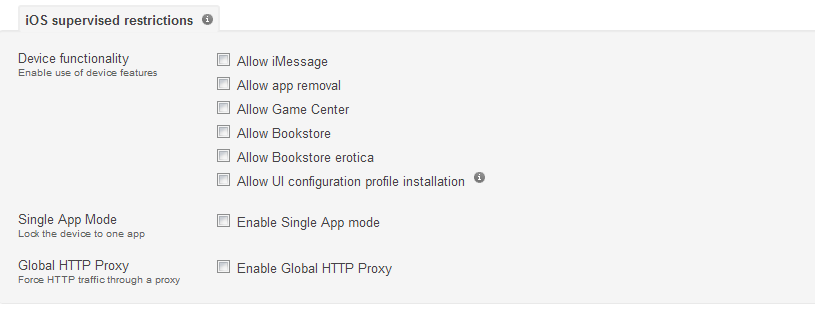
In your restrictions, you need to turn off all the ones that say Supervised Devices only. The profiles have to be very specific. They must be UNTICKED like this picture Any more help, just ask

-
Working.