gsk
-
Posts
492 -
Joined
-
Last visited
2 Followers

About gsk

-
Passkeys by default and retirement of Microsoft SMS and voice authentication
gsk replied to gsk's topic in Cloud Services
Ah, looks like it's only applicable to Insider builds. Thanks for the link -
Passkeys by default and retirement of Microsoft SMS and voice authentication
gsk replied to gsk's topic in Cloud Services
Oooh disabling the post-login provisioning would be good. With the result being that users can enrol to WHfB but aren’t prompted to? Any chance of sharing that custom policy please? -
Passkeys by default and retirement of Microsoft SMS and voice authentication
gsk replied to gsk's topic in Cloud Services
Also, what method are you using to target WHfB? I’d like to target it to users rather than devices if possible. -
Passkeys by default and retirement of Microsoft SMS and voice authentication
gsk replied to gsk's topic in Cloud Services
How does they passkey situation work if you log in on another device? -
Passkeys by default and retirement of Microsoft SMS and voice authentication
gsk replied to gsk's topic in Cloud Services
How is this looking/working across multiple devices. One of my biggest frustrations with WHfB is that it doesn’t sync those authentication methods back to entra so that you can enrol a face onto one laptop and then log in on another laptop without re-enrolling. -
Passkeys by default and retirement of Microsoft SMS and voice authentication
gsk replied to gsk's topic in Cloud Services
This is brilliant - thanks for sharing. -
Passkeys by default and retirement of Microsoft SMS and voice authentication
gsk replied to gsk's topic in Cloud Services
I’d like to understand this better. So you issue them with a laptop, they enrol into windows hello on that device and then what’s the process to get them using passkeys on there? -
Passkeys by default and retirement of Microsoft SMS and voice authentication
gsk replied to gsk's topic in Cloud Services
Good luck getting the different departments to talk. What’s you preferred form factor for storing passkeys? -
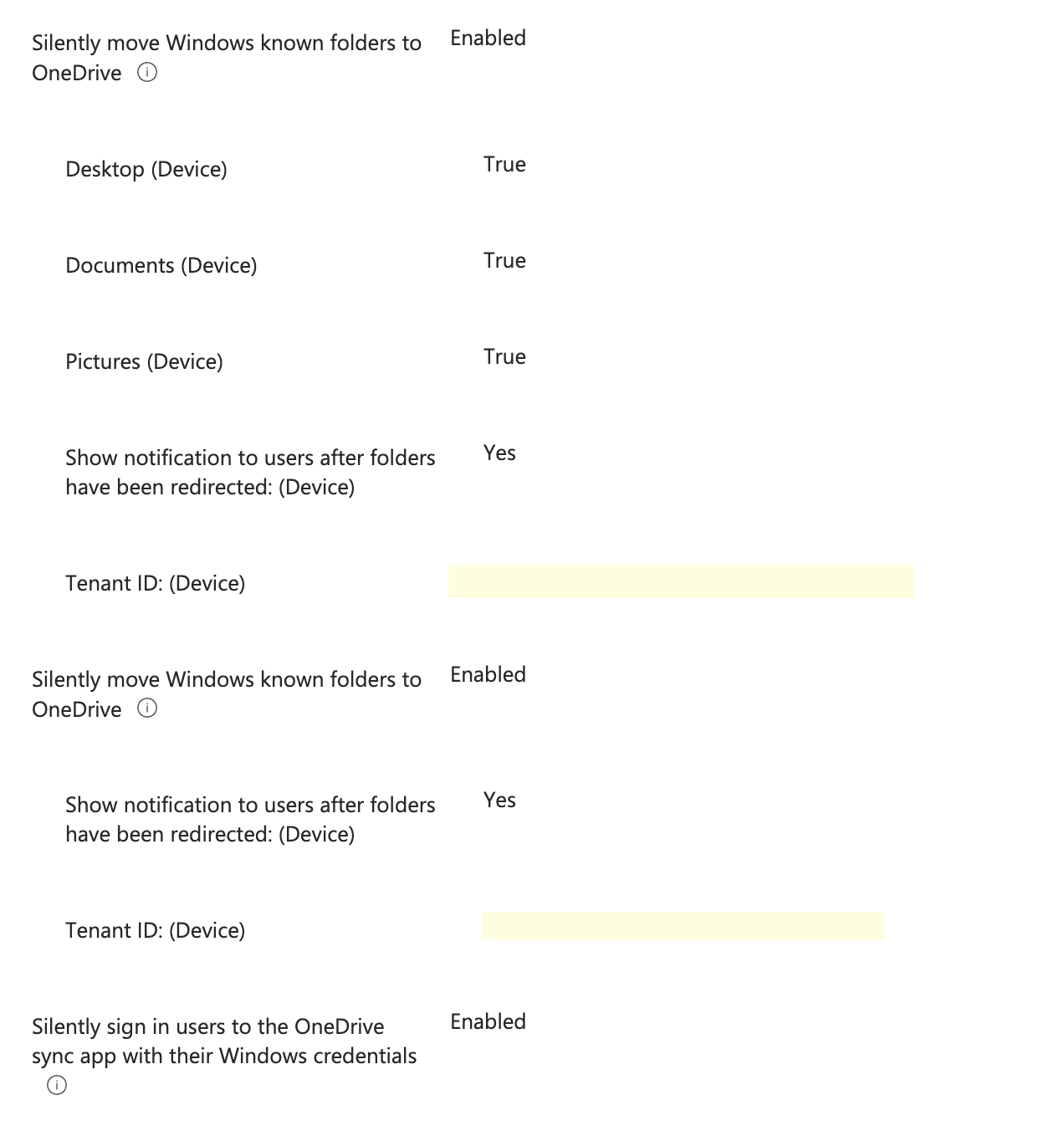
Can anyone share their Known Folder Move Intune config ??
gsk replied to mikkydoos's topic in Cloud Services
Screenshot of the settings specific to moving known folders attached. JSON of the whole policy we use (tenant ID blanked) attached. It's also worth noting that these settings don't apply if you have shared PC configuration enabled, which I think is part of the default EDU policies. Global - OneDrive Settings_2026-08-11T11_41_45.073Z.json
-
Hi All, I thought it would be interesting to see what people are assessing the impact to them will be. I know we've got a few people who rely on SMS/Voice for various reasons (of varying validity!). The vast majority of our users use authenticator push notifications. I've not given it enough (any) thought yet to see how these users might be impacted and what training and actions we'll need to put in place, if anything. Thanks,
-
Hi All, Just wondering how you're all tackling the automated creation and deletion of M365 accounts for Supply staff to be able to access PCs via Intune, MIS via SSO, and emails? Where Arbor is the MIS, for long term supply staff, we're currently recommending creation of a staff profile where they're excluded from the Workforce census and their contract dates entered accurately. We're getting a lot of push back regarding short-term supply, especially where they don't know until they arrive on site what their name is going to be. Thanks,
-
Hi All, I was wondering whether there's a consensus in how Trusts are managing the cross-school risks of students communicating between themselves. For emails - are people doing scoped Address Book Policies as well as transport rules? For Teams, do you just disable chat for students or do you use Information Barriers in entra? Thanks,
-
This is the sort of thing I'm wondering. Whether people feel it's not even an issue worth considering? Or have considered and decided that the risk isn't worth the cost?
-
Hi All, I was just hoping to get a feel for how many are using or considering using ITDR and/or MDR products to complement the existing AV and EDR we are all used to having in place. So I guess 3 questions: 1. Are you using ITDR to protect cloud identities? 2. Are you using a managed SOC for your existing EDR or an all in one MDR? 3. If yes to either - which are you using? Thanks,
-
Checking filtering reports - legal implications.
gsk replied to sigma's topic in Internet Related/Filtering/Firewall
We had a meeting with a few officers from East Mids Special Operations Unit a couple of years ago and they referenced the possiblity that just viewing the image in a capture could constitute an offence, unless you take reasonable measures to ensure the material isn't accessed or shared by anyone else other than the police. ie, Don't show your boss/head/DSL to ask for an opinion on whether it needs to be reported. You should either report directly or inform DSL that it needs to be reported but you can't show them. This guide from Securus forms the basis of the way we handle these situations: https://securus-software.atlassian.net/wiki/spaces/SSKB/pages/328020/Guidance+for+Printing+Copying+or+Emailing+Captures Thanks,