Fazza
-
Posts
2,336 -
Joined
-
Last visited
Content Type
Forums
News
20th
EduGeek EDIT Conference
Blogs
Everything posted by Fazza
-
 Excellent! We're finally getting somewhere. Why is this information not available to your Support team on the helpdesk that we call? If it is then why are they scared to tell us - or do they not know how to use this part of the system. I've been asking (for what I consider to be very basic information that I was able to get 18 years ago from other ISPs) since we went with Schools Broadband over 3yrs ago - bandwidth useage (both current and historic) along with top 10 protocols and websites visited etc. (both by number of uses/visits and by bandwidth in MB) has simply never been available to us and without this information we simply can not properly manage our internet usage. The option has always been available on the Fortinet box but it's always been blank and when we ask about it we're fobbed off with random excuses each time. I've tried multiple times to sign up to your portal ever since I found out about it months ago (tried again yesterday) but after waiting and waiting and waiting I never get sent any log on details so I give up now as I'm simply fed up with it all.
 -
We're supposed to have a 1:1 contention ratio 100Mbps leased line but since the middle of last week (at times) we've only had 5Mbps. We keep being told they're investigating it - either no one has a clue at there end what is going on, or they've cocked something up and dont want to tell us! The last time this happened they hadnt purchased enough bandwidth at one of their nodes that one of our schools that we support went through. On Twitter they denied there was a problem and implied it was probably Windows Updates and we should look at a WSUS server. We have a WSUS server so I dont think it is that! I've always had a niggly feeling that we dont have what we think we have connection wise but have no way to investigate it.
-
We get this randomly on random PCs and we just boot in to safe mode with low resolution video (easier said than done sometimes with Windows 8.1) and then reboot the computer and that seems to sort it out for us!
-
TouchDevelop from Microsoft is going to be used when (or even, if) the BBC MicroBit comes out and is delivered to our School. The website was working OK last week but there is now an announcement on their site that says Microsoft has changed something on their back end and now the site has stopped working for us in our computer suites! After signing in with a MS Live account you just get this displayed: Has anyone got any ideas what is causing this? If we can work out what should be happening at this point we might be able to work out what we need to investigate and fix!

-
Tell me why this is a bad idea (or maybe its not!)
Fazza replied to AdamEdTech's topic in Wireless Networks
Not sure they'll be able to do that yet as in the original post they say the building is still being built... -
Tell me why this is a bad idea (or maybe its not!)
Fazza replied to AdamEdTech's topic in Wireless Networks
Sounds like you need to find a Datacoms company you 100% trust to get on board ASAP to give your School some professional advice on if this is a good idea or not and what the pros and cons are for the school. -
We use Hornbill SupportDesk - it's great value for money, FITS compliant and the support is brilliant! Never had any problems but have contacted support on several occasions asking if it's possible to do certain things and 9 times out of 10 it has been and the one time it wasn't, they took it on board and updated their software so it now is! There is a Windows client (not compatible with Windows 10) and a Web Based client that you can use too. We support multiple sites so use the web based client when out and about
-
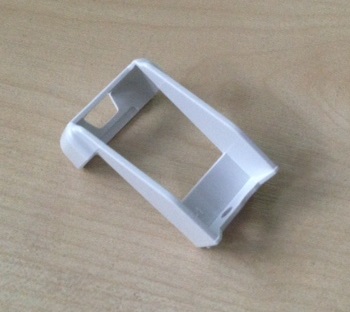
Just worked it out that it's to hold in the optional wireless USB 'dongle'
-
Nope! Tried every which way but loose with the remote control and there's nowhere for it to clip on to or hold!
-
Free online courses: https://www.digitalskills.com/ BBC WebWise - BBC WebWise
-
They seem to work OK in one of our Primary schools but perform badly on our (Secondary) school network as they seem to require a lot of bandwidth and with all the students constantly on the wireless as well it just doesnt work.
-
We've just got a few Epson projectors and they all came with this bit of plastic: There is an image of it in the 'manual' as being part of the contents of the box but nowhere does it mention what it does and we cant see anywhere on the projector or remote control it can go! Any ideas?!
-
We've got a lot of Student Desktop computers like that - we got some cheap SSD drives for around 100 of them and it made a huge difference in performance.
-
SCOM is fairly cheap for Education so that's always worth a shot.
-
In my experience, if you buy cheep you often end up having to buy twice so lose out on a lot of money. If you've found a particular laptop you're interested in then as one of your suppliers if they can get hold of a demo one for you so you can try them out with your software before going ahead and ordering a load of them. We've done this loads of times in the past and always get a demo one to play with before we buy anything. Not only with laptops, we've had loan thin-clients and wireless bridges loaned to us in the past before we went ahead with any purchases.
-
Try updating the BIOS on the laptops and then loading the optimised defaults and see if that helps.
-
Pupil and Staff Leavers - Server Account Maintenance
Fazza replied to Aqua's topic in How do you do....it?
Check with your exams department on how long you need to keep their user areas in case exam boards need to re examine any coursework etc. -
The PXE part is normally on a separate chip on the NIC so it will just be the PXE part that is faulty - that's why on some built-in NICs it's called an Option ROM in the BIOS as in the 'olden days' it was an optional extra and if you wanted PXE you had to purchase a ROM chip that you installed on/in to your NIC.
-
I think you've answered your own question here, sounds like a faulty NIC if you've replaced it with another one and it works OK.
-
When you create a VM with Hyper-V it only assigns 1 CPU which means your server will be painstakingly slow - when creating a VM, berfore installing the OS I configure the CPU could to at least 2 and configure the RAM as well to be at least 2GB on startup and then Dynamic. I would suggest that you shutdown the server and change the CPU count to at least 2, if you're not planning on having too many VMs on the host server then set it at 3 or 4 CPUs.
-
1) As many as we possibly can squeeze out of the budget - sometimes its just a few but it can be as many as several computer suites. Depends how the computers perform, one year we purchased a load of RAM and SSD drives to upgrade some PCs rather than replace them as they were OK but just needed a bit more oomph! 2) We call then Staff computers! 3) We cable tie all the cables together with, er, cable ties! Cheap but effective and easy to sort out if we have to replace a keyboard/mouse etc.
-
System Center Administrator Consoles Not Working With Windows 10
Fazza replied to Fazza's topic in Windows 10
SCDPM Administrator Console is now working. It seems that Windows Updates is not installing any SCDPM updates (like it does for Windows 7/8/8.1) so you have to manually update SCDPM Admin Console. https://support.microsoft.com/en-us/kb/3065246 Oddly enough, all four updates fail but they must do something as if you then open up the SCDPM Admin Console afterwards it works! SCCM works without having to do anything other than install it (i.e. no updates etc.) SCOM also works OK without having to do anything extra SCVMM just hangs when you click on 'Connect' to connect to the server -
Just installed SCDPM Administrator Console on Windows 10, then performed all Windows Updates so it is updated to the latest version but it does work, the MMC just crashes Not a good start when Microsofts own software doesnt work.... I'll let you know how we get on with the SCCM, SCOM and SCVMM admin consoles.
-
System Center Enpoint Protectop (SCEP) No Longer Installs - What Now?
Fazza replied to Fazza's topic in Windows 10
I can imagine a few unscrupulous salespeople who sold a school SCEP/FEP as part of their ESS agreement get in touch and let them know that it wont install with Windows 10 and see if they want to buy an Antivirus program from the. Schools/Academies with a dedicated IT Services/Support department will tell them where to go but any that dont have their own IT Support department (mainly Primary education) may end up parting with some cash to buy a third part piece of software. I've seen schools purchase thousands of pounds worth of unnecessary things like this and until someone puts them straight they simply trust the salesperson who called them. -
System Center Enpoint Protectop (SCEP) No Longer Installs - What Now?
Fazza replied to Fazza's topic in Windows 10
I can see sales of third-party antivirus/antimalware software increasing now then.