Fazza
-
Posts
2,336 -
Joined
-
Last visited
Content Type
Forums
News
20th
EduGeek EDIT Conference
Blogs
Everything posted by Fazza
-

Doctor Who: Series 8 Teaser Trailer: Returns To BBC 1: 23rd August 2014
Fazza replied to 6Foot2's topic in Other Stuff
To be honest I dont think I'll bother watching this series as the BBC has spoilt it for me by revealing too much information about it (and I'm not referring to the leaks from the USA) they keep tweeting loads of info and photos when it should be left as a surprise, they've even told us what enemies of the Doctor will be in the new series so nothing much will be a surprise! -
SCCM 2012R2 - Deploying Windows Updates - Guidance Needed
Fazza replied to Fazza's topic in Enterprise Software
I seem to remember setting up the Maintenance Windows on our computer suite device collections so that bit is taken care of thanks Er, no - hence me posting this query on what I need to do to do it - care to share how you did it? -
For the last three weeks I have been learning about, installing, configuring and implementing SCCM 2012 R2! It's been a sharp learning curve and I am now at a stage where I have a standard 'Golden Image' ready to be deployed to over 400 computers within the next week or so. So far I have created dozens of Applications, a few packages, created a 'Golden Image' and enabled Endpoint and Protection on all Windows devices. Now it's time for me to look at Software Updates! What I would like to do is as follows: Configure Software Updates on the computers in our computer suites. Software Updates must not be installed during the day as lessons are only 45 minutes long so if Windows Updates suddenly install and they reboot a computer it could take up to half of the lesson for them to install so they end up not being able to use a computer so I need to make sure they only ever install out of hours so to speak. So far I have added the Software Update Point role and all the Windows Updates are appearing in the All Software Updates section in the Software Library. Any tips on what I need to do next to achieve my goals would be greatly appreciated. Thanks.
-
Prize-a-day-May! Win merch, tablets and a PC with VeryPC
Fazza replied to VeryPC's topic in Our Advertisers
Looks OK to me, are you on a Mac by any chance?? #shouldveGoneToSpecsavers Definitely nothing spelt wrong in my post. *now how do you get rig of the 'Last edited' message?.... -
Prize-a-day-May! Win merch, tablets and a PC with VeryPC
Fazza replied to VeryPC's topic in Our Advertisers
I've spoken to WagnerK and feel free to share it! If you tweet it on Twitter feel free to tag me in it (@TBWblog) - I'm sure all the schools and businesses we support will find it funny as WagnerK and I have a bit of a reputation for being daft so it wont come as any surprise to them! -
Prize-a-day-May! Win merch, tablets and a PC with VeryPC
Fazza replied to VeryPC's topic in Our Advertisers
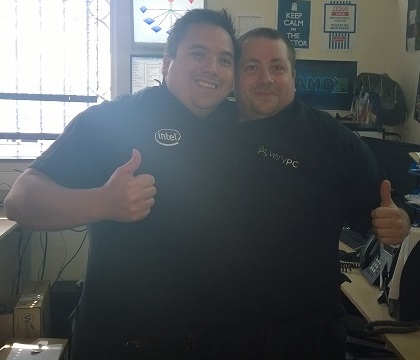
As soon as I opened the package and saw it was the wrong size I immediately knew what I had to do and had a photo taken straight away! -
Prize-a-day-May! Win merch, tablets and a PC with VeryPC
Fazza replied to VeryPC's topic in Our Advertisers
My prize arrived today so I thought I'd pop on and say ThankYou to VeryPC! Only thing is (and I've double-checked my PM's) the wrong size has been sent so it's every-so-slightly too big... As you can see it's way larger than I requested so both myself (on the right) and my boss can wear it, at the same time! It must be a VeryPC policy to give their customers extra value when you order things from them!!!
-
Correct me if I'm wrong, but I'm sure the Installation Language is exactly that, just the language used for the installation and no bearing on the Time and Currency setting which should be changed to UK etc.
-
So do we - no problems so far and you get a certificate of destruction etc. for you records. Oh, and they're drivers also give away free mugs (sometimes) when they collect all your stuff!!
-
We've (literally) got dozens of these from Dave and they work really well with Windows 7 and Windows 8.1 Remember though, with Windows 8.x you dont need a TMP chip to make use of BitLocker as you can just use a password at bootup without the need to plug in a USB memory stick.
-
The only things we (have time to) air dust are our Servers and Data Projectors and we only do those when we move them. Just like a few other people, we don't use cans of air any more since we came across the Datavac Electric Duster which we paid around £49 for which in under a year saved us money on expensive air duster cans.
-
We've got a couple of QNAP Pro devices and they've been very reliable so far, a little slow to reboot but other than that they're OK. If you can afford it get a Drobo as they're brilliant but slightly more expensive than a QNAP and you don't get as much free space after setting up RAID as Drobo do some 'magic' and use a bit more space for even better redundancy, they restart quickly and offer brilliant perfomance in my experience.
-
I'm just getting in to SCCM 2012 R2 and have a few newbie questions: Should I be using Packages or Applications to deploy software? Perhaps that's a bit too open ended - For Student Computer Suites which one should I be using? And what should I use for staff computers? Should I be avoiding Packages altogether and just use Applications? In my mind so far I think for Computer Suites I should be using Packages as I've set up Collections based on computer suites and that's the best way of deploying software to them but I think for Staff computers (except for things like Endpoint Protection) I should be using Applications and then giving them the choice on whether or not they want to update/upgrade to things like Office 2013 if they are not already on it? Have I got this right or do you do it some other way?
-
With that many you'd probably be better off getting a separate wireless infrastructure to cope with them all. Try and speak to Apple Education for tech advice or an Apple Specialist Reseller as that's a lot of devices to buy all in one go and could be a very expensive mistake.
-
If you want hard-wearing then a Lenovo business laptop (not one designed for home use) is your answer. Something like a Lenovo T410 (T's are business grade so they have roll-cages in them and meet military grade standards etc) should suit your needs. For a Core i5 they're around the £700 mark or you can pick up a refurbished one with a 2yr warranty for around £250.
-
When I worked at a College we sold off really old Desktop computers for £50 all that was on the PC was Windows and the Drivers. Everyone was told there was nothing else on the PCs and no support would be offered and they were 'Sold as Seen' with no warranty what-so-ever. We had dozens of these and after a couple of days of the first few people buying them, we had people turning up saying "I know you don't offer any support on these, but can you help me with this...". We were overworked at the time (who in IT Support isnt?!) so had to politely remind them on the terms of purchase that they signed but they expected we'd make an exception for them. This happened too many times so we stopped the sale of the desktops and returned any monies paid to us for ones that had not been collected yet and we insisted that everyone who had purchased one to return it to us for a full refund as it was far more hassle than it's worth. You could always set up an School eBay account and sell them on eBay - sometimes you may find splitting them up for parts (CPU, HDD and RAM etc.) can create a larger income than selling the PC as a whole. Pro: you make some money Cons: it can take up a lot of time and dont forget about all the rules and regulations (like the Distance Selling Regulations where people can send stuff back for a full refund) and not forgetting dealing with items that dont turn up or faulty ones! I did think about this myself and settled on sending it away to a WEEE company for free - although no money made, it frees up our time and saves on the hassle. You could always set up your own website to sell the stuff on - you could always just set a website up as a catalog of what you have and then sell only to Education and just send out an Invoice to whichever establishment has purchased the kit. It depends on the spec of the equipment you are getting rid of to be honest.
-
I worked with the 'Purple Boxes' (aka Extreme Switches) for many years whilst I worked at a College where we had 5 main campuses and 24 outreach centres spread across 2 counties (each connecting back to the main campus with a BT Learning Stream) and all sites/locations had Extreme switches. We had a core at each main campus (which also linked back to our main campus either via Microwave or Infrared links). The kit worked very well and was very reliable. Easy to assign VLANs to ports etc. and the Support we got was fantastic (mainly used for making changes to how we did things rather than faults). So if you go with Extreme switches then I can fully recommend them. The only question is will you be getting an annual maintenance contract over the years? Is it affordable? Where I currently work (now at a School) we use HP Switches, like Extreme they're reliable and do the job. Do we have a maintenance contract? No. HP have a lifetime warranty so no need. We save money with HP by not having to have an annual maintenance contract. If one fails (*touch wood* not happened yet) and we want to get back online whilst we deal with HP to get it fixed, then we can order a new one for next day delivery from a supplier which is infinitely cheaper than an annual maintenance contract and still providing a quick-fix for our internal customers.
-
I use a TP-LINK TL-WA850RE 300Mbps Universal Wireless N Range Extender - I paid just under £30 for one at Asda but they now appear to be around £25 as it looks like they've been replaced with a new model that supports AC. I use mine upstairs where right in the corner of my bedroom I get a perfect signal but as soon as I move to where my desk is it drops very rapidly so I have my Wireless Extender in the corner (it's plugged in to an extension lead) and then that gives me full signal throughout the whole of upstairs. It has an Ethernet port so I have a switch connected to that for my Ethernet devices to get internet access.
-
Anybody here use Impero's Patch Management? I've spoken to Impero about it and they told me although you can schedule patches to be installed at a time of your choosing, we would have to manually go around our 750+ computers and manually stop all the software that Impero can update from automatically updating themselves as Impero has no way of disabling them itself. For us the whole idea of implementing a patch management solution would be to control when the computers update so that the automatic updates that currently occur no longer disrupt lessons by taking a computer out of action as it's spending half a lesson updating for example. My question for you guys is; if you use Impero's Patch Management solution - how have you disabled the auto-updates? Are there some group policy settings for the likes of iTunes, Acrobat Reader or Flash that can turn autoupdating off? Thanks
-
If you want to use the original product key then you'll need the original disk that was used to install it - even some OEM disks are made in batches that only support certain product keys so even if you went and found an OEM version on eBay there's no gaurantee it will work. If you have downloaded a VLK version in ISO format from the Microsoft Volume Licensing Center then that type of disc/ISO will only work with your VLK/KMS keys which is why your OEM key doesnt work with it as it's a VLK version not OEM version.
-
Downloading it now!
-
We've got at least one physical DC on each site along with at least one virtual.
-
It's a big Yes! from me - I've got two (one I have personally) and one for work and my colleagues also have one for work too. The ones we have are USB 3 so nice and whizzy fast on a USB 3 enabled computer. The main reason we got them though, is for the Virtual Optical Drive feature where you just copy ISO files on to the drive and then after selecting which ISO to mount you can boot from it which makes installing OS's even faster!
-
Every time we get a DPD delivery I get a text telling me the time of delivery and even the drivers name!
-
[video] The Shard: London's Lightning Conductor!
Fazza replied to CAM's topic in Jokes/Interweb Things
Western Europe's tallest building gets struck by lightening - #shock #horror