hallb15
-
Posts
2,013 -
Joined
Content Type
Forums
News
20th
EduGeek EDIT Conference
Blogs
Everything posted by hallb15
-
Here's another one for Jack...

-
Ok, found 5 mins to fashion a hero image - you'd think by now with all my previous submissions to edugeek competitions I would have improved! Here are the ICT Direct Avengers...
-
to all the newbies.
-
Good luck - I've had mine on here for over a month without a single enquiry.
-
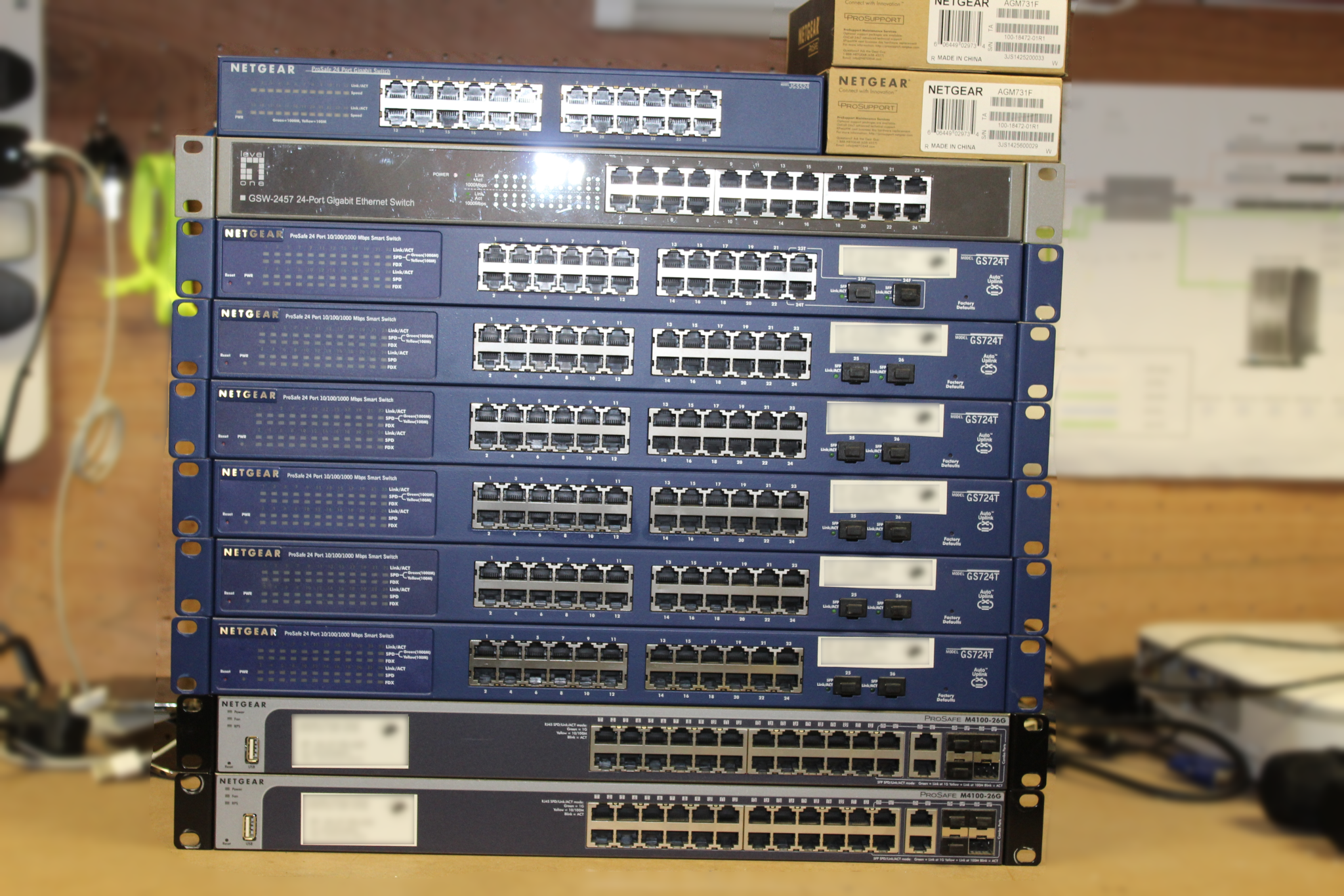
We've recently upgraded to UniFi across school so no longer need our old Netgear switches. We have the following 24 Port Netgear switches: 1 x JGS524 v1 6 x GS724T (1 x V3 and 5 x V4) 2 x M4100-26G Plus 2 x AGM731F Netgear Fibre modules (never used) 1 x LevelOne GSW2457 24 port switch I'd ideally like to get rid of the whole lot in one go. Any sensible offer accepted.
-
This morning I came in to work to find no-one could access the fileserver. When I checked the VM, it was reporting it was connected to our domain but no internet access. A quick ping test showed it could not contact anything, not even the host server. This VM was using a new virtual switch (#5) that I created a couple of months ago when I put a new 10Gb NIC in the host server. It has been working fine up until now. The 10Gb NIC is connected via fibre between two buildings to a Unifi 16XG switch which was showing as connected and working in the unifi controller. I've checked the event log and can see when it happened, but I can't see anything obvious as to why. So I stopped the VM, changed it to a different virtual switch (#3) and restarted it but the same issue happened. So I removed the virtual switch #5 from Hyper-V and restarted the VM again, this time it connected (still on #3) and everything was fine. So I've re-created virtual switch #5 on the 10Gb NIC and moved the VM back on to it and now it works again. So, my question is has anyone else experienced similar behaviour? I don't want this to happen again.
-
everyone.
-
@ArtemisLion
-
I think we've had this discussion before on edugeek somewhere... Anyway, most of the signs are on the road which is no good when you can't see them because of the traffic on the road. Driving in Leeds is not for the faint hearted, but it does give you good training for driving in other cities.
-
@SeanAllen @wakka9876
-
Thanks for the input everyone. I've gone with the 665249-B21. Its going to be connected to Unifi kit, a US-XG-16 using one of these: https://www.4gon.co.uk/ubiquiti-unifi-direct-attach-copper-cable-10gbps-3m-p-7196.html
-
 Definitely +1 for DVDStyler.
 -
@cw222
- 4,289 replies
-
- 1
-

-
- assistance
- background
- (and 2 more)
-
@pugrick_31
-
HPE: https://www.serversdirect.co.uk/p/790677/hpe-ethernet-10gb-p-560sfp#/maindesc 10GTek: http://amzn.eu/4TkItUj There's a big difference in price, but they are both using the same Intel controller. Any thoughts?
-
Is anyone using a 10Gb NIC in an HP ML350p Gen8 that they would recommend? I'm planning an upgrade to 10Gb over the summer and am looking for a suitable 10Gb NIC for our ML350p Gen 8 running server 2012 (currently) Any recommendations?
-
Welcome @centerprise_lucy
- 4,289 replies
-
- 1
-
-
- assistance
- background
- (and 2 more)
-
What Interactive Touchscreens are people using?
hallb15 replied to CHSGM's topic in AV and Multimedia Related
For us, the software determined which IFP to go for. We are 100% SMART notebook in school and so, after testing several other hardware brands, we've decided to go with SMART hardware. The Iiyama was a close second, but it just isn't 100% compatible with SMART Notebook and the teaching staff who tested it got too frustrated with it not working reliably. Nothing wrong with the hardware, just not compatible with Notebook. -
We're about to buy Tapestry so have been testing it on various mobile devices. Tapestry runs fine on iPad Mini 2, which has the same A7 CPU as the iPad Air (slightly slower clock speed) so I wouldn't worry about whether it can cope with Tapestry, but it is getting pretty old in Apple terms. 5 years old in October. The Air 2 has the triple-core A8 CPU and double the RAM at 2GB DDR3, plus is a year younger so should be supported longer, but for running Tapestry, you won't notice any discernible difference in performance. We've opted to run it on the Amazon Kindle Fire 7 as it works really well on them, and they are cheap! There's no MDM but as these are exclusively for staff, that shouldn't be an issue for us.
-
Hello to all the newbies.
-
Happy Birthday @mikeprice A little late:
-
News regarding ICT4C/YHGfL?
hallb15 replied to enbiggen's topic in Yorkshire & Humberside Grid for Learning (YHGfL)
Has everyone else received the email about a Webinar Sophos are hosting on Tue 13th Feb, specifically aimed at ICT4C customers? I emailed them to say it was the half term holiday in Leeds schools and they replied to suggest that a copy of the webinar can be emailed to those who register before hand. Here's the link to register https://register.gotowebinar.com/register/6329762385726139137 -
I thought the list was longer - sorry!
-
More free ebooks https://blogs.msdn.microsoft.com/mssmallbiz/2017/07/11/largest-free-microsoft-ebook-giveaway-im-giving-away-millions-of-free-microsoft-ebooks-again-including-windows-10-office-365-office-2016-power-bi-azure-windows-8-1-office-2013-sharepo/
-
Welcome back @mehball