SHimmer45
-
Posts
1,402 -
Joined
-
Last visited
Content Type
Forums
News
20th
EduGeek EDIT Conference
Blogs
Everything posted by SHimmer45
-
SMART Ink / Notebook 11.4 - Office 365 display issue
SHimmer45 replied to Cache's topic in Educational Software
you only need to purchase the license for one year they will continue to function after that, but you will not be able to install the latest software released after your license has "expired" -
SMART Ink / Notebook 11.4 - Office 365 display issue
SHimmer45 replied to Cache's topic in Educational Software
We had a similar problem with smart 11 causing our inhouse exchange email to display a blank page directly after logging in, if the your refreshes the page a couple of times it would display the email. Updating to smart 14 appeared to resolve the issue so we have been slowly updating machines around the site as we purchases licenses. so we had to either hold the machines back to IE 10 and the issue does not appear or stopped smart ink from manually loading and added a shortcut to stop it running. all a bit of a faff smart software isnt the best these days and i put it in the category marked "bloatware" -
i have used "mixed" memory in servers without a problem, if you purchase "3rd party" RAM and it meets the specification it should be fine imo. Most of the major ram vendors have picking tools to aid you in finding the correct parts.
-
dragging this up again as we are in a similar boat to alot of other that we are not migrating to 10 just yet, as for the updates for 7 on skylake plus i assume these can still be manually installed into the image? but drivers are going to the the biggest stumbling block
-
we mostly use i3 around the site if there is a bit more money to spend then i5. (with an ssd in both where possible) on the flip side if there very little money i would be happy to use a modern pentium DC again with an ssd i would say that for the vast majority of uses in school an i7 is going to be under used.
-
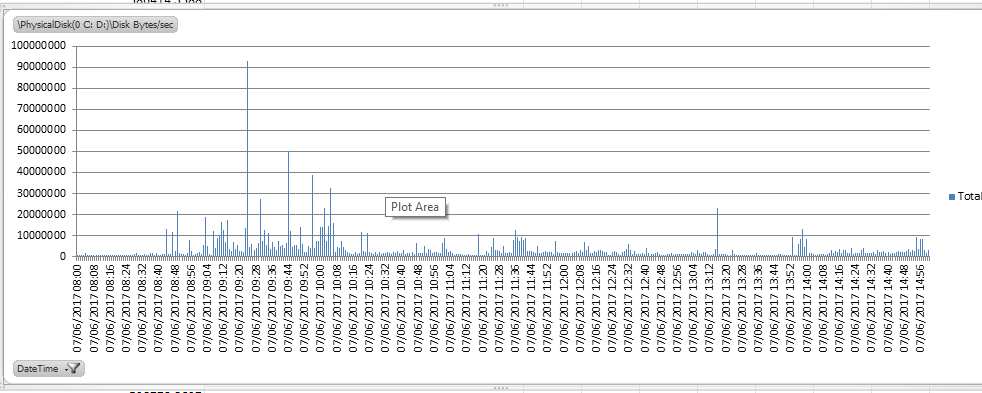
no havent purchased any kit yet... just getting around to attempting to graph some data not sure i have it setup quite right as the numbers look off / low my thoughts are that the server is not actually doing a great deal over the course of a school day

-
when i did some testing of earlier versions of 10 i would build a profile under the local administrator account via audit mode after capturing with MDT i would mount the wim file and clear temp files and caches (even after running the c:\ drive clean up) this provided me with a clean base for users. But with each "update" they seem to introduce other issues which is frustrating
-
used it when we migrated the data to another server, and worked without an issue, the bit that would worry me is if you had to start from scratch and getting SIMS installed and setup properly before importing the data.
-
Capita / the LEA would provide a backup script to make a copy of the actual SIMS data from SQL this with Windows Back baremetal / your chosen system state recovery should be fine i guess
-
compared to stuff like Dell and HP the pricing does look good. some of the initial pricing on Dells website is enough to make you fall off your chair. My data collection finishes tomorrow so will be interesting to see what sort of actual real world load the current kit is under
-
noticed that the R2416 has a concurrent connection limit when using CIFS/AFP/FTP would they have bundled CIFS and SMB together seeing as CIFS and SMBv1 are "sort of" the same thing
-
Not getting Dell OpenManage server admin email alerts
SHimmer45 replied to TwistedHelixis's topic in How do you do....it?
they might have changed how they handled mail since i last looked at OMSA and OME -
Not getting Dell OpenManage server admin email alerts
SHimmer45 replied to TwistedHelixis's topic in How do you do....it?
i thought you needed the openmanage essentials (OME) to actually send any email stuff out as the OMSA client cant manage it on its own / when i was looking at this you need to setup alerting for the specific sections as i dont think there is a "catch all" -
looking at the rack mounted equipment. school has around 1100 users (250 - 300 concurrent users is average) looking at collecting some data to give me an idea on load and the like but will take a little time to get a good amount of data from that
-
Hi all, after some feedback about users of synology/qnap/thecus NAS's who use them to as the main storage area for user folders instead of a traditional "server" i know they are popular as backup targets with alot of people on here but how do they perform in a more front line role. Looking at replacing an old poweredge file server (10k SAS 3Gb/s PERC6) which has done a sterling job. Do you find 7200rpm disks are quick enough? Are you using SSD Caching? How are you presenting the storage to users / Servers --> Users cheers
-
[1511, nu] Windows 10 1511 expiry, have I got this right?
SHimmer45 replied to Zourous's topic in Windows 10
so essentially if you havent got SCCM in place its a pita i know 10 have brought improvements but the whole "upgrade" process is broken. -
you need to run 2x database upgrades and then the release and it then rolls out ok. not got anyone in yet but i can login and see the things i should be able to see. my "patch" list resembles something from the last days of windows XP....
-
Joining a VirtualBox VM to a Domain
SHimmer45 replied to angrycomputingteacher's topic in Thin Client and Virtual Machines
as long as you have a DNS server on your network which has the correct entries for your domain controller it doesnt need to be on the DC -
Joining a VirtualBox VM to a Domain
SHimmer45 replied to angrycomputingteacher's topic in Thin Client and Virtual Machines
do you have netbios over tcpip enabled in your DHCP. (ignore if you join domain with the nebios name on none vmmachines) which network adapter is assigned the guest machine you are trying to join to the domain -
Joining a VirtualBox VM to a Domain
SHimmer45 replied to angrycomputingteacher's topic in Thin Client and Virtual Machines
can you ping the server, is the VM client connected to a network switch/connection within Virtual box which will allow it to talk to the outside world (IE not just the computer it is hosted on) on Virtual box i believe this is "bridged network" if you are using Private / Internal it wont talk onto your network via the Host network card check your netbios and FQDN as well as it might be different to your DC's name -
+1 for this
-
the software for smart is also a bloated mess last time i looked it had grown to over 1GB
-
if given the choice i woudnt not use them and would be looking at LCD panels as the newer boards are nothing but aggro. its a tech which to an extent has had its day and the market has moved to touch LCD panels etc
-
have you modified the task sequence for the capture task at all? SMS trace is a very handy log reader for troubleshooting MDT problems (part of the logging kit for SCCM which can be install stand along iirc)
-
is the application your trying to edit running while your editing the file (or as a service) if your deploying the image you could add a step to the task sequence to grab the settings file from elsewhere as part of a deployment of the machine. GPO Preferences? or mount the image you are going to deploy and just change the file / over write it, unmount the image wim