-
Posts
10,527 -
Joined
-
Last visited
Content Type
Forums
News
20th
EduGeek EDIT Conference
Blogs
Everything posted by mac_shinobi
-

[news] VexBox - This is just cruel..
mac_shinobi replied to abillybob's topic in Jokes/Interweb Things
There are better ways of restricting internet access then paying even more money for something like that, surely that box must have a network cable from the router going into it, so if the box is what is slowing speeds down etc then just use the network cable that is going into that box. Failing that if it is wirelessly connecting that black box to the router then get a wireless card to connect to the wireless network ? If you need to restrict or stop access altogether then surely there are at least a few other ways of achieving the same or similar thing ? -
Reminded me of this lol

-
Thought this was a moot point ? :-p
-
So basically panasonic / sony now ?
-
Doing it from my phone will try again
-
Yes - ImgBurn has always worked on drives I have had Just as long as you buy reasonable media so no cheap non branded stuff I normally go with tdk / panasonic or sony ======================== Snippet from this site http://club.myce.com/f61/pioneer-bdr-209dbk-vs-bdr-209ebk-337253/ The M-Disc website has a list of compatible devices: http://www.mdisc.com/m-ready/ ... So BD media is a yes, DVD media is a no with recent Pioneer drives. The EBK is not exclusively listed, but if the DBK supports it, and the XJ supports it, the series in general should support it. DBK versus EBK: The only real difference is the DBK doesn't support writing to BDXL (3 layer and 4 layer BD media), EBK does support BDXL media. (Note: only 3-layer BDXL media is really available, but is rare). Both drives support all the same other types of media and share the same features otherwise. =========================== Used to be one other brand but I can't for the life of me recall it's name
-
Never had any other make of drive other than pioneer myself so can't really comment. Got the bdr-209ebk on pre order from aria. There is the 209-dbk which is oem and afaik can't do three or four layer burning but don't think thats an issue Over to @Arthur or someone else
-
Not allowing me to register for a key sigh
-
Possibly that faulty cable which has melted , presume after replacing that it works fine ?
-
Remove all power sources ( battery and mains cable ) from both laptops --> Remove a working screen + Invertor + Display cable from a working laptop ( same make and model obviously ) --> Install this into the laptop with issue(s) and try again Also is there any dust / dirty / debris blocking up the heatsink / fan unit in the laptop ? Also what Graphics card / GPU do these laptops have ? If nvidia then maybe an over heating issue ? Also maybe worth a shot is to get a memory module(s) from a working laptop and replace the RAM / Memory in the faulty laptop and see if that is any different ? If it is still the same then I would say remove the battery and mains power from the laptop, then disconnect the cmos battery for at least 5 mins and then re connect the cmos battery ( when you boot it back up you will need to re program the date / time and possibly SATA or Hard Drive Mode ) so will be a good idea to make a note of what the hard drive settings are set to in the bios before disconnecting the cmos battery. If after all this it is still the same then possibly a faulty GPU on the motherboard or faulty motherboard ?
-
A Mila Kunis Brewski !!! Although am sure Amanda Seyfried was or is in the 2nd one
-
@Garacesh - Found this and thought of your post / thread here lol
-
A collar around there neck that induces a strong electric shock whenever they do anything with the mouses / keyboards etc that they shouldn't be lol
-
Not really helpful comment I know but the title of this says mouses, I thought the plural of mouse was mice Will just stay subscribed and watch lol
-
In that case is it not reliable to use BD-RE for data backups then ? My plan was that I could get 4 or so BD-RE discs and re use the BD-RE Discs every so often to create a new backup by either adding items to the backup disc or over writing it completely and thus making a new backup disc so I don't up with hundreds of record only blu ray discs of backups as didn't really want to keep buying blu ray discs ( as in recordable ones )
-
Does LTH only apply to BD-R Discs ( so recordable discs ) only or does this apply to the re writable discs as well ie BD-RE ??
-
Is this only for recordable and not bd-re discs ? Trying to find htl bd-re ( if such a thing exists ) either single or dual layer Looking for at least two bd-re discs
-
OS X Yosemite will be available from the Mac App Store today
mac_shinobi replied to Arthur's topic in Mac
ok ok - just thought I'd put it out there lol -
OS X Yosemite will be available from the Mac App Store today
mac_shinobi replied to Arthur's topic in Mac
And ios 8.1.3 -
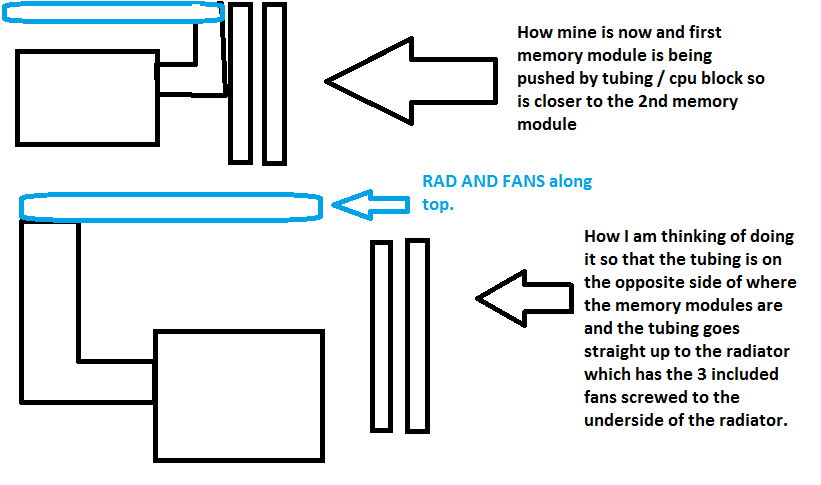
Update : Ok flipped the radiator 180 degrees so that the tubing is at the rear of the case and the tubing on the cpu block is on the opposite side, temp wise I think it is running 1 or 2 degrees hotter so running windows I am getting about 25 / 26 degrees to 30 at most but still a reasonable temp How are people telling what temp the cpu gets to whilst gaming etc ?
-
3 Guesses what I am going to be doing this evening for a few hours but you will only need one guess, sigh Need four hands as had to hold the rear bracket on and try and screw the cpu block on at the same time ( was only screwing opposite corners a little at a time ). Was a ruddy nightmare, must be a knack to doing it ?
-
Not sure what you are getting at EDIT See attached image @Garacesh / @Arthur Is it possible to flip the radiator and install the cpu block / heatsink pump unit as per the 2nd image ( see attached image ) so that the tubing is on the left hand side then cpu block and then memory modules on the right side
-
They still have the tubing on the same side of the cpu block / heat sink, am I not able to flip the cpu block / heatsink around so the tubing on the cpu block is on the left side of the cpu block instead of near the memory modules / RAM ?
-
The fans are on the radiator, Im talking about the fans that came with the case Corsair 750D, I got two fans at the front pulling air into the case ( which is fine ) and one 140mm fan at the rear again this came with the case I then have the radiator with the 3 fans which are screwed together ( fans that came with the radiator cpu cooler ) Im saying that I will need to remove the rear 140mm case fan in order to flip the radiator around etc
-
So remove the 140mm fan , take the cpu block off and clean both the cpu block and cpu of any thermal paste, flip the rad around and re install it with the rad and tubing at the rear of the case etc ? Worth while getting a 120 mm fan to exhaust out the rear of the case or just leave it with no fan installed at the rear as the fans on the rad should exhaust hot air out the top of the case anyway ?