edutech4schools
-
Posts
2,744 -
Joined
-
Last visited
Content Type
Forums
News
20th
EduGeek EDIT Conference
Blogs
Everything posted by edutech4schools
-
Incase anyone else does this, I thought I had killed the server - Rebooted the server, rdp to it from another server and it said 'Please wait for the Windows Modules Installer' it was stuck on this for about 20mins. Reading online lots of people rebooted the server and had issues, I just left it and it eventually logged in.
-
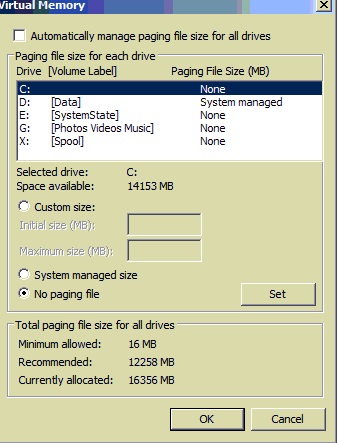
Its OK found a website that says to set both to the same. Any reason for not setting the D drive to system managed?
-
@win I have 2 settings, initial size and max size for both HDDs, any suggestions what I should put for these for both drives. Thanks

-
What sort of small pagefile size would you recommend for c?
-
Did that just now but server needs to reboot. I will need to reboot tonight at some point.
-
Got it up to 6gb on C which although not great takes the heat off me a bit.
-
just running Disk Cleanup wizard - thanks
-
Just noticed our 2008r2 server is below 3gb on the c drive. This is a primary school and this server runs everything from DC DHCP DNS SQL Printers + all work. All work is on the D drive which does have plenty of space. I don't want to do anything to radical as they are due a new server next May. What can I do to get some space back on the C drive, remove old updates? remove log files? Also will take a look at moving the SQL database over to the D drive but not done this before so any step by steps would be very handy. BTW it is SQL express 2012 but does have management interface
-
Out of interest is anyone using the Hardened mode?
-
I have read numerous posts where admins shut down the SQL server and then take a snapshot, power it back up, run Windows update or whatever, reboot, shutdown and then delete / re merge snapshot. This all sounds sensible it's just I don't have the nerve to do it.
-
Just out of interest is it still a no no to snapshot/checkpoint a DC?
-
@Arthur Thanks for taking the time to find that information. I do wonder how many do not realize it's possible to bork an SQL database simply by taking a snapshot or checkpoint.
-
But I have just found this Changes in support for virtual machine snapshots for SQL Server « The Lowercase w
-
@john that does not seem to mention sql databases specifically. Confusion Over Hyper-V and “Snapshots†| Aidan Finn, IT Pro So are you all taking snapshots of your sql servers? and if so I presume nothing has broken for you so far.
-
No, its to do with database consistency. @john thanks will have a read
-
Moved a primary school over to Hyper-V (yay) but am confused in regards to snapshots and Sims. Everyone convinced me to move to virtual saying it was better because of this and that but one of the main reasons was the ability to snapshot a server before making any big changes. Only issue is, everything I have read says it's not a great idea to snapshot a server running SQL databases and obviously Sims is this. So far I have been installing any Windows updates on this server without taking a snapshot but this just seems bonkers and I am wondering if others are taking snapshots of servers running Sims.
-
Remote desktop services or Web apps are both built in to Windows server and can be very secure, depending on the options you choose in the gui.
-
Bit of an odd one. Installed Windows 10, connected to network + proxy and went to windows update on the OS where it said some updates are waiting to download, I hit download but nothing happened, it just sat for a few days on 0%. I have also not been able to activate windows 10, although that could have been due to MS servers being swamped. I then wanted to re - install 8.1 so downloaded the MS USB ISO tool for 8.1 but when I run the tool it gets to the point of downloading all the files and says 'try again later'. I have unfiltered the internet and disabled the firewall and I am able to browse every site on earth without issue and do everything else with this laptop. After 4 days of leaving it powered on but still not receiving any updates or activation I took it home and within seconds of putting it on my home network it has activated and started to download the updates. I have contacted RM who host the proxy but they do not have anything on their systems about an issue like this, so I am hopeful someone on EG can help.
-
Well I took it home and it activated in seconds and started to download it's updates. I have contacted RM as windows 7 and Windows 8 can all download the updates just fine.
-
A few months ago I installed sql 2012 and migrated all databases over I also stopped the old sql2008r2 services from running. I would now like to uninstall the old sql 2008r2 software and have clicked on uninstall 2008r2 (64bit) to start the uninstall. I have reached a page that is unclear to me what it's implications might be, in the select features to remove I have a few tick boxes under 'Shared Features' these are, Client tools connectivity Client tools backwards compatibility Management tools - basic Management tools - complete SQL client connectivity SDK the uninstall will not let me proceed without selecting one or more of the items but I am worried as these are shared items which seems to imply they might be shared with our new SQL2012 install. Am I OK to select and uninstall all the items or would that cause an issue. BTW the databases hold Sims and FMS Thanks
-
OK things have got strange. I noticed windows updates are not downloading on the windows 10 machine, I then decided to roll back to windows 8.1 but that is not listed as an option in restore which is odd as it does have the windows.old folder and I did choose upgrade rather than doing a full install. I then decided to download the 8.1pro download tool but that gets to the point of saying estimating download time and errors out with Download did not complete. I just got a friend to do the same from home and that has download. I then tried from another computer but get the same. So it looks like something is blocking some windows items. I can browse the internet fine. I have tried disabling the firewall and disabled the proxy but still get the same thing. I am now very confused. Anyone got any thoughts on whats causing this odd issue.
-
Would that be the Windows 8.1 pro OEM Key I should enter?
-
Bit worried that it will start saying illegal Windows messages I'll give that a go on when I am back at the school, cheers
-
Really wanted to hand out these laptops asap but don't want to until they are activated. Come on MS
-
We received 2 new laptops the other day with 8.1 oem pre installed. I installed all updates but did not get the upgrade icon near the clock so found out we do not need this anymore if we upgrade using the ISO / USB method. I went for the USB version and downloaded the same version (10 pro) and the same 64bit version and then while in Windows 8.1 ran the update on one laptop. Windows 10 installed fine. Problem is that it is not activating and when I click activate it says Windows can't activate try again later. I have tried rebooting the laptop etc but can't get it to activate. What's going on, any advice.