2097
-
Posts
1,077 -
Joined
-
Last visited
Content Type
Forums
News
20th
EduGeek EDIT Conference
Blogs
Everything posted by 2097
-
ok i got round this problem by redoing everything located in the documentation.pdf on the HAP website .. Great stuff But im now having problem with Directory Links . im creating them fine ... But there not showing up when i login to HAP gor e.g. i have mapped H to %homedrive% and gave domain admins , staff and the ICT group read and write permisions .. but they dont show ? Also i cant removed the mapped drives after creating them
-
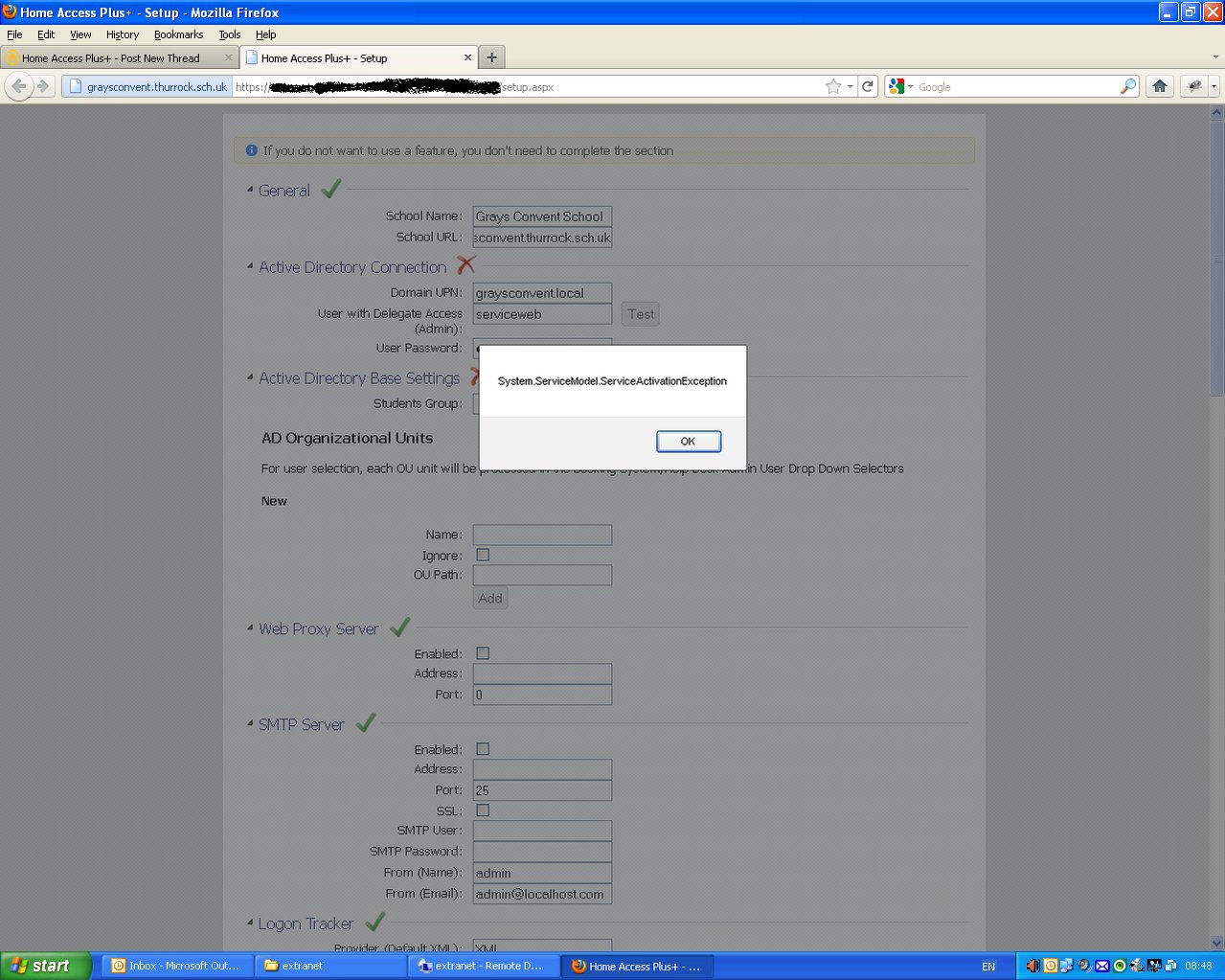
Hi Nick , Love the prorgram btw , keep up the good work . Decided to go for an upgrade to the latest v7 All i did was remove the contents of our HAP folder and replaced with the latest v7 files and ran the v7 setup.aspx ( i assume its all setup ok as previous versions work fine) I get the following error when entering in and clicking the test button on the domain UPN / username and password Any information on what i might have done wrong ?

-
http://www.edugeek.net/forums/behind-red-door/50912-stupid-eu-choice-screen-3.html I have the vbs listed there , This worked in my last work place where we had local profiles.
-
i did make a VBS a while back to remove this and posted it on this forum have a search for me and the term browser choice
-
If its only small i would just do em manual Otherwise you can set reservations based apon MAC
-
If its only small i would just do em manual Otherwise you can set reservations based apon MAC
-
Auto shutdown when network cable is unplugged
2097 replied to BenTruscott's topic in Network and Classroom Management
I had a script that some one made on here that binds to a network drive , if the drive is not there it logs off . Problem i had was that i forgot about it and made some exam account and not linking the drive ! -
Not sure if this will help you but we had a problem with some fujitsu's here where startup scripts wasnt being applied. It was something to do with the network card , and i changed something in the registry ! i will find out what it was .. But it was a pain in the but to find , considering these machines were brand new !
-
Just a heads up Windows XP running WSUS Installed the updates from June for the .net 2.0 and 3.5 ( cant remember there KB numbers) Now all machines take well over a minute to get passed the ' Applying computer settings ' . After that everything else works fine ! but still a pain in the but considering it normally takes around 3 seconds. Fix ? Here it is Make a BAt and put the following inside NET STOP clr_optimization_v4.0.30319_32 C:\Windows\System32\sc.exe config clr_optimization_v4.0.30319_32 start= demand It basically sets a service inside 4.0 to manual and also stops it . the service i dont think really affects anything .
-
Are all the admin Machines Wired or Wireless ? ( if wireless make sure you are using windows to manage the connection) what does the startup scripts do out of intrest? Make sure in the PC OU's there is no user based scripts , only computer based as this can cause problems. regards luke
-
had a brief read of your post . Im assuming its Computer based scripts that are not working ? Have you enabled loopback processing ?
-
found out the authenticating user .. test1 was the account name .. I think i could guess the password lol ! disabled the account for now . Think it was setup prior to my arrival Thanks every one for the help Manage to catch it out with using MXexchange transport logging . no other logs will log it
-
Thanks for the post After enabling SMTP logs ive noticed this is a external client They are relaying , and are using it to spam outside accounts Ive enabled some more logging to see what account they are using to authenticate. It is currently enabled that all Authenticated users can Relay and Submit , I have modified what computers can use relay .. I think i might just enable it so only Admins can use the relay service , So this will still allow my applications to send out some emails
-
i had a similar problem 'I think' In the end i used some registry fix in windows .. I think it was something about this software starting before the spooler service or something along them lines
-
Im pretty sure if i enable that its going its going to disable all incoming mail . As its not todo with the relay but more to do with the SMTP server and allowing users to send incoming mail without authenticating if i read that correctly. I enabled logging the other day on messages and can see that a lot of the mail is coming from a outside source IP. i have just enabled also SMTP logging , so should hopefully when they send out there next lot of messages see what user is authenticating . Also enabled account logon audit IN GP to see auth requests. Under relays allow all PC authentication was enabled , I unchecked this and added all internal ranges only
-
intresting ... 'Is the anonomous access (as mentioned in the website link) switched off?' if i untick this , wont it stop all incoming mail beacause they cant connect to the SMTP to send mail ?
-
Thanks . Had a look at that already , We have GFI mail essentials which blocks spam but unsure how this is happening tbh ! as i have checked all servers and any desktops that have been on and they all seem ok !. Im thinking maybe some one is authenticating with a username and password somehow to send the spam
-
Hi Guys , Since coming back from holiday i have noticed something sending out mail via our exchange 2003 smtp server . Its managed to send out like 15k emails out on a random day ! Its confusing me where its coming from , i dont think its an internal machine as its been sending out on the weekend and we only have 1 machine on all the time ( apart from the servers) . its not using an internal account but using it own outside address ( its pretending to be banks etc ) Outside relay is disabled so its not that . Can some one relay if they manage to obtain admin password etc ? Many thanks Luke
-
i think monitoring tools is the best for this sort of thing . For e.g. With italc in thumb view in realtime you can see whos playing games etc . Lock there screen .. show you are watching. You can then block there accounts when caught . I also use a script to log all Sites pupils visit which you can then block in your proxy etc . Doing this should stop 95% of pupils playing games . The other 5% wont care and you can just block there internet access
-
Happy Bday Witch Another Thank you for doing my CV
-
http://www.luketaylor.org/Profiles.zip there you go Inside is a BAT ( put this in the policy share with the script ) I use this as a Startup script , but you can probally do a shutdown script if you wish . cscript.exe \\gcsserver\media\profiles\deleteprofiles.vbs /I 07*,08*,09*,10* This removes all profiles/usernames that beings with 07 08 09 10
-
I do the following Mandatory profiles Hive cleanup service And a Vbscript that removes all accounts/profiles that begin with 07 08 09 10 11 ( leaves teachers accounts alone as there local) at startup. Works perfect . I never ever have any profile problems !
-
depends what version of Robin hood you watch They are causing these place to tighten security which is a good thing
-
Moodle Installation. Ldap Authentication
2097 replied to Chunks_'s topic in Learning Network Manager
show us a screen shot of the moodle ldap screen . what you have in there etc ( blank out password and username ) -
Bulk user creation with exchange 2010 mailbox
2097 replied to z_z_zebedeeee's topic in Windows Server 2008
I have a xls that has a list of there last name and forename also has a seperate txt file with a massive list of random passwords It has 1 VBS script that basically takes a set number from the VBS e.g. 11 Then adds the lastname from COL1 and the front initial from COL2 from the forename so it looks like this 11taylorp it then adds the user to AD in a set OU And then at the end exports the userlist into a XLS for us to print out I added my year 7's in 10 mins . I did have to manually add there exchange accounts but with 2003 ( and with exchange installed on the DC) i can select them all and its one click of a button.