2097
-
Posts
1,081 -
Joined
-
Last visited
Content Type
Forums
News
20th
EduGeek EDIT Conference
Blogs
Everything posted by 2097
-
Self Contained Laptop Booking Web Interface and ID photo card Interface.
2097 replied to 2097's topic in New Project Ideas
Currently only Windows. Works on Any Windows OS. For authentication you can use None , Microsoft or the built in internal database . ( for the moment , LDAP might be a good idea ) For testing this doesnt have to be done in a school , it can be done on anything , i.e. a VM @ home etc . -
Self Contained Laptop Booking Web Interface and ID photo card Interface.
2097 replied to 2097's topic in New Project Ideas
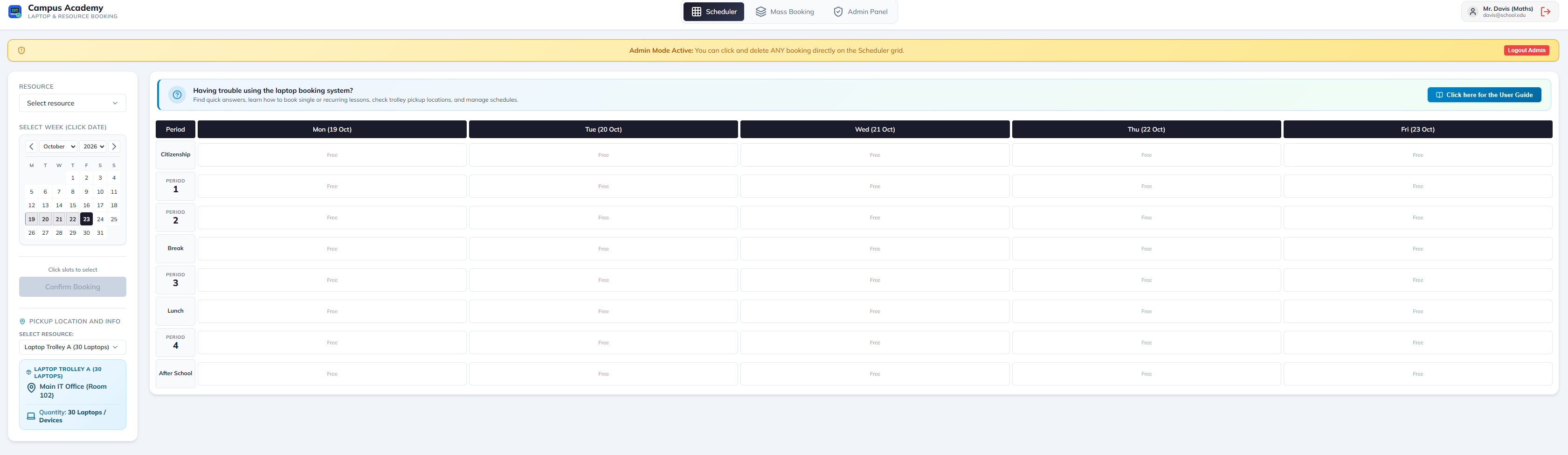
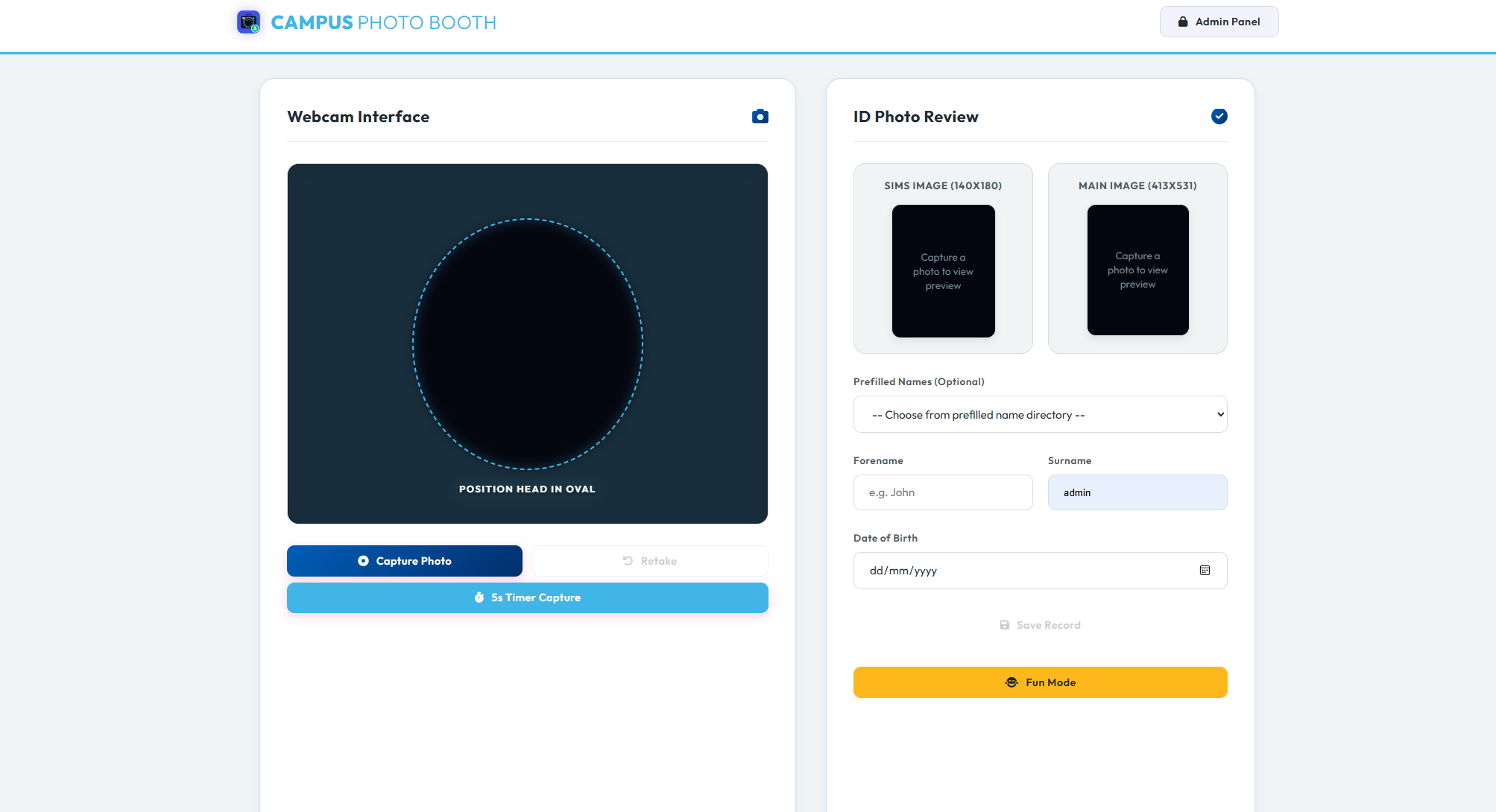
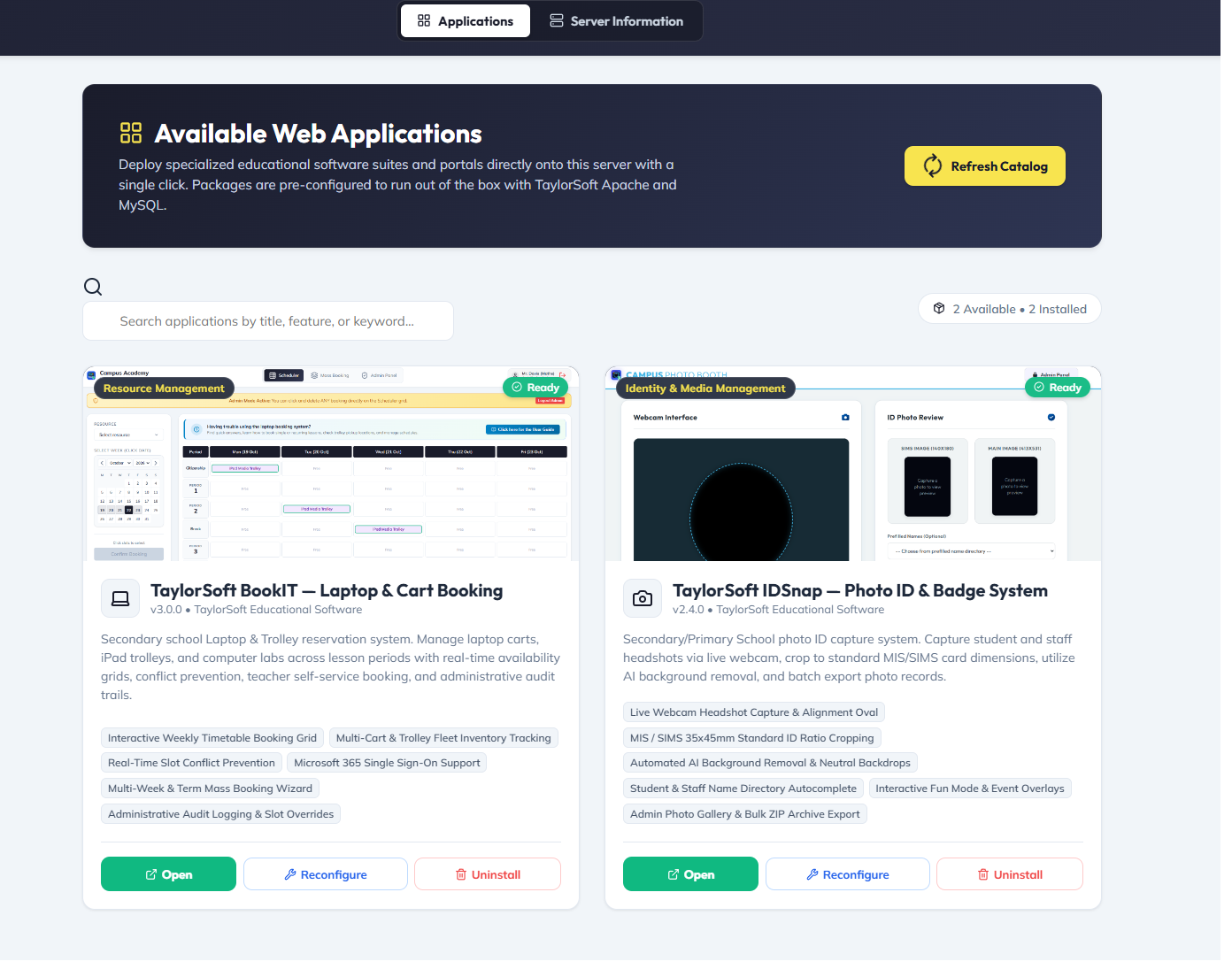
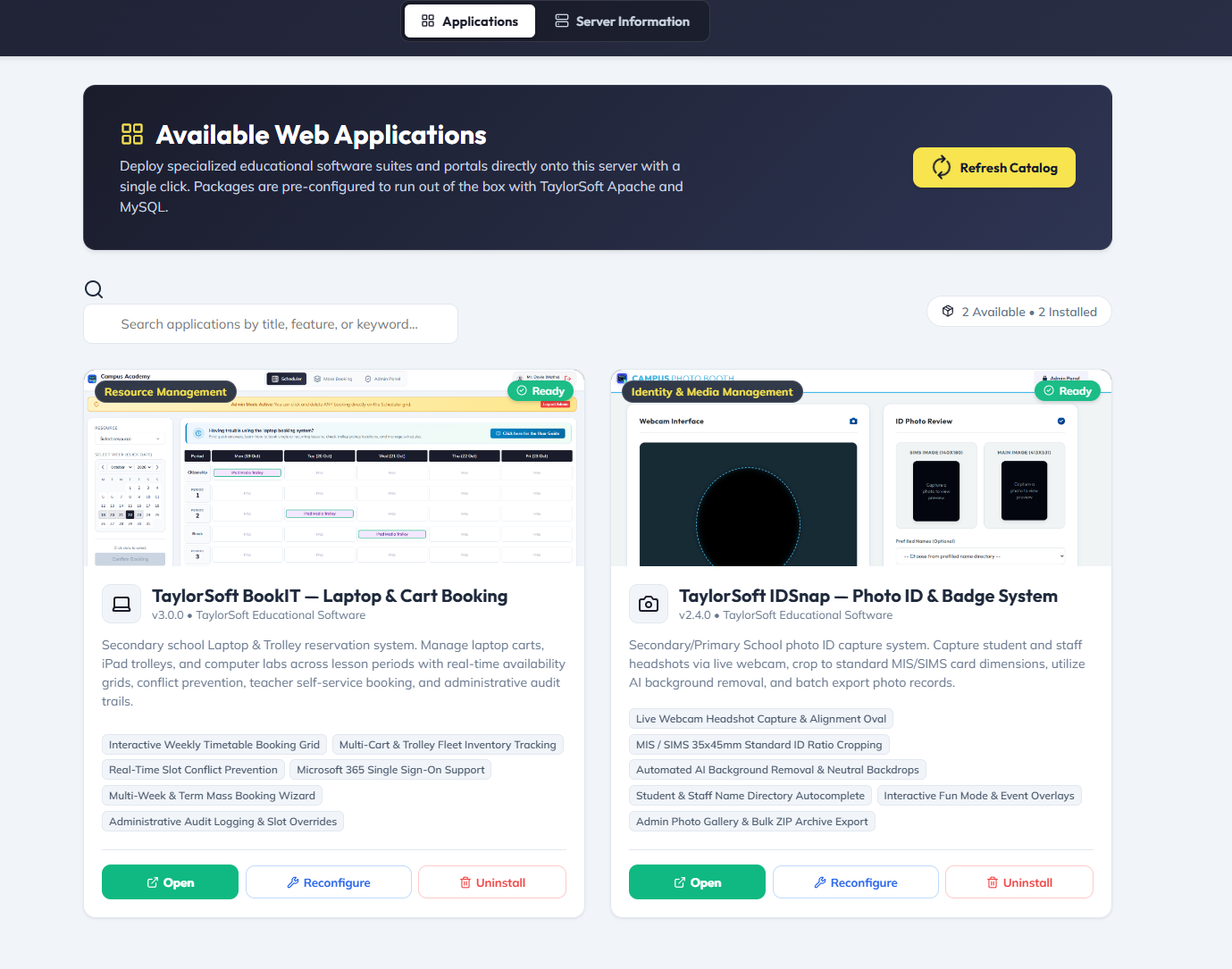
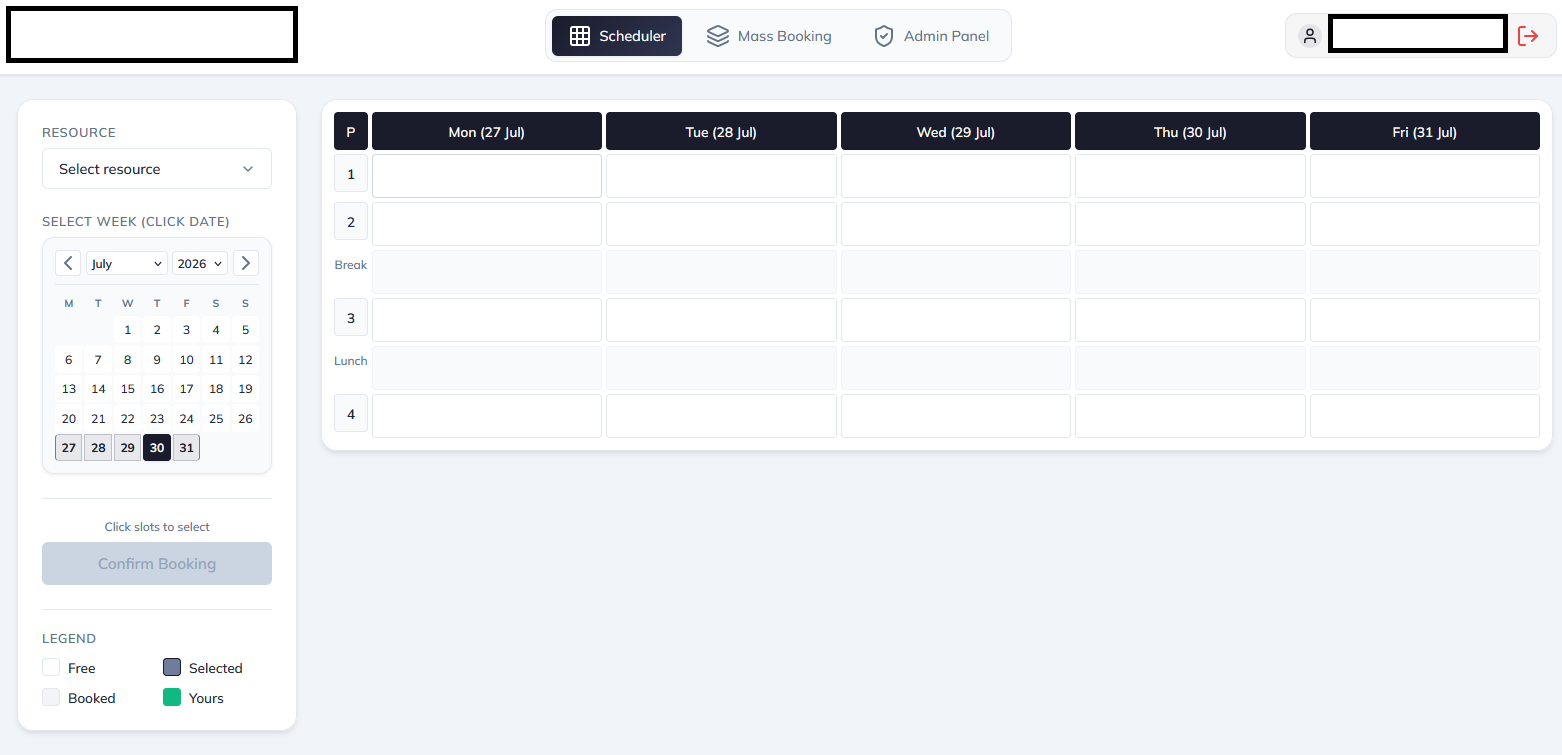
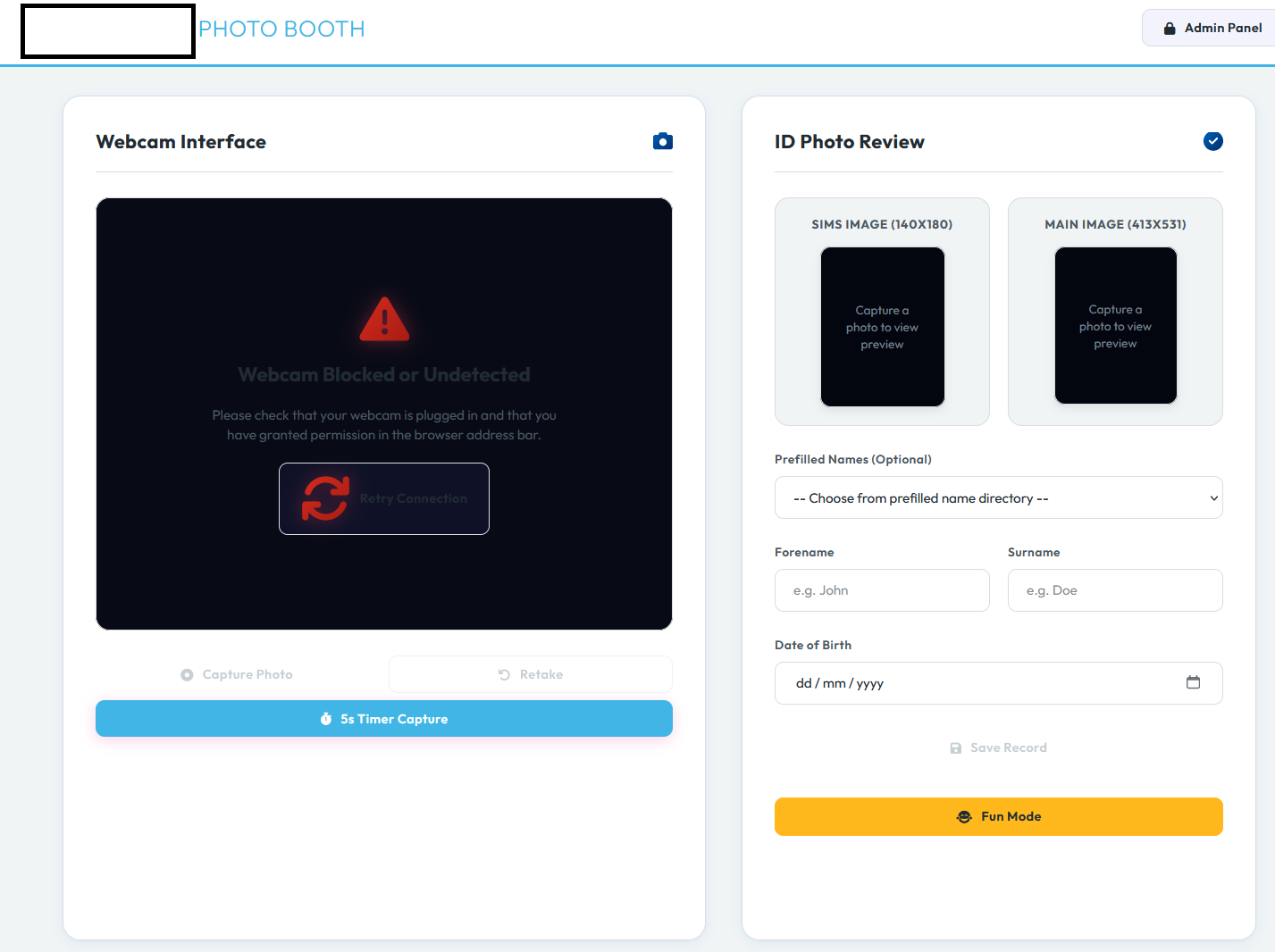
Little Update . V1 is now released . Update Info - All applications can now be accessed via Open Access- no authentication on usage Internal database - Central application database which users can be setup and used for all applications. MS Reg app - Setup a quick app registration and limit who can login via Microsoft SSO Also Simple Step By step setup included as part of the install Reconfiguration of individual apps - Can change between authentication methods etc . Customisation/Branding of Individual app names and logos etc Upload your own Signed SSL certificate or use Self Sign I have changed the colour scheme a little and now has a better windows control panel. Currently has two applications available as below . If anyone would like to test it out ? Just looking for feedback on ease-ability etc .
-
Hi Everyone , With my recent interest in AI coding , i have been creating web apps for the school and hosting it on our internal Linux server . Would any one be interested in testing a snippet of some of the creations. Basically i have created a self installer ( Windows Only ) , it will install everything required , and allow it all to be managed via a web interface portal and a windows control panel . On first run you will configure passwords , hostnames etc . It works with a self cert SSL , which it will generate for you and you can just download it and run on your machine . The modules available at the moment are ICT laptop booking system And a web based photo software which will take your photo with a webcam , remove the background via AI and then save in SIms / ID card sizes . Furture additons - Sims To Teams - Complete automation of Sims.net classes/Pupils and Staff to Teams . A modern Login Tracker for Domain Admins - Complete for local logins via domain and Azure LockDown - Webbased/App based Lockdown software that can push preconfigured messages to Computers. Outlook Signature - Complete Design and Implementation tool kit to Push Outlook signatures to New Outlook / Web Outlook and outlook classic .
-
Whats wrong with the free selfhosted https://www.hesk.com/ We host that on Linux and secure the directory with a Microsoft registered app , blocks the kids Sends outs emails etc for tickets , allows staff to reply direct via the email instead of the helpdesk GUI
-
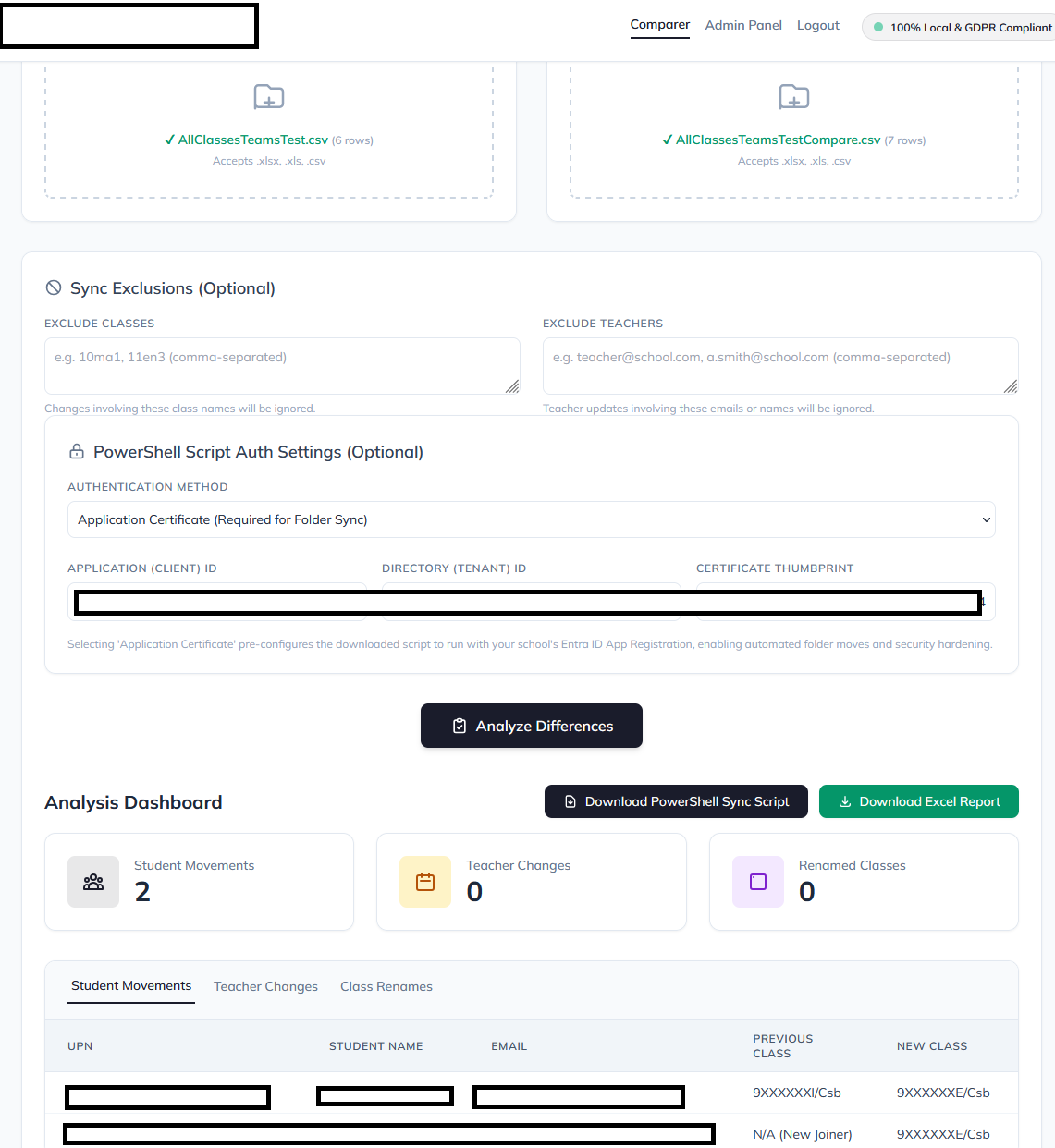
So a new day and a new project to get something going for me . As much as salamander looks great , I only needed it for the Sim’s To MS Teams integration . ( not very cost effective ) So i decided to make my own Created a SIMs report to extract Classes and class lists and teachers into a simple CSV file ( automated using the commandreporter.exe , creates a new one each week with changes) I have a PowerShell script that from the initial CSV file , will create every class , add every teacher as a owner and add every student as a member . It will also create them a "Secure" folder in the General part of the team for them and the teacher to access ( I don’t think salamander does that ). So basically i run two files each Year that will pre-populate my teams etc . What about changes to Sims ? Student Class moves , Class renames , Staff changing . For the moment i dont want this automated as i want to see the changes and make sure the script is working correctly. So I created a simple Web gui that takes the exports from commandreporter and compares them , this then prepares me a pre-made script which i can run and it will move , add , rename and move folders etc. it also reports on all the differences and changes to make sure everything is correct within Sims.
-
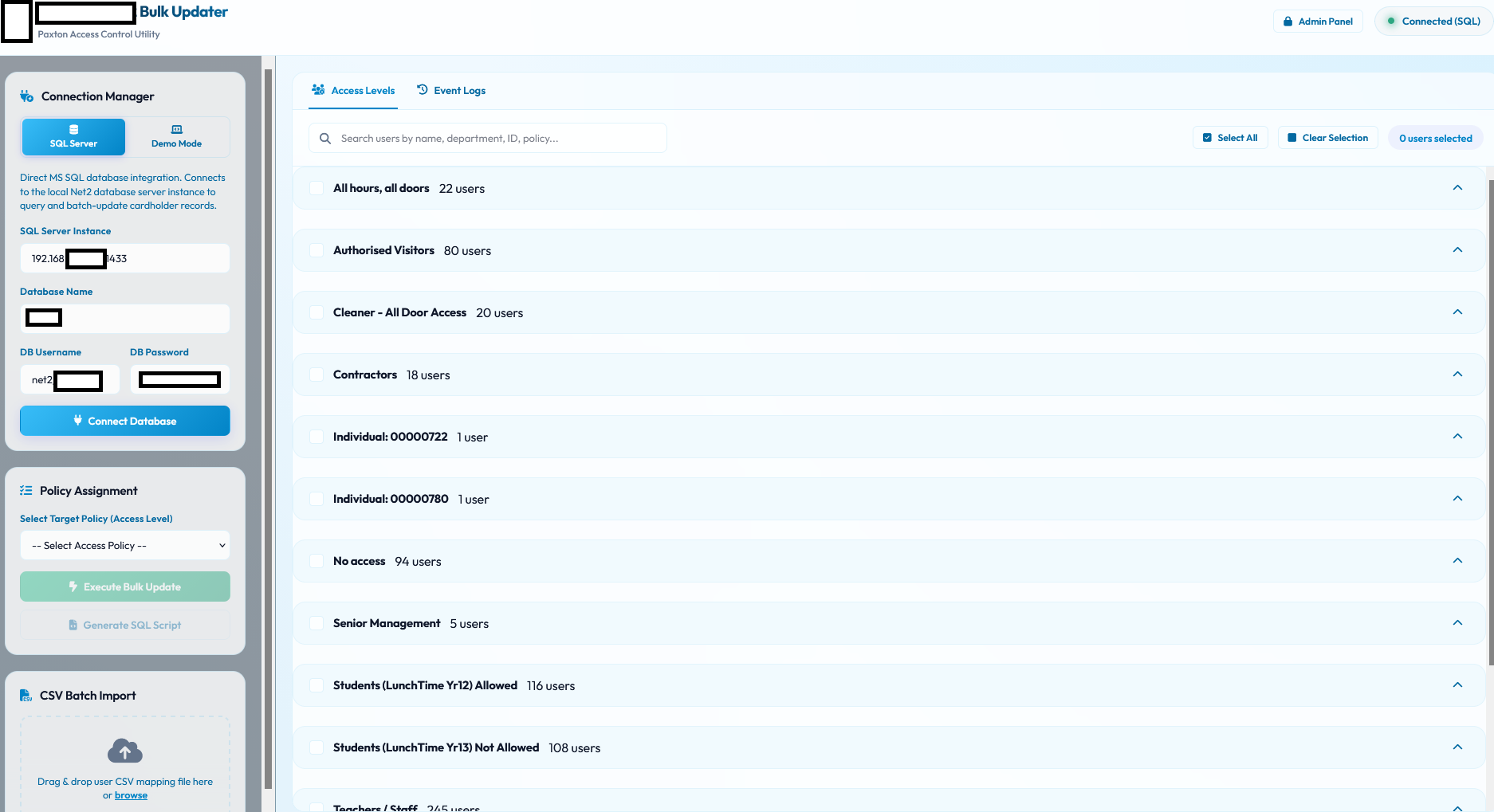
Oh Also forgot it created me another utility , Our Paxton Net2 system , Currently within sixth form we only allow specific people to use the gate system for lunchtime . With Net2 there was no way to Bulk assign a policy ( apart from SQL ) . So i created the following GUI to allow this.
-
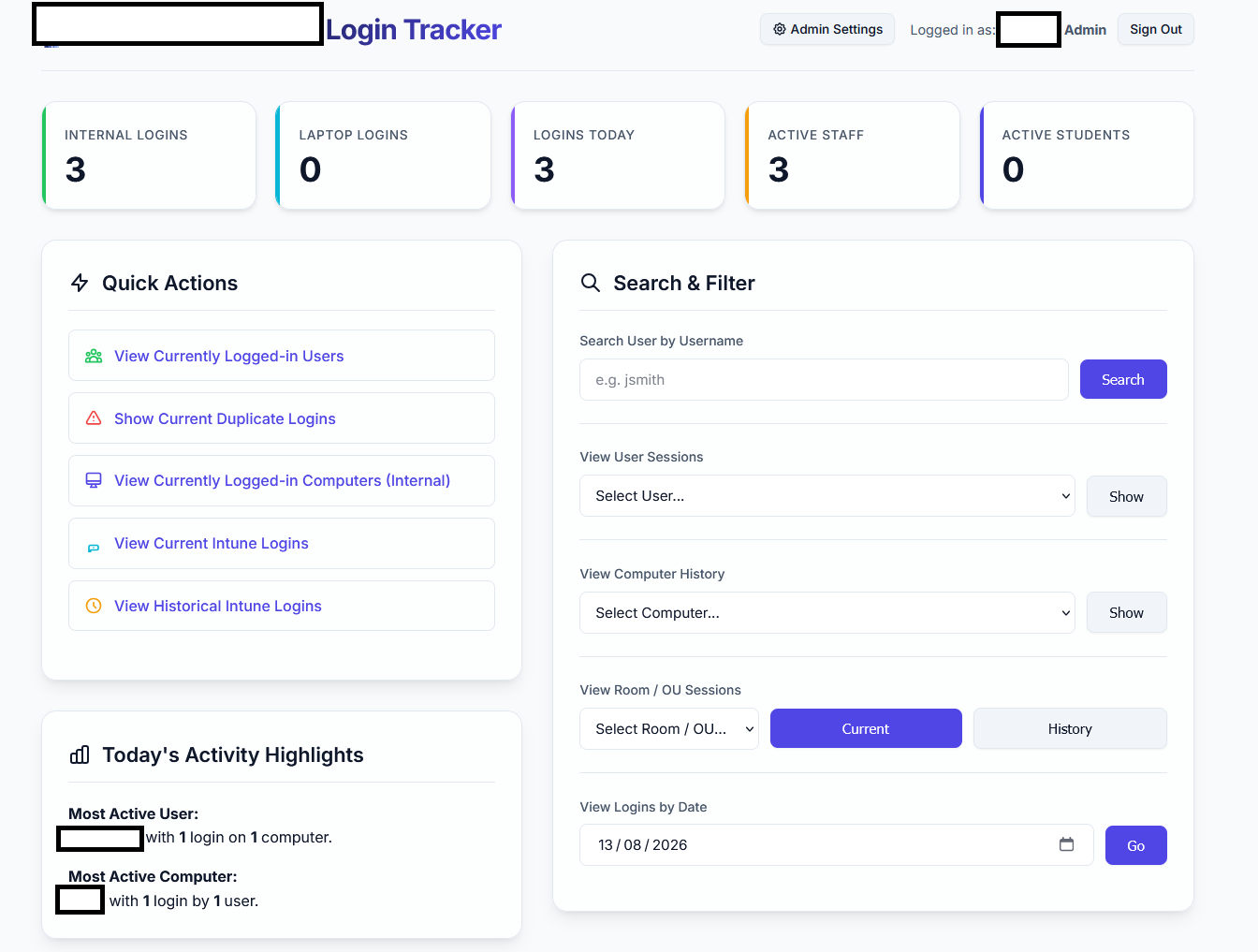
Another one added to the Arsenal , AI redone the original logintracker that was posted on edugeek many years ago . Made a few modifications , Still uses a VBS login and logoff script to monitor logins. Redone the GUI Uses SSO from azure to access the frontend . Reads Entra Logs for laptop logins. Can determine either student or staff via the OU of the user. also added a print PDF button , which makes a nice table in a printable format to print out the logins for admin purposes. Also added a calendar option which allows me to choose a date and show all logins for that specific date.
-
Sounds very Interesting . I am currently working on a Paxton net2 Bulk policy updater and easy event log exporter into PDF . All Our sixthform kids are imported into Paxton from Entry sign with no policy , and then i get given a list of who i need to manually adjust to allow out of the gate etc . In a few hours i have a working design for Bulk changing
-
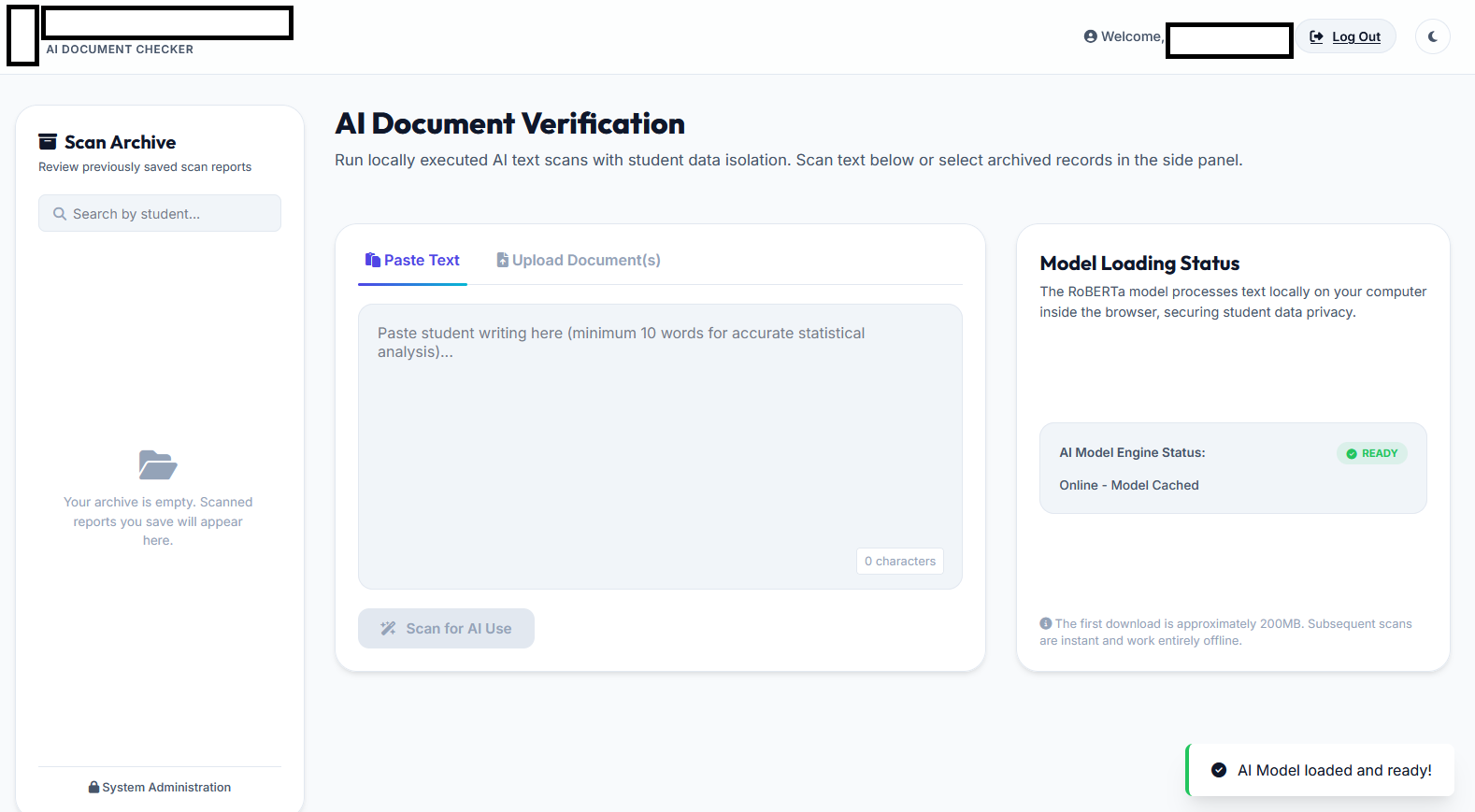
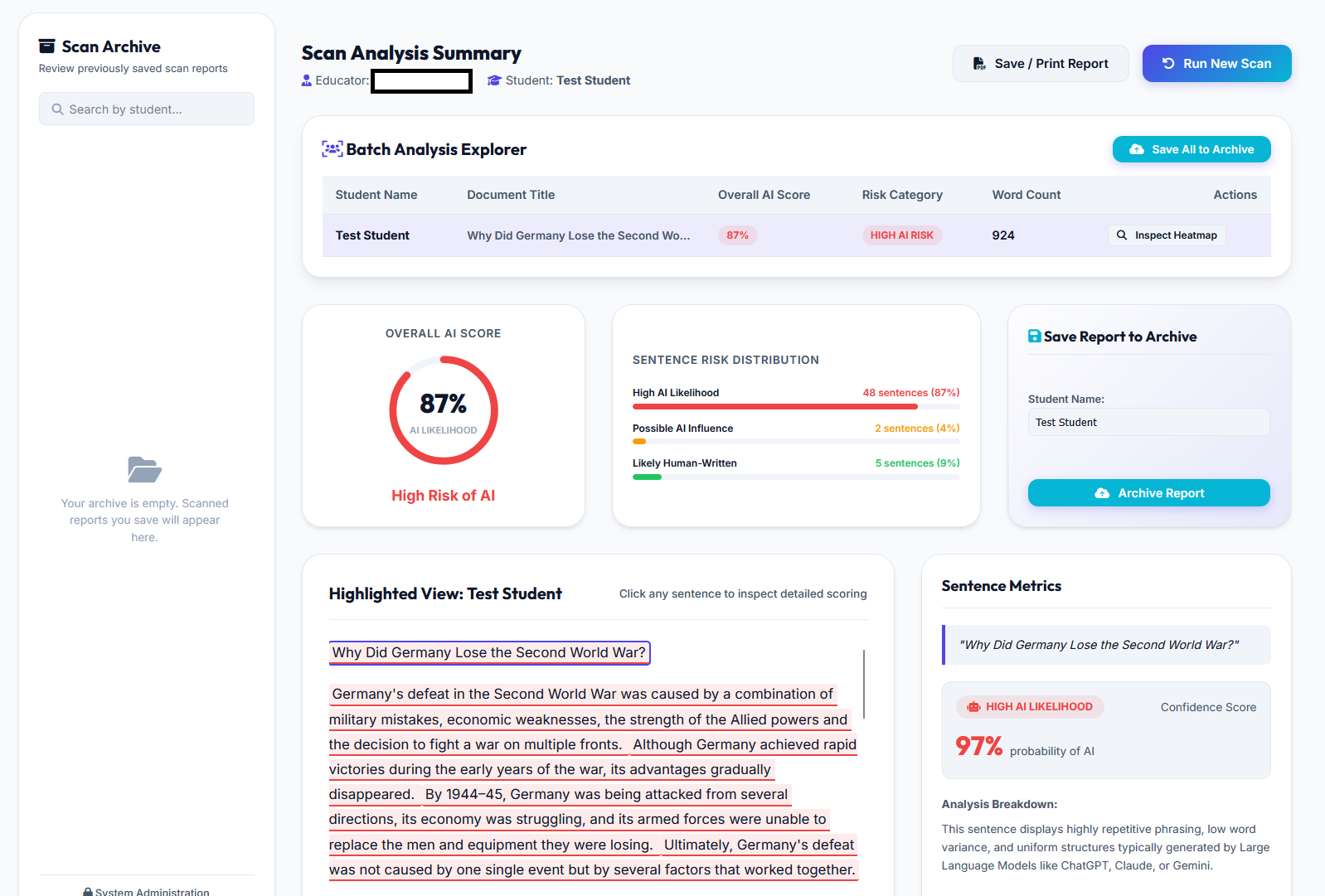
What a wonderful tool it is ! I have been trying to implement some web-tools for a while , but no luck in finding in what i really needed. Until someone on here mentioned using Antigravity for creating a Laptop booking software . Here is some of the Tools i have created so far with it , I host them internal only on Apache/Mysql . Normally secured against a Azure app also SSO . Laptop Booking System - Single / Mass booking - Sims timetable import . Admin Panel logs everything and allows removal etc Photo Booth - Allows self service taking of Photo/Sims iD images using a webcam , AI model removes the background and saves into the correct dimensions for Sims and the ID card software , saves them to a central database and names the files . Gives the user also the ability to download their photo , retake and Countdown etc . AI Check - Its a web based AI checker for staff , supports copied and pasted text and Multiple file uploads , When uploading it will allow the input of a pupil name next to a document so you can assign it . Produces a report for each upload , highlights the text etc . The tool downloads the model into the staffs temporary files on their machine, so its basically a offline AI check Tool.
-
So you cant event escape their online problems with using the offline program . They need to Start afresh from all this rubbish . create a new platform without using none of the old programming ( and apparent Hybrid working model ) Thanks For this Post though , sorted out the issue here
-
Entra Joined Laptop - Block Logins from outside a trusted location
2097 replied to 2097's topic in Cloud Services
Thank you , Thats what i did in the end . Blocked all other SSID , Blocked login page of changing the SSID password protected boot menu etc . -
Hi , I have researched this and cant really find a answer - We have lots of new laptops trolleys for "Internal Use" only , I want to prevent these ( Laptops ) from being taken home . We currently have a department that do this despite being told not to . I’m trying to find a conditional access policy that prevents this , But it seems Login ( Especially if already Cached ) will still allow them to login fine . Anyone done anything similar ? Thanks
-
Thanks for the replys . Im using the following https://github.com/SuperDOS/Intune-USB-Creator Basically will autoProvision for me as well as install our base image . The drivers works fine in the PE enviroment , Connects to wifi etc to provision to Intune. its when the image is loaded and windows is basically installed on the laptop and we are at the setup phase its "Lets connect to a network" which i assume is out of the PE enviroment and cannot find the drivers . Its not the standard setup , and i have already DISM slipped the drivers into the image . Edit - I might have slipped the drivers into the incorrect Index - So trying that now with index 3 instead of 1 !
-
Hi , about to image 100+ intune devices . I have a intune USB install which works great upto the point "Lets connect you to a network" , sadly looks like our wifi drivers are not in the standard setup . I can manually click "Install Driver" and get it from a directory on the USB ( Works fine ) But .. i wanted to keep my steps down to a minimum , i have tried slipping the drivers into the Install.wim image using the DISM command ( It says it added them ) But it never does , i have to still manually select them during the install process. Is there any other methods that i can use ? Thanks !
-
I had this issue when I first joined the HP G7's , took lots of attempts to get them on the system. With these machines only being able to run Windows 10 , for security they are now removed from our system , Wiped etc . Parents informed that they can keep or return , But no longer supported by us . If anyone wants my script that can remove bulk ( Serials required in a CSV ) # Path to CSV $csvPath = "C:\Scripts\Intune\devices_to_remove.csv" # Connect to Microsoft Graph Connect-MgGraph -Scopes ` "DeviceManagementManagedDevices.ReadWrite.All", "DeviceManagementServiceConfig.ReadWrite.All", "Directory.ReadWrite.All" # Required for Azure AD device removal # Import CSV $devices = Import-Csv $csvPath # Get all Autopilot devices once $autopilotDevices = Get-MgDeviceManagementWindowsAutopilotDeviceIdentity -All # Get all Intune managed devices once $managedDevices = Get-MgDeviceManagementManagedDevice -All # Get all Azure AD devices once $aadDevices = Get-MgDevice -All # Check if the cmdlet exists $wipeCmdletExists = Get-Command Invoke-MgDeviceManagementManagedDeviceWipe -ErrorAction SilentlyContinue foreach ($entry in $devices) { $serial = $entry.SerialNumber.Trim().ToUpper() Write-Host "`nProcessing serial:" $serial # --- Remove from Autopilot --- $apDevice = $autopilotDevices | Where-Object { $_.SerialNumber -and $_.SerialNumber.Trim().ToUpper() -eq $serial } if ($apDevice) { Write-Host "Removing from Autopilot..." Remove-MgDeviceManagementWindowsAutopilotDeviceIdentity -WindowsAutopilotDeviceIdentityId $apDevice.Id Write-Host "Autopilot entry removed" } else { Write-Host "Autopilot device not found" } Start-Sleep -Seconds 5 # small wait for propagation # --- Remove from Azure AD --- $aadDevice = $aadDevices | Where-Object { ($_.devicePhysicalIds -match "SerialNumber:$serial") -or ($_.deviceId -eq $serial) -or ($_.displayName -like "*$serial*") } if ($aadDevice) { Write-Host "Removing device from Azure AD..." foreach ($d in $aadDevice) { Remove-MgDevice -DeviceId $d.Id } Write-Host "Azure AD device removed" } else { Write-Host "Azure AD device not found" } # --- Find Intune managed device --- $managedDevice = $managedDevices | Where-Object { $_.SerialNumber -and $_.SerialNumber.Trim().ToUpper() -eq $serial } if ($managedDevice) { Write-Host "Managed device found:" $managedDevice.DeviceName # --- Send wipe command --- if ($wipeCmdletExists) { Write-Host "Using Invoke-MgDeviceManagementManagedDeviceWipe..." Invoke-MgDeviceManagementManagedDeviceWipe -ManagedDeviceId $managedDevice.Id -KeepEnrollmentData:$false -KeepUserData:$false } else { Write-Host "Cmdlet not available, using direct Graph API request..." $body = @{ keepEnrollmentData = $false keepUserData = $false } | ConvertTo-Json Invoke-MgGraphRequest -Method POST ` -Uri "https://graph.microsoft.com/v1.0/deviceManagement/managedDevices/$($managedDevice.Id)/wipe" ` -Body $body } Write-Host "Wipe command sent" } else { Write-Host "Intune managed device not found for serial:" $serial } Write-Host "-----------------------------" } Write-Host "`nAll devices processed"
-
Windows Server 2025 DCs / Trust Relationship Issues for PCs
2097 replied to SKELTON's topic in Windows Server 2025
What forest functional level are the servers ? -
Just checked on the laptop , and the Json isnt actually in that folder. From what i have read i believe it removes it once the first setup runs. I think i have just realised something , "Join a domain" Allows you just to create a local account. Think i will just tell people to do that instead Thanks a lot for your help Luke
-
Ah yes , Whole point we are getting rid of them . They were the free DFE laptops , They just about ran windows 10 ... Wouldnt have liked to see them running windows 11 ! .
-
Decided to give a different path a try . We currently use windows 10 education , i am going to change the OS type on my test laptop before wipeing , and then see the screen after
-
Hi Davr , Its strange , i have removed the above (Folder) after wiping ( just to test ) and it is still experiencing the same issue always prompts for the work or school email . Sadly , I am trying to get rid of all the DFE laptops but also give the kids who currently have them the ability to keep the laptops without any issues. Me re-installing windows again for them would sadly increase my workload which i dont have time for atm . What i have seen is I opened up the install.wim of the USB installer i used and can see the JSON file in the location above ( as expected ) After i wipe , i use shift F10 to open a cmd prompt , browse to that directory and its empty ... So not really sure where its getting these autopilot settings from.
-
Unsure if anyone has come across this , But we created a custom image when deploying our Intune Laptops ( this had the autopilot config baked in ) . The issue i now have is the following 1.) i remove the device from Autopilot on Intunes site 2.) Set the device to wipe - Remove all data etc 3.) Remove laptop from Entra Now.. The device one rebooted and wiped , trys to set windows up again , But it shows the Work email or school email page. I am assuming this is still trying to connect somehow to our intune ?
-
SOLVED ! For anyone else having this issue . I use an automated script to create exam accounts. We create the exam accounts with their user ID e.g. 1234 with a letter on the end . Turns our when i did the last class i didnt include the letter on the end when it came to their UPN So we had duplicates running ! so it was causing some majour issues there ! Looks like the script bypasses the AD validation as you wouldnt normally be able to do it . Microsoft IDFIX tool saved the day !
-
Unfortunatly , that didnt help much ! The only thing i have found out so far , all these users are the same year group and possibly the same class. Apart from Joint teams , they have no other connection.
-
Noticed the following on the MS admin Portal MY users who are affected , They are part of Teams Class's Which have the SecurityEnabled property set to False . I have now removed a user from these teams , going to see what then happens.
-
We More recently did the following Windows 11 local profiles Cloud drive mapper for drives Folder redirection. All our storage is done on Teams/Onedrive For our media suite , i made an internal drive mapping for kids saving their video work . I had endless problems with Onedrive synctool and kids loosing work . The CDM tool ( which now uses graph ) has been really good at bridging the gap .