mikkydoos
-
Posts
2,616 -
Joined
-
Last visited
Content Type
Forums
News
20th
EduGeek EDIT Conference
Blogs
Everything posted by mikkydoos
-
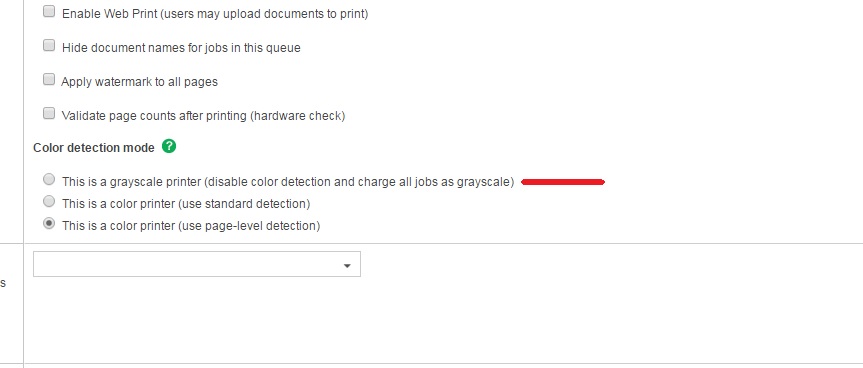
You've got this set... right ? On the mono Follow Me Printer in paperCut EDIT: Ah no! I'm wrong. That setting is only for charging, not for forcing mono. Here I meant...

-
You know what @sted ... I think ure right m8.
-
New mount or bend a bit of Unistrut ?
-
You could try CPC. They have tons of stuff like that.
-
8 Pin DIN. Maplin for pence. Remember them on old portable cassette recorders. Sigh!
-
lol
-
Flippin' 'ell. I gave up!
-
 @sparkeh Primaries get ****loads of money, its just that a lot of it gets flushed down the bog, wasted on stupid salaries or other wasteful cr@p.
 -
Turn it off and leave it off for a few days. You'll soon get a new one
-
Erm.... its the teachers. Invent an android that responds only to... "Will you do it for me" "This is rubbish" "It'll work now you're standing there" You'll sell millions m8. Seriously... Its levels of skill and an unwillingness to learn how to do it yourself. Technical issues only exist if a) There's no IT staff b) Management don't want to invest. c) There is a crummy local authority service providing bad infrastructure / support. I'm very lucky because I get listened to, get a decent budget and more if I need it, access to governing body and am trusted and praised by the school. End result.... Rock solid network, good kit and NEVER goes down. Oh, and some Ipads :)
-
@DaveP lol.
-
AAAAAAAAARRRRRRRRRGGGGGHHHHHHHHHHHHHHHHHHHHH!!!!!!!!!!!!!!!!!!!!!!!!!!!!!!
-
Wallpaper and Screensaver on one PC for all users...?
mikkydoos replied to Koldov's topic in Windows Server 2012
Loopback is a way to do it. Bit OTT for one computer though as you need to apply the loopback to all the other computers you don't want to setting applied to. I'd put it in its own OU and apply whatever settings from there. I use loopback for not applying a setting that locks the computer after 10 mins of inactivity. On whiteboards and display screens but I have like 40 of them. EDIT: Set the screen saver in your users OU GPO then apply the loopback to machines you don't want this to apply to....
-
These are absolutely awesome.... not cheap but indestructable and PC is completely fanless. I've built loads of them. Perfect solution. Akasa Thermal Solution
-
Also thats a good point. I have some Micro-ATX boards with that feature. That board might be in another model with a touch screen
-
Are you using a powered splitter? Quite often the signal isn't good enough on depending on what you're connecting to and needs amplifying - yep even with HDMI. I use similar to these... https://www.startech.com/uk/AV/Splitters/VGA-Splitters/2-Port-VGA-Video-Splitter-USB-Powered~ST122LE Obviously this one is VGA. Might be worth a try. EDIT: With a splitter, your settings should only pick up 2 screens anyway, not 3. 1 - Laptop screen 2 - Splitter. Why why have you got 3 listed ? Have you got 2 x HDMI cables plugged into the splitter from the laptop ?
-
I get these. Theyre ok but the drivers are a bit rubbish on Win 7.
-
Daft innit !
-
Cheers @Big_Ted
-
Genius. Time to play! Cheers again @Localz :) :)
-
Cheers @Localz thats done it m8. Quick one though.. ATM I'm setting all my users credit by membership of their OU. If a user is a member of an OU and a security group will it apply both amounts of credit?
-
I can only see OUs synced in Papercut m8. Wheres the security groups ?
-
I can only see OUs synced in Papercut m8. Wheres the security groups ? COMPLETELY IGNORE THAT. JUST SPOTTED IT lol
-
Aaaaah... Got it!! Cant see how to schedule it tho however.
-
@Localz Because it will make my AD a bit messy and I also want to apply different amounts to each user on a schedule. Why have an OU just for people who need an extra fiver print credit ?