-
Posts
3,700 -
Joined
Content Type
Forums
News
20th
EduGeek EDIT Conference
Blogs
Everything posted by garethEds
-
HOOOORRRAAAYYYYY - It's finally connected and the staff users have been moved across to AzureAD and have an Office 365 account. Now for some more questions... 1. Is there a way to configure a structure in the AzureAD/Office365 window so that it mimics the local AD. I've looked at 'Configure Provisioning Hierarchy' and set it to OU - but I'm not sure that was the right thing to do. 2. For some reason it has not set the default domain when syncing the users. Instead of our sch.uk domain it has given every user the onmicrosoft.com domain. I'll research this now - and I bet it's something simple I've missed. Gareth
-
Yes - but for testing we have removed this from the line. We bypass it. Microsoft told us to bypass this to start with. So we did. We got further Then we couldn't connect from the configuration window in AADSync. So they asked us to open the firewall - never going to happen in an LEA setup. Outbound 80 and 443 are open so today the LEA opened up 80 and 443 incoming. Still isn't working. Gareth GJE
-
I'm tearing my hair out with this now. We still cannot get a connection to the AzureAD during the Configuration stage of using ADSync. We can go through the whole process but it fails at the configure option. Today I spent over an hour on the phone with Microsoft working through things. We even managed to convince the LEA to open incoming ports 80 and 443 on the firewall for testing. Yet still it hasn't worked - all based on what Microsoft advised. So at the moment there is nothing in the way of the server and the internet on ports 80 and 443 - which I see from the MS Technet document is what I need open. What are the chances that the Azure setup has gone wrong somewhere? We tried some Powershell connection script today and it connected without issue. Anybody? Many thanks Gareth
-
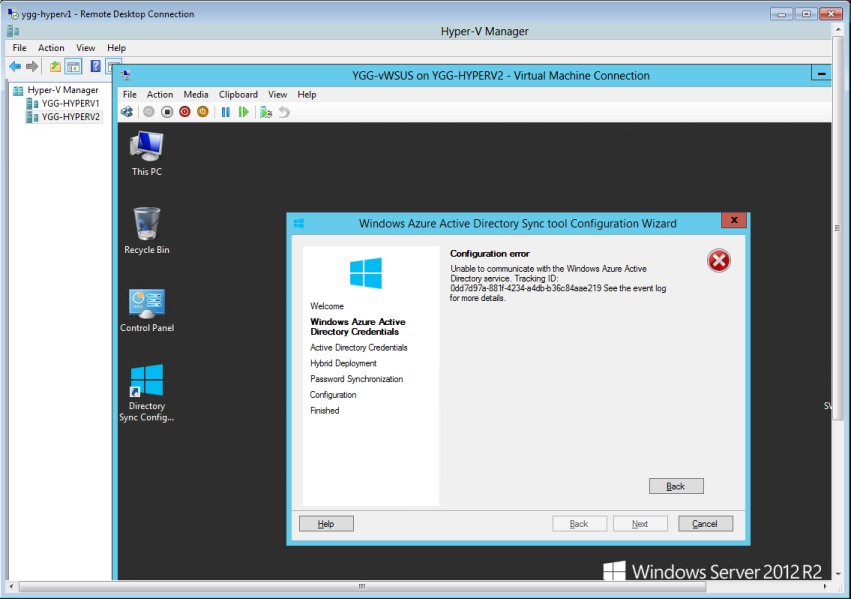
So we've been now working with the LEA to get this sorted and have managed to get all the way through to the 'Configure' part of the ADSync tool. I click configure and the following error appears: Unable to establish a connection to the authentication service. Contact Technical Support No idea where to go from there. Any ideas? Also - just to check what do people have set on the User Matching dialogue box? I only want a certain user prefix moved over (those starting with ygg-) - as every school in Swansea has a user account on this AD and they are all sorted into OUs. Any advice and help appreciated. Many thanks Gareth
-
Evening, I've been trying to setup a start menu as I would like to see it in school. I have the main Office 2013 icons in their small format and want them 1 on top of each other vertically down. However they keep wanting to go into a either a block of 4 (a square) or a horizontal line of 4. Does that make sense to people? Any idea if this can be forced? Cheers Gareth
-
Hi @LosOjos - Wasn't going to post it in public as it's an assignment that I needed advice on so didn't want it out there for other people. Just needed some help explaining the question. Needed to go back over my books - but was running out of time. GJE
-
Hi, Any Visual Basic gurus here? Need some help with methods for an assignment. Cheers Gareth
-
You Sir are amazing. Thank you. Just waiting for the LEA to re-open the clean feed now. Gareth
-
Any link to .admx files for central stores yet?
-
@EduTech : Got this from MS Support today. Gutted:
-
Obvious next question - what is the difference between DirSync and AAD Sync? Cannot find much online about AAD Sync - but plenty about DirSync. I'm all Sync'ed out. @EduTech : If you are free I wouldn't mind some help configuring it. All I want at the moment is to synchronise usernames/passwrds to pupils and staff can access Office 365 and their download. I do not want anything else working for now. Gareth
-
Just a quick report back here. After a Chat with Microsoft we put the server onto a clean internet (unauthenticated) feed - and it it connected straight away to the Azure Service. So that answered that connection. The next issue raised it's head - we are not Enterprise Admins on the LEA AD. We are Domain Admins on our part of the OU. So the whole thing falls down there and then. Apparently you have to be an Enterprise Admin to do this. GJE
-
Not sure I like this or what it suggests. https://gigaom.com/2015/01/12/uks-cameron-wont-allow-strong-encryption-of-communications/
-
Wonder if it will run XBMC better than my M8 Android box.
-
Right - all domains added. Still cannot see the AzureAD service. Yet it's clearly seeing the server and authenticating because when I enter the wrong password it is giving me a different message. The LEA tell me the DirSync software is not supported by then so I have to wait until it goes to a special team. GJE
-
Afternoon, So since before Christmas I have been having problems connecting our onsite AD to the Azure AD using DirSync. The credentials are correct but the DirSync application cannot communicate with the AzureAD service. I've checked the TechNet document which tells me ports 443 and 80 need to be open for DirSync (Ports and protocols used by Office 365) But still the problem is there. So I am wondering maybe domains are blocked by our LEA Smoothwall server. Simple question - does anyone have a list of domains that need to be allowed through the Smoothwall server for this DirSync to work? Can they send them through? I cannot find them online. Thank you Gareth
-
We are having a nightmare with this. Our DIRSync is telling me it cannot see the Azure servers. I've contacted the LEA but they are so darned slow getting back to me. GJE
-

[ms office - 2013] Autodiscover authentication box
garethEds replied to Harry_Small_'s topic in Office Software
We had this the other day - Smoothwall. Not sure what the LEA did but it was fixed a few hours after we reported it. Regards GJE -
Evening all - just saw @rich_tech mentioned me. I'll be absolutely honest - I cannot remember what I did. I'm almost sure it was there as part of our original School Agreement 3 package with the various companies we went through. We are now EES through SoftCat (who have been brilliant). I very much doubt we will use it much more because we now have the Office 365 free stuff for pupils and faculty members. Not many of the staff in my school ask me for Windows 8.1 download links. Pupils do but not staff. GJE
-
It's been there for donkeys. GJE
-
When I access http://licensing.microsoft.com I get three options. One is for Partners - which I get, but can anyone tell me the difference between: Volume Licensing Center and Volume Licensing Service Center I can log into the second one, but not the top one. I cannot even create an account for the top one. GJE
-
Office 365 ProPlus free for staff from 1st dec 2014
garethEds replied to Marshall_IT's topic in Cloud Services
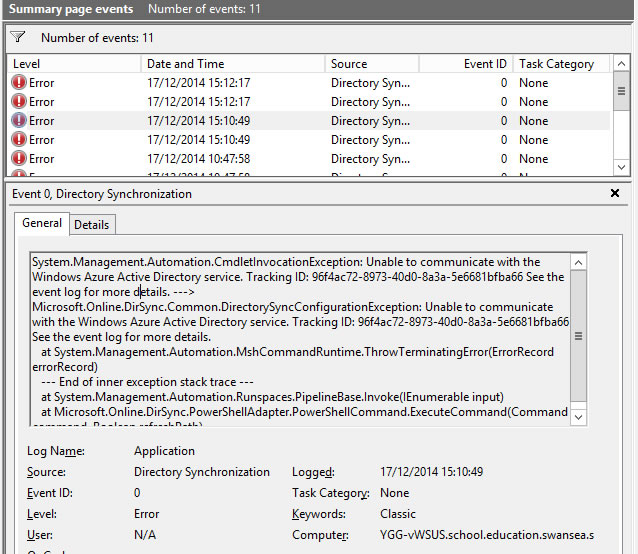
Looks a good tool. I have it open on the desktop when running the DirSync application. I assume it should show any attempt, but alas it doesn't show anything. As for the Event viewer... See screenshot
-
Office 365 ProPlus free for staff from 1st dec 2014
garethEds replied to Marshall_IT's topic in Cloud Services
Yip. It's on our WSUS server for trial at the moment whilst we experiment with the software. WSUS has a connection through the LEA to download updates so connects to the internet without any issues. I've checked AzureAD services and they are activated. GJE -
Office 365 ProPlus free for staff from 1st dec 2014
garethEds replied to Marshall_IT's topic in Cloud Services
Hiya @Sam_Brown - Indeed it is. Not this issue that is getting my back up. Anyhow - here is the screenshot. Hope you can see it. It's quite small in the message.
-
Office 365 ProPlus free for staff from 1st dec 2014
garethEds replied to Marshall_IT's topic in Cloud Services
Done most of that. WHole process is failing on 'Sync'd our students' - my server cannot see the AzureAD for some reason. Have checked firewalls etc etc but nothing seems to be going through. Frustrating today. I'm in a foul mood. GJE