TwistedHelixis
-
Posts
3,401 -
Joined
-
Last visited
Content Type
Forums
News
20th
EduGeek EDIT Conference
Blogs
Everything posted by TwistedHelixis
-
Do you have the IPv6 box ticked on your DC NIC?
TwistedHelixis replied to TwistedHelixis's topic in How do you do....it?
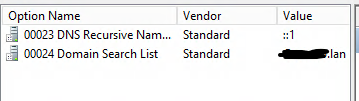
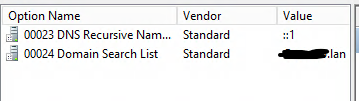
I have already enabled IPv6 on the NICS and working through a couple of other sections. So, if I have IPv6 enabled on the DC / DHCP server NIC, but don't want to use DHCP for IPV6 addresses, why do some of the schools I have inherited have the following under DHCP > IPv6 > Server options, and some have nothing? My question, if I am not using DHCP for IPv6 and have no scopes set, should I still have the above filled out or not? Just trying to workout why some of the schools that I inherited have this section filled out.
-
gpupdate /force hangs - spent all day trying to work this out :-(
TwistedHelixis replied to TwistedHelixis's topic in Windows
OK so its all working now and I would love to know what caused the issue, but I have no idea as I made so many changes to all systems including the host. Yes Broardcom -
Do you have the IPv6 box ticked on your DC NIC?
TwistedHelixis replied to TwistedHelixis's topic in How do you do....it?
For post above
-
Do you have the IPv6 box ticked on your DC NIC?
TwistedHelixis replied to TwistedHelixis's topic in How do you do....it?
In DHCP > IPV6 > server options, some of the sites have nothing in this section, while others have ::1 & Domain search listed. If I click on DHCP > IPV6, it asks me to setup a new scope, so none of the sites has an IPv6 scope running. Which of the sites has the correct setup, based on previous posts. Thanks -
Really odd issue in my hyper-v test environment. Just restored our DC from backup into my test environment. Installed a new Windows 10 pro VM Joined the Windows 10 vm to the DC domain Rebooted Windows VM, logged in to domain. The login seemed to take a bit longer then normal, but still only 1 minutes, so not crazy long. Noticed the mapped drives had not mapped, so opened cmd and typed gpupdate /force, but it just hangs there until I power down the PC. Next I deleted windows client VM, reinstalled, but still same issue. Just to test things out, I installed a fresh new DC, added a few group policies, but get the exact same issue. All above was setup using 'internal' hyper-v network. I can ping the server from client Whats going on??? EDIT - just went back to my original setup with the restored DC, now the client login is taking ages. EDIT - Just made a few changes, including disabling IPv6 on client nic, and it just ran gpupdate /force. Ill need to do some more testing tomorrow and report back.
-
Do you have the IPv6 box ticked on your DC NIC?
TwistedHelixis replied to TwistedHelixis's topic in How do you do....it?
am I OK to leave the IPv6 settings under properties to auto assigned? -
I look after a few primary school networks. Some I have setup from scratch and some I have inherited. I have just noticed that some of the DCs have the IPv6 adapter protocol ticked, while some do not. Internally each school only uses IPv4 Each of the DCs also runs DHCP, DNS etc Should IPv6 be ticked on the DC or not? If yes, am I OK to leave the settings under properties to auto assign? Thanks
-
All shared drives are blocked from external sharing but the staff My drive area we allow.
-
Thinking about it, we only have a couple of devices that might have fixed IP settings, so I might just promote the server, leave it running alongside the other DC for a while, turn off the old dc and see if anything stops working, if all good turn it back on and demote it. If I do decide to set the new DC IP to the old server, what is the sweet spot in my list to do this? Promote the new server to a domain controller Point the old DC servers DNS IP setting to the new DC Check the new server has netlogon and sysvol folders Move FSMO roles to new server Check FSMO roles on new server Update DHCP on old server with new DNS server info, so clients get new DC info Demote old domain controller Move DHCP from old server to new server Raise the domain and forest functional levels on new server
-
The only bit I have never done is use the same IP address as the old server, so I'll need to do some testing on where that should get done in my list
-
Always do :-) By the way this is not my first DC migration, I have done about 25 over the years, but they were all pre server 2012 R2, so its been a while, hence wanting my (hastily put together) check list double checked.
-
That will give me something to do over the half-term :-)
-
So at which point in my list would you change the old DC's IP address to something else and then use that IP on the new server? I assume just before demoting the old server, but wanted to check.
-
I did think about that, but have decided to migrate. I read a post where the upgrade seemed to work for a few weeks and then crashed out. Reading that put me off. If somethings going go wrong with the switch over, I would rather it went wrong while I was actually doing the switch, not x time later. Silly question, but doesn't that move when I promote the new server? Does my list above look OK?
-
Mosyle - what causes iPad to go into limbo mode?
TwistedHelixis replied to TwistedHelixis's topic in Cloud Services
Yes, good call I bet its that. Thanks -
I have 2 staff iPad's that randomly will put themselves into limbo mode in Mosyle. Sometimes it happens after a week, sometimes a month. Any idea what might be causing this?
-
I need to migrate our one and only DC from Server 2012 to Server 2019. They are both VMs on a 2019 Hyper-V host. Its been a long long time since I last did this. Hopefully someone can look over my migration check list and let me know if it looks OK or not. Set static IP on new server Set time services Check if old server is FRS or DFRS - Needs to be DFRS Join the new server to existing Active Directory domain Install Active Directory Domain Services role Promote the new server to a domain controller Point the old DC servers DNS IP setting to the new DC Check the new server has netlogon and sysvol folders Move FSMO roles to new server Check FSMO roles on new server Update DHCP with new DNS server info Demote old domain controller Move DHCP from old server to new server Raise the domain and forest functional levels on new server
-
Setting Ukrainian keyboard layout on a Chromebook
TwistedHelixis replied to TwistedHelixis's topic in Cloud Services
We have the OS settings section on the Chromebook completely blocked for the pupils, which is why I am trying to do all of this from Workspace admin GUI and pushing it out. I am not at the school until Monday afternoon, but will have a play then. Thanks for the detailed steps, its very helpful. -
Setting Ukrainian keyboard layout on a Chromebook
TwistedHelixis replied to TwistedHelixis's topic in Cloud Services
Thanks, I have just forwarded this to the teachers, so they can double check. For the moment lets assume they do need Ukranian keyboard layout. -
The school has just purchased some stickers to put over the keyboard on a new Ukrainian pupils Chromebook. I need to add Ukrainian as a keyboard layout option and have made the following change in Google Workspace under Devices > Chrome > Settings > User & Browsers But Ukrainian is not listed as an option on the Chromebook. Any ideas?
-
At each primary school..... Onsite data Host backs up VMs to an old server running as an iSCSI target. Windows backup backs this up to external USB every other day. I rotate the USB drives every month. Cloud data Cubebackup backs up cloud data to Wasabi bucket Cubebackup backs up cloud data to local server. Windows backup backs this up to external USB. I rotate the USB drives every month.
-
Worked out the large files are from system restore, but system restore is actually disabled on the laptop. Any idea if any other Windows apps will use or enable system restore?
-
Anyone know what might have caused the hidden system volume information folder to fill up with 20gb ish files? The teachers laptop is a new Dell Vostro with a 250gb ssd. She reported everything running very slow. When I looked the c drive was full, so deleted all the normal files, uninstalled most programs etc. Then ran tree size and found the issue was in system volume info folder. I didn't want to re install the OS just yet, until I have worked out what might have caused this. Also, can I deleted the large files in this hidden folder? Thanks
-
How do you back-up your Google Workspace data (UK Based School)
TwistedHelixis replied to Jaan's topic in Cloud Services
Yep, its something like $2 per user per year and 6$ per TB month. -
Hi, I need to enable 'Anyone with the link' sharing option for just one 'Shared Drive', so I can share the contents as 'public on the web', but can't get this as an option listed under sharing. I cant even seem to get it listed on all shared drives, let alone just the one shared drive. I know it should be possible, because I seem to remember this was a feature as default, but I remove the ability for staff to share externally from Shared drives. I have been going back over all the tick boxes in Apps > Google Workspace > Settings for Drive and Docs > Sharing settings, and also checked the settings in .......> Manage shared drives, but nothing seems to enable 'Anyone with the link' sharing feature. BTW, I know I wont get the option on the shared drive itself, but only on the folders or files inside. Any ideas.