-
Posts
1,927 -
Joined
Content Type
Forums
News
20th
EduGeek EDIT Conference
Blogs
Everything posted by DavR
-
Great news @mobrien, happy to have helped. It is a bit confusing the difference between apps and provisioned apps, some might say unnecessarily so. Interesting that you've chosen to embed the software into your image, but then deal with the appx stuff as a script in the task sequence - we did ours the other way round. But, whatever is working for you Windows 10 does seem to have required a lot more beating, and cajoling, to do what Edu admins want than I remember Windows 7 needing. Could just be rose tinted specs for the past though.
-
Ooops - missed the entire second page of this thread! As you were ladies and gents.....
-

Does anyone have the Sherston Mega Bundle MSI's?
DavR replied to superaz300's topic in Educational Software
If it's just copying files, then it's dead easy to make your own MSI. I used Advanced Installer to do this all the time - https://www.advancedinstaller.com/ -
Surprised no-one else has mentioned it yet, but surely something like NetSupport Notify is what you're looking for? It's a client that sits on every PC, and you can broadcast messages from a console, which pop up and make a sound on each PC. We scripted a panic button for lockdown, it sits on the desktop of SLT / Admin. It only cost us a couple of hundred quid, much cheaper than buying hardware for every room.
-
[windows software] Science Software Query...
DavR replied to exhaustedittech's topic in Licensing Questions
Is that TTS Datadisc, that comes with the associated USB TTS Logboxs? I've got an MSI somewhere for that which worked on Windows 7.... -
I will say though, I have had mixed experiences with that method, I don't use it in production any more. Existing installations I've retro-fitted apps with that string, new installations I've injected the necessary apps into my Windows 10 image.
-
Yes, Add-AppxPackage only works on a per user basis. If you want to add a new package for all users, you need to provision the package using Add-AppxProvisionPackage. This will install the app for all users, and when a user first logs on it will (should) install it for them. You also have to have the correct offline installer from Microsoft Store for Business. The line I've used in the past is as follows. Edit locations and file strings as appropriate!
- 15 replies
-
- 1
-

-
- install
- microsoft store
- (and 1 more)
-
I wouldn't bother troubleshooting to much tbh. Just delete the content directory and resync, usually solves most issues. https://blogs.technet.microsoft.com/gborger/2009/02/27/what-to-do-when-your-wsuscontent-folder-grows-too-large/
-
I've done this our end with PowerShell, it's a bit of a hack, but it can be done. Ideally, you'd want to inject your apps into your WIM build before deployment using DISM - https://docs.microsoft.com/en-us/windows-hardware/manufacture/desktop/preinstall-apps-using-dism If you're adding the apps post-install into a live environment, you'll need to have one script run on PCs using the Add-AppxProvisionedPackage command to provision the package, and then you may need another script to run at user login to install that app per user, using the Add-AppxPackage command.
-
Looking for IWB supplier recommendations
DavR replied to crc-ict's topic in AV and Multimedia Related
We're using bog standard iiYama 65" touch panels. They're meeting room screens really, but at the end of the day, they've been the cheapest reliable touchscreen available for us. We've had installation by AVPartsmaster and also CC Communications. The former was cheaper, the latter do buy back of old boards etc. -
I'm not sure I understand it, but I like it! Installed, thank you.
-
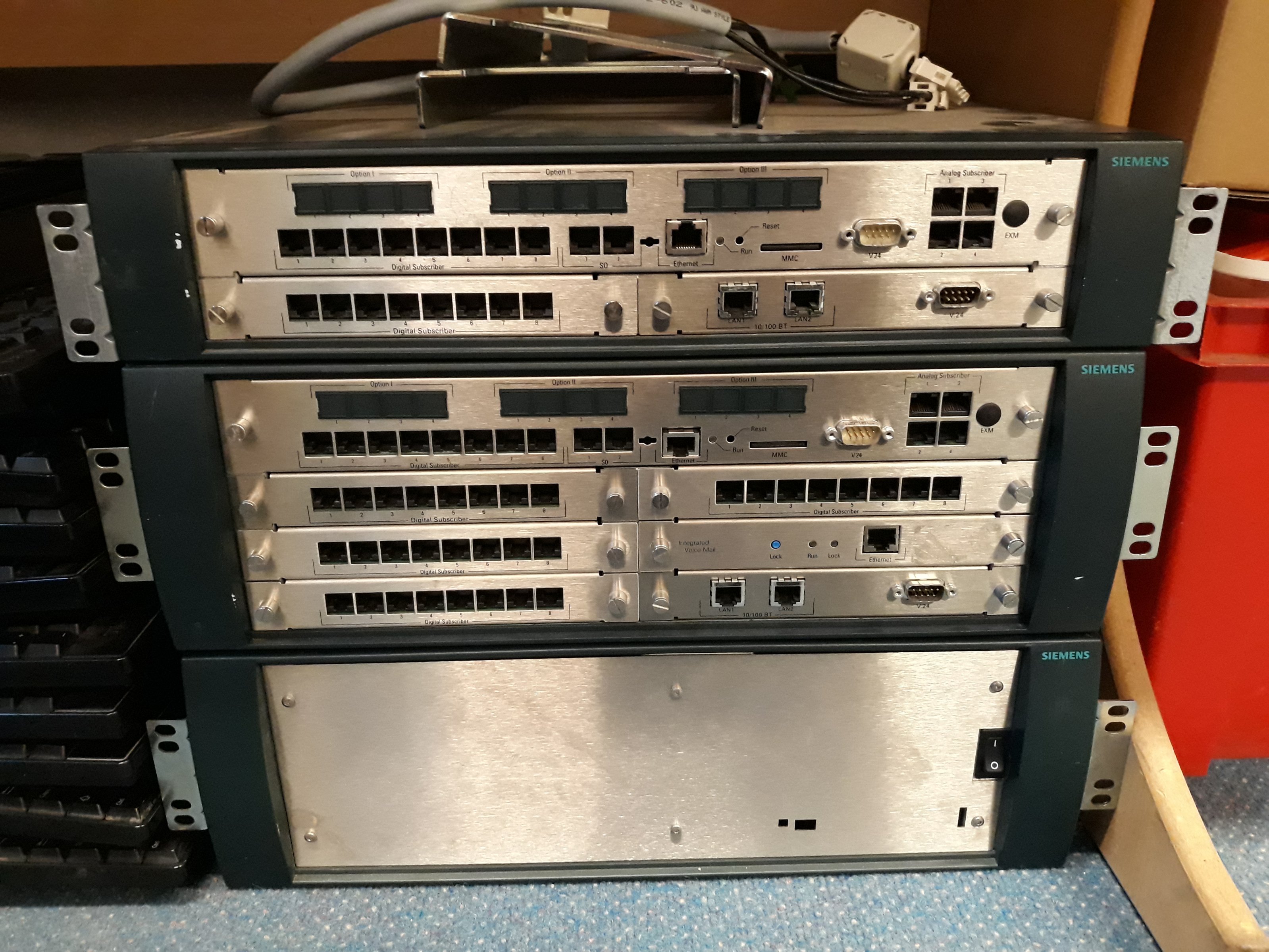
We had a new phone system in over Easter to replace an old Siemens HiPath 3300 and 3500. I'm told these are quite hard to get spares for now, so if anyone wants any of the cards out of these you're welcome. Loads of digital subscriber cards, plus an IVM voicemail.

-
I'd be tempted by the Optipoint 500 box to keep our ageing fleet of the same patched up, if you were local. But I'm guessing from your profile you're Yorkshire? Probably not worth the postage!
-
Righto Paddy.... will stick this in a support case FYI. I've logged on to my main office PC, and then have been logging on to PCs around the building for maintenance. Upon return to my main desktop, I've lost access to my additional groups. Weird!
-
@PaddyNewman, a bit of advice please! I've found that my Webscreen credentials have expired, so I've lost the extra access groups I was signed into at login, and reverted to my IP scope default policy. Is there a timeout on the ADLink system? If so, can this be changed somewhere? OR, is it because I've been logging on to other machines around the building, and logging off again? Can a domain user only be signed in to Webscreen on one PC at a time? Thanks!
-
Hi Paddy, I put the whole folder into \\MYDOMAIN\SysVol\MYDOMAIN\Policies\{GUID-OF-A-POLICY}\User\Scripts\Logon, and added login.bat as a group policy logon script from there. The script did not work in that configuration. Given that we have multiple policies and multiple scripts, I don't use NETLOGON for login scripts, haven't for a long time. I always keep login script within the policies these days.
-
Usage update from us - I've just put the AD Link scripts in place. We are now, in theory, AD integrated to Webscreen! Testing seems to be OK, the real proof will be next week. One thing I did find is that the login scripts Atomwide provided did not work with our group policy setup. As far as I can see, the scripts they've provided call the WebScreenADLink.exe file without specifying the source directory, which won't always work. I've worked round that though, and fed back on the support site.
-
But not received.... hmm, odd!
-
Hi all, I have some Dell Optiplex 390 and 780 workstations now replaced and surplus to requirements, if anyone needs a few to fill a gap. The 780s are probably pretty worthless at this point, but the 390s, with an SSD upgrade, could be useful. I'd store them myself, but don't have the space. 8 x Optiplex 390 - Core i3, 4GB RAM, 2012 model 10 x Optiplex 780 - Core 2 Duo, 4GB RAM, 2011 model Free to another school, collection only North London. Cheers!
-
Hi all, I've got an ever growing stock of VGA splitters and unused long lengths of VGA cable, if anyone has a need. We're slowly replacing whiteboards with HDMI displays. Standard 1 x VGA in to 2 x VGA out. Not sure the exact spec, but I've had them running 1980x1020 quite happily. Free collection (North London) or can discuss P&P options. Cheers!
-
LGfL Lets Get Technical Conference
DavR replied to bald_pig's topic in London Grid for Learning (LGfL)
There was a newsletter the other week saying they were still in preparation. As far as I can see they are planning to share them. -
As in, block.lgfl.org.uk has been revamped. We use a base IP policy, but staff can login there for the higher level of access. Haven't looked at the management pages yet.
-
Mine went through yesterday I think, I saw some new screens. Haven't been doing much desk work this week though so haven't investigated yet.
-
This took down my Windows 7 box at home, which is a useful canary in a way, as it tends to get the updates about 24hrs before they've made their way through my WSUS server. Completely borked the thing, sticks at configuring Windows Updates and has to be removed using Safe Mode! Declined the updates in the Sophos article just now, before my servers attempt to update overnight - affecting Server 2008 R2, 2012 and 2012 R2. No clients involved for me, as they're all Windows 10.
-
[ipad] Recommend iPad Charging Cables - bulk?
DavR replied to Bev's topic in Mobile Devices & Tablets
I've always used the JETech ones, reasonably priced and have always worked for both charge and sync for us.